
A simple tools for container network configuration using tc command.

Project description
contcfg
这是一个简单的用于控制 Docker 容器之间网络的工具。目前只支持设置网络链路的带宽。
特性
- 设置容器之间的带宽限制
- 支持动态添加和删除容器
- 定期调整网络带宽
- 支持通过 Unix Socket 接收控制消息
安装
pip install contcfg
原理
contcfg 通过在 docker 容器内部执行 tc 命令来设置网络带宽。tc
在桥接模式下,容器之间的网络通信是通过veth pair来实现的。veth pair是一对虚拟网络设备,一端连接到容器内部,另一端连接到宿主机的网桥上。tc命令可以通过veth pair来设置网络带宽。
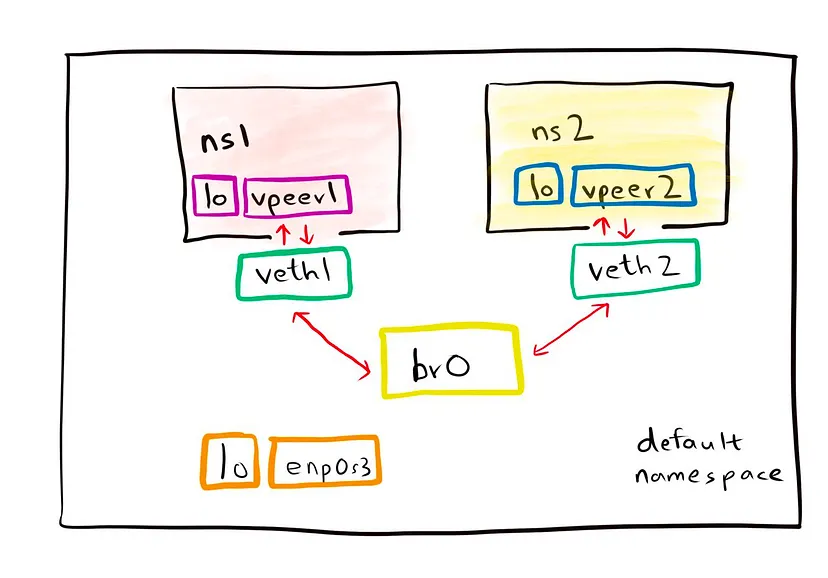
contcfg通过设置容器内部peer的egress带宽来限制容器的网络带宽。peer是veth pair的一端,egress分别表示出口的方向。
使用
contcfg --help

usage: contcfg [-h] [--version] [--socket-path SOCKET_PATH] {start-server,ctrl,stop-server,cli} ...

Container Network Controller

positional arguments:
  {start-server,ctrl,stop-server,cli}
                        Sub-command help
    start-server        Start the server
    ctrl                Control the server
    stop-server         Stop the server
    cli                 Run the CLI

options:
  -h, --help            show this help message and exit
  --version             show program's version number and exit
  --socket-path SOCKET_PATH
                        Path to the Unix socket
关于带宽单位
tc命令采用的带宽单位与常规的使用不太一致,如10mbit表示10m bit/s,实际上习惯表示为10mbps ;10mbps表示10m bytes/s, 而习惯上表示为10mBps。 在contcfg中,我们与tc保持一致。
以下来自
tc的使用说明
         bit or a bare number
                Bits per second
         kbit   Kilobits per second
         mbit   Megabits per second
         gbit   Gigabits per second
         tbit   Terabits per second
         bps    Bytes per second
         kbps   Kilobytes per second
         mbps   Megabytes per second
         gbps   Gigabytes per second
         tbps   Terabytes per second
         To specify in IEC units, replace the SI prefix (k-, m-,
         g-, t-) with IEC prefix (ki-, mi-, gi- and ti-)
         respectively.

         TC store rates as a 32-bit unsigned integer in bps
         internally, so we can specify a max rate of 4294967295
         bps.
CLI
contcfg cli set c1 c2 100mbit # 设置 c1 和 c2 的带宽为 100mbit
contcfg cli clear c1 c2 # 清除 c1 和 c2 的带宽限制
注意
- docker 容器需要在桥接模式下才能使用
contcfg contcfg需要在 root 权限下运行contcfg要求容器内部安装有tc命令,且启动时需要指定--cap-add=NET_ADMIN权限contcfg会在容器内部执行tc命令,可能会影响容器内部的网络性能。 仅在测试环境下使用
Release history Release notifications | RSS feed


Download files
Download the file for your platform. If you're not sure which to choose, learn more about installing packages.
Source Distribution
Built Distribution
Filter files by name, interpreter, ABI, and platform.
If you're not sure about the file name format, learn more about wheel file names.
Copy a direct link to the current filters
File details
Details for the file contcfg-0.0.5.tar.gz.
File metadata
- Download URL: contcfg-0.0.5.tar.gz
- Upload date:
- Size: 20.6 kB
- Tags: Source
- Uploaded using Trusted Publishing? No
- Uploaded via: twine/6.1.0 CPython/3.9.21
File hashes
| Algorithm | Hash digest | |
|---|---|---|
| SHA256 |
92a3207ffdea39dddfbdce53c74455f6d48cce5d0d4176c4f0ece97a6c9afec2
|
|
| MD5 |
986fffd7d855bc8b78b420add511182f
|
|
| BLAKE2b-256 |
3049daefb55f57a02eb5c2269172f501a3cd1b1652c4d5ef85a436b48baed7ab
|
File details
Details for the file contcfg-0.0.5-py3-none-any.whl.
File metadata
- Download URL: contcfg-0.0.5-py3-none-any.whl
- Upload date:
- Size: 24.9 kB
- Tags: Python 3
- Uploaded using Trusted Publishing? No
- Uploaded via: twine/6.1.0 CPython/3.9.21
File hashes
| Algorithm | Hash digest | |
|---|---|---|
| SHA256 |
1f56ebde5f285cf26a9348bfbe102d34807fa8524b8b8ec33309273c3dc89656
|
|
| MD5 |
22999f90cab183b8436bca77b772255b
|
|
| BLAKE2b-256 |
d87fcc619b3d08f8d89320c2b7490910a6d17c39c7120a2e00f29371de757b38
|






