
A convenient way to configure and work with an async SQLAlchemy session through context in asynchronous applications

Project description
context-async-sqlalchemy



No AI was used in the creation of this library.
Provides a super convenient way to work with SQLAlchemy in asynchronous applications. It handles the lifecycle management of the engine, sessions, and transactions.
The main goal is to provide quick and easy access to a session, without having to worry about opening or closing it when it’s not necessary.
Key features:
- Extremely easy to use
- Automatically manages the lifecycle of the engine, sessions, and transactions (autocommit / autorollback)
- Does not interfere with manually opening or closing sessions and transactions when needed
- Framework-agnostic - works with any web framework
- Not a wrapper around SQLAlchemy
- Convenient for testing
- Runtime host switching
- Supports multiple databases and multiple sessions per database
- Provides tools for running concurrent SQL queries
- Fully lazy initialization
What does usage look like?
from context_async_sqlalchemy import db_session
from sqlalchemy import insert

from database import connection  # your configured connection to the database
from models import ExampleTable  # just some model for example

async def some_func() -> None:
    # Created a session (no connection to the database yet)
    session = await db_session(connection)

    stmt = insert(ExampleTable).values(text="example_with_db_session")

    # On the first request, a connection and transaction were opened
    await session.execute(stmt)

    # If you call db_session again, it will return the same session
    # even in child coroutines.
    session = await db_session(connection)

    # The second request will use the same connection and the same transaction
    await session.execute(stmt)

    # The commit and closing of the session will occur automatically
How it works
Here is a very simplified diagram of how everything works:
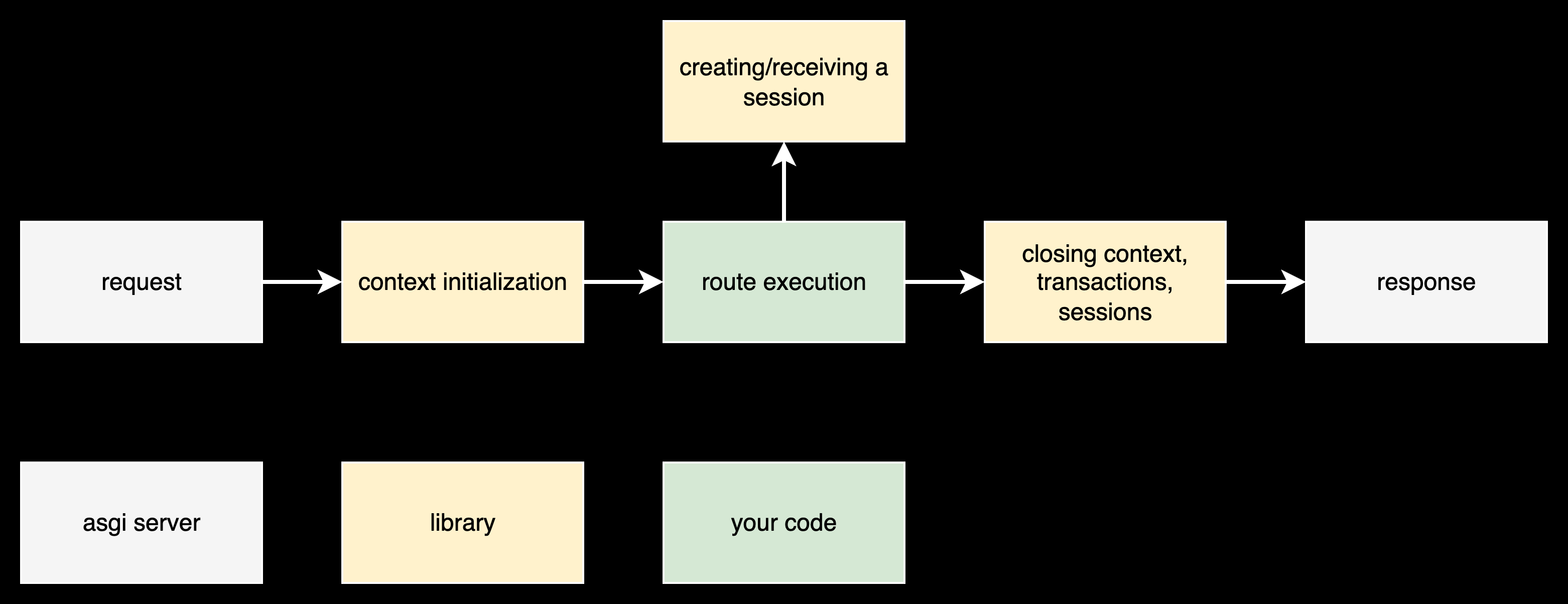
- Before executing your code, the middleware will prepare a container in which the sessions required by your code will be stored. The container is saved in contextvars
- Your code accesses the library to create new sessions and retrieve existing ones
- After your code, middleware will automatically commit or roll back open transactions. Closes open sessions and clears the context.
The library also provides the ability to commit, rollback, and close at any time, without waiting for the end of the request, without any problems.
Release history Release notifications | RSS feed


Download files
Download the file for your platform. If you're not sure which to choose, learn more about installing packages.
Source Distribution
Built Distribution
Filter files by name, interpreter, ABI, and platform.
If you're not sure about the file name format, learn more about wheel file names.
Copy a direct link to the current filters
File details
Details for the file context_async_sqlalchemy-2.1.6.tar.gz.
File metadata
- Download URL: context_async_sqlalchemy-2.1.6.tar.gz
- Upload date:
- Size: 3.5 MB
- Tags: Source
- Uploaded using Trusted Publishing? No
- Uploaded via: uv/0.7.17
File hashes
| Algorithm | Hash digest | |
|---|---|---|
| SHA256 |
7c976b99da49a5bc3d643182ade82ceafd5e0f52b077fb88c823d11878bf693e
|
|
| MD5 |
e4129e570a9366ae5cff545b553a055f
|
|
| BLAKE2b-256 |
81a40c9a9bf89d3c6f6fdb49342480b5e0f7be51180c431a772693c0df335628
|
File details
Details for the file context_async_sqlalchemy-2.1.6-py3-none-any.whl.
File metadata
- Download URL: context_async_sqlalchemy-2.1.6-py3-none-any.whl
- Upload date:
- Size: 13.5 kB
- Tags: Python 3
- Uploaded using Trusted Publishing? No
- Uploaded via: uv/0.7.17
File hashes
| Algorithm | Hash digest | |
|---|---|---|
| SHA256 |
b9e1bf115a659bd40fda65d9c9003a7bcfd01ca8e7a2dd4ec2e886a9a6f19d6e
|
|
| MD5 |
34fb6abb8817e9bb5c94cfe548b4786c
|
|
| BLAKE2b-256 |
38c4b1de00c472c045aa437d37d07e5a91459bd519b7b83b190450973135c4d4
|






