
Cost-saving CLI middleware for pruning oversized LLM agent tool catalogs.
Verified details
These details have been verified by PyPIProject links
GitHub Statistics
Maintainers

Reason this release was yanked:
Superseded by 1.0.0rc3. This release candidate fixed PyPI rendering but was replaced by rc3 with clearer README framing, cache privacy documentation, and prune dry-run support.
Project description
Context Janitor
100.0% tool-selection accuracy on the bundled synthetic benchmark at 0 ms median latency, with zero router cost.
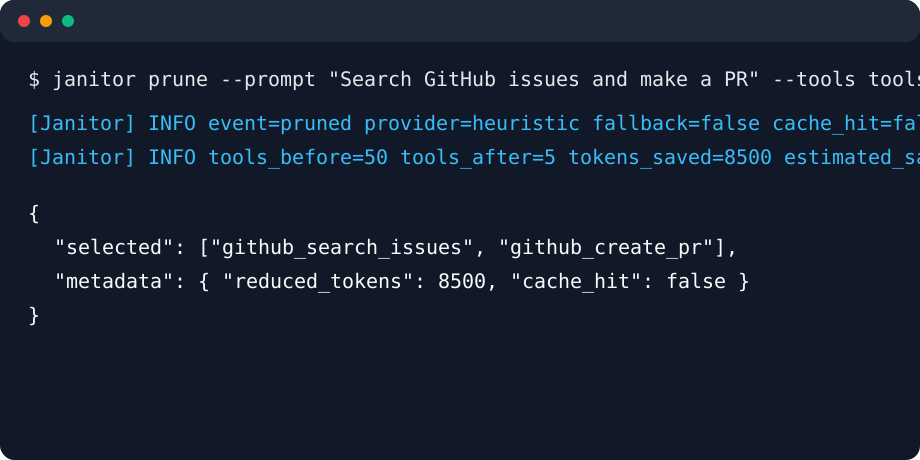
Context Janitor is a dependency-free CLI and Python library for pruning oversized LLM tool catalogs. Give it a user prompt and a JSON list of tools, and it returns only the tools the agent is likely to need.
It is built for agent systems where sending every available tool is expensive, slow, and noisy. If an API-backed router fails, times out, or is missing credentials, Context Janitor can fall back to a local heuristic so the pipeline keeps moving.
Context Janitor is MCP-compatible by design. MCP servers expose structured tool definitions, and
Context Janitor can sit between those JSON tool catalogs and your agent runtime with janitor mcp-proxy.
Why It Exists
Large tool catalogs make agents worse in two ways:
- They inflate every request with thousands of extra prompt tokens.
- They increase the chance that the model picks a plausible but wrong tool.
Context Janitor keeps the tool surface small before the main model sees it.
| Setup | Tools sent | Tool overhead | Expected effect |
|---|---|---|---|
| Without Janitor | 50 | High | More prompt cost and more tool confusion |
| With Janitor | 5 | Low | Smaller payloads and clearer tool choice |
Benchmark Snapshot
Run locally:
python scripts\benchmark.py --providers heuristic
Current output on the included 100-prompt synthetic benchmark and examples/tools.json:
+-----------------------+--------------------+---------------+-----------+--------+-----------------+------------------+-------------+--------------------------------------------------------------------------------------------------------------------------------------------+
| Mode                  | Selection accuracy | Agent success | Median ms | p95 ms | Router cost/run | Tool payload/run | Compression | Notes                                                                                                                                      |
+-----------------------+--------------------+---------------+-----------+--------+-----------------+------------------+-------------+--------------------------------------------------------------------------------------------------------------------------------------------+
| No Janitor (baseline) | 100.0%             | not measured  | 0         | 0      | $0.000000       | $0.001060        | 0.0%        | all 8 tools sent for 100 prompts |
| heuristic             | 100.0%             | not measured  | 0         | 0      | $0.000000       | $0.000280        | 73.6%       | ok |
+-----------------------+--------------------+---------------+-----------+--------+-----------------+------------------+-------------+--------------------------------------------------------------------------------------------------------------------------------------------+
Benchmark notes:
Selection accuracymeans the expected tool was present in the pruned selection.No Janitor (baseline)has 100% selection accuracy because every tool is sent.Agent successis intentionallynot measuredunless you provide real agent eval data.Tool payload/runuses--payload-price-per-million, which defaults to$5.00.Router cost/runuses--router-price-per-million, which defaults to$0.15.- The included benchmark is a small synthetic sanity check. Run it against your own catalog before making production claims.
The repository also includes examples/messy_production_evals.jsonl, a 100-case prompt pack with
informal, ambiguous workplace phrasing, plus examples/messy_aliases.janitor.yaml for team slang.
The release gate requires the local heuristic to keep the expected tool for every messy case
against the simulated production catalog when that alias config is provided.
To display measured agent success rates:
python scripts\benchmark.py --providers heuristic --agent-success-file examples\agent_success.example.json
Installation
From a local checkout:
pip install -e .
With test dependencies:
pip install -e ".[test]"
With contributor tooling:
pip install -e ".[dev]"
The package exposes two console scripts:
janitorcontext-janitor
Most examples use the shorter janitor command.
On Windows, pip may install those scripts outside your current PATH. If janitor is not
recognized in cmd.exe, use:
set PATH=%PATH%;%APPDATA%\Python\Python314\Scripts
Or run the module directly:
python -m context_janitor.cli --help
Quick Start
janitor prune --prompt "Search GitHub issues and make a PR" --tools examples\tools.json --limit 2
Output:
{
  "selected": [
    {
      "name": "github_search_issues",
      "description": "Search issues in a GitHub repository by text, label, state, or assignee."
    },
    {
      "name": "github_create_pr",
      "description": "Open a pull request with a title, body, source branch, and target branch."
    }
  ],
  "metadata": {
    "requested_provider": "heuristic",
    "provider": "heuristic",
    "fallback_used": false,
    "cache_hit": false,
    "duration_ms": 0,
    "limit": 2,
    "available_tools": 8,
    "original_tokens": 212,
    "selected_tokens": 60,
    "reduced_tokens": 152,
    "estimated_savings_usd": 0.00076
  }
}
Names-only output:
janitor prune --prompt "Search GitHub issues and make a PR" --tools examples\tools.json --limit 2 --format names
github_search_issues
github_create_pr
Middleware Mode
middleware reads an OpenAI-compatible request JSON from stdin, prunes the tools field, and
writes the modified payload to stdout.
Get-Content request.json | janitor middleware --limit 5
In cmd.exe, use type instead of Get-Content:
type examples\request.example.json | janitor middleware --limit 2
Input shape:
{
  "messages": [
    { "role": "user", "content": "Create a calendar event" }
  ],
  "tools": [
    {
      "type": "function",
      "function": {
        "name": "calendar_create",
        "description": "Create events."
      }
    },
    {
      "type": "function",
      "function": {
        "name": "web_search",
        "description": "Search the web."
      }
    }
  ]
}
Logs go to stderr, so stdout remains safe to pipe into another command.
Supported Tool Formats
Plain tool objects:
[
  {
    "name": "github_create_pr",
    "description": "Open a pull request."
  }
]
OpenAI-style function tools:
[
  {
    "type": "function",
    "function": {
      "name": "github_create_pr",
      "description": "Open a pull request.",
      "parameters": {
        "type": "object"
      }
    }
  }
]
Object wrappers are also accepted:
{
  "tools": [
    { "name": "web_search", "description": "Search the web." }
  ]
}
Selection Providers
Context Janitor supports four provider values:
| Provider | Uses network | Required environment |
|---|---|---|
heuristic |
No | None |
openai |
Yes | OPENAI_API_KEY |
anthropic |
Yes | ANTHROPIC_API_KEY |
gemini |
Yes | GEMINI_API_KEY or GOOGLE_API_KEY |
Provider calls use only the Python standard library and default to an 800 ms timeout.
Example with OpenAI:
$env:OPENAI_API_KEY = "..."
janitor prune `
  --provider openai `
  --model gpt-4o-mini `
  --prompt "Summarize this PDF" `
  --tools tools.json `
  --timeout-ms 800 `
  --fallback heuristic `
  --log-level INFO
If the provider errors, rate-limits, times out, or is missing credentials, --fallback heuristic
logs a warning and returns a heuristic selection instead of crashing the pipeline.
Set --fallback none if you want provider failures to exit with an error.
How The Heuristic Works
The local selector is not just a keyword set. It is a compact TF-IDF-style ranker:
- Tokenizes the prompt and each tool's
name + description - Splits names like
github_search_issuesinto useful terms - Removes common stop words
- Expands common intent aliases like
meeting -> calendar event - Scores term frequency in the tool text
- Weighs rare terms more heavily with inverse document frequency
- Adds a small bonus for longer substring matches
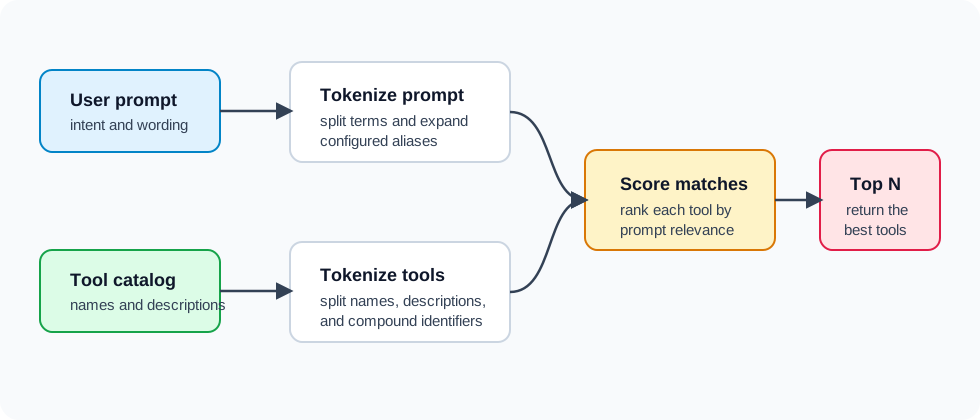
Distinctive terms like stripe, github, postgres, or pdf usually beat generic words like
create, get, or send.
Configuration
Context Janitor searches upward from the current directory for .janitor.yaml.
Example:
provider: anthropic
model: claude-3-haiku-20240307
limit: 5
fallback: heuristic
cache: true
timeout_ms: 800
log_level: INFO
format: json
price_per_million_tokens: 5.0
keep: log_error,notify_admin
aliases:
  bq: bigquery,query,warehouse
  blast: email,send
  prio: priority
The config parser intentionally supports simple top-level key: value settings plus the aliases
mapping shown above. It is not a full YAML implementation.
CLI flags override config values.
For safety in untrusted repositories, an auto-discovered .janitor.yaml cannot silently switch the
selector from heuristic to a network provider. If a discovered config sets provider: openai,
provider: anthropic, or provider: gemini, pass --config path\to\.janitor.yaml or
--provider ... explicitly to confirm that you trust the project and intend to send prompts/tool
metadata to that provider.
| Key | Default | Description |
|---|---|---|
provider |
heuristic |
Selection backend: heuristic, openai, anthropic, or gemini |
model |
null |
Model name for API-backed providers |
limit |
5 |
Maximum number of tools to keep |
fallback |
heuristic |
Use heuristic or none after provider failure |
cache |
false |
Reuse previous selections from local cache |
timeout_ms |
800 |
Provider timeout in milliseconds |
log_level |
WARNING |
DEBUG, INFO, WARNING, ERROR, or CRITICAL |
format |
json |
prune output format: json, names, or raw |
price_per_million_tokens |
5.0 |
Price used for savings estimates |
keep |
empty | Comma-separated tool names that must stay selected |
aliases |
empty | Team-specific prompt slang to expand before ranking |
Use aliases for vocabulary your tool descriptions do not already cover. For example, if your team
types bq but your tool says BigQuery, map bq to bigquery,query,warehouse in config instead
of hardcoding that slang into Context Janitor.
Required Tools
Some production agents need safety, audit, or notification tools in every request. Use --keep
to force those tools into the selected set:
janitor prune --prompt "Search the web" --tools tools.json --limit 5 --keep log_error,notify_admin
Kept tools reserve slots inside the limit. If --limit 5 and you keep two tools, Janitor ranks
the catalog for the remaining three slots.
Selections modified by keep are not written into the normal semantic cache, because required
tools are policy rather than prompt relevance.
Cache
Enable prompt caching:
janitor prune --cache --prompt "Summarize the daily logs" --tools tools.json
Cache file:
~/.janitor_cache/cache.json
The cache stores selections by prompt, provider, model, limit, and catalog hash. It can also reuse highly similar prompts. If the cache cannot be read or written, Janitor ignores the cache and keeps running. Cache updates are written through a temporary file and atomically replaced, so interrupted writes should not leave partial JSON behind.
Privacy note: --cache stores prompt previews and prompt tokens in a local plaintext file. Keep it
off for sensitive prompts unless local plaintext storage is acceptable for your environment. Janitor
ignores oversized cache files and trims old entries so the cache cannot grow without bound.
Clear the local cache while iterating on prompts or tool descriptions:
janitor clear-cache
Inspect cache metadata:
janitor cache-info
Explain Mode
Use --explain to see why tools were kept or pruned.
janitor prune --prompt "Search GitHub issues" --tools examples\tools.json --limit 2 --explain
JSON output includes an explain array:
{
  "name": "github_search_issues",
  "selected": true,
  "score": 14.0026,
  "matched_terms": ["github", "issues", "search"],
  "top_terms": ["issues", "search", "github", "substring_match"]
}
For --format names or --format raw, explanations are printed to stderr.
Dry Run Mode
Use --dry-run with middleware to audition Janitor without changing the request payload:
Get-Content request.json | janitor middleware --limit 5 --dry-run --log-level INFO
The original JSON is written back to stdout. Janitor logs what it would have kept and pruned to stderr.
CLI Reference
janitor prune
Select tools for a prompt and a tool catalog.
janitor prune --prompt PROMPT --tools tools.json [options]
Options:
| Option | Description |
|---|---|
--prompt TEXT |
User prompt. If omitted, stdin is used |
--tools PATH |
Required path to a JSON tool catalog |
--limit N |
Maximum tools to keep |
--provider NAME |
heuristic, openai, anthropic, or gemini |
--model NAME |
Model for API-backed providers |
--fallback NAME |
heuristic or none |
--timeout-ms N |
Provider timeout |
--cache / --no-cache |
Enable or disable local cache |
--log-level LEVEL |
Structured stderr logging level |
--price-per-million-tokens N |
Cost estimate price |
--keep a,b |
Required tools to keep |
--explain |
Include or print ranking explanations |
--format json |
Default structured output |
--format names |
Print selected tool names |
--format raw |
Print original selected tool objects |
--config PATH |
Explicit config file path |
janitor middleware
Read a request payload from stdin and prune its tools field.
janitor middleware [options] < request.json
Most options match prune. middleware also supports --dry-run.
janitor mcp-proxy
Proxy an MCP stdio server and prune tools/list responses before they reach the client:
janitor mcp-proxy --prompt "Find GitHub issues" --limit 5 -- python -m your_mcp_server
MCP tools/list does not include the user's chat prompt, so pass a scoped task prompt with
--prompt or JANITOR_PROMPT. Use --keep with prune or middleware for hidden policy tools;
for MCP proxy sessions, configure the downstream server around one narrow workflow when possible.
janitor lint
Validate a tool catalog and report quality warnings before using it in production:
janitor lint --tools tools.json
The linter checks the catalog shape, duplicate names, empty descriptions, and very short descriptions.
janitor clear-cache
Delete the local semantic-selection cache:
janitor clear-cache
janitor cache-info
Show cache path, entry count, providers, models, and creation timestamps:
janitor cache-info
Python API
Synchronous API:
from context_janitor.models import load_tools
from context_janitor.selection import select_resilient

tools = load_tools(tool_json)
result = select_resilient(
    provider="openai",
    model="gpt-4o-mini",
    prompt="Find GitHub issues about auth",
    tools=tools,
    limit=5,
    fallback="heuristic",
    timeout_ms=800,
    cache_enabled=True,
    keep=("log_error", "notify_admin"),
)

selected_tools = result.selected
Async wrapper:
from context_janitor.selection import select_resilient_async

result = await select_resilient_async(
    provider="heuristic",
    prompt="Create a calendar event",
    tools=tools,
    limit=3,
)
select_resilient_async runs the same implementation in a worker thread. The current provider
clients use the Python standard library rather than native async HTTP.
Structured Logging And ROI
Use --log-level INFO to emit production-friendly logs to stderr:
[Janitor] INFO event=pruned requested_provider=openai provider=heuristic fallback=true cache_hit=false tools_before=50 tools_after=5 tokens_before=12000 tokens_after=1200 tokens_saved=10800 estimated_savings_usd=0.054000 duration_ms=7
Token counts use a lightweight estimate of roughly four characters per token. Savings are useful for quick comparisons, not invoice-grade accounting.
Benchmarks
Run the included benchmark:
python scripts\benchmark.py --providers heuristic openai anthropic gemini --openai-model gpt-4o-mini --anthropic-model claude-3-haiku-20240307 --gemini-model gemini-1.5-flash
Useful benchmark options:
| Option | Default | Description |
|---|---|---|
--providers |
heuristic |
Providers to compare |
--limit |
5 |
Tools kept per prompt |
--timeout-ms |
800 |
Provider timeout |
--router-price-per-million |
0.15 |
Router model input price estimate |
--payload-price-per-million |
5.0 |
Main model tool payload price estimate |
--agent-success-file |
none | JSON map of measured agent success rates |
Model pricing moves quickly, so treat the defaults as placeholders and set these values to your current provider prices when calculating ROI.
Example agent success file:
{
  "baseline": 0.85,
  "heuristic": 0.99
}
The benchmark skips API providers when their API keys are missing.
Real Prompt Evals
Use scripts/evaluate.py to check Janitor against prompts from your own product instead of the
bundled synthetic benchmark:
python scripts\evaluate.py --tools examples\tools.json --evals examples\evals.example.json --providers heuristic --limit 2
To report the production-facing Distraction Delta, pass measured agent success rates:
python scripts\evaluate.py --tools examples\tools.json --evals examples\evals.example.json --providers heuristic --limit 2 --agent-success-file examples\agent_success.example.json
Distraction Delta is Success_with_Janitor - Success_baseline, which helps separate "the right
tool was present" from "the agent actually completed the task more often."
Eval files may be JSON or JSONL. Each case needs a prompt and one of expected_tool,
expected_tools, or expected:
[
  {
    "id": "github-triage",
    "prompt": "Find open GitHub issues about billing and summarize the blockers.",
    "expected_tool": "github_search_issues"
  }
]
For production rollout, replace examples/evals.example.json with real tasks from your agent logs
and track the resulting accuracy alongside downstream agent success.
Agent Success Evals
Use scripts/eval_agent.py when you want to measure the whole agent loop, not just whether the
expected tool survived pruning.
The harness runs your agent command once with the full catalog and once with Janitor-pruned tools. Each run receives a JSON payload on stdin:
{
  "id": "github-triage",
  "mode": "janitor",
  "provider": "heuristic",
  "prompt": "Find open GitHub issues about billing and summarize the blockers.",
  "expected_tools": ["github_search_issues"],
  "tools": [{ "name": "github_search_issues", "description": "Search GitHub issues." }]
}
The agent command should print JSON with a boolean success field:
{ "success": true, "used_tools": ["github_search_issues"] }
Run the bundled deterministic mock agent:
python scripts\eval_agent.py --tools examples\tools.json --evals examples\evals.example.json --providers heuristic --limit 2 -- python examples\agent_runner_mock.py
For a local model or real agent, replace the command after -- with your runner. The runner can
call Ollama, llama.cpp, a LangGraph app, or any process that accepts the JSON payload on stdin.
Ollama Smoke Test
The repository includes a small local-model example that prunes a noisy 21-tool catalog before sending the remaining tool definitions to Ollama:
pip install ollama
python examples\ollama_agent.py
Small local models sometimes return tool calls as plain text or fenced JSON instead of native tool calls. The example handles all three shapes so you can confirm the pruned catalog is still usable before wiring Janitor into a larger agent loop.
For thresholded rollout gates, see Production Rollout.
To draft a real eval pack from agent logs:
python scripts\prepare_evals.py --logs agent-logs.jsonl --success-field success --output production-evals.draft.json
Simulated Production Rehearsal
Before you have real logs, generate a deterministic production-like dataset:
python scripts\generate_simulated_data.py
This creates:
examples\simulated_production_tools.json: 100 OpenAI-style tools across realistic domains.examples\simulated_production_evals.json: 100 labeled prompts.examples\simulated_agent_logs.jsonl: 100 JSONL agent-log rows.
Run selection accuracy:
python scripts\evaluate.py --tools examples\simulated_production_tools.json --evals examples\simulated_production_evals.json --providers heuristic --limit 5 --min-accuracy 0.95
Run the full agent-success harness with the mock runner:
python scripts\eval_agent.py --tools examples\simulated_production_tools.json --evals examples\simulated_production_evals.json --providers heuristic --limit 5 --min-janitor-success-rate 0.95 --min-distraction-delta 0.50 -- python examples\agent_runner_mock.py
Recipes
Terminal GIF
The repository includes a VHS tape at docs/demo.tape.
Render it with VHS:
vhs docs/demo.tape
On Windows, ScreenToGif is also a practical option for recording the terminal benchmark.
Development
Set up:
pip install -e ".[dev]"
Run tests:
python -m pytest
Run lint and type checks:
python -m ruff check .
python -m mypy src scripts
Validate package metadata:
python -c "import tomllib; tomllib.load(open('pyproject.toml','rb')); print('pyproject ok')"
Run the benchmark:
python scripts\benchmark.py --providers heuristic
Build distributable artifacts:
Remove-Item -Recurse -Force dist,build -ErrorAction SilentlyContinue
python -m build
Run the full release gate:
python scripts\release_check.py
Release Checklist
- Confirm the release version in pyproject.toml.
- Run Release Checklist.
- Create a matching GitHub release tag, for example
v1.0.0rc2. - Run the tests and benchmark.
- Run thresholded selection and agent-success evals.
- Clean stale build artifacts, then build the wheel and source distribution.
- Render or update the terminal GIF.
- Verify the README examples still match CLI output.
Project Status
Context Janitor is at v1.0.0rc2: the CLI, config shape, heuristic selector, fallback behavior,
cache path, MCP proxy, eval tooling, and packaging flow are release-candidate ready. Before the
final v1.0.0 release, the remaining validation target is real-world testing against external tool
catalogs and at least one real-log eval pack.
Project details
Verified details
These details have been verified by PyPIProject links
GitHub Statistics
Maintainers
Release history Release notifications | RSS feed


Download files
Download the file for your platform. If you're not sure which to choose, learn more about installing packages.
Source Distribution
Built Distribution
Filter files by name, interpreter, ABI, and platform.
If you're not sure about the file name format, learn more about wheel file names.
Copy a direct link to the current filters
File details
Details for the file context_janitor-1.0.0rc2.tar.gz.
File metadata
- Download URL: context_janitor-1.0.0rc2.tar.gz
- Upload date:
- Size: 76.9 kB
- Tags: Source
- Uploaded using Trusted Publishing? Yes
- Uploaded via: twine/6.1.0 CPython/3.13.12
File hashes
| Algorithm | Hash digest | |
|---|---|---|
| SHA256 |
7e1a95a785d3be4d0a6ec93b4f56a561edfd0225ed8757edf94171630aacafd9
|
|
| MD5 |
d1aa21d257b6c623545417781949d3a0
|
|
| BLAKE2b-256 |
2c766c06beff0292bcfe4972134b8e70d35556e69d4c112751025db930068fd3
|
Provenance
The following attestation bundles were made for context_janitor-1.0.0rc2.tar.gz:
Publisher:
publish.yml on oarisur/context-janitor
-
Statement:
-
Statement type:
https://in-toto.io/Statement/v1 -
Predicate type:
https://docs.pypi.org/attestations/publish/v1 -
Subject name:
context_janitor-1.0.0rc2.tar.gz -
Subject digest:
7e1a95a785d3be4d0a6ec93b4f56a561edfd0225ed8757edf94171630aacafd9 - Sigstore transparency entry: 1553394610
- Sigstore integration time:
-
Permalink:
oarisur/context-janitor@8f30a102525a55576d5f2eeeba7a1288c4173fa5 -
Branch / Tag:
refs/tags/v1.0.0rc2 - Owner: https://github.com/oarisur
-
Access:
public
-
Token Issuer:
https://token.actions.githubusercontent.com -
Runner Environment:
github-hosted -
Publication workflow:
publish.yml@8f30a102525a55576d5f2eeeba7a1288c4173fa5 -
Trigger Event:
release
-
Statement type:
File details
Details for the file context_janitor-1.0.0rc2-py3-none-any.whl.
File metadata
- Download URL: context_janitor-1.0.0rc2-py3-none-any.whl
- Upload date:
- Size: 29.9 kB
- Tags: Python 3
- Uploaded using Trusted Publishing? Yes
- Uploaded via: twine/6.1.0 CPython/3.13.12
File hashes
| Algorithm | Hash digest | |
|---|---|---|
| SHA256 |
f9a892f1943c6ee8acef505560c9a5475325f557201703a9bb1d89743112a142
|
|
| MD5 |
c7349d2afb9ddad978834cc762e3bf11
|
|
| BLAKE2b-256 |
661c9d837c6f28b6b35b5d2f148ef63e99b435ce3bda2d78b09b473cb15576f1
|
Provenance
The following attestation bundles were made for context_janitor-1.0.0rc2-py3-none-any.whl:
Publisher:
publish.yml on oarisur/context-janitor
-
Statement:
-
Statement type:
https://in-toto.io/Statement/v1 -
Predicate type:
https://docs.pypi.org/attestations/publish/v1 -
Subject name:
context_janitor-1.0.0rc2-py3-none-any.whl -
Subject digest:
f9a892f1943c6ee8acef505560c9a5475325f557201703a9bb1d89743112a142 - Sigstore transparency entry: 1553394614
- Sigstore integration time:
-
Permalink:
oarisur/context-janitor@8f30a102525a55576d5f2eeeba7a1288c4173fa5 -
Branch / Tag:
refs/tags/v1.0.0rc2 - Owner: https://github.com/oarisur
-
Access:
public
-
Token Issuer:
https://token.actions.githubusercontent.com -
Runner Environment:
github-hosted -
Publication workflow:
publish.yml@8f30a102525a55576d5f2eeeba7a1288c4173fa5 -
Trigger Event:
release
-
Statement type:






