
Context Rail


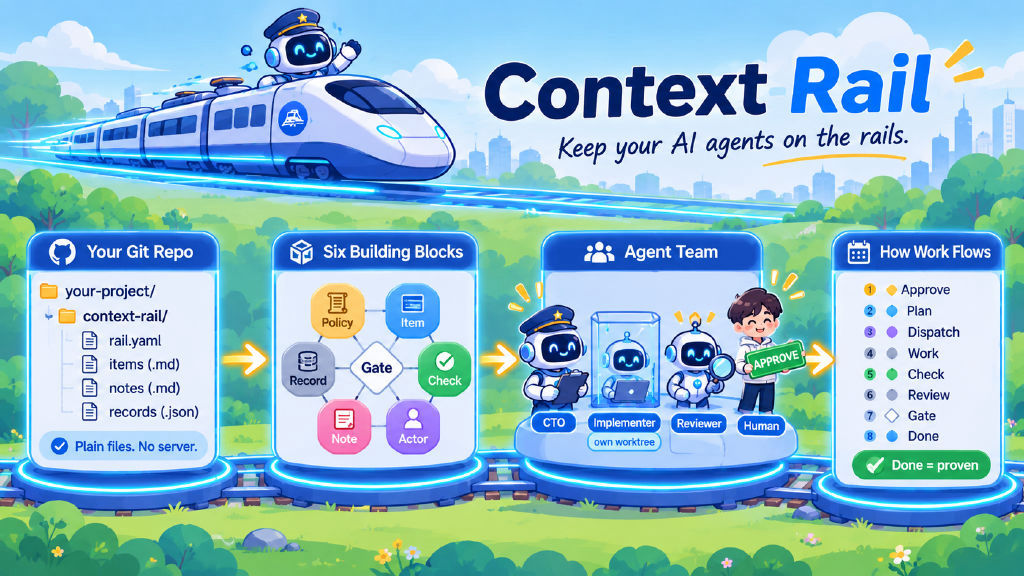
Keep your AI agents on the rails. Context Rail turns your project into a shared workspace where AI agents do the work and you stay in charge of what matters.
Building with AI agents is fast, until it isn't. Agents forget what was decided, lose track of what is done, skip the tests and change things nobody asked for. The bigger the project, the worse it gets.
Context Rail gives every project one source of truth that lives in your git repo. A lead agent plans and hands out the work. Each helper agent sees only what its job needs. Nothing counts as done until it is proven, and the big calls wait for a human yes.
What you get
- Agents that stay focused. Each agent gets a short brief for its role instead of the whole project. Less noise, fewer wrong turns.
- You approve what matters. The project's scope, its quality bar and anything irreversible wait for a human. Change the rules, and Context Rail asks again.
- "Done" means proven. Work only reaches done when its checks pass. When proof is missing, Context Rail tells you which command produces it.
- Every agent works in its own sandbox. Each job runs in a separate git worktree and lands only after review, as a clean fast-forward merge.
- Your project stays yours. Everything is plain Markdown and JSON in your repo. No server, no account, no lock-in.
- One tool for any kind of project. Kanban, sprints, phase gates or video production: pick a template and the same engine runs it.
Try it in 5 minutes
You need Python 3.11+ and git.
python -m pip install context-rail     # Windows: py -m pip install context-rail
cd your-project
rail init --pack basic                 # sets up the workspace and walks you through the project brief
rail change add task "Write the first task"
rail overview                          # your daily starting page
rail serve ui                          # the local web view
rail init creates a context-rail/ folder in your project and asks a few
questions about what you are building. If it reports that approval is missing,
approve the brief yourself:
rail --actor human approve charter --confirm "APPROVE charter" --confirmer "Your Name"
To let agents pick up the work, install the Factory droid CLI (or point
RAIL_DROID_BIN at it).
How a day looks
- See where things stand.
rail overviewshows progress, what is next and what is blocked. - Approve the plan. Nothing runs until a human approves the brief. Working alone? Solo mode skips the ceremony; the quality checks still apply.
- Hand out work.
rail loop dispatchgives an agent one task, a focused brief and its own sandbox. - Prove it. The checks you chose run against the agent's work.
- Review and merge. A different actor reviews, and
rail loop mergelands only approved work.
Works for any kind of project
Pick a template when you start with rail init --pack <name>:
| Template | Best for | How work flows |
|---|---|---|
basic |
Getting started, small projects | todo → doing → done |
flow |
Work that arrives all the time, no sprints | backlog → ready → building → review → shipped |
scrum |
Teams that work in sprints | goal → scope → sprint → story → task |
waterfall |
Projects with distinct phases | planned → designing → building → testing → done |
video |
Video and content production | scene → shot, each shot: storyboard → generating → review → approved → published |
Want your own words or steps? Copy a template and make it yours with
rail ops pack create --name <name> --from basic. Renaming things never needs
re-approval; changing the rules does.
Build any project from six building blocks
Every Context Rail project, whatever its shape, is built from the same six building blocks. The engine knows only these; a template gives them the names your team already uses. Each section below shows two pictures: how the blocks relate, and how a project runs through them. Colors are the same everywhere: yellow policy, blue item, green check, gray record, pink note, purple actor.
How the blocks relate
flowchart TD
    P["policy<br/>the charter: rules and who decides"]
    G{"gate"}
    I["item<br/>the work<br/>not_started → active → done<br/>blocked · dropped"]
    C["item<br/>a container"]
    D["item<br/>a dependency"]
    K["check<br/>a command, a file, evidence,<br/>a review or a human sign-off"]
    R["record<br/>append-only history"]
    N["note<br/>context"]
    A["actor<br/>cto · implementer · reviewer"]

    P -- "defines the gates" --> G
    K -- "verifies: fresh and passing" --> I
    K -- "proof" --> G
    R -- "approved review" --> G
    G -- "opens the finished status" --> I
    I -- "part_of: builds the tree,<br/>drives focus and progress" --> C
    I -- "depends_on: unfinished means blocked" --> D
    I -- "owned_by" --> A
    A -- "writes" --> R
    R -- "about" --> I
    N -- "about: feeds the agent brief" --> I

    classDef cPolicy fill:#fde68a,stroke:#b45309,color:#111
    classDef cItem fill:#bfdbfe,stroke:#1d4ed8,color:#111
    classDef cCheck fill:#bbf7d0,stroke:#15803d,color:#111
    classDef cRecord fill:#e5e7eb,stroke:#4b5563,color:#111
    classDef cNote fill:#fbcfe8,stroke:#be185d,color:#111
    classDef cActor fill:#ddd6fe,stroke:#6d28d9,color:#111
    classDef cGate fill:#fff,stroke:#111,color:#111
    class P cPolicy
    class I,C,D cItem
    class K cCheck
    class R cRecord
    class N cNote
    class A cActor
    class G cGate
The policy decides which gates exist. A gate keeps an item out of
its finished status until its checks pass and a review record approves
it. An unfinished depends_on blocks the item, and part_of builds the tree
that decides focus and progress. Notes give agents their context, and
records keep the history.
How a project runs
flowchart LR
    S1["1 Approve<br/>policy"] --> S2["2 Plan<br/>item"] --> S3["3 Dispatch<br/>actor"] --> S4["4 Work<br/>record"] --> S5["5 Check<br/>check"] --> S6["6 Review<br/>record"] --> S7{"7 Gate"} --> S8["8 Finish<br/>item"]

    classDef cPolicy fill:#fde68a,stroke:#b45309,color:#111
    classDef cItem fill:#bfdbfe,stroke:#1d4ed8,color:#111
    classDef cCheck fill:#bbf7d0,stroke:#15803d,color:#111
    classDef cRecord fill:#e5e7eb,stroke:#4b5563,color:#111
    classDef cNote fill:#fbcfe8,stroke:#be185d,color:#111
    classDef cActor fill:#ddd6fe,stroke:#6d28d9,color:#111
    classDef cGate fill:#fff,stroke:#111,color:#111
    class S1 cPolicy
    class S2,S8 cItem
    class S3 cActor
    class S4,S6 cRecord
    class S5 cCheck
    class S7 cGate
- A human approves the charter; nothing runs before that.
- The CTO agent plans work under the container in focus.
- An implementer agent gets one item, a brief built from notes, and its own git worktree.
- The run is written down as a record.
- The item's checks run in that worktree. A failed run gets one retry, then escalates to you.
- A different actor reviews the work.
- The gate opens only with fresh, passing checks and an approved review.
- The item finishes, the work merges as a fast-forward, and progress updates in your daily digest.
Example: a video production
flowchart TD
    CH["charter · policy"]
    GO["film goal · item"]
    SC["scene · container item<br/>focus: the active scene"]
    SH["shot · the unit of work<br/>draft → storyboard → generating<br/>→ review → approved → published"]
    AS["asset · item<br/>example: a character model"]
    GT{"item_done gate"}
    QC["quality check · check"]
    RV["review · record"]
    RN["render run · execution record<br/>running → succeeded or failed"]
    NT["vision, style guide · note"]
    IM["implementer · actor"]
    RE["reviewer · actor"]

    SC -- "part_of" --> GO
    SH -- "part_of" --> SC
    SH -- "depends_on (example)" --> AS
    CH -- "defines" --> GT
    QC -- "verifies" --> SH
    QC --> GT
    RE -- "writes" --> RV
    RV -- "about" --> SH
    RV --> GT
    GT -- "opens approved" --> SH
    SH -- "owned_by" --> IM
    SH -- "render, once approved" --> RN
    NT -- "about" --> SH

    classDef cPolicy fill:#fde68a,stroke:#b45309,color:#111
    classDef cItem fill:#bfdbfe,stroke:#1d4ed8,color:#111
    classDef cCheck fill:#bbf7d0,stroke:#15803d,color:#111
    classDef cRecord fill:#e5e7eb,stroke:#4b5563,color:#111
    classDef cNote fill:#fbcfe8,stroke:#be185d,color:#111
    classDef cActor fill:#ddd6fe,stroke:#6d28d9,color:#111
    classDef cGate fill:#fff,stroke:#111,color:#111
    class CH cPolicy
    class GO,SC,SH,AS cItem
    class QC cCheck
    class RV,RN cRecord
    class NT cNote
    class IM,RE cActor
    class GT cGate
flowchart LR
    V1["1 Approve<br/>charter"] --> V2["2 Start scene<br/>scene"] --> V3["3 Storyboard<br/>shot"] --> V4["4 Generate<br/>run record"] --> V5["5 Check<br/>quality check"] --> V6["6 Review<br/>review record"] --> V7{"7 Approve"} --> V8["8 Render<br/>render run"] --> V9["9 Publish<br/>shot"]

    classDef cPolicy fill:#fde68a,stroke:#b45309,color:#111
    classDef cItem fill:#bfdbfe,stroke:#1d4ed8,color:#111
    classDef cCheck fill:#bbf7d0,stroke:#15803d,color:#111
    classDef cRecord fill:#e5e7eb,stroke:#4b5563,color:#111
    classDef cNote fill:#fbcfe8,stroke:#be185d,color:#111
    classDef cActor fill:#ddd6fe,stroke:#6d28d9,color:#111
    classDef cGate fill:#fff,stroke:#111,color:#111
    class V1 cPolicy
    class V2,V3,V9 cItem
    class V4,V6,V8 cRecord
    class V5 cCheck
    class V7 cGate
The shot is the unit of work, and the scene in production is the focus. A shot
reaches approved only through the item_done gate. Progress counts approved
shots per scene; render runs show up as execution progress and never count as
finished work.
Example: vibe coding in sprints
flowchart TD
    CH["charter · policy"]
    SR["sprint · container item<br/>focus: the active sprint"]
    ST["story · the unit of work<br/>todo → doing → review → done"]
    BG["bug · item<br/>reported → fixing →<br/>verifying → closed"]
    GT{"item_done gate"}
    TS["tests · check"]
    RP["repro-check + acceptance · check"]
    RV["review · record"]
    NT["vision, conventions · note"]
    IM["implementer agent · actor<br/>own git worktree"]
    RE["reviewer · actor<br/>never the implementer"]

    ST -- "part_of" --> SR
    BG -- "part_of" --> SR
    CH -- "defines" --> GT
    TS -- "verifies" --> ST
    RP -- "verifies" --> BG
    TS --> GT
    RP --> GT
    RE -- "writes" --> RV
    RV -- "about" --> ST
    RV --> GT
    GT -- "opens done / closed" --> ST
    GT --> BG
    ST -- "owned_by" --> IM
    NT -- "about: feeds every brief" --> ST

    classDef cPolicy fill:#fde68a,stroke:#b45309,color:#111
    classDef cItem fill:#bfdbfe,stroke:#1d4ed8,color:#111
    classDef cCheck fill:#bbf7d0,stroke:#15803d,color:#111
    classDef cRecord fill:#e5e7eb,stroke:#4b5563,color:#111
    classDef cNote fill:#fbcfe8,stroke:#be185d,color:#111
    classDef cActor fill:#ddd6fe,stroke:#6d28d9,color:#111
    classDef cGate fill:#fff,stroke:#111,color:#111
    class CH cPolicy
    class SR,ST,BG cItem
    class TS,RP cCheck
    class RV cRecord
    class NT cNote
    class IM,RE cActor
    class GT cGate
flowchart LR
    Q1["1 Approve<br/>charter"] --> Q2["2 Start sprint<br/>sprint"] --> Q3["3 Plan<br/>story"] --> Q4["4 Build<br/>run record"] --> Q5["5 Test<br/>tests"] --> Q6["6 Review<br/>review record"] --> Q7{"7 Gate"} --> Q8["8 Merge<br/>story done"] --> Q9["9 Close sprint<br/>sprint"]

    classDef cPolicy fill:#fde68a,stroke:#b45309,color:#111
    classDef cItem fill:#bfdbfe,stroke:#1d4ed8,color:#111
    classDef cCheck fill:#bbf7d0,stroke:#15803d,color:#111
    classDef cRecord fill:#e5e7eb,stroke:#4b5563,color:#111
    classDef cNote fill:#fbcfe8,stroke:#be185d,color:#111
    classDef cActor fill:#ddd6fe,stroke:#6d28d9,color:#111
    classDef cGate fill:#fff,stroke:#111,color:#111
    class Q1 cPolicy
    class Q2,Q3,Q8,Q9 cItem
    class Q4,Q6 cRecord
    class Q5 cCheck
    class Q7 cGate
The story is the unit of work, and the running sprint is the focus. A story
reaches done only with passing tests and an approved review; a bug also needs
its repro-check and acceptance checks before it closes. A sprint closes only
when every story in it is finished, and progress counts finished stories per
sprint.
Code graph
For code projects, Context Rail reads your git checkout and builds a graph of
files, functions and who calls whom. It lives in a local cache, not in the
store, and rebuilds from git. When you dispatch an agent, the work order
carries a short code area: the files and symbols the item mentions, plus their
callers. At review, the reviewer sees which functions the diff changed, what
reaches them, and which tests cover them. rail why src/app.py:total answers
for a file or a function the same way it answers for an item.
rail ops codegraph setup     # check the provider and build the first snapshot
rail ops codegraph status    # provider, coverage and freshness
It is on by default for code packs and off for the video pack. Choose a
provider in rail.yaml:
code_graph: builtin # builtin | graphify | gitnexus | none
or pass --code-graph graphify (or gitnexus, builtin, none) to
rail init. For an external provider, init runs a readiness probe once and
reports the line at the end; it does not build a snapshot, and a missing tool
does not fail the init. Run rail ops codegraph setup for the first build.
builtin needs no install. graphify (uv tool install "graphifyy>=0.9.100,<0.10",
Apache-2.0) and gitnexus (npm install -g gitnexus, Node 22.18+ or 24.11+,
PolyForm Noncommercial) are optional upgrades. Override a binary with
RAIL_GRAPHIFY_BIN or RAIL_GITNEXUS_BIN. A store made before the code graph,
with hand-written code notes, moves over once with
rail --actor human ops codegraph adopt; it rewrites only the profiles and
skills you have not edited.
The rail never installs an external tool. If the configured tool is missing or
broken, dispatch falls back to builtin and says why in the work order.
rail ops codegraph setup caches its readiness check; status, the overview,
approval and rail ops doctor read that cache without starting a process.
GitNexus is indexed in an isolated mirror under the local cache, so it never
writes .gitnexus, .claude or a GitNexus section into your checkout, and
GITNEXUS_HOME keeps its registry out of your home directory.
Use it your way
- Command line.
railworks for you and your agents alike. Every answer is one JSON reply that agents read easily. - Any MCP client.
rail serve mcpplugs Context Rail into AI tools that speak MCP. - Local web UI.
rail serve uishows Flow, Plan and Records views. It runs on your machine only and is protected by a token. - Quick by default. A small background helper keeps everyday commands fast and stops itself after 10 idle minutes.
For engineers
- Files are the truth. The store is Markdown, JSON records and
rail.yamlin your repo. SQLite is only a cache under the git dir; delete it and the next command rebuilds it. - One write path. CLI, MCP and UI all go through validate → authorize → lock → atomic write → record → index.
- Fail closed. An unknown pack key, manifest schema or policy field is refused, never guessed.
- Agents never read
pack.yaml. A compiler turns the pack into one model, and agents askrail next,rail read show,rail whyandrail model. - No lost updates, safe retries. Every write carries the etag it read, and every retry carries an idempotency key that returns the same record.
- Project shape is data. Six primitives, eight relations and five status categories are fixed; sprints, phases and scenes are pack data, not engine code.
The full picture, with the architecture, the operating model and every command, is in How Context Rail works.
Learn more
- How Context Rail works: architecture, operating model, commands, surfaces
- User guide: diagrams and a zero-to-daily walkthrough
- Interactive engine graph
- Agent onboarding kit: set up any agent harness
- Operator skills: drop-in skills for your agents
- Upgrading from v1/v2
Contributing
python -m pip install -e .[test]
python -m pytest -q -m "not slow and not perf"
The test lanes, speed budgets and working rules are in How Context Rail works and AGENTS.md.
License
MIT. See LICENSE.
1 maintainer

Metadata
1 maintainer
Release files for context-rail 3.3.1
For a detailed explanation of source distributions (sdists) and built distributions (wheels), please see the package formats documentation.
Source distribution (sdist)
| File | Size | Uploaded | Provenance | Actions |
|---|---|---|---|---|
| context_rail-3.3.1.tar.gz | 675.4 kB | Without provenance | Details for context_rail-3.3.1.tar.gz |
Built distribution (wheel)
| File | Interpreter | ABI | Platform | Actions Reset |
|---|---|---|---|---|
| context_rail-3.3.1-py3-none-any.whl | Python 3 | none | any | Details for context_rail-3.3.1-py3-none-any.whl |
Total release size: 1.4 MB
Release files / context_rail-3.3.1.tar.gz
| Download URL | context_rail-3.3.1.tar.gz |
|---|---|
| Size | 675.4 kB |
| Tags | Source |
|
SHA-256 checksum How to use checksums |
3855ef7e4e619acdfdbcd744414759fee7d1ea06b0712377d137f05a64400975
|
|
BLAKE2b-256 checksum How to use checksums |
48ed20009203b9247b341955f422fa5863cfe2f81692f8f46c9ef2d623707690
|
| Upload date | |
|
Uploaded using Trusted Publishing? What is trusted publishing? |
No |
| Uploaded via |
twine/6.2.0 CPython/3.13.7
|
Release files / context_rail-3.3.1-py3-none-any.whl
| Download URL | context_rail-3.3.1-py3-none-any.whl |
|---|---|
| Size | 764.5 kB |
| Tags | Python 3 |
|
SHA-256 checksum How to use checksums |
b79e20d0a185a9daf6f5e4c2ea981dbf65615f9242f742927db25fff33bf07c6
|
|
BLAKE2b-256 checksum How to use checksums |
add162e047dd398be2d37214fcbb5ce76f77586aa427051f35932f6b1fd5afa1
|
| Upload date | |
|
Uploaded using Trusted Publishing? What is trusted publishing? |
No |
| Uploaded via |
twine/6.2.0 CPython/3.13.7
|
Security for context-rail 3.3.1
Provenance
Provenance describes where a file came from. On PyPI, provenance is shared via attestations, which provide a verifiable record of the build or publishing details. View details, limitations and caveats.
No provenance found
None of the files in this release were uploaded with provenance metadata.
A note on package security
PyPI is a repository for distributing packages, not a service for auditing them. While third-party security researchers and our staff do their best to detect and remove malicious packages, PyPI cannot guarantee the quality, security or suitability of any given package.
To learn more about protecting yourself from malicious actors, visit our package security documentation.














