
context-render
Which of your Claude Code scaffolds — skills, commands, subagents, MCP servers, hooks, CLAUDE.md files — actually get used?
context-render reads your local session transcripts (read-only) and reports each component's state per session: R registered → L loaded → I invoked. No scores, no API calls, no telemetry — everything stays on your machine.
Install
Requires Python 3.11+. Install from PyPI — pipx or uv tool keeps the CLI in its own environment:
pipx install context-render      # or: uv tool install context-render
pip install context-render       # plain pip works too
Or install the latest main straight from GitHub:
pip install git+https://github.com/gigayaya/context-render.git
Either way you get the ctxr command on your PATH.
Quickstart
cd your-repo
ctxr init           # scan scaffolds → .context-render/manifest.yaml
ctxr sync           # ingest past sessions (idempotent, safe to re-run)
ctxr sessions       # list ingested sessions, newest on top
ctxr sessions <id>  # one session: what was loaded/invoked, full timeline
Once you have some history:
ctxr report --since 30d      # cross-session aggregate: active / low-use / unused, plus what the agent had to go find itself
ctxr map                     # static: is your guidance a usable routing map, and what does it fail to cover?
What a session report looks like
Every session report (sessions <id-prefix>) has three views of the same session:
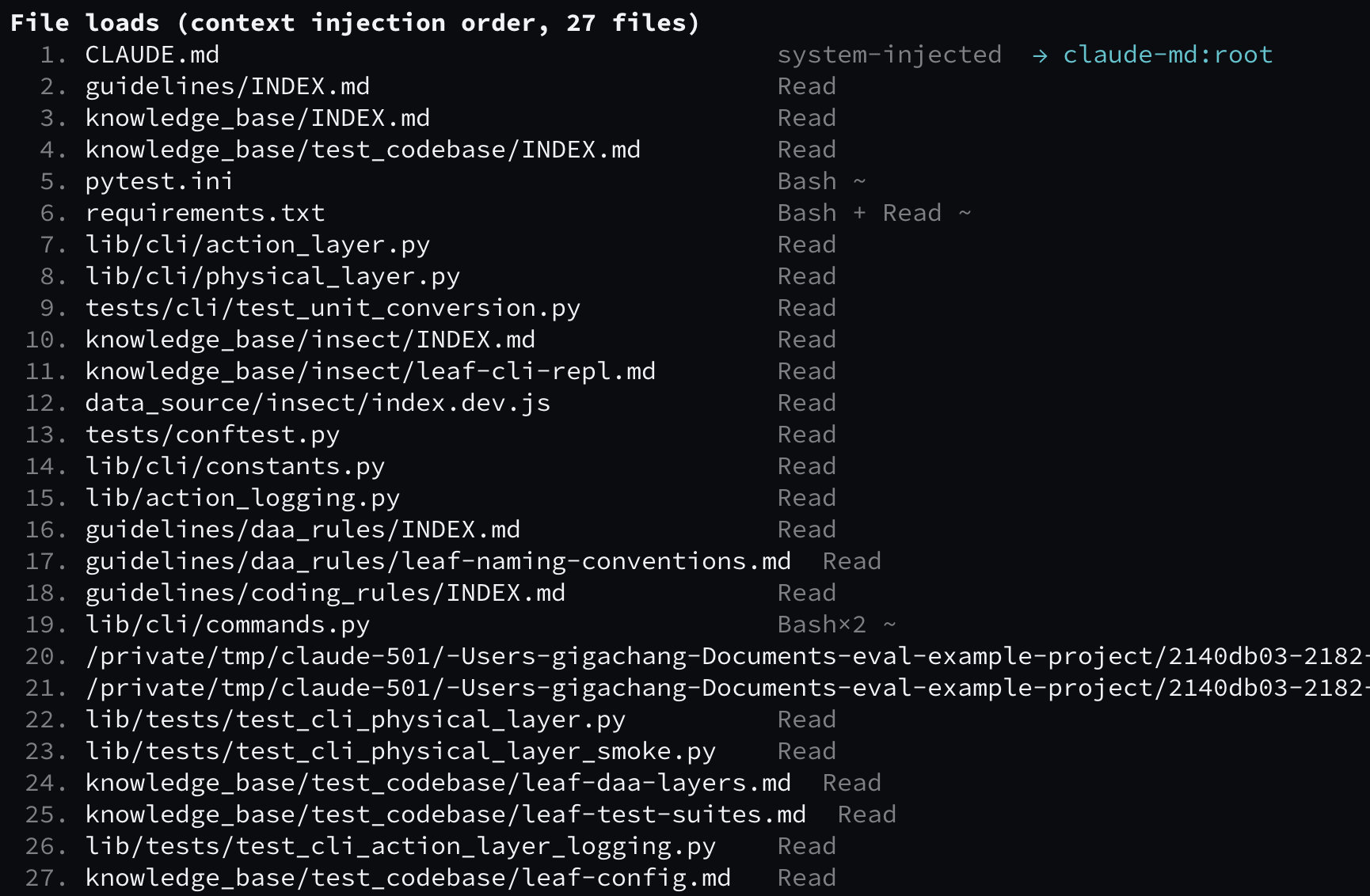
File loads — every file that entered the context, in injection order, with how it got there (Read, Bash, system-injected) and, where possible, which component it's attributed to:
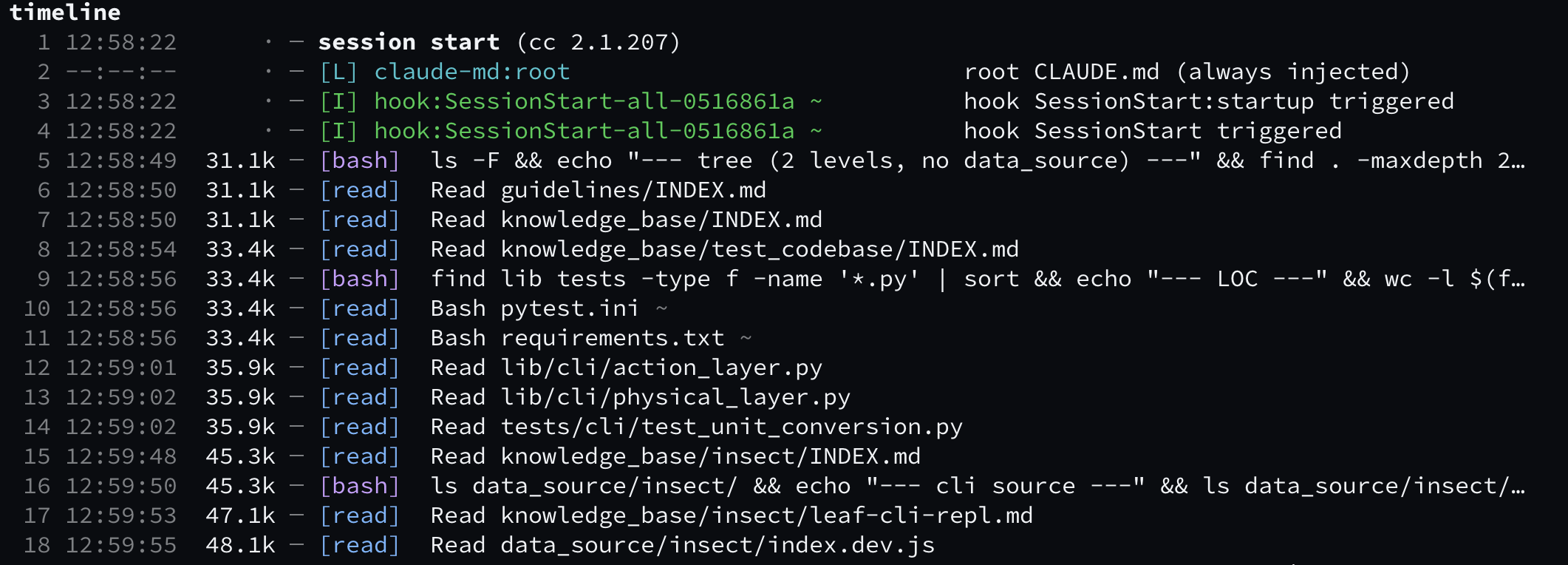
Timeline — the session as a chronological event list: hooks firing, CLAUDE.md injection, reads, bash commands, writes. [L] marks a load, [I] an invocation; ~ marks heuristic (vs. exact) attribution:
Context-window map — when tokens entered the window and what put them there: injected loads (▼) above, your actions (▲) below, numbers linking each bar back to its timeline row, and cumulative window occupancy along the bottom:
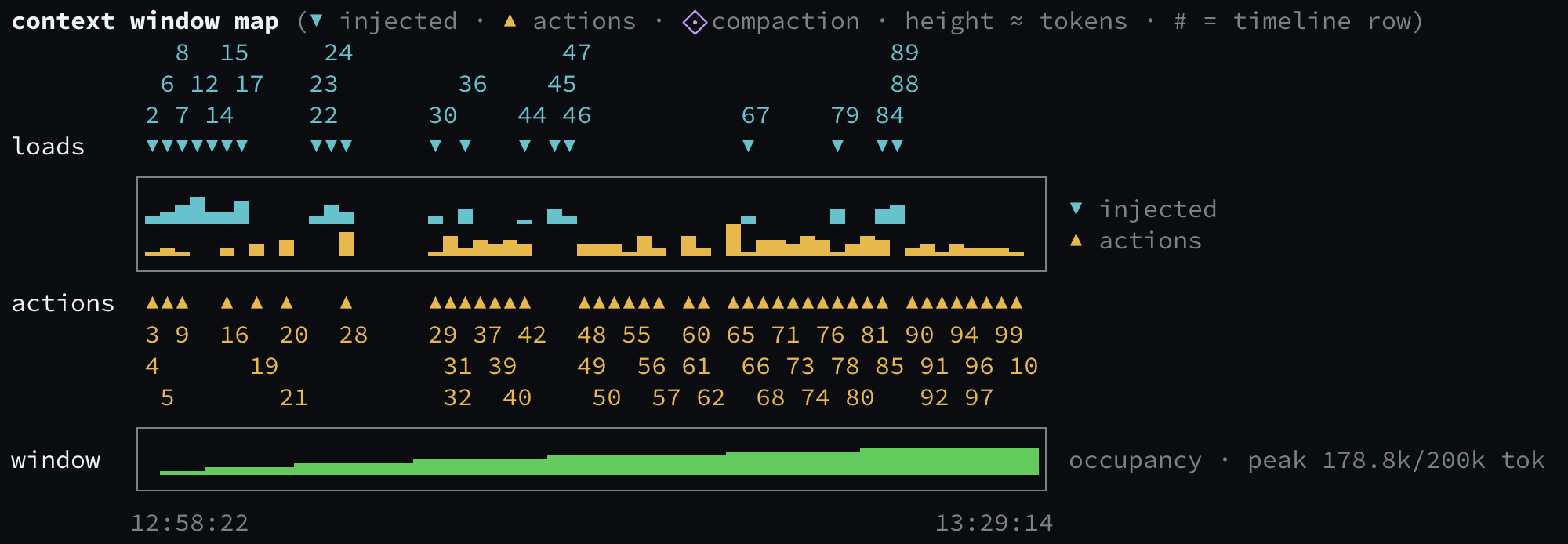
The report closes with a SELF-DERIVATION block — the top information needs the agent answered itself (searches, repo-structure mapping) with their token and window-occupancy cost; report aggregates the same rows across sessions.
See docs/reports.md for how to read each view in detail.
Live map in Claude Code (ctxr-live mod)
ctxr-live (claude-mod/) keeps the current session's context-window map above the prompt while you work — no need to wait for the session to end.
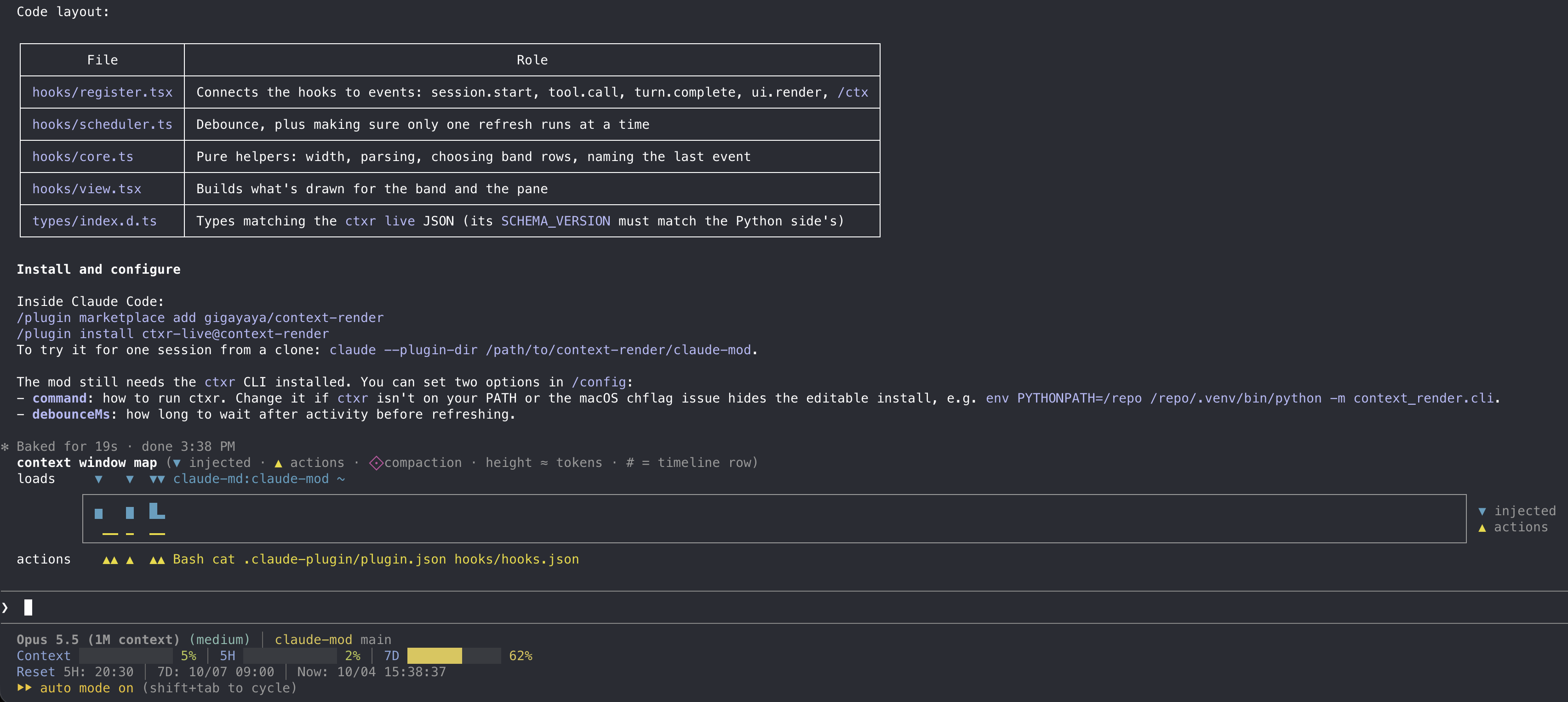
Install inside Claude Code (needs the ctxr command, see Install):
/plugin marketplace add gigayaya/context-render
/plugin install ctxr-live@context-render
Type /ctx to open the full timeline in a pane. Prefer it beside the transcript? Set the plugin's layout option to sidebar for a vertical map docked on the right (fullscreen layout, 110+ columns; it falls back to the band otherwise). No ctxr init needed; the mod is read-only and makes no API calls. If ctxr isn't on your PATH, set the plugin's command option in /config. Details: docs/reports.md.
The routing map
ctxr map is the one static view — no transcripts needed. It checks whether your guidance works as a routing map: carrier quality, loading guarantees, dead routes, and which files the agent can reach from root CLAUDE.md versus only by grepping.
ctxr map init generates a skeleton (paths + TODO labels) for your agent to fill in. See docs/map-authoring.md.
The iteration loop
Rewriting a skill's description without observability means never learning whether the next task triggered it. context-render closes that loop:
- Write a skill (or command, subagent, CLAUDE.md).
- Run a real task in Claude Code.
- Check with
ctxr sessions <id-prefix>: stuck atR(never loaded)? The trigger never matched. Stuck atL(loaded, never invoked)? The content didn't earn a use. ASTALE COPIESrow never re-read? The file changed and the agent didn't know. - Fix the trigger or content, run the next task.
- Verify on the next session, or weekly with
report --since 30d.
It measures "did it fire", not "did it make the output better" — that's an eval question. Before deleting anything, read docs/limitations.md: used ≠ useful.
Commands
ctxr init        [--refresh] [--yes] [--hook|--no-hook]
ctxr sync        [--since <spec>] [--force]
ctxr sessions    [<id-prefix>] [--since <spec>] [--md] [--evidence] [--full] [--no-timeline] [--no-graph]
ctxr live        <id-prefix> --json [--width 60]   # used by the ctxr-live mod
ctxr report      [--since 30d] [--md] [--no-timeline] [--no-graph] [--emit-prompt <#|key>]
ctxr map         [--md] [--since 30d]
ctxr map init    [--shape auto|flat|tree] [--output <path>]
ctxr clear       [--yes]
ctxr remove-hook
ctxr help | --version
| Command | What it does |
|---|---|
init |
Scan the repo's scaffolds into .context-render/manifest.yaml; optionally install a SessionEnd hook for auto-ingest |
sync |
Parse past transcripts into the local db (idempotent; --force re-parses everything still on disk) |
sessions |
List ingested sessions; sessions <id-prefix> shows one session's full report |
live |
Read-only JSON snapshot of a (possibly in-progress) session, for the ctxr-live mod |
report |
Cross-session aggregate: per-component status (active / low-use / unused / MISS), activity, cost, SELF-DERIVATION. --emit-prompt turns one row into a scaffold-drafting prompt |
map |
Static routing-map measurements (docs/map-authoring.md) |
map init |
Routing-map skeleton plus fill instructions; never overwrites an existing CLAUDE.md |
clear |
Delete the db and reports (manifest/config kept); warns about sessions that can't be rebuilt |
remove-hook |
Remove the SessionEnd hook that init --hook installed |
Common flags:
--sinceaccepts30d/12w/2026-06-01(bare dates are local midnight; an explicit offset like2026-06-01T00:00:00+08:00is honored)--mdwrites the complete markdown report to.context-render/reports/(terminal output truncates long lists)--fullshows the complete session report in the terminal, keeping colors (no truncation, no file written)--evidenceattaches the raw transcript events behind each attribution to a session report--no-timeline/--no-graphhide report sections;NO_COLORdisables colors
Data & configuration
Everything lives under <repo>/.context-render/. manifest.yaml is the hand-editable, version-controlled asset. config.yaml is optional — thresholds, billing mode, price table: see docs/configuration.md.
db.sqlite is an archive, not a cache: Claude Code expires transcripts after cleanupPeriodDays (default 30), after which the db is the only record. It is gitignored — back it up, and never delete and rebuild it to fix a problem.
Documentation
- Three-state model & design principles — what R/L/I mean and how to act on them
- Reading the reports — file loads, timeline, context-window map, live map mod, colors, exit codes
- Configuration — directory layout, config.yaml, SessionEnd hook
- Limitations — read before deleting anything
- Development
Privacy
Zero uploads, zero telemetry, zero API calls in the core flow, and the ctxr-live mod adds none either; transcripts are read-only and all outputs live in your repo.
1 maintainer

Metadata
1 maintainer
Release files for context-render 1.1.0
For a detailed explanation of source distributions (sdists) and built distributions (wheels), please see the package formats documentation.
Source distribution (sdist)
| File | Size | Uploaded | Provenance | |
|---|---|---|---|---|
| context_render-1.1.0.tar.gz | 170.3 kB | With provenance | Details |
Built distribution (wheel)
| File | Interpreter | ABI | Platform | Reset |
|---|---|---|---|---|
| context_render-1.1.0-py3-none-any.whl | Python 3 | none | any | Details |
Total release size: 288.8 kB
Release files / context_render-1.1.0.tar.gz
| Download URL | context_render-1.1.0.tar.gz |
|---|---|
| Size | 170.3 kB |
| Tags | Source |
|
SHA-256 checksum How to use checksums |
de5aaabe6da8689d0ec292fc80b32e71fe1f4dd8030c4b8767d39480e4dd789c
|
|
BLAKE2b-256 checksum How to use checksums |
6b0423dfaca710a88f0bfd8213d1610f5a1fd0c64b64f977d8a41cabe71497be
|
| Upload date | |
|
Uploaded using Trusted Publishing? What is trusted publishing? |
Yes |
| Uploaded via |
twine/7.0.0 CPython/3.13.14
|
Provenance
Provenance describes where a file came from. On PyPI, provenance is shared via attestations, which provide a verifiable record of the build or publishing details. View details, limitations and caveats.


PyPI Publish Attestation
PyPI verified that this artifact, at this checksum, originated from the publisher listed below.
Signed by GitHub Actions, verified by PyPI on Oct 6, 2026.
Transparency logRelease files / context_render-1.1.0-py3-none-any.whl
| Download URL | context_render-1.1.0-py3-none-any.whl |
|---|---|
| Size | 118.5 kB |
| Tags | Python 3 |
|
SHA-256 checksum How to use checksums |
ccb883a0ec35fafaab7beb1206140a293ca9084d3848bcaa9d7f4e55b7e5335d
|
|
BLAKE2b-256 checksum How to use checksums |
64adbcf7b3b44095cefa124db4722216c65b78306df1a746b9a004a346508477
|
| Upload date | |
|
Uploaded using Trusted Publishing? What is trusted publishing? |
Yes |
| Uploaded via |
twine/7.0.0 CPython/3.13.14
|
Provenance
Provenance describes where a file came from. On PyPI, provenance is shared via attestations, which provide a verifiable record of the build or publishing details. View details, limitations and caveats.
PyPI Publish Attestation
PyPI verified that this artifact, at this checksum, originated from the publisher listed below.
Signed by GitHub Actions, verified by PyPI on Oct 6, 2026.
Transparency logSecurity for context-render 1.1.0
Provenance
Provenance describes where a file came from. On PyPI, provenance is shared via attestations, which provide a verifiable record of the build or publishing details. View details, limitations and caveats.
Full provenance
All 2 files in this release have been uploaded with provenance metadata.
Attestation for context_render-1.1.0.tar.gz
PyPI Publish Attestation
PyPI verified that this artifact, at this checksum, originated from the publisher listed below.
Signed by GitHub Actions, verified by PyPI on Oct 6, 2026.
Transparency logA note on package security
PyPI is a repository for distributing packages, not a service for auditing them. While third-party security researchers and our staff do their best to detect and remove malicious packages, PyPI cannot guarantee the quality, security or suitability of any given package.
To learn more about protecting yourself from malicious actors, visit our package security documentation.














