
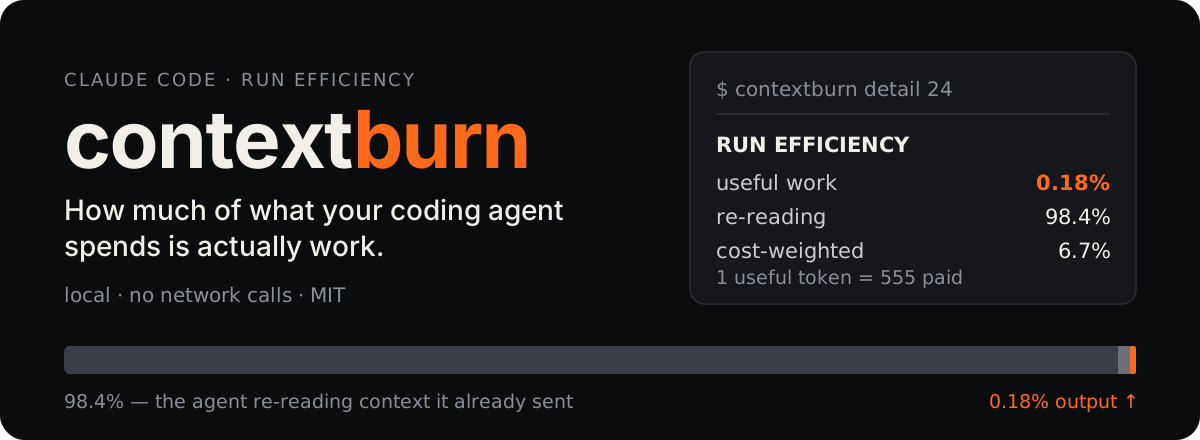

contextburn reads the transcripts Claude Code already writes on your machine and tells you what share of the tokens you paid for became model output — and how much was the agent re-reading context it had already sent.
Token counters answer "how much did I spend?". This answers "how much of it was work?" — a normalised share, so it can be compared across sessions, models and ways of working.
Try it
cp bin/contextburn ~/bin/contextburn && chmod +x ~/bin/contextburn   # python3 only, no dependencies
contextburn detail 24
Why two numbers
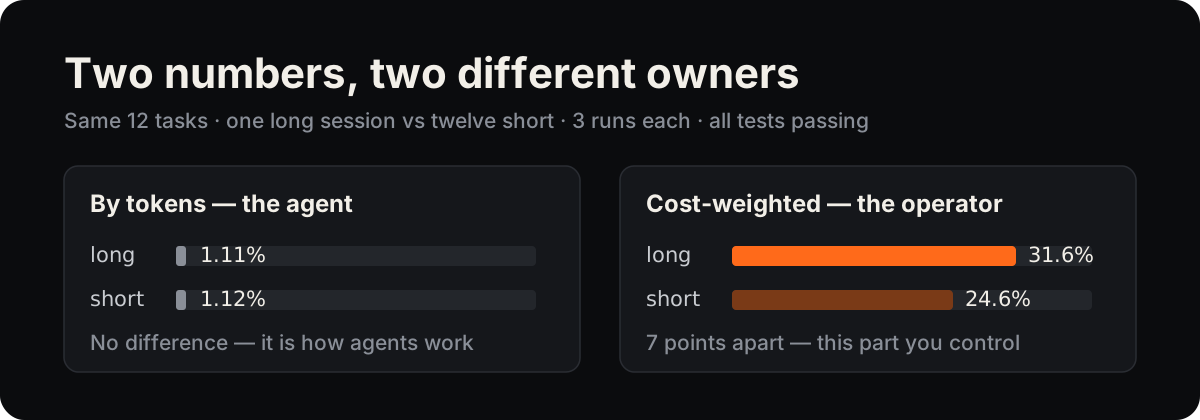
- By tokens the share barely moves. Every agent step resends the accumulated context, so re-reading dominates whatever you do — it describes the agent.
- Cost-weighted the share does move, because cached reads are priced far below fresh input and output. It depends on how you run sessions — it describes you.
The comparison above comes from a controlled experiment with its dataset and analysis scripts: Clear Every Third Task: A Measured U-Curve in the Context Economy of Coding Agents.
How it counts
- Reads local Claude Code transcripts (
~/.claude/projects/**/*.jsonl). Nothing leaves the machine — no network calls at all. - Deduplicates usage records by message id and keeps the element-wise maximum. A streaming runtime writes an early snapshot and a final record for the same call: counting both double-counts it, keeping only the first halves the output.
- Weights the cost share with per-model prices kept at the top of
bin/contextburn. Update them there when they change.
Commands
| command | what it shows |
|---|---|
contextburn |
what is burning tokens right now |
contextburn detail [hours] |
run efficiency, sessions, and what specifically inflated the context |
contextburn window |
the current 5-hour subscription window |
contextburn --json |
machine-readable state (used by the menu-bar app) |
contextburn --probe <hours> |
raw JSON dump of the parsed sessions |
Configuration
| setting | default | meaning |
|---|---|---|
CONTEXTBURN_LANG or ~/.config/contextburn/lang |
en |
interface language: en or ru |
CONTEXTBURN_DAY_START |
6 |
hour your day starts — the daily total resets here |
CONTEXTBURN_WARN |
30000000 |
tokens/hour that turns the menu-bar counter yellow |
CONTEXTBURN_ALARM |
90000000 |
tokens/hour that turns it red |
The language file exists because the menu-bar app is launched from Finder, where environment
variables never reach it: echo ru > ~/.config/contextburn/lang switches both the app and the CLI.
Menu-bar app (macOS)
app/main.swift is a small status-bar app. It polls contextburn --json once a minute and shows the
current burn rate with an hourly graph; click a bar to see that hour's breakdown.
swiftc -O -o ContextBurn app/main.swift
Set CONTEXTBURN_BIN=/path/to/contextburn if the CLI is not in ~/bin or the usual Homebrew paths.
Limits
- Claude Code transcripts only, for now.
- The cost-weighted share is only as current as the price table in
bin/contextburn.
Citing
Software DOI: 10.5281/zenodo.22712986. GitHub's "Cite this repository" button gives the
reference; metadata is in CITATION.cff.
Author
Evgenii Arsentev — arsentev.ai · ORCID 0000-0002-9120-7298
This project was published as tokmon on its first day and renamed to avoid confusion with
unrelated tools of that name; TOKMON_* environment variables still work.
License
MIT — see LICENSE.
1 maintainer

Download files
Download the file for your platform. If you're not sure which to choose, learn more about installing packages.
Source Distribution
Built Distribution
Filter files by name, interpreter, ABI, and platform.
If you're not sure about the file name format, learn more about wheel file names.
Copy a direct link to the current filters
File details
Details for the file contextburn-0.1.1.tar.gz.
File metadata
- Download URL: contextburn-0.1.1.tar.gz
- Upload date:
- Size: 18.9 kB
- Tags: Source
- Uploaded using Trusted Publishing? No
- Uploaded via:
twine/7.0.0 CPython/3.14.4
File hashes
| Algorithm | Hash digest | |
|---|---|---|
| SHA256 |
9166db7e433caa777e43c4a9d701e02b5ada56fd02de3bc3aeefc65f5a2ccb13
|
|
| MD5 |
3e406e8e88a1b3a5fb22ced31e535232
|
|
| BLAKE2b-256 |
8f1ccc85f0115250082c78ed1cf8d32fdbe360596ce130f03c4df03d712dde5b
|
File details
Details for the file contextburn-0.1.1-py3-none-any.whl.
File metadata
- Download URL: contextburn-0.1.1-py3-none-any.whl
- Upload date:
- Size: 16.5 kB
- Tags: Python 3
- Uploaded using Trusted Publishing? No
- Uploaded via:
twine/7.0.0 CPython/3.14.4
File hashes
| Algorithm | Hash digest | |
|---|---|---|
| SHA256 |
af08fabe0da0c8688cd1ebd61c14d8068b9da8b9227210d6c49aef35b3d9e0ef
|
|
| MD5 |
f7dfea8542090be1b07a1dc3b6dcf8b1
|
|
| BLAKE2b-256 |
a81ed56e29e44c62801e73f67c7492a67cf966e85a03086dba0309b9d50a514f
|














