
A local context layer for AI tools: mirror your repositories, index them into a knowledge graph, and serve it over MCP.
Verified details
These details have been verified by PyPIProject links
GitHub Statistics
Maintainers

Project description

contextlake
All your real context, in one local lake.
A local context layer for your AI tools: mirror your repositories, index them
into a knowledge graph, and serve it over MCP, so agents answer from real source instead of guessing.


Why contextlake
Your AI assistant is only as good as what it can actually see. Point it at one file and it's sharp; ask it about the system, which service calls this API, who depends on that package, where a symbol is really defined across dozens of repos, and it starts guessing.
contextlake gives your tools the real source to read. It mirrors your repositories to your machine, indexes them into a queryable knowledge graph, and serves that graph to your editor over MCP. Everything runs locally and offline, no code leaves your machine, and it carries no credentials of its own.
How it works
contextlake is three layers you adopt one at a time. The mirror is useful on its own, and each layer above it is optional.
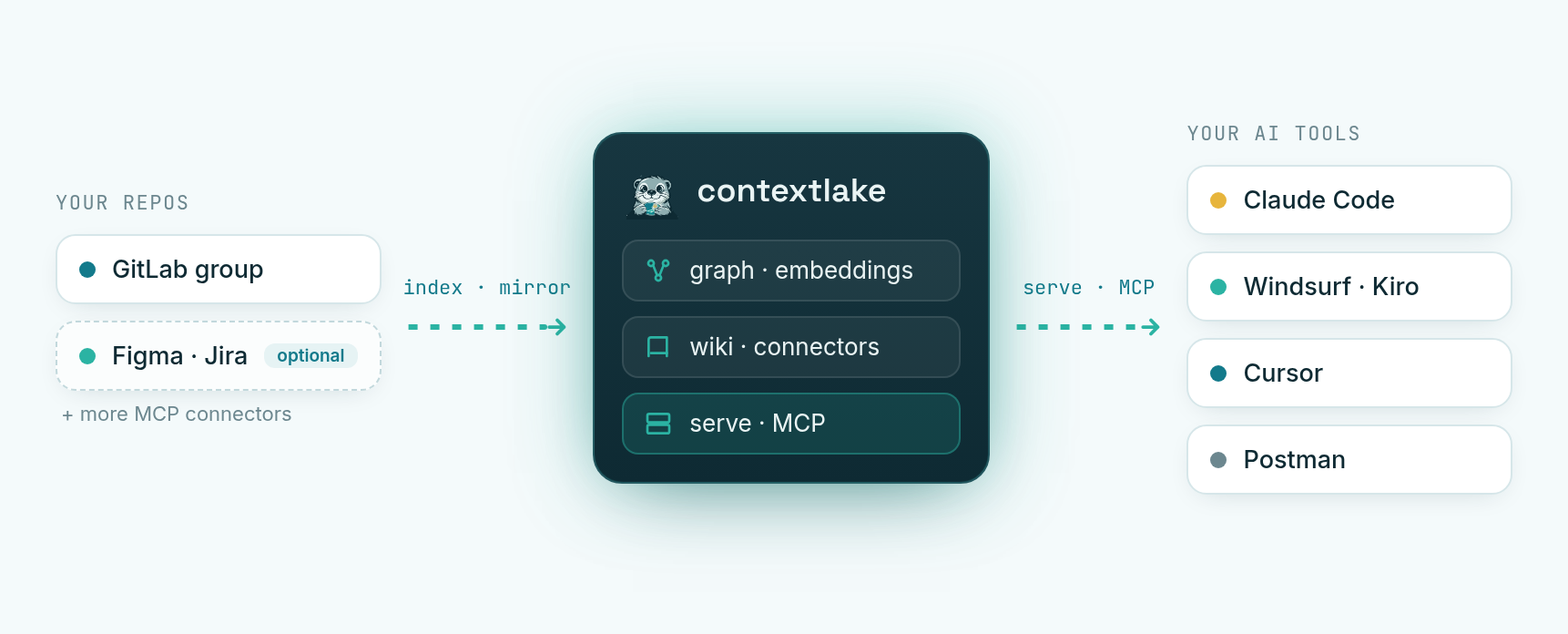
- Mirror: clone every repo you can reach in a GitLab group into a faithful copy of its namespace tree, each on its most active branch, kept fresh with one command. (The source is GitLab today; the design is source-agnostic.)
- Knowledge layer (optional): parse the mirror into a code + dependency graph, add semantic search, a council-verified wiki, and connectors to Atlassian / Figma / GitLab.
- Serve: expose it all over MCP and an offline interactive graph visualizer, so
agents can answer "where is
Xdefined?" or "who callsY?" instead of grepping.
Each layer has its own guide: the mirror in Usage & config, the knowledge layer and serving in Knowledge layer, and the whole flow start to finish in QUICKSTART.
Install
pip install contextlake             # the mirroring CLI
pip install "contextlake[kb]"       # + the knowledge layer (graph, search, wiki, MCP server)
Prefer an isolated, zero-setup install? uv fetches the right
Python and an isolated environment for you:
uv tool install "contextlake[kb]"            # install the CLI on your PATH
uvx --from "contextlake[kb]" contextlake --help   # …or run it once, without installing
# pipx install "contextlake[kb]"             # pipx works too
From source (for contributors)
git clone https://github.com/sayak-sarkar/contextlake && cd contextlake
pip install -e ".[kb]"
Prerequisites: git, and, only for GitLab mirroring, an authenticated
glab (glab auth login). The knowledge layer needs
neither. Once installed, contextlake, python -m contextlake, and python3 contextlake.py
are equivalent.
Quickstart: one repo, no setup
You don't need GitLab or any config to try contextlake on a repo you already have.
No install? Run it once with uvx: prefix any command
below with uvx --from "contextlake[kb]" (e.g. uvx --from "contextlake[kb]" contextlake index --source .).
contextlake index --source .          # parse this repo into a local knowledge graph
contextlake graph --overview --open   # open the interactive graph in your browser
contextlake serve                     # …or serve it to your AI IDE over MCP
Wire it into your editor in one line, no config file needed (it uses the local
~/.contextlake/kb store you just built):
claude mcp add contextlake -- contextlake serve      # Claude Code
# zero-install variant: claude mcp add contextlake -- uvx --from "contextlake[kb]" contextlake serve
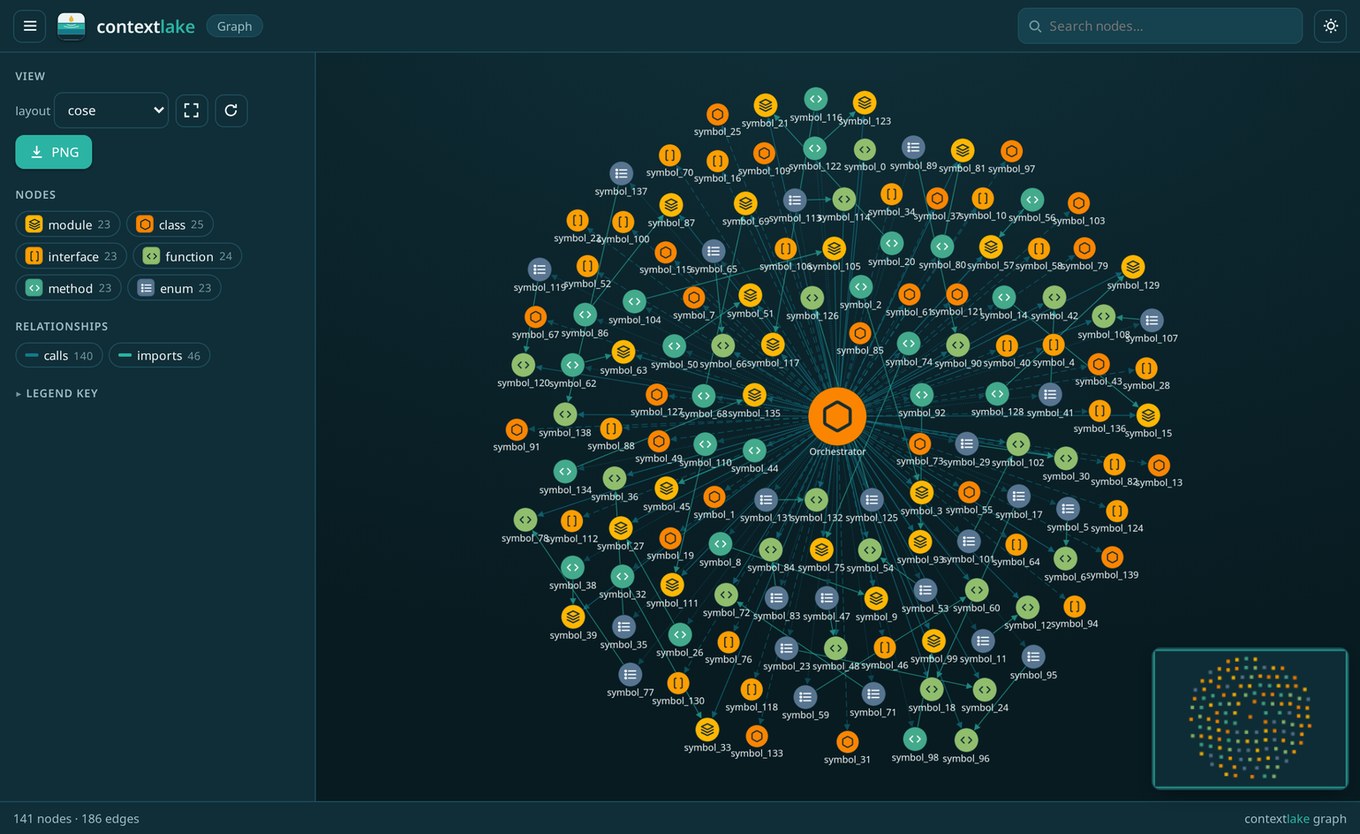
contextlake graph, a whole codebase as one offline, navigable graph.
Everything lands in a local store (~/.contextlake/kb), nothing leaves your machine. Index
any path with --source PATH, or every git repo under a directory with --workspace DIR.
Want the full path, mirror a GitLab fleet → graph → wired editor in a few minutes? QUICKSTART.md walks the whole flow.
Fleet mode: mirror a GitLab group
Where contextlake goes beyond single-repo tools is mirroring and cross-referencing a whole GitLab fleet. Copy the example config and set your group + workspace:
cp .contextlake.ini.example ~/.contextlake.ini
[contextlake]
work_dir = ~/work
gitlab_group = your-gitlab-group
contextlake status      # see where you stand (read-only)
contextlake sync        # fetch → clone → update → branches → verify → audit
It carries no credentials of its own (auth rides on your existing glab login), so
.contextlake.ini holds only non-secret settings and is gitignored by default. It runs
across hundreds of repos concurrently, with an adaptive worker pool, retries with
backoff, and never stomps on the feature branch you're in the middle of.
Behind a slow / TLS-inspecting corporate proxy (e.g. Zscaler) where
glab's API calls time out? SetGITLAB_TOKEN(aread_apitoken) and contextlake enumerates projects via its own HTTP client, which tolerates the slow DNS whereglab's short dial timeout fails.
Commands at a glance
Run any command as contextlake <command>. Full per-command docs: docs/usage.md.
| Command | What it does |
|---|---|
status |
Show the workspace sync state vs GitLab (read-only) |
sync |
The full pipeline: fetch → clone → update → branches → verify → audit |
fetch · clone · update |
The sync steps, individually |
branches |
Switch each repo to its most active branch |
verify · audit |
Check the mirror vs GitLab; report repo health, age & drift (JSON + CSV) |
bootstrap |
Turnkey: sync + index + connect + embed + wiki + steer |
index |
Build the code/dependency graph (--workspace, incremental, --watch) |
connect |
Link repos to Atlassian / Figma / GitLab items |
embed |
Build semantic-search vectors (zero-config built-in CPU model, Ollama, or an API) |
wiki |
LLM-synthesized, council-verified wiki pages |
query |
Search the index (--kind, --repo, --as-of <commit>) |
graph |
Visualize the graph, offline interactive HTML / DOT / Mermaid / JSON |
serve |
Expose the graph over MCP (--transport stdio/http) |
steer |
Write editor steering, AGENTS.md, .mcp.json, .windsurfrules, skills |
lint · doctor · eval |
Graph health · environment check · retrieval-quality scoring |
Global options apply to any command: --dry-run (preview without changing anything),
-v/-q (verbosity), --log-file PATH, --config PATH, --version. Output is colorized on
a TTY and plain when piped; set NO_COLOR to force-disable.
Knowledge layer
Beyond mirroring, the optional contextlake.kb layer turns your repos into a knowledge
graph and serves it to AI tools over MCP. It can link repos to their Atlassian / Figma /
GitLab items, add semantic search, write a curated wiki, visualize the graph
(offline interactive HTML, fleet overview, a symbol's neighbourhood, or a single repo), and
generate per-tool steering files + a skills library. Most of it needs no model; the rest
works with a local Ollama or any OpenAI-compatible endpoint.
One command sets it all up:
contextlake bootstrap --kb-config ~/.contextlake/kb.toml
Full guide: docs/knowledge-layer.md.
Documentation
- QUICKSTART.md, install → bootstrap → wire your editor, in minutes
- docs/usage.md, every command, configuration, branch safety, scheduling
- docs/knowledge-layer.md, the graph, connectors, search, wiki, steering
- docs/internals.md, architecture & internals
- docs/releasing.md, maintainer runbook: versioning, tagging, publishing
- CHANGELOG.md · ROADMAP.md · CONTRIBUTING.md · BRANDING.md
License
MIT, see LICENSE. Pebble the otter is the project mascot; deep context, clear answers.
Project details
Verified details
These details have been verified by PyPIProject links
GitHub Statistics
Maintainers
Release history Release notifications | RSS feed


Download files
Download the file for your platform. If you're not sure which to choose, learn more about installing packages.
Source Distribution
Built Distribution
Filter files by name, interpreter, ABI, and platform.
If you're not sure about the file name format, learn more about wheel file names.
Copy a direct link to the current filters
File details
Details for the file contextlake-2.10.0.tar.gz.
File metadata
- Download URL: contextlake-2.10.0.tar.gz
- Upload date:
- Size: 286.0 kB
- Tags: Source
- Uploaded using Trusted Publishing? Yes
- Uploaded via: twine/6.1.0 CPython/3.13.12
File hashes
| Algorithm | Hash digest | |
|---|---|---|
| SHA256 |
3f265d864f790b982ed0ce6e6f74b397358176391ac93737f28d18924334fab9
|
|
| MD5 |
1f57854ec4675c1ce9fc3f85cbdbfb07
|
|
| BLAKE2b-256 |
11a27efa6fdc2f7edfe83cabe9388c10871f153bf8c63035a7dc1f44b77a3461
|
Provenance
The following attestation bundles were made for contextlake-2.10.0.tar.gz:
Publisher:
release.yml on sayak-sarkar/contextlake
-
Statement:
-
Statement type:
https://in-toto.io/Statement/v1 -
Predicate type:
https://docs.pypi.org/attestations/publish/v1 -
Subject name:
contextlake-2.10.0.tar.gz -
Subject digest:
3f265d864f790b982ed0ce6e6f74b397358176391ac93737f28d18924334fab9 - Sigstore transparency entry: 1986434336
- Sigstore integration time:
-
Permalink:
sayak-sarkar/contextlake@2694465970ed3bbe854d2f8956ee3228eac6ef00 -
Branch / Tag:
refs/tags/v2.10.0 - Owner: https://github.com/sayak-sarkar
-
Access:
public
-
Token Issuer:
https://token.actions.githubusercontent.com -
Runner Environment:
github-hosted -
Publication workflow:
release.yml@2694465970ed3bbe854d2f8956ee3228eac6ef00 -
Trigger Event:
push
-
Statement type:
File details
Details for the file contextlake-2.10.0-py3-none-any.whl.
File metadata
- Download URL: contextlake-2.10.0-py3-none-any.whl
- Upload date:
- Size: 288.9 kB
- Tags: Python 3
- Uploaded using Trusted Publishing? Yes
- Uploaded via: twine/6.1.0 CPython/3.13.12
File hashes
| Algorithm | Hash digest | |
|---|---|---|
| SHA256 |
7169e4a2f73997a640f13ded83aa661cb7b75c547e3c3e37c8b24f8df2946342
|
|
| MD5 |
1d65f701ea03a3abdccc959b5ab6fabf
|
|
| BLAKE2b-256 |
c6809e4ee65b2176272572e5dbc022e45d7a2aa1e58c6d05b5773b1af660ae64
|
Provenance
The following attestation bundles were made for contextlake-2.10.0-py3-none-any.whl:
Publisher:
release.yml on sayak-sarkar/contextlake
-
Statement:
-
Statement type:
https://in-toto.io/Statement/v1 -
Predicate type:
https://docs.pypi.org/attestations/publish/v1 -
Subject name:
contextlake-2.10.0-py3-none-any.whl -
Subject digest:
7169e4a2f73997a640f13ded83aa661cb7b75c547e3c3e37c8b24f8df2946342 - Sigstore transparency entry: 1986434549
- Sigstore integration time:
-
Permalink:
sayak-sarkar/contextlake@2694465970ed3bbe854d2f8956ee3228eac6ef00 -
Branch / Tag:
refs/tags/v2.10.0 - Owner: https://github.com/sayak-sarkar
-
Access:
public
-
Token Issuer:
https://token.actions.githubusercontent.com -
Runner Environment:
github-hosted -
Publication workflow:
release.yml@2694465970ed3bbe854d2f8956ee3228eac6ef00 -
Trigger Event:
push
-
Statement type:






