
Garbage collection for LLM context windows.

Project description
contextprune
Garbage collection for LLM context windows.
Sits between your application and the LLM API. Analyzes your messages list, removes dead weight — stale tool outputs, resolved errors, superseded reasoning — and returns a leaner version. Every API call costs less. The model stays focused on what actually matters.
100% local. No data sent anywhere. No LLM calls during compression.
pip install contextprune
The problem
Long LLM sessions fill up fast:
Turn  1  ████░░░░░░░░░░░░░░░░░░░░░░░░░░   12%   4,100 tokens
Turn  5  ████████████░░░░░░░░░░░░░░░░░░   38%  12,800 tokens
Turn 10  ████████████████████░░░░░░░░░░   58%  19,400 tokens
Turn 15  ████████████████████████████░░   78%  26,100 tokens  ← quality degrades here
Turn 20  ██████████████████████████████   91%  30,600 tokens  ← coherence cliff
Around 65–75% utilization, model behavior suddenly gets worse — the model loses track of earlier constraints, repeats itself, makes mistakes it wouldn't make with a clean context. Most developers hit this, get confused, and manually clear context — losing all the good state too.
With contextprune:
Turn  1  ████░░░░░░░░░░░░░░░░░░░░░░░░░░   12%   4,100 tokens    —
Turn  5  ████████████░░░░░░░░░░░░░░░░░░   38%  12,800 tokens    —
Turn  6  ████░░░░░░░░░░░░░░░░░░░░░░░░░░   11%   3,700 tokens  ← compressed, 71% saved
Turn 10  ██████████░░░░░░░░░░░░░░░░░░░░   28%   9,500 tokens    —
Turn 11  ████░░░░░░░░░░░░░░░░░░░░░░░░░░   10%   3,200 tokens  ← compressed, 66% saved
Turn 20  ████████████░░░░░░░░░░░░░░░░░░   34%  11,600 tokens    ← never exceeds 40%
Quick start
from contextprune import ContextPrune

cp = ContextPrune(model='claude-sonnet-4-5')

result = cp.compress(messages)
# result.messages  — drop-in replacement for your messages list
# result.summary.tokens_saved   — tokens recovered
# result.summary.savings_percent  — e.g. 0.47 = 47% saved
One line changes in your existing code:
# Before
response = client.messages.create(
    model='claude-sonnet-4-5',
    messages=messages,        # ← growing unbounded
    max_tokens=8096,
)

# After
result = cp.compress(messages)
response = client.messages.create(
    model='claude-sonnet-4-5',
    messages=result.messages, # ← compressed
    max_tokens=8096,
)
Installation
pip install contextprune
Requires Python 3.10+. tiktoken is used for token counting when available; falls back to a character estimate otherwise.
pip install contextprune[tiktoken] # includes tiktoken for exact counts
Three ways to use it
1. compress(messages) — explicit, you decide when
result = cp.compress(messages)

print(result.summary.tokens_saved)       # 48100
print(result.summary.savings_percent)    # 0.43
print(len(result.messages))              # fewer messages
Compresses unconditionally every time you call it. Use this when you explicitly decide compression is warranted — after a tool-heavy phase, on every N turns, or inside a LangGraph compress node.
2. watch(client) — automatic, zero changes to call sites
import anthropic
from contextprune import ContextPrune

cp = ContextPrune(model='claude-sonnet-4-5')

# Wrap once at startup
watched = cp.watch(anthropic.Anthropic())

# Use exactly as before — compression fires automatically when context > 65%
response = watched.messages.create(
    model='claude-sonnet-4-5',
    messages=messages,
    max_tokens=8096,
)
Works with OpenAI and any OpenAI-compatible provider — OpenRouter, Groq, Together AI, Mistral, and others:
import openai
from contextprune import ContextPrune

# OpenAI
cp = ContextPrune(model='gpt-4o')
watched = cp.watch(openai.OpenAI())
response = watched.chat.completions.create(model='gpt-4o', messages=messages, max_tokens=4096)

# OpenRouter
cp = ContextPrune(model='meta-llama/llama-3.3-70b-instruct')
watched = cp.watch(openai.OpenAI(
    base_url='https://openrouter.ai/api/v1',
    api_key=os.environ['OPENROUTER_API_KEY'],
))
response = watched.chat.completions.create(
    model='meta-llama/llama-3.3-70b-instruct',
    messages=messages,
    max_tokens=4096,
)

# Groq
from groq import Groq
watched = cp.watch(Groq())
response = watched.chat.completions.create(model='llama3-70b-8192', messages=messages, max_tokens=4096)
3. analyze(messages) — read-only inspection
analysis = cp.analyze(messages)

print(analysis.recommendation.urgency)              # 'none' | 'suggested' | 'recommended' | 'critical'
print(analysis.recommendation.projected_savings)    # tokens that would be saved
print(analysis.session_state.token_budget.utilization_percent)  # 0.56
print(analysis.session_brief)                       # markdown handoff prompt
Never compresses — use this to build dashboards, gate on urgency, or log opportunities.
Async support
import asyncio
from contextprune import ContextPrune

cp = ContextPrune(model='claude-sonnet-4-5')

async def main():
    result   = await cp.compress_async(messages)
    analysis = await cp.analyze_async(messages)

asyncio.run(main())
LangGraph
In a LangGraph agent, state["messages"] accumulates every tool result and intermediate step across all graph iterations. By call 20, a typical coding agent has 30–50k tokens of stale tool outputs.
Wrap the client — zero changes inside the graph:
import anthropic
from contextprune import ContextPrune

cp     = ContextPrune(model='claude-sonnet-4-5')
client = cp.watch(anthropic.Anthropic())

def call_model(state):
    return client.messages.create(      # ← unchanged
        model='claude-sonnet-4-5',
        messages=state['messages'],     # compresses automatically above 65%
        max_tokens=8096,
    )
Add a dedicated compress node:
cp = ContextPrune(model='claude-sonnet-4-5')

def compress_node(state):
    result = cp.compress(state['messages'])
    if result.summary.tokens_saved > 0:
        print(f'[contextprune] saved {result.summary.tokens_saved} tokens '
              f'({result.summary.savings_percent:.0%})')
    return {'messages': result.messages}

builder.add_node('compress', compress_node)
builder.add_edge('tools',    'compress')   # compress after every tool cycle
builder.add_edge('compress', 'agent')
Or use the built-in LangGraph node helper:
cp = ContextPrune(model='claude-sonnet-4-5')

# Returns a ready-to-use node function — handles message conversion,
# threshold check, and no-op when context is below the warning threshold
builder.add_node('compress', cp.as_langgraph_node())
builder.add_edge('compress', 'agent')
Dashboard
A live browser dashboard for monitoring Claude Code sessions in real time. Runs as a companion CLI tool — no Python required.
npx @grapine.ai/contextprune watch
Discovers all sessions in ~/.claude/projects/ and opens an interactive picker. The dashboard updates every time the session file changes.
# Or point directly at a file
npx @grapine.ai/contextprune watch --follow ~/.claude/projects/my-project/session.jsonl
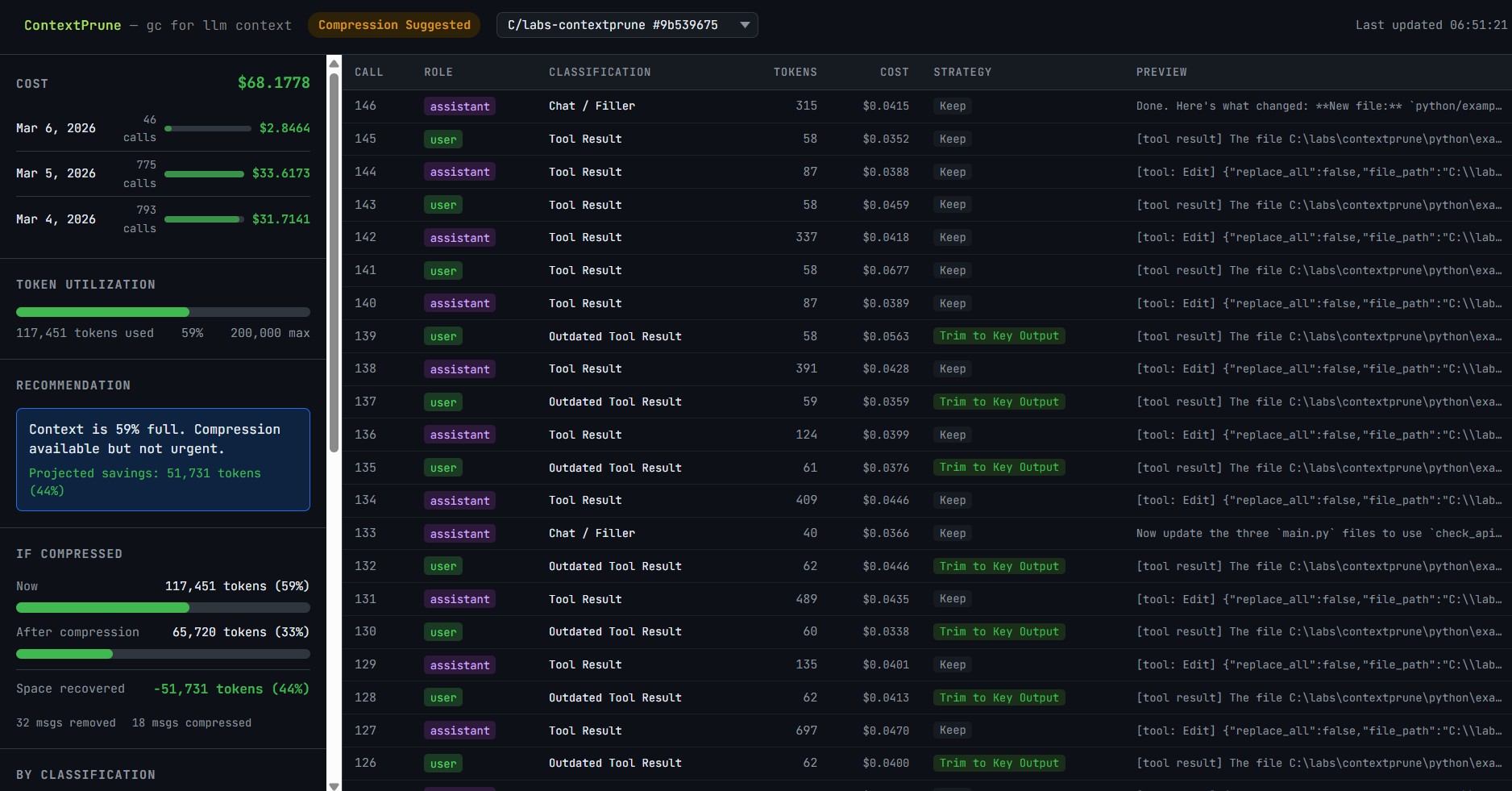
Healthy Context Dashboard
Context Compression Recommendation Dashboard
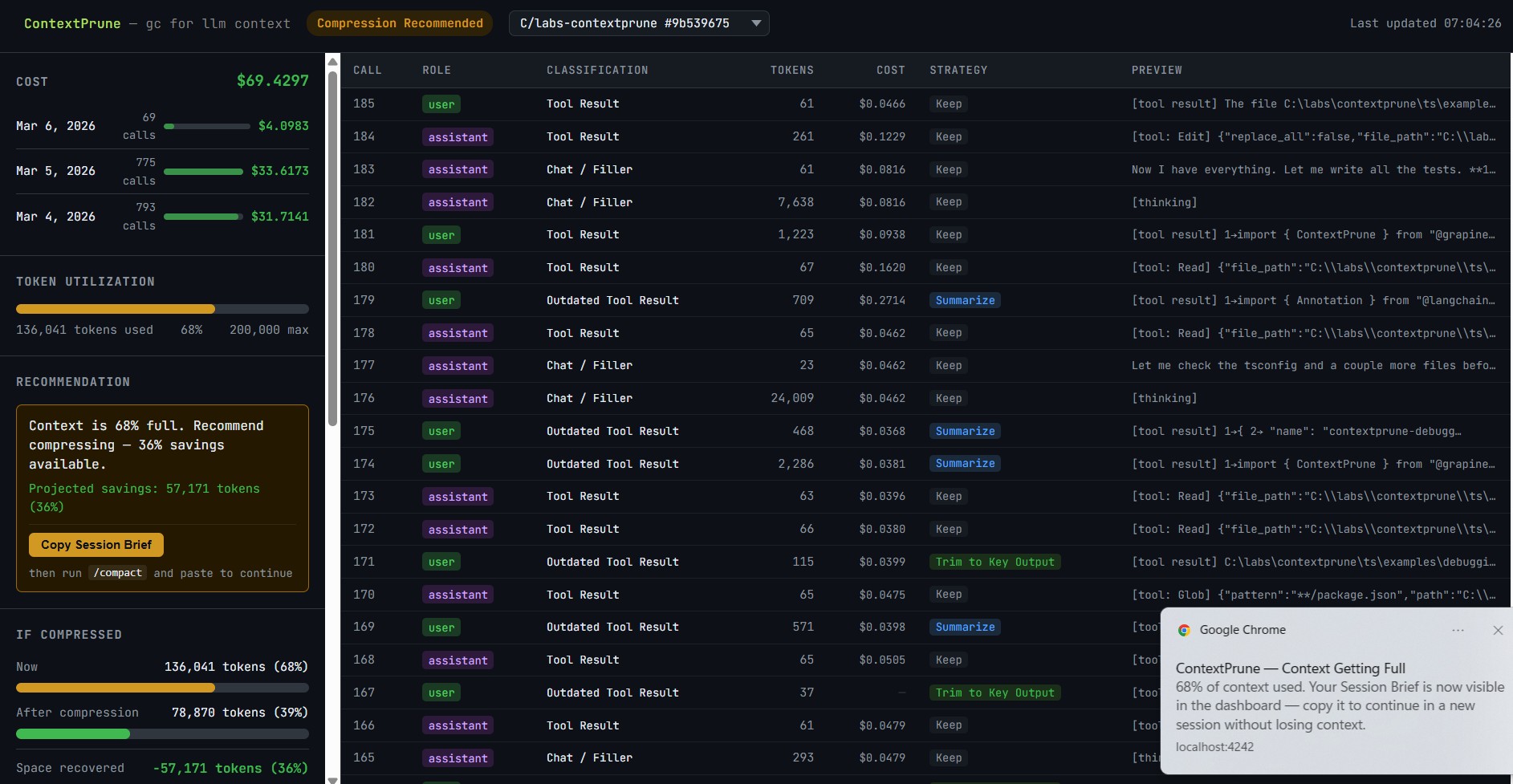
What the dashboard shows:
Context Window — utilization bar with colour-coded status. Switches to Compression Suggested / Compress Now badges as context fills up.
Session Cost — cost per API call with input/output/cache breakdown, grouped by calendar day.
Classification Breakdown — how your context is distributed across message types with token counts and percentages.
Compression Projection — before/after utilization bars showing exactly how much would be recovered. Hidden when context is healthy.
Top Consumers — the largest individual messages ranked by token count, with their classification and compression opportunity.
Session Brief — auto-generated handoff prompt at 65%+ utilization. One click copies a compact context summary to paste into a new session.
Desktop notifications — opt-in alerts at 65% utilization, then every 5% increment.
Push data from your own process:
npx @grapine.ai/contextprune watch &

curl -X POST http://localhost:4242/analyze \
  -H 'Content-Type: application/json' \
  -d '{ "messages": [...], "model": "claude-sonnet-4-5" }'
When it helps (and when it doesn't)
The core prerequisite: there must be a growing messages list that gets passed to an LLM repeatedly.
✓ It helps: single-agent accumulating loops
# ReAct / tool-calling loop — context grows with every iteration
messages = [{'role': 'system', 'content': system_prompt}]

while not done:
    response = llm.invoke(messages)
    messages.append({'role': 'assistant', 'content': response.content})

    tool_result = run_tool(response)
    messages.append({'role': 'user', 'content': tool_result})

    # ← contextprune here: stale tool results removed before next call
    messages = cp.compress(messages).messages
By call 30, a typical agent has accumulated file reads, bash outputs, error traces, and intermediate reasoning that will never be referenced again. Every call pays for all of it. contextprune removes it.
✗ It doesn't help: parallel stateless fan-out
# Each agent call is 2–3 messages built fresh, discarded after
strategy = await orchestrator.invoke([HumanMessage(content=strategy_prompt)])
calendar = await strategist.invoke([HumanMessage(content=calendar_prompt)])
copy     = await copywriter.invoke([HumanMessage(content=copy_prompt)])
Each call is constructed fresh and discarded. There is no accumulating history. Nothing to prune.
The diagnostic question:
After N agent calls, is there a single
messageslist that is longer than it was at call 1?
If yes — contextprune helps. If no — each call starts fresh, and contextprune has no leverage point.
Compression modes
| Mode | When compression runs | Default for |
|---|---|---|
manual |
Always, unconditionally | compress() |
auto |
Only when utilization ≥ warning_threshold |
watch(), as_langgraph_node() |
suggest-only |
Never — analysis only | analyze() |
from contextprune import ContextPrune, CompressionOptions

cp = ContextPrune(
    model='claude-sonnet-4-5',
    options=CompressionOptions(
        warning_threshold=0.65,   # start compressing at 65% full (default)
        critical_threshold=0.80,  # compress aggressively at 80% (default)
        compression_mode='auto',  # only compress when needed
    )
)
What gets compressed
| Message type | Strategy | Why |
|---|---|---|
| Outdated Tool Result | Remove | Not referenced in subsequent turns |
| Fixed Error | Remove | Stack trace no longer needed |
| Chain of Thought | Collapse to 1 line | Conclusion already in context |
| Status Update | Collapse to 1 line | Acknowledged, no longer active |
| Tool Result (active) | Trim to key output | Keep answer, drop verbose body |
| Chat / Filler | Remove | Low relevance to current task |
Always preserved: system prompts, user corrections, active errors, session goals, final answers.
The classifier assigns one of 11 types to each message. Classification confidence gates compression aggressiveness — if the classifier is uncertain, the message is always preserved.
Supported providers and models
Token budgets are pre-configured for:
| Provider | Models |
|---|---|
| Anthropic | Claude 4.x, Claude 3.x (all variants) |
| OpenAI | GPT-4o, GPT-4.1, GPT-4-turbo, GPT-3.5, o1, o3 series |
| Gemini 2.5 Pro/Flash, Gemini 2.0, Gemini 1.5 | |
| Meta | Llama 3.3 / 3.1 (70B, 8B) |
| Mistral | Mistral Large/Medium/Small, Mixtral, Codestral |
| DeepSeek | DeepSeek Chat, DeepSeek Reasoner |
| Cohere | Command R, Command R+ |
| OpenRouter | All provider/model prefixed names |
| Groq | Llama3, Mixtral, Gemma hosted models |
Any unrecognized model string falls back to a 128k token budget.
License
MIT © Grapine AI
Release history Release notifications | RSS feed


Download files
Download the file for your platform. If you're not sure which to choose, learn more about installing packages.
Source Distributions
Built Distribution
Filter files by name, interpreter, ABI, and platform.
If you're not sure about the file name format, learn more about wheel file names.
Copy a direct link to the current filters
File details
Details for the file contextprune-0.1.1-py3-none-any.whl.
File metadata
- Download URL: contextprune-0.1.1-py3-none-any.whl
- Upload date:
- Size: 1.1 MB
- Tags: Python 3
- Uploaded using Trusted Publishing? No
- Uploaded via: twine/6.2.0 CPython/3.11.14
File hashes
| Algorithm | Hash digest | |
|---|---|---|
| SHA256 |
fd086ac03d45457ce966881344862904d2b572f864274345a361f040cdf17fd5
|
|
| MD5 |
3d58afe75d74e3524cca821638ef4a6d
|
|
| BLAKE2b-256 |
50b71d8abe7118265f3cd185869128066f20d585f2669f67b82a9103360e4970
|






