
contextrot
Your coding agent gets worse as its context fills.
contextrot proves it on your own sessions — and tells you exactly what to change.





Quick start
uvx contextrot
or, with plain pip (Python 3.9+ — including the stock python3 on macOS):
pip3 install contextrot
contextrot
contextrot: command not foundafter pip install? Your Python scripts directory isn't onPATH(common with the stock macOSpython3). Either useuvx contextrotabove, or run it PATH-free withpython3 -m contextrot.
That's it. No config, no API keys, no uploads. contextrot reads the session transcripts your agent CLI already keeps on disk and answers a question no other tool answers:
At what context fill does my agent start failing, what's causing it, and what is it costing me?
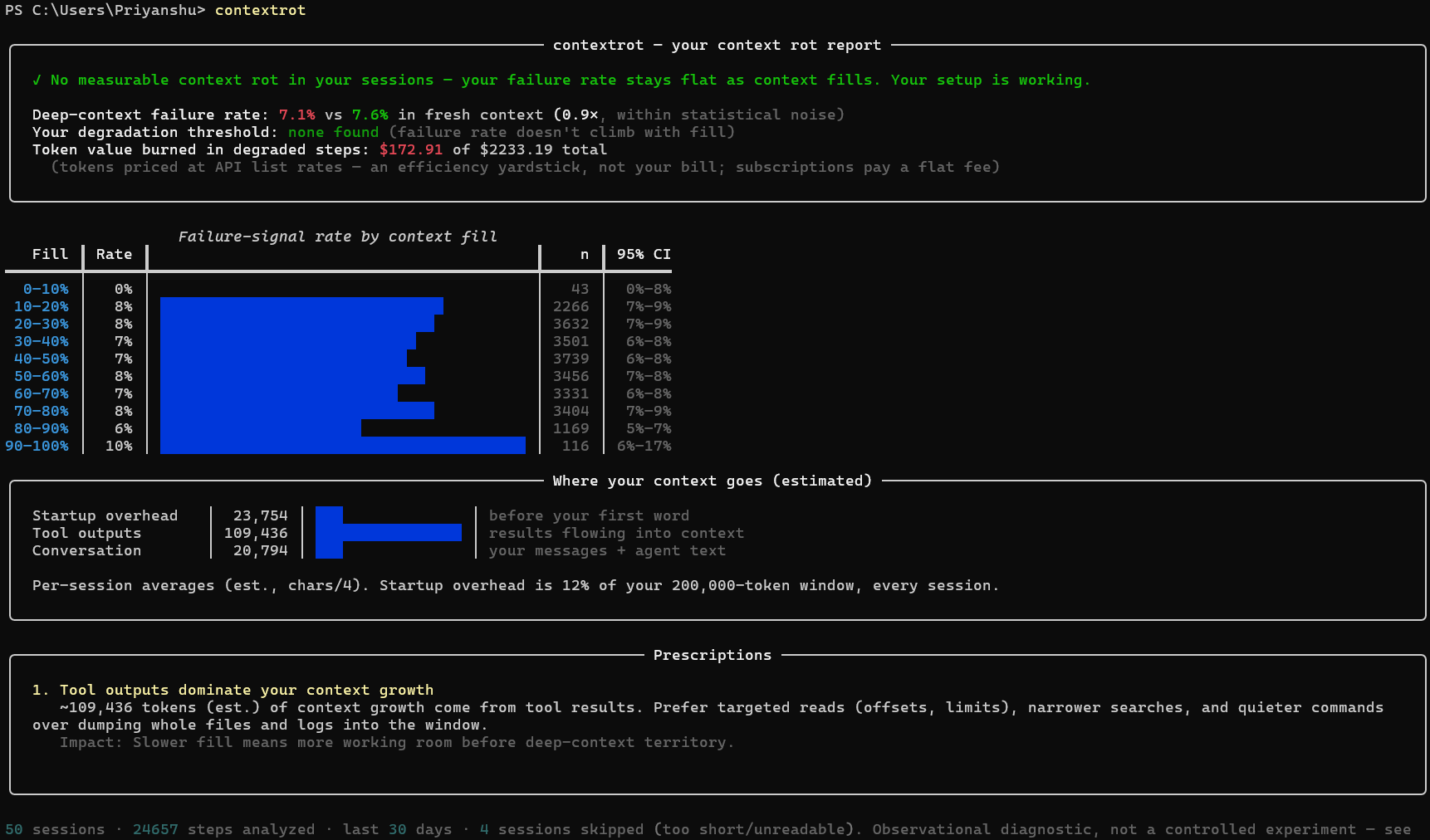
Every report leads with a plain verdict — one of four honest answers:
| Verdict | Meaning |
|---|---|
| ✗ Context rot detected | your failure rate climbs significantly as context fills |
| ! Edge rot | flat until near the window limit, then it climbs — compact before you get there |
| ✓ No measurable rot | your failure rate stays flat; your setup is working |
| ? Not enough data | keep using your agent and re-run |
A tool that can say "you're fine" is a tool you can trust when it says you're not.
What it does, in plain words
One command reads the session logs your coding agent already saved and tells you where it starts getting worse. Everything runs on your machine. Here's the whole tool, by what you might want:
| You want to… | Run | What you get back |
|---|---|---|
| See if your agent degrades — and where | contextrot |
a short verdict: what's happening, what it's costing, what to change |
| Dig into the numbers behind that | contextrot --full |
the rot curve, per-model/project/agent comparisons, context breakdown |
| Look further back for tighter numbers | contextrot --days 90 |
the same report over more history |
| Check just one repo | contextrot -p myproject |
that project's own curve and verdict |
| Get a report you can share | contextrot --html report.html |
one local HTML file + a ready-to-post image card |
| Find which of your repos rots first | contextrot projects |
your projects ranked, worst-degrading first |
| Find which agent rots first | contextrot agents |
Claude Code vs Codex vs Gemini vs Cline, ranked on your work |
| Know what to actually change | contextrot fix |
plain fixes + a list of MCP servers you set up but never use (preview only, changes nothing) |
| See what your rot actually costs | contextrot waste |
the share of your token spend that produced nothing, broken down by what went wrong |
| See what it cost the planet | contextrot water |
litres of water your agents used, filling up on screen — the one figure here that's an estimate, and labelled as one |
| Check whether you're improving | contextrot trends |
week-over-week failure rate and startup-bloat trend |
| Put a status badge in your README | contextrot badge |
a local SVG verdict badge — no badge service sees your data |
| See your context health right now | contextrot status |
one live line for tmux, Starship, or your shell prompt — works with any agent |
| Work out why you have no verdict | contextrot doctor |
which agents were found, where it looked, and what's still missing |
Use more than one model? A head-to-head model comparison (Opus vs Sonnet vs Haiku, on your workload) shows up in the main report automatically.
And you can watch it live while you work — in any terminal with any agent (tmux, Starship, your shell prompt), plus a richer native integration for Claude Code (status bar, in-session warning, and a way for Claude Code to check its own rot mid-task).
Why a benchmark can't tell you this
Research (Chroma's context-rot report, several 2026 papers) shows LLM output quality degrades as input context grows — even far below the window limit. But that research runs synthetic tasks in lab conditions. Your degradation point depends on your projects, your MCP setup, your model, your prompting style.
contextrot measures it where it actually matters: in your own sessions.
How it works
Agent CLIs like Claude Code log every session to local JSONL transcripts. Each step carries token accounting and behavioral evidence. contextrot extracts five independent failure signals per step and correlates them with context fill at that moment:
| Signal | What it catches |
|---|---|
| Edit failures | the agent tried to edit code and missed — the clearest "lost track of file state" event |
| Retry loops | the same tool call repeated after an error: paying twice for one action |
| Re-reads | re-reading files it already read — content scrolled out of effective attention |
| Self-corrections | "I apologize, let me fix that" |
| Tool errors | any failed tool call |
Statistics are kept honest: Wilson 95% confidence intervals, per-signal breakdowns, visible n-counts, and a degradation threshold that only gets declared when a bucket's confidence floor clears the baseline — one noisy bucket can't scare you. Full method: docs/methodology.md.
Use more than one model? The report also compares them head-to-head — an independent rot curve and verdict per model family (Opus vs Sonnet vs Haiku), on a shared scale, so you can see which model degrades first for your workload.
Work across several repos? contextrot projects does the same head-to-head by project — an independent rot curve and verdict per working directory, ranked by size, so the specific repo whose CLAUDE.md or MCP setup is dragging you down stops hiding inside your all-projects average.
Use more than one coding agent? contextrot agents compares them too — Claude Code vs Codex CLI vs Gemini CLI vs Cline, each with its own curve and verdict on a shared scale, measured on your workload rather than a benchmark's.
Command reference
The table above explains each of these in plain words; this is the quick lookup.
contextrot                      # short verdict, last 30 days
contextrot --full               # the complete analysis behind it
contextrot --days 90            # more history = tighter statistics
contextrot -p myproject         # one project only
contextrot --html report.html   # shareable single-file report + share card (100% local)
contextrot --json               # every number, machine-readable
contextrot waste                # the share of your spend that produced nothing
contextrot water                # litres of water your agents drank (watch it fill up)
contextrot projects             # rank your projects — which repo rots first
contextrot agents               # rank your coding agents — which CLI rots first
contextrot fix                  # what to change (dry-run; --apply to act, backs up first)
contextrot trends               # week-over-week: are you improving?
contextrot badge                # local SVG verdict badge for your README
contextrot sessions             # list what was parsed
contextrot doctor               # why don't I have a verdict? what can you see?

# Live status in any terminal, with any agent:
contextrot status               # one line: current context health
contextrot status --format tmux # tmux-styled (also: plain, json)
contextrot status --setup tmux  # print a copy-paste snippet (starship/bash/zsh/fish too)

# Live inside Claude Code (see next section):
contextrot install statusline   # context-health meter in your status bar
contextrot install statusline --segments ctx,tokens,health,plan,water
contextrot install hook         # one in-session warning when you cross your threshold
contextrot mcp                  # let Claude Code query your rot report mid-session
Live status in any terminal (any agent)
Claude Code is the only agent CLI that can push live session data into a command
(Codex and
OpenCode have open feature requests for it).
So for everyone else contextrot pulls instead: contextrot status finds whichever session is
currently active — across Claude Code, Codex CLI, Gemini CLI, OpenCode, Cline and friends — and
prints one line.
$ contextrot status
ctx 61% ██████░░░░ · 122k/200k · ~5 turns left, ~1 heavy · ▲ past threshold ~50% · slip 11.2% — 2.6× fresh
# and when nothing is wrong, just:
ctx 34% ███▍░░░░░░ · 340k/1M · ~45 turns left
That makes it work anywhere a status bar can run a command on a timer. Get a ready-made snippet:
contextrot status --setup tmux       # also: starship, bash, zsh, fish
contextrot status --legend           # what every segment of the line means
For example, in tmux:
set -g status-interval 5
set -ag status-right ' #(contextrot status --format tmux) '
--format picks the output style: ansi (default), plain (no escapes), tmux (tmux's own
#[fg=…] tags, since tmux doesn't render ANSI), or json for Waybar/polybar/scripting. It stays
silent when no session has been touched recently (--within, default 30 minutes), so your bar
doesn't show a stale number.
--segments trims the line to what you have room for — ctx, tokens, health, plan, cost,
or all:
$ contextrot status --segments ctx,tokens
ctx 61% ██████░░░░ · 122k/200k · ~5 turns left
Use it live inside Claude Code
The report tells you where you degrade after the fact. These three put it in front of you while you're working — and they're the reason a Claude Code user gets the most out of contextrot. All three are dry-run by default, write only with --apply, back up your settings first, and undo cleanly with contextrot uninstall.
1. A live context-health meter in your status bar
contextrot install statusline --apply
Claude Code's status bar shows your current context fill, colored against your own measured curve — not a generic "yellow at 70%":
ctx 72% ███████▊░░ · 144k/200k · ~4 turns left · ▲ past threshold ~70% · slip 4.8% — 1.5× fresh · 5h █▏░░░ 24%
Reading left to right: how full the window is, the raw token counts, how much more work fits, and then what your history says about being here.
~4 turns left is headroom in the unit you plan in. It's measured from your own sessions — the
median user turn adds a certain number of tokens, so what remains divides into roughly that many
more turns. Under 12 turns it goes yellow and adds the heavy case (~4 turns left, ~1 heavy),
because one wide grep can cost several times a typical turn. Until enough turns have been measured
it just says 56k left.
slip 4.8% means 4.8% of your past steps at this fill level hit at least one failure signal (tool
error, failed edit, retry, re-read, self-correction), against 3.2% on a fresh context. It's a
historical base rate, not a prediction.
5h █▏░░░ 24% and wk ██░░░ 41% are your Claude.ai subscription rate limits — how much of the
5-hour and weekly windows you've burned, each with its own meter, plus time-to-reset once either
passes 70%. Claude Code reports these only for Pro/Max accounts and only after the session's first
API response; the meters simply disappear otherwise.
Every bar fills in eighth-cells rather than whole ones, so it glides as the number climbs instead of sitting still for 10% and then jumping.
Two segments are off by default. cost is the one number Claude Code already shows elsewhere, and
water is an estimate sitting among measurements — see below. Turn either on at install time:
contextrot install statusline --segments ctx,tokens,health,plan,water --apply
ctx 34% ███▍░░░░░░ · 342k/1M · ~45 turns left · water 681 ml ▁▂█▂▁
Those five cells are a droplet falling into a pool, advancing one frame per redraw — it descends, lands, throws a crown, and the ripples settle.
It will not look animated, and it can't. Claude Code re-runs a status command when the conversation changes rather than on a timer, which in practice is a couple of times a minute, so the droplet advances a frame at a time. Nothing rendered into a status line can do better, because the host decides when to redraw it. For actual motion, give it its own process and put it in a split pane:
contextrot water --live
That animates continuously at 20 fps, fills toward the next round volume, splashes over it, and tracks whichever agent you are using right now.
When nothing is wrong, the line says nothing about it. A clean curve produces no health text at all — the green bar is the message:
ctx 34% ███▍░░░░░░ · 340k/1M · ~45 turns left
Words show up only when they'd change what you do: nearing threshold ~70%, ▲ past threshold ~70%,
deep runs hotter, rot measured, or need deeper sessions. For the full picture — including how
deep your data actually reaches, which matters on a 1M-token window you never fill past 80% — run
contextrot doctor.
The threshold it shows is the one for what you're running right now. Curves are measured and stored per agent, per model family, and per agent+model pair — because they genuinely differ. A 200k-window model and a 1M-window one have different curves and different denominators, so a blended number describes neither. The live surfaces resolve the narrowest curve that fits your session:
agent+model → model → agent → all of it
Each level needs enough steps of its own before it's trusted, so a thin slice falls through to a
broader one instead of quoting a threshold built from noise. If the answer does come from a broader
slice, the line says so — ▲ past threshold ~70% (all agents) — rather than passing it off as
yours. contextrot doctor tables every curve it stored:
  Measured curve           Steps  Threshold  Measured to
  Claude Code + Opus 5    21,367  none                 —
  Claude Code + Opus 4.8   3,619  none          60% full
  Claude Code + Fable 5    2,484  none          40% full
  Opus 5                  21,378  none                 —  blends all agents
  all agents and models   28,448  none                 —  blends all agents
Two knobs:
contextrot statusline --legend                        # decode every segment
contextrot statusline --segments ctx,tokens,health    # trim it; add 'cost' for $/session
Other statusline tools show cost and a hardcoded threshold; this one knows where you start failing, and every plain contextrot run recalibrates it from your latest sessions.
2. A one-time warning the moment you cross your threshold
contextrot install hook --apply
Prefer an active nudge over a passive bar? This registers a hook that warns once — the instant a session crosses your measured failure threshold — then stays quiet until the next crossing. If your curve has no threshold, it says nothing at all: no generic scare popups.
3. Let Claude Code check its own rot, mid-task
claude mcp add contextrot -- contextrot mcp
This runs contextrot as an MCP server, so Claude Code itself can pull your rot report during a session — and decide to compact, warn you, or switch models based on your real numbers. It exposes three tools to the agent: rot_report, agents_ranking, and prescriptions. Still zero network — it's a local pipe, not a socket.
How is this different from…
| Tool | Question it answers | What it can't tell you |
|---|---|---|
| ccusage | "How much did I spend?" | anything about output quality — use both, they're complementary |
Claude Code /context |
"What's in my window right now?" | no outcomes, no history, no correlation |
| Langfuse / Phoenix / MLflow | "How is the app I built behaving?" | require instrumentation; contextrot analyzes the agent you use, zero setup |
| Chroma's research | "Do models degrade on benchmarks?" | nothing about your workload — contextrot is the personal-data counterpart |
FAQ
The report says $2,000+ but I'm on a $20/month subscription. Is it broken? No — that figure is the token value of your usage priced at API list rates, labeled as such in the report. It exists because tokens are the resource that fills your context window and burns your rate limits, and dollars are the only unit everyone reads instantly. Two honest readings: it's what your usage would cost pay-per-token (enjoy your subscription), and the "burned in degraded steps" share is the fraction of that resource going to rework. It is not, and never claims to be, your bill.
Why is the token flow so large? Agents re-send the entire conversation to the model on every step. A 100-step session at 100k context ≈ 10M tokens flowing through — mostly cache reads. That's normal; it's also exactly why context bloat matters.
Correlation isn't causation, right? Right, and the report says so on its face. Deep-context steps are also later-in-task steps. contextrot is an observational diagnostic with conservative statistics, not a lab experiment — see methodology.
It says "not enough data" — or it can't see the agent I use.
Run contextrot doctor. It lists every agent it looked for, the exact paths it searched, how many
steps each contributed, and how many more fresh/deep steps a verdict needs. The most common cause is
simply a short window — try contextrot --days 90 (or --days 0 for all history).
What about my privacy? contextrot makes zero network calls. Local files in, terminal/local HTML out. Grep the codebase for an HTTP client — there isn't one.
Supported agents
| Agent | Status |
|---|---|
| Claude Code | ✅ today |
| OpenCode | ✅ today — both the current file storage and legacy opencode.db |
| Codex CLI | ✅ today |
| Gemini CLI | ✅ today |
| Qwen Code | ✅ today — same recording format as Gemini CLI |
| Cline (VS Code) | ✅ today |
| Roo Code (VS Code) | ✅ today |
| Kilo Code (VS Code) | ✅ today |
| Google Antigravity | 🔬 investigating — it does keep local session/token files, so it's the most promising IDE to add next |
| Cursor / Windsurf | ⚠️ blocked for now — their local stores rarely record per-message token counts, so context fill can't be computed reliably |
| Kiro CLI | ❌ blocked upstream — its transcripts record no token counts, so context fill can't be computed |
| OpenTelemetry GenAI spans | planned |
An adapter is one small file with a fixture and a test — it's the paved first-contribution path.
Roadmap
- ✅
contextrot fix(0.6.0) — dry-run prescriptions + unused-MCP-server detection, reversible--apply - ✅ Adapter wave (0.6.1–0.7.0) — Codex CLI, Gemini CLI, Qwen Code, Cline, Roo Code, Kilo Code + per-agent comparison
- ✅ Live surfaces (0.8.0–0.10.0) — calibrated Claude Code statusline, threshold-crossing warning hook, MCP server for any agent
- ✅
contextrot trends(0.11.0) — week-over-week before/after measurement forfix - ✅ 1.0 (1.0.0–1.3.0) — correct 1M-token windows,
contextrot statusfor any terminal,doctor, adaptive verdict zones - ✅ Statusline that earns its width (1.4.0) — absolute token counts, live Claude.ai rate-limit meters, smooth sub-cell bars
- ✅ Scoped calibration (1.5.0) — a measured threshold per agent, per model and per pair, so one agent's curve is never shown in another's session
- ✅ Two reports (1.6.0) — a short default that answers the question,
--fullfor the whole analysis - ✅ Headroom +
contextrot waste(1.7.0) — what's left in turns rather than tokens, and the share of your spend that produced nothing - ✅
contextrot water(1.8.0) — the litres your agents used, with a sub-cell water animation, a--livepane, and a looping droplet in the status bar - OpenTelemetry GenAI span ingestion
- Opt-in, anonymized aggregate stats → the State of Context Rot report: real-workload degradation curves across the community (off by default, aggregate-only, documented schema)
Contributing
See CONTRIBUTING.md. Most valuable first PR: an adapter for the agent CLI you use — there are spec'd, ready-to-pick-up adapter issues waiting.
Ran the tool? Share your rot curve — flat curves count too.

Stats




Live dashboards: pypistats · clickpy (ClickHouse)
If contextrot told you something useful about your setup, a ⭐ helps other agent users find it.
License
1 maintainer

Metadata
1 maintainer
Release files for contextrot 1.8.0
For a detailed explanation of source distributions (sdists) and built distributions (wheels), please see the package formats documentation.
Source distribution (sdist)
| File | Size | Uploaded | |
|---|---|---|---|
| contextrot-1.8.0.tar.gz | 7.1 MB | Details |
Built distribution (wheel)
| File | Interpreter | ABI | Platform | Reset |
|---|---|---|---|---|
| contextrot-1.8.0-py3-none-any.whl | Python 3 | none | any | Details |
Total release size: 7.3 MB
Release files / contextrot-1.8.0.tar.gz
| Download URL | contextrot-1.8.0.tar.gz |
|---|---|
| Size | 7.1 MB |
| Tags | Source |
|
SHA-256 checksum How to use checksums |
bcd85f72aa04c29eeeecd840febfb10a786c764e355e0a317dcc102e36048955
|
|
BLAKE2b-256 checksum How to use checksums |
0cf0bdabdd713f1e8cca84a53ae6b94abec5b50addc72aefb9d5b530070ff1ee
|
| Upload date | |
|
Uploaded using Trusted Publishing? What is trusted publishing? |
Yes |
| Uploaded via |
twine/7.0.0 CPython/3.13.14
|
Provenance
Provenance describes where a file came from. On PyPI, provenance is shared via attestations, which provide a verifiable record of the build or publishing details. View details, limitations and caveats.


PyPI Publish Attestation
PyPI verified that this artifact, at this checksum, originated from the publisher listed below.
Signed by GitHub Actions, verified by PyPI on Oct 1, 2026.
Transparency logRelease files / contextrot-1.8.0-py3-none-any.whl
| Download URL | contextrot-1.8.0-py3-none-any.whl |
|---|---|
| Size | 140.6 kB |
| Tags | Python 3 |
|
SHA-256 checksum How to use checksums |
bfa4e3461db3c6aee8d17ce53c42c2ae56a523dfb95798f90d0fe6c10e0f9acf
|
|
BLAKE2b-256 checksum How to use checksums |
714e394c6c3fb71f0f937d8dbdbc280040e9473eeb559a2966da10dcbb0aab6d
|
| Upload date | |
|
Uploaded using Trusted Publishing? What is trusted publishing? |
Yes |
| Uploaded via |
twine/7.0.0 CPython/3.13.14
|
Provenance
Provenance describes where a file came from. On PyPI, provenance is shared via attestations, which provide a verifiable record of the build or publishing details. View details, limitations and caveats.
PyPI Publish Attestation
PyPI verified that this artifact, at this checksum, originated from the publisher listed below.
Signed by GitHub Actions, verified by PyPI on Oct 1, 2026.
Transparency log













