
ContextSage





Information-aware context summarization for LangChain and LangGraph agents. Large tool outputs shrink without losing their signal, and the facts that matter survive every summary.
Agents accumulate long, mixed context: tool results that combine prose, JSON,
logs and stack traces, user corrections, and IDs the next step depends on.
Summarizing the oldest messages blindly loses exactly those details.
ContextSage replaces LangChain's SummarizationMiddleware with a middleware
that understands what it summarizes:
- Compacts structured content. Runs of similar log lines, identical JSON records and duplicate table rows collapse, while warnings, errors and identifiers stay.
- Keeps what matters. User corrections, standing instructions, identifiers tied to failures and conflicting evidence become facts that every rewritten history must contain.
- Verifies every summary. Facts the summary model dropped are restated verbatim inside the summary, and tool results never lose their tool call.
- Survives model failures. If the summary model fails, the agent continues on a trimmed history that restates the latest request and the lost facts.
- Traces every summary to the messages it replaced, across summaries of summaries, in a langgraph-xai provenance store.
- Reports every rewrite as a content-free event, for logs and metrics.
ContextSage builds on LangChain, which still writes every summary, on parsefabric, which parses the content, and on langgraph-xai.
Installation
pip install contextsage
ContextSage requires Python 3.12 or newer. Summaries are written by any
LangChain chat model; install the integration for your provider, such as
langchain-openai.
Quickstart
Add the middleware to a LangChain agent wherever you would use
SummarizationMiddleware:
from langchain.agents import create_agent
from langchain_core.tools import tool

from contextsage import IntelligentSummarizationMiddleware


@tool
def order_status(order_id: str) -> str:
    """Return the status of an order."""
    return f"{order_id}: shipped"


agent = create_agent(
    model="openai:gpt-5",
    tools=[order_status],
    middleware=[
        IntelligentSummarizationMiddleware(
            model="openai:gpt-5-mini",
            trigger=("tokens", 100_000),
            keep=("messages", 20),
        )
    ],
)
See it work
This history holds a tool result of 50 routine log lines and an error. The middleware runs here with a scripted model, exactly as the agent would run it before its next model call:
from itertools import cycle

from langchain_core.language_models.fake_chat_models import GenericFakeChatModel
from langchain_core.messages import AIMessage, HumanMessage, ToolMessage
from langgraph.runtime import Runtime

from contextsage import IntelligentSummarizationMiddleware

log = "".join(f"2026-10-04T08:00:{s:02d}Z INFO heartbeat ok\n" for s in range(50))
log += "2026-10-04T08:00:50Z ERROR payment failed for order ORD-5521"
history = [
    HumanMessage("Why did the payment fail?"),
    AIMessage("", tool_calls=[{"id": "c1", "name": "read_logs", "args": {}}]),
    ToolMessage(log, tool_call_id="c1"),
]
middleware = IntelligentSummarizationMiddleware(
    model=GenericFakeChatModel(messages=cycle([AIMessage("unused")])),
    trigger=("tokens", 500),
)
update = middleware.before_model({"messages": history}, Runtime())
print(update["messages"][-1].text)
Output:
2026-10-04T08:00:00Z INFO heartbeat ok
... 48 similar lines omitted (lines 2-49) ...
2026-10-04T08:00:49Z INFO heartbeat ok
2026-10-04T08:00:50Z ERROR payment failed for order ORD-5521
The routine lines collapsed into one marker that names the omitted lines; the error and the order ID stayed as they were. With a longer history, LangChain would then summarize the older messages, and ContextSage would check that the order ID survived the summary.
How it works
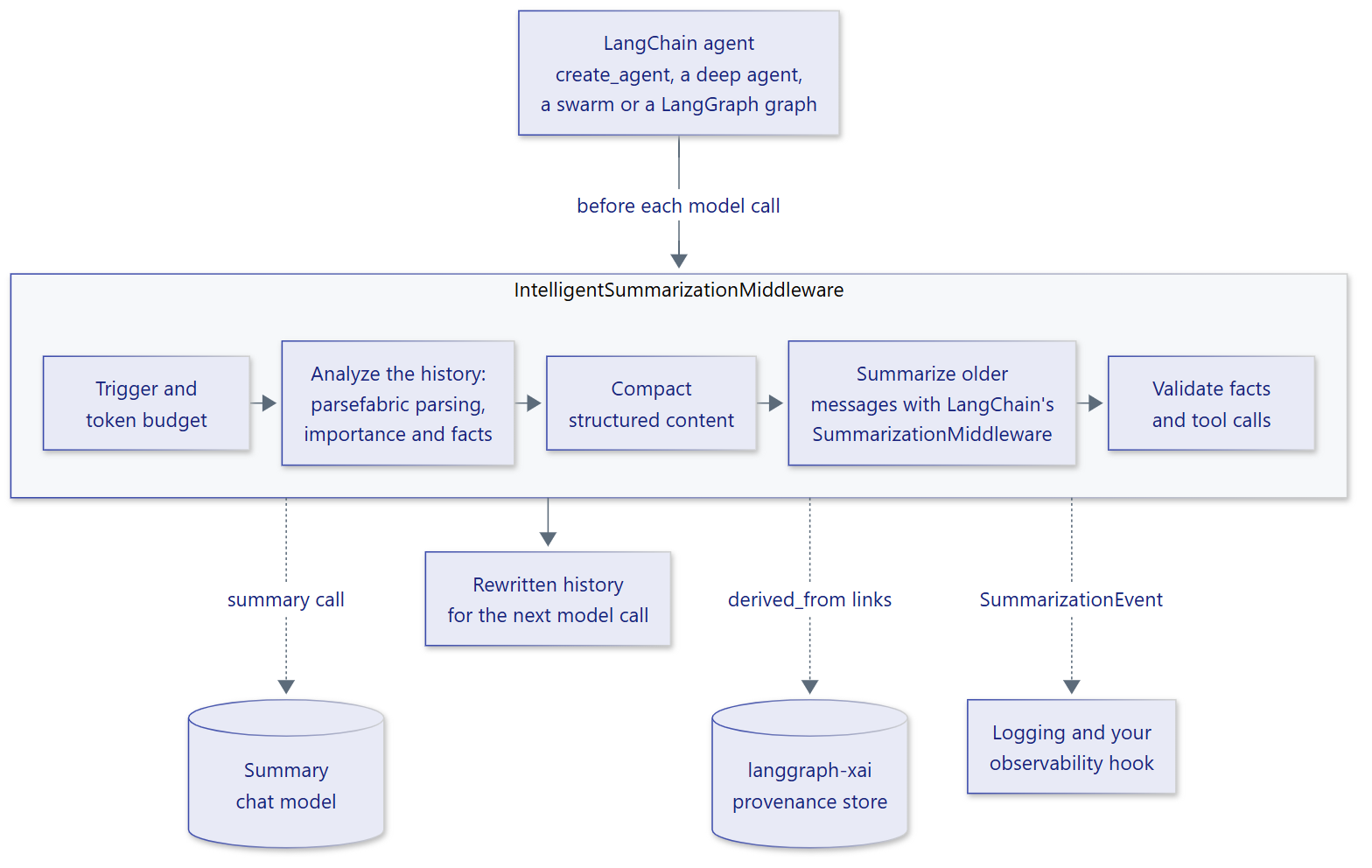
- Trigger. Count the history's tokens and stop unless the trigger fires or the history exceeds the token budget.
- Analyze. Parse every message into prose, JSON, log, table, code and stack-trace units; score them; and derive the facts that must survive.
- Compact. Rewrite repetitive structured content deterministically, within what each unit's preservation level allows.
- Summarize. LangChain's
SummarizationMiddlewaresummarizes the messages older than thekeepwindow. - Validate. Restate missing facts in the summary, link the summary to
its sources, and emit a
SummarizationEvent.
Documentation
The documentation covers configuration, preservation policies, validation and recovery, observability, provenance and the API reference. Runnable examples show every feature offline and with Deep Agents and LangGraph Swarm.
An Agent Skill teaches coding agents such as Claude Code, Codex, Cursor and GitHub Copilot to integrate ContextSage correctly.
Contributing
Contributions are welcome; see the contributing guide. This project follows a code of conduct. Report security issues privately as described in the security policy.
License
Apache License 2.0; see LICENSE.
1 maintainer

Metadata
1 maintainer
Release files for contextsage 1.0.0
For a detailed explanation of source distributions (sdists) and built distributions (wheels), please see the package formats documentation.
Source distribution (sdist)
| File | Size | Uploaded | |
|---|---|---|---|
| contextsage-1.0.0.tar.gz | 896.2 kB | Details |
Built distribution (wheel)
| File | Interpreter | ABI | Platform | Reset |
|---|---|---|---|---|
| contextsage-1.0.0-py3-none-any.whl | Python 3 | none | any | Details |
Total release size: 948.3 kB
Release files / contextsage-1.0.0.tar.gz
| Download URL | contextsage-1.0.0.tar.gz |
|---|---|
| Size | 896.2 kB |
| Tags | Source |
|
SHA-256 checksum How to use checksums |
4569f90aebb5b293015e8dc0a0a796c2f120baf1f59ed0fb8c8200ffba4fdf2a
|
|
BLAKE2b-256 checksum How to use checksums |
372acf4809945e9b7c714b30900821292f692f7b8e8bd61b29a102319c55763c
|
| Upload date | |
|
Uploaded using Trusted Publishing? What is trusted publishing? |
No |
| Uploaded via |
uv/0.12.15 {"installer":{"name":"uv","version":"0.12.15","subcommand":["publish"]},"python":null,"implementation":{"name":null,"version":null},"distro":null,"system":{"name":null,"release":null},"cpu":null,"openssl_version":null,"setuptools_version":null,"rustc_version":null,"ci":null}
|
Release files / contextsage-1.0.0-py3-none-any.whl
| Download URL | contextsage-1.0.0-py3-none-any.whl |
|---|---|
| Size | 52.1 kB |
| Tags | Python 3 |
|
SHA-256 checksum How to use checksums |
59cf26b4e060d367c8a373607f428145806d4a907803917fc662e28177abd8e0
|
|
BLAKE2b-256 checksum How to use checksums |
2add0b55d32c2688ab7cd756956f886b4f3fa5099709fd545b2a2a5192e9ba0d
|
| Upload date | |
|
Uploaded using Trusted Publishing? What is trusted publishing? |
No |
| Uploaded via |
uv/0.12.15 {"installer":{"name":"uv","version":"0.12.15","subcommand":["publish"]},"python":null,"implementation":{"name":null,"version":null},"distro":null,"system":{"name":null,"release":null},"cpu":null,"openssl_version":null,"setuptools_version":null,"rustc_version":null,"ci":null}
|














