
ContextWalker
ContextWalker is a local PDF question-answering system that combines contextual chunking, semantic retrieval, BM25 keyword retrieval, Reciprocal Rank Fusion, neural reranking, and agent-driven exploration of neighboring chunks.
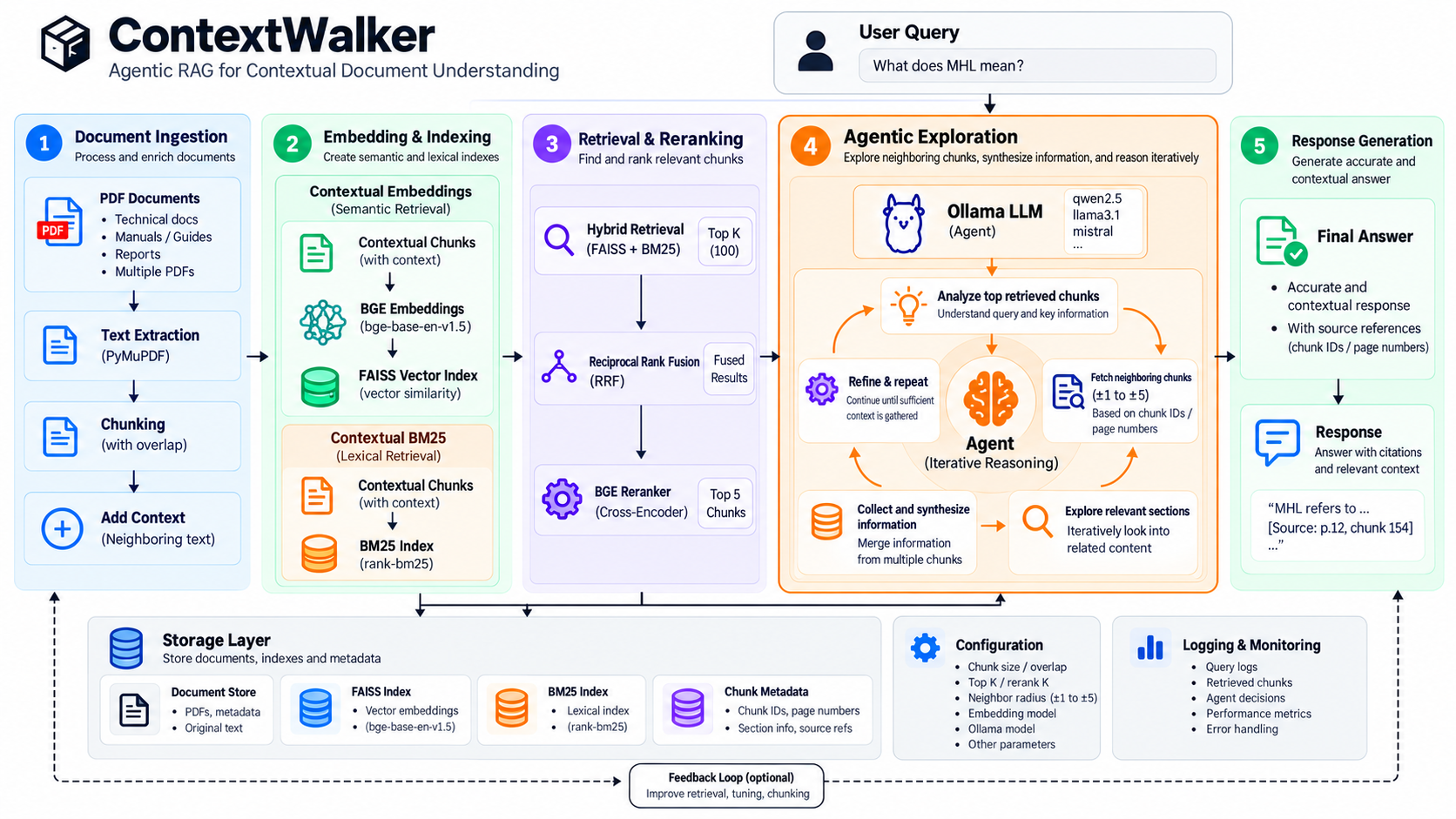
This repository is a modular reorganization of agent_sample.py. Its retrieval
and answering algorithms remain unchanged, with additional validation around
Ollama generation and persistent caches.
How it works
PDF extraction
  -> document summary
  -> overlapping chunks
  -> LLM-generated context for every chunk
  -> FAISS vector search + BM25 keyword search
  -> Reciprocal Rank Fusion
  -> cross-encoder reranking
  -> top five starting chunks
  -> agent explores neighboring chunks
  -> supported answer
See the architecture guide for a module-by-module explanation.
Requirements
- Python 3.9 or newer
- Ollama running locally at
http://localhost:11434 - The Ollama model
gpt-oss:20b - A PDF named
data.pdfin the directory from which ContextWalker is run
Installation
Install the published package from PyPI:
python -m pip install contextwalker
ollama pull gpt-oss:20b
For local development from a cloned repository:
python -m venv .venv
source .venv/bin/activate
python -m pip install --upgrade pip
python -m pip install -e .
ollama pull gpt-oss:20b
Place the document at data.pdf, start Ollama, and run:
contextwalker
Alternatively:
python -m contextwalker
Type exit, quit, or q to stop the interactive prompt.
Python API
ContextWalker can also be embedded directly in another Python application. Pass the PDF and a dedicated cache directory, build once, and reuse the same indexes for multiple questions:
from contextwalker import ContextWalker

rag = ContextWalker(
    pdf_path="manual.pdf",
    cache_dir="./manual_cache",
)

rag.build()

answer = rag.ask("What does MHL mean?")
print(answer)

answer, results = rag.ask(
    "Which page explains the setup process?",
    return_results=True,
)

for result in results:
    print(result["chunk_id"], result["reranker_score"])
Calling ask() before build() automatically builds the system. For a
single-question script, use the convenience function:
from contextwalker import ask_pdf

answer = ask_pdf(
    pdf_path="manual.pdf",
    question="Summarize the installation procedure.",
    cache_dir="./manual_cache",
)
Use a different cache directory for each PDF. ContextWalker reuses complete entries and regenerates missing contexts. It does not automatically invalidate a complete cache when the source PDF changes.
Runtime cache
The first run creates rag_cache/document_summary.txt and
rag_cache/contextual_chunks.json. Later runs reuse complete contextual chunks
but rebuild the in-memory FAISS and BM25 indexes. If a run is interrupted or
Ollama fails, the next run resumes by generating only missing contexts. Cache
writes are atomic, so an interrupted write cannot leave invalid JSON.
Context generation requests low reasoning from gpt-oss and retries empty or
token-limited responses with a larger output allowance. A chunk is never
accepted as complete unless Ollama returns a non-empty final response.
Configuration
The original constants are preserved in src/contextwalker/config.py:
- chunks: 900 characters with 150 characters of overlap
- vector candidates: 60
- BM25 candidates: 60
- fused candidates: 100
- final reranked candidates: 5
- neighbor radius: at most 5 chunks
- agent reasoning steps: at most 25
- tool calls per question: at most 40
Development
Validate imports and syntax without starting the heavyweight models:
python -m compileall -q src
The original agent_sample.py remains outside this repository and has not been
modified.
Release maintainers should follow the publishing guide for the PyPI release process.
1 maintainer

Metadata
1 maintainer
Release files for contextwalker 0.2.1
For a detailed explanation of source distributions (sdists) and built distributions (wheels), please see the package formats documentation.
Source distribution (sdist)
| File | Size | Uploaded | |
|---|---|---|---|
| contextwalker-0.2.1.tar.gz | 20.4 kB | Details |
Built distribution (wheel)
| File | Interpreter | ABI | Platform | Reset |
|---|---|---|---|---|
| contextwalker-0.2.1-py3-none-any.whl | Python 3 | none | any | Details |
Total release size: 43.4 kB
Release files / contextwalker-0.2.1.tar.gz
| Download URL | contextwalker-0.2.1.tar.gz |
|---|---|
| Size | 20.4 kB |
| Tags | Source |
|
SHA-256 checksum How to use checksums |
7f30c20f2f9c5a13310de6c320e61a3c21a19861fc8f3428b16bddfafc64a70f
|
|
BLAKE2b-256 checksum How to use checksums |
53986d3757036617cddcc035bd636f1b2671d5fe575f1db42cb74d16452d42bc
|
| Upload date | |
|
Uploaded using Trusted Publishing? What is trusted publishing? |
Yes |
| Uploaded via |
twine/7.0.0 CPython/3.13.14
|
Provenance
Provenance describes where a file came from. On PyPI, provenance is shared via attestations, which provide a verifiable record of the build or publishing details. View details, limitations and caveats.


PyPI Publish Attestation
PyPI verified that this artifact, at this checksum, originated from the publisher listed below.
Signed by GitHub Actions, verified by PyPI on Sep 30, 2026.
Transparency logRelease files / contextwalker-0.2.1-py3-none-any.whl
| Download URL | contextwalker-0.2.1-py3-none-any.whl |
|---|---|
| Size | 22.9 kB |
| Tags | Python 3 |
|
SHA-256 checksum How to use checksums |
dfa8e8ca5cdbe58167568ef0c92437546d193839c94c24779d873a823c82a571
|
|
BLAKE2b-256 checksum How to use checksums |
ca003417b5e62672590428f62442185d7d2bd3574fd92b29998520c279229fbc
|
| Upload date | |
|
Uploaded using Trusted Publishing? What is trusted publishing? |
Yes |
| Uploaded via |
twine/7.0.0 CPython/3.13.14
|
Provenance
Provenance describes where a file came from. On PyPI, provenance is shared via attestations, which provide a verifiable record of the build or publishing details. View details, limitations and caveats.
PyPI Publish Attestation
PyPI verified that this artifact, at this checksum, originated from the publisher listed below.
Signed by GitHub Actions, verified by PyPI on Sep 30, 2026.
Transparency log













