
English | 中文
ContextWeave
Context-aware document translation / 语境感知文档翻译
ContextWeave (语络译) is a fully automatic desktop translation app for long novels, books, PDFs, scanned documents, manga, and subtitles. It aims to preserve source formatting while keeping terminology and translation style consistent across the whole work.
Advanced documentation covers glossary memory, previous-context injection, format preservation, CLI automation, and advanced use cases.
Who ContextWeave Is For
- Novel, web novel, and light novel translation
- Long books and documents that need consistent naming and terminology
- Scanned books, PDFs, and manga that need OCR before translation
- People who want a desktop workflow instead of managing prompts by hand
Why ContextWeave
- Builds a glossary from your source material
- Carries context forward across chapters and pages, with useful summaries injected alongside glossary context
- Preserves original formatting for text-native files
- Handles text, EPUB, PDF, scanned pages, manga, and subtitles in one app
Install
Current desktop builds are unsigned, so the first launch may show an OS security warning.
macOS
- Download the latest
.dmg - Open it and drag
ContextWeave.appintoApplications - Launch
ContextWeave.appfromApplications - If macOS blocks it because the developer cannot be verified, go to
System Settings->Privacy & Security - In the
Securitysection, clickOpen AnywayforContextWeave.app, then confirmOpen
Windows
- Download the latest
.zip - Unzip it anywhere
- Run
ContextWeave.exe - If Windows SmartScreen warns that the app is unrecognized, click
More info->Run anyway
Setup
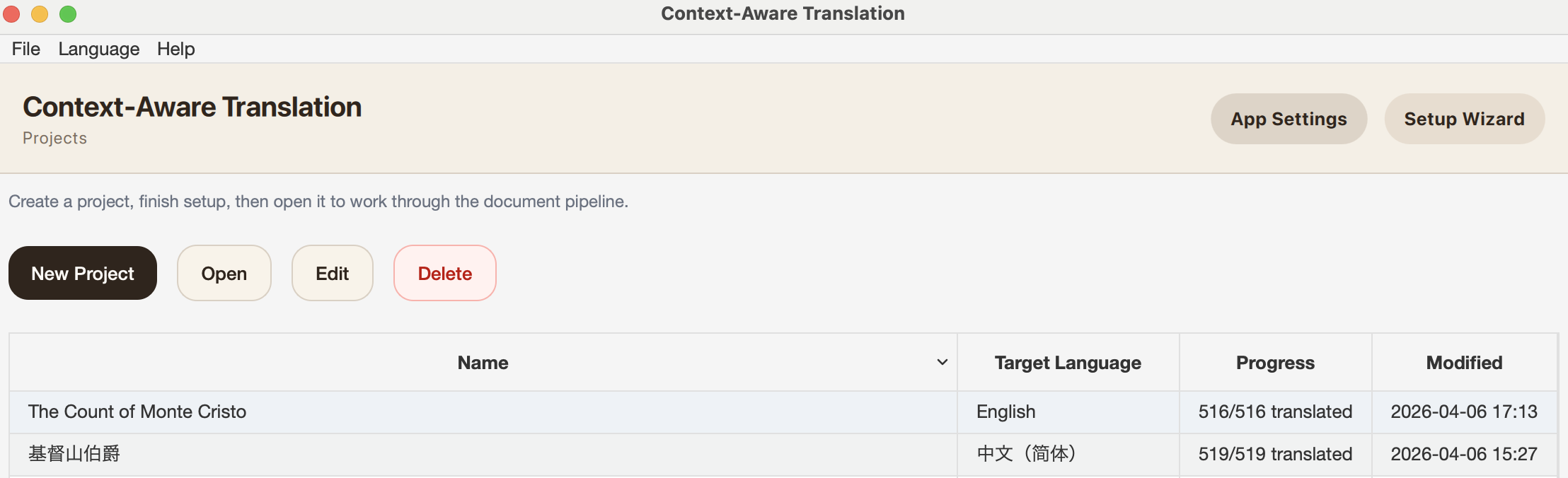
1. Open the projects screen and click Setup Wizard
This is the home screen for projects. Use Setup Wizard for the quickest first-time setup.
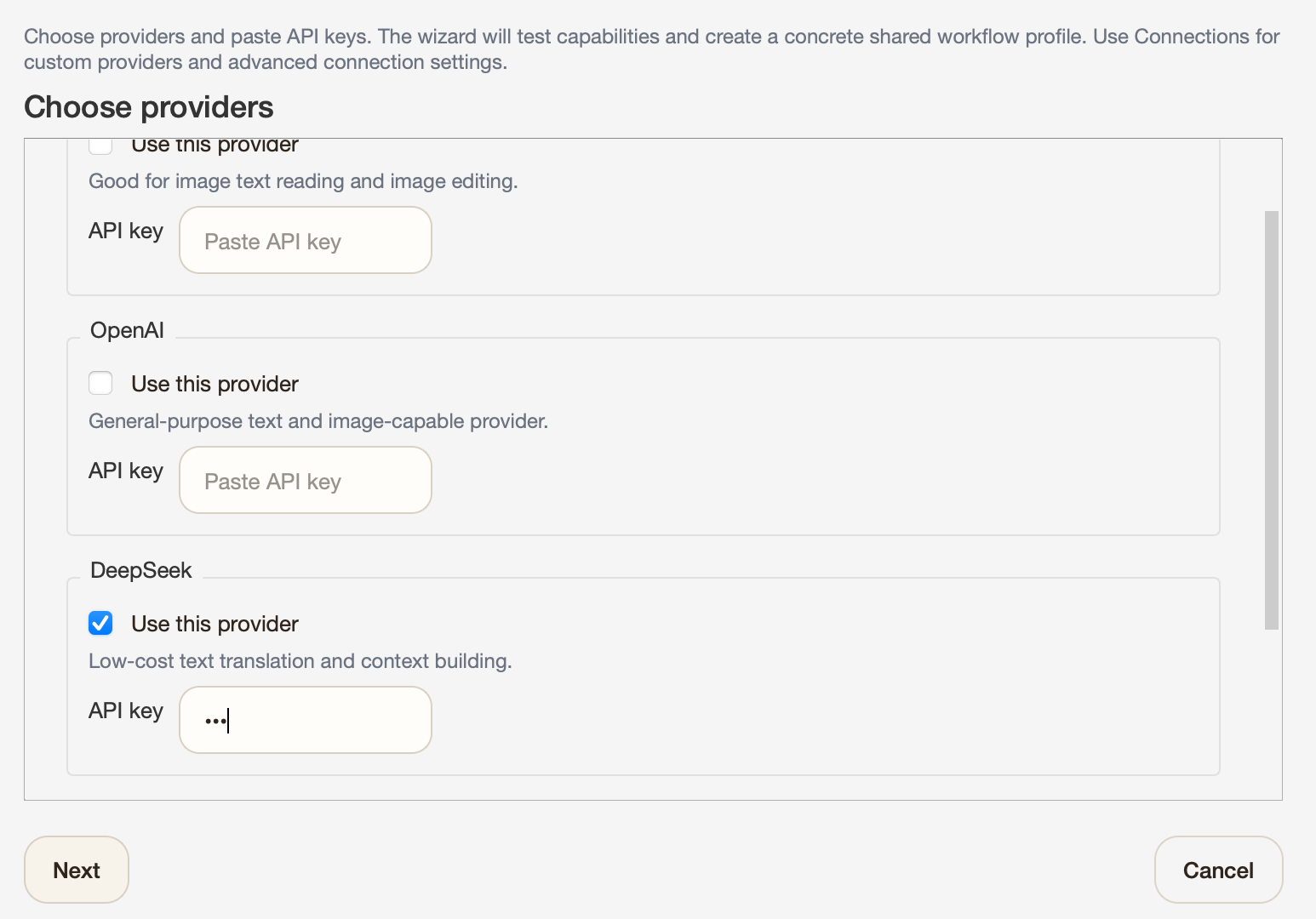
2. Choose providers and paste API keys
The wizard collects the providers it needs up front. For most users, DeepSeek + Gemini is the most practical starting point.
3. Review the workflow profile
The review step shows which connection and model ContextWeave will use for each workflow step.
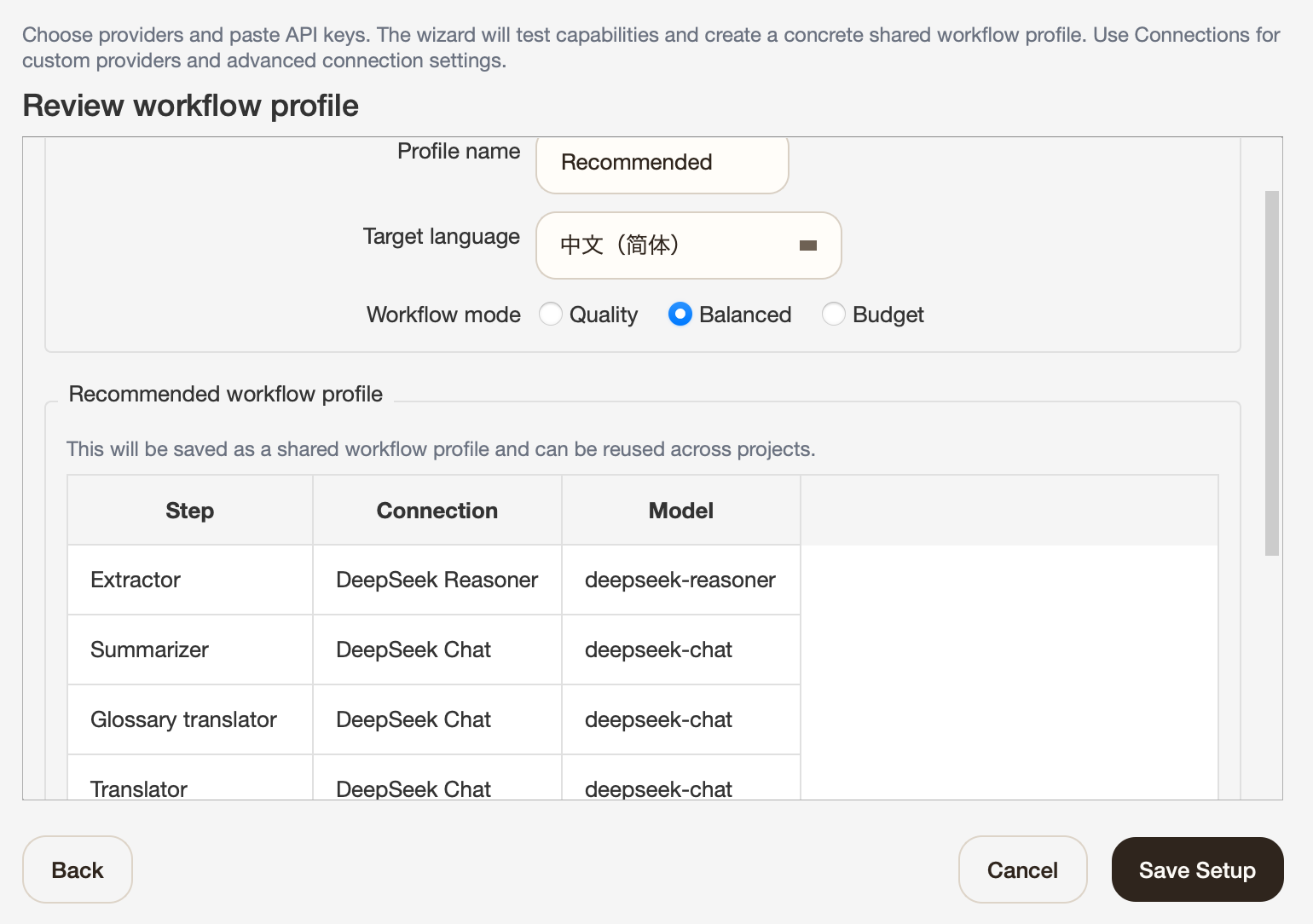
Quality spends more for better reasoning and can get very, very expensive unless you are using only DeepSeek. Balanced is the safest default. Budget is the cheapest option when you want to minimize cost.
Translation
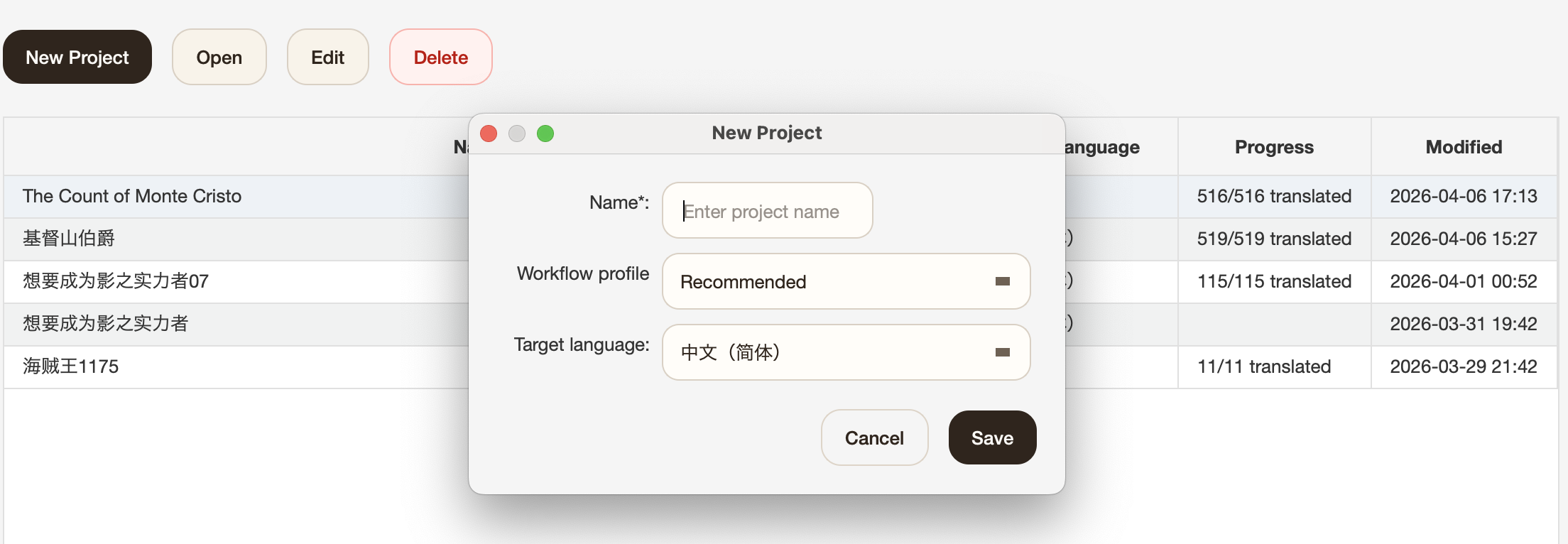
1. Create a project
Pick a project name, target language, and workflow profile.
2. Open the project work page
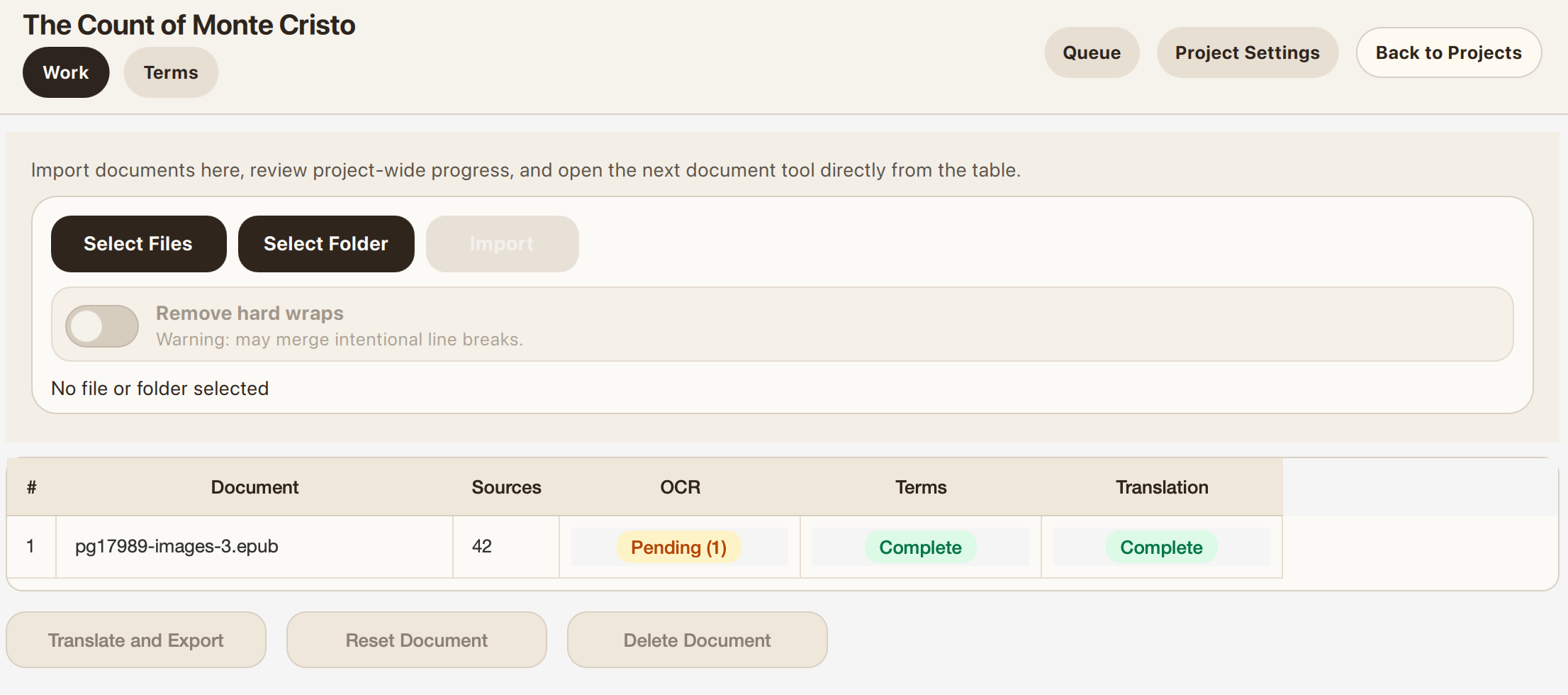
Import files in reading order so terminology and context stay consistent across the whole book, then click Translate and Export to start. Double-click a file if you want to inspect each step manually or retouch images.
3. Optional: import existing term translations
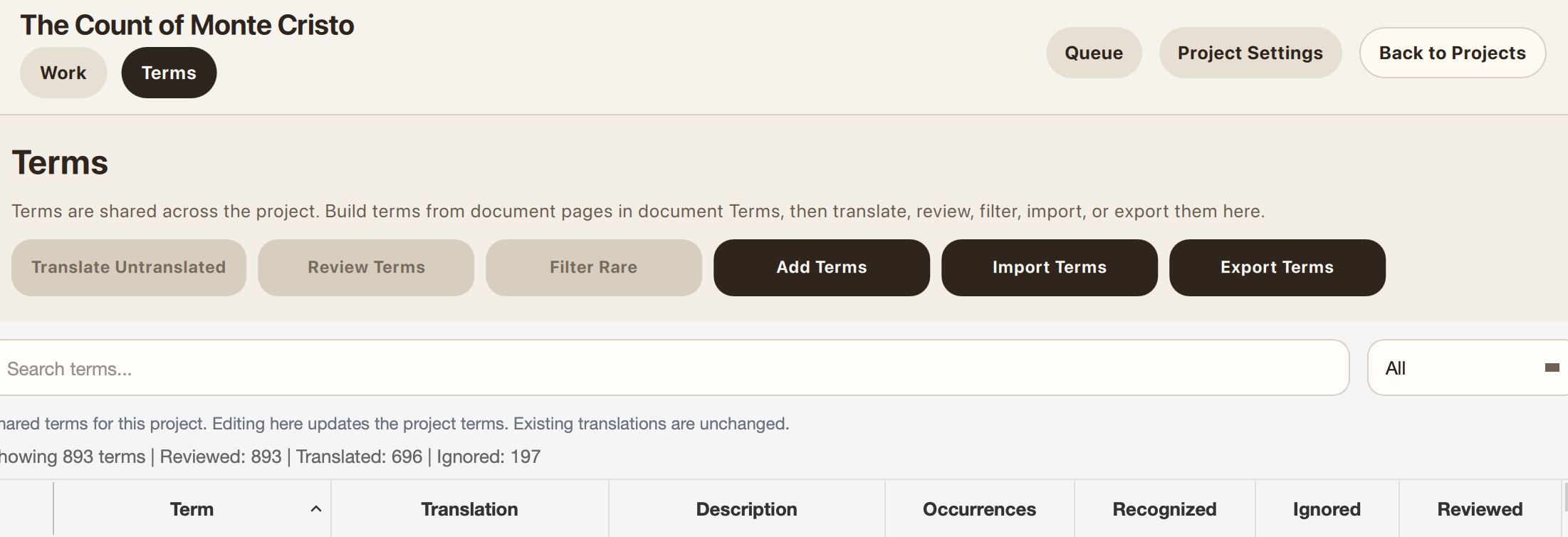
Open Terms, then use Import Terms if you already have a terminology list you want ContextWeave to reuse. A simple JSON object like {"original": "translated"} is enough.
Demo EPUBs
This sample EPUB was generated with Translate and Export directly from the French Project Gutenberg EPUB for The Count of Monte Cristo, Tome I, using DeepSeek.
Quality can be dramatically better with Gemini or GPT, but the cost is also significantly higher.
- The Count of Monte Cristo.epub - English output. Cost: under
$2.5.
CLI
ContextWeave also includes a small CLI for config-driven one-shot translation and basic book management. From a source checkout, use uv run contextweave-cli; from an installed package, use contextweave-cli.
contextweave-cli config path
contextweave-cli config init
contextweave-cli config validate

contextweave-cli run ./book.epub --output ./translated/book.epub
contextweave-cli run ./chapter.txt --output ./translated/chapter.txt --json
contextweave-cli run ./episode.srt --output ./translated/episode.srt --no-polish
contextweave-cli galgame inspect ./extracted-game --json
contextweave-cli galgame skill --output ./contextweave-galgame-translation
contextweave-cli run ./extracted-game --type galgame --output ./translated-patch --preserve-structure --json

contextweave-cli books list
contextweave-cli books show BOOK_ID
contextweave-cli books delete BOOK_ID --yes
The CLI resolves config from --config, then CONTEXTWEAVE_CONFIG, then the nearest contextweave.yaml/.contextweave.yaml walking upward, then the platform default shown by contextweave-cli config path. The config mirrors the setup UI: connections define provider endpoints and workflow_profiles route each translation step. Prefer api_key_env so API keys stay in environment variables instead of config files or task snapshots. Use --no-polish when a one-shot run should skip the polish pass, which can be useful for timing-sensitive subtitle output. Use --preserve-structure for patchable galgame/script exports.
For unsupported game engines, convert extracted script text into a supported intermediate format such as ParaTranz JSON or Translator++ .trans, then import that file or folder as --type galgame. contextweave-cli galgame skill writes a Codex/OpenAI-style skill file with this workflow for external extractor agents.
A commented starting point is available at docs/examples/contextweave-cli.yaml.
What To Know Before Using ContextWeave
- The setup wizard path is mainly tested with
DeepSeek+Gemini.ClaudeandGPTshould also work well, but I do not recommend going belowDeepSeek-class models. - Image editing is expensive, and hallucinations are still common. For image reembedding,
GPT Image 2is recommended when available. - OCR does not preserve original layout for PDFs and scanned books. It rebuilds from content instead. Manga is the exception.
- Import in reading order if you want the glossary and context to build correctly.
- Samples are still limited because testing across formats is expensive. Bug reports are very welcome.
Supported Formats
| Type | Import | Export | OCR needed before translation? |
|---|---|---|---|
| Text | .txt, .md |
txt |
No |
.pdf |
epub, md |
Yes | |
| Scanned book | image files or folders | epub, md |
Yes |
| Manga | .cbz, image folders |
cbz |
Yes |
| EPUB | .epub |
epub, md, docx, html |
No, but image OCR is supported |
| Subtitle | .srt, .vtt, .ass, .ssa |
srt, vtt, ass, ssa |
No |
| Galgame | .rpy, .ks, RPG Maker MV/MZ JSON, MTool JSON, Translator++ .trans, VNText JSON, ParaTranz JSON, TPP/Translator++ .xlsx, Wolf RPG .xlsx |
txt, preserve-structure folder |
No |
1 maintainer

Metadata
1 maintainer
Release files for contextweave 2.8.2
For a detailed explanation of source distributions (sdists) and built distributions (wheels), please see the package formats documentation.
Source distribution (sdist)
| File | Size | Uploaded | |
|---|---|---|---|
| contextweave-2.8.2.tar.gz | 9.5 MB | Details |
Built distribution (wheel)
| File | Interpreter | ABI | Platform | Reset |
|---|---|---|---|---|
| contextweave-2.8.2-py3-none-any.whl | Python 3 | none | any | Details |
Total release size: 12.8 MB
Release files / contextweave-2.8.2.tar.gz
| Download URL | contextweave-2.8.2.tar.gz |
|---|---|
| Size | 9.5 MB |
| Tags | Source |
|
SHA-256 checksum How to use checksums |
a1ba91682e64e53d8e020593e357026d611589381601f71de6306271aff10f12
|
|
BLAKE2b-256 checksum How to use checksums |
08f65b0b9be522fb04bb4d0526012ae985f7d93344f209de0f8805c1cc5dae2d
|
| Upload date | |
|
Uploaded using Trusted Publishing? What is trusted publishing? |
Yes |
| Uploaded via |
twine/6.1.0 CPython/3.13.12
|
Provenance
Provenance describes where a file came from. On PyPI, provenance is shared via attestations, which provide a verifiable record of the build or publishing details. View details, limitations and caveats.


PyPI Publish Attestation
PyPI verified that this artifact, at this checksum, originated from the publisher listed below.
Signed by GitHub Actions, verified by PyPI on Jun 20, 2026.
Transparency logRelease files / contextweave-2.8.2-py3-none-any.whl
| Download URL | contextweave-2.8.2-py3-none-any.whl |
|---|---|
| Size | 3.3 MB |
| Tags | Python 3 |
|
SHA-256 checksum How to use checksums |
1f29adbd90cba5cdeda48a1b96e39876e78d85cca2b316140a4fa6d06216ee5a
|
|
BLAKE2b-256 checksum How to use checksums |
61e0dccc2f1d458e519621a2e1efc6e8855cd0395ff48a709460f38b90286c30
|
| Upload date | |
|
Uploaded using Trusted Publishing? What is trusted publishing? |
Yes |
| Uploaded via |
twine/6.1.0 CPython/3.13.12
|
Provenance
Provenance describes where a file came from. On PyPI, provenance is shared via attestations, which provide a verifiable record of the build or publishing details. View details, limitations and caveats.
PyPI Publish Attestation
PyPI verified that this artifact, at this checksum, originated from the publisher listed below.
Signed by GitHub Actions, verified by PyPI on Jun 20, 2026.
Transparency log













