

Controller Companion
Easily create controller shortcuts to perform actions on your computer — quit a game that has no quit option, control the volume, toggle fullscreen, and more.




Controller Companion listens to your connected controllers and triggers an action whenever you press a defined button combination — while gaming, streaming, or anywhere else on your system.
Supported actions:
- Terminate a task by its name
- Execute a keyboard shortcut
- Execute any console command
Features
- GUI and CLI — manage your shortcuts from a window or the terminal
- Supports all controllers that pygame supports (Xbox, PlayStation, 8BitDo, …)
- Runs on Windows, Linux and macOS
- Shows connected controllers as chips that can be enabled or disabled with a click
- Follows your system's light/dark appearance
- Autostart on system startup (Windows only for now)
- Can be compiled into a standalone executable (using PyInstaller)
Screenshots
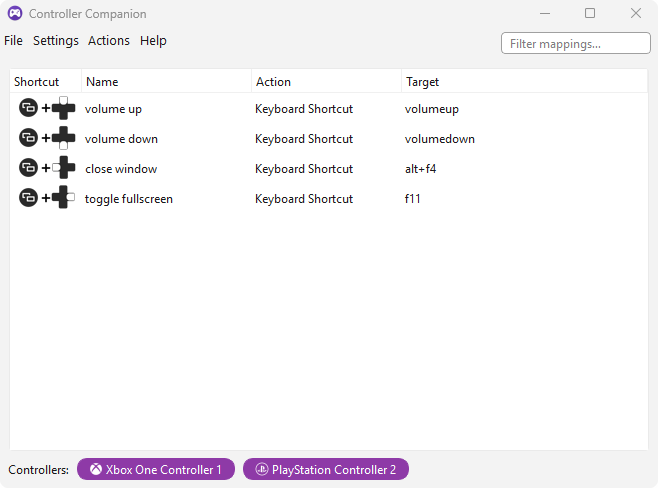 Main window |
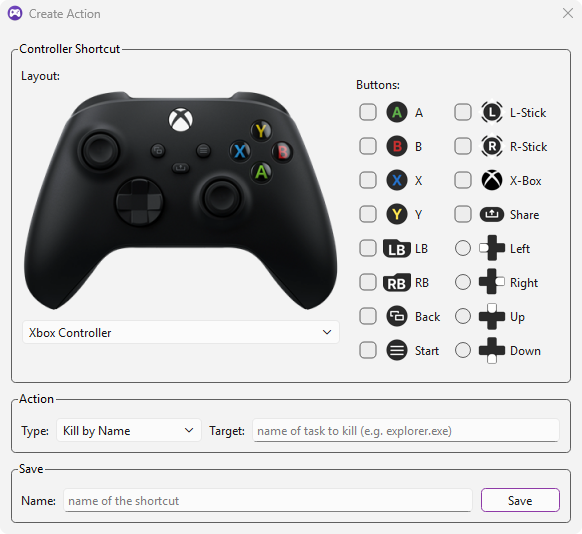 Creating a new shortcut |
Installation
Requires Python 3.10–3.13.
- Using pip:
pip install controller-companion - Standalone executables are also available in the releases for Windows, macOS and Linux. An installer is provided for Windows as well.
Usage
GUI
controller_companion --ui
Add --minimized to start the app minimized to the tray.
CLI
-
Multiple shortcuts can be created.
-
One or multiple input controller key combinations that trigger an action can be defined with
--input. The keys of one individual input combination are separated by commas, while each distinct input combination is separated by a space. -
One or multiple actions can be defined with either
--task-kill,--consoleor--shortcut. These actions are mapped to the--inputkey combinations in the order--task-kill,--consoleand finally--shortcut. -
The mappings saved by the GUI can be loaded with
--config, or with--custom-config <file>using the same file format. -
Example with 2 shortcuts:
controller_companion --input A,B Back,Left --console explorer.exe --shortcut alt+f4will result in the following mapping:
┏━━━━━━━━━━━━━━━━━━━━━━━━━━━━┳━━━━━━━━━━━┳━━━━━━━━━━━━━━┳━━━━━━┓
┃ Name                       ┃ Shortcut  ┃ Action       ┃ Type ┃
┡━━━━━━━━━━━━━━━━━━━━━━━━━━━━╇━━━━━━━━━━━╇━━━━━━━━━━━━━━╇━━━━━━┩
│ Run command "explorer.exe" │ A+B       │ explorer.exe │ Xbox │
│ Shortcut "alt+f4"          │ Back+Left │ alt+f4       │ Xbox │
└────────────────────────────┴───────────┴──────────────┴──────┘
-
Run
controller_companion --helpto see all available arguments.
Build Executable
With poetry installed, run the following command to build the executable using PyInstaller:
poetry run build_controller_companion_exe
Credits
- Gamepad button icons (Xbox & PlayStation): 80.lv — free button icons for Unreal Engine and Unity
- PlayStation 5 controller artwork: pngall.com
License
This project is licensed under the MIT License — see LICENSE for details.
1 maintainer

Metadata
1 maintainer
Release files for controller-companion 0.8.3
For a detailed explanation of source distributions (sdists) and built distributions (wheels), please see the package formats documentation.
Source distribution (sdist)
| File | Size | Uploaded | Provenance | Actions |
|---|---|---|---|---|
| controller_companion-0.8.3.tar.gz | 476.2 kB | With provenance | Details for controller_companion-0.8.3.tar.gz |
Built distribution (wheel)
| File | Interpreter | ABI | Platform | Actions Reset |
|---|---|---|---|---|
| controller_companion-0.8.3-py3-none-any.whl | Python 3 | none | any | Details for controller_companion-0.8.3-py3-none-any.whl |
Total release size: 977.7 kB
Release files / controller_companion-0.8.3.tar.gz
| Download URL | controller_companion-0.8.3.tar.gz |
|---|---|
| Size | 476.2 kB |
| Tags | Source |
|
SHA-256 checksum How to use checksums |
a45c537b30cac84633b8c1f7e9f1afb35fa4226c977994e7c3ce0c99658981bd
|
|
BLAKE2b-256 checksum How to use checksums |
344ed18b71484bfd775d7d695e32b7f45120ed067be8c292755c91b2b8b1c4a5
|
| Upload date | |
|
Uploaded using Trusted Publishing? What is trusted publishing? |
Yes |
| Uploaded via |
twine/7.0.0 CPython/3.13.14
|
Provenance
Provenance describes where a file came from. On PyPI, provenance is shared via attestations, which provide a verifiable record of the build or publishing details. View details, limitations and caveats.


PyPI Publish Attestation
PyPI verified that this artifact, at this checksum, originated from the publisher listed below.
Signed by GitHub Actions, verified by PyPI on Oct 18, 2026.
Transparency logRelease files / controller_companion-0.8.3-py3-none-any.whl
| Download URL | controller_companion-0.8.3-py3-none-any.whl |
|---|---|
| Size | 501.6 kB |
| Tags | Python 3 |
|
SHA-256 checksum How to use checksums |
50dfea84928b01208a5758fa20eefb343c441ebf0fba9f1ede933db9f9e1a7b4
|
|
BLAKE2b-256 checksum How to use checksums |
3ff778cf94f5f05f4cc9c90726d7e68d8e8097e72b1cb9a4b46f3a245a8a4984
|
| Upload date | |
|
Uploaded using Trusted Publishing? What is trusted publishing? |
Yes |
| Uploaded via |
twine/7.0.0 CPython/3.13.14
|
Provenance
Provenance describes where a file came from. On PyPI, provenance is shared via attestations, which provide a verifiable record of the build or publishing details. View details, limitations and caveats.
PyPI Publish Attestation
PyPI verified that this artifact, at this checksum, originated from the publisher listed below.
Signed by GitHub Actions, verified by PyPI on Oct 18, 2026.
Transparency logSecurity for controller-companion 0.8.3
Provenance
Provenance describes where a file came from. On PyPI, provenance is shared via attestations, which provide a verifiable record of the build or publishing details. View details, limitations and caveats.
Full provenance
Both files in this release have been uploaded with provenance metadata.
Attestation for controller_companion-0.8.3.tar.gz
PyPI Publish Attestation
PyPI verified that this artifact, at this checksum, originated from the publisher listed below.
Signed by GitHub Actions, verified by PyPI on Oct 18, 2026.
Transparency logA note on package security
PyPI is a repository for distributing packages, not a service for auditing them. While third-party security researchers and our staff do their best to detect and remove malicious packages, PyPI cannot guarantee the quality, security or suitability of any given package.
To learn more about protecting yourself from malicious actors, visit our package security documentation.














