
Convert Markdown into HTML, PDF, and other formats with executed code blocks. Display charts and graphs.

Project description
Convert Markdown into HTML, PDF, and other formats with executed code blocks.
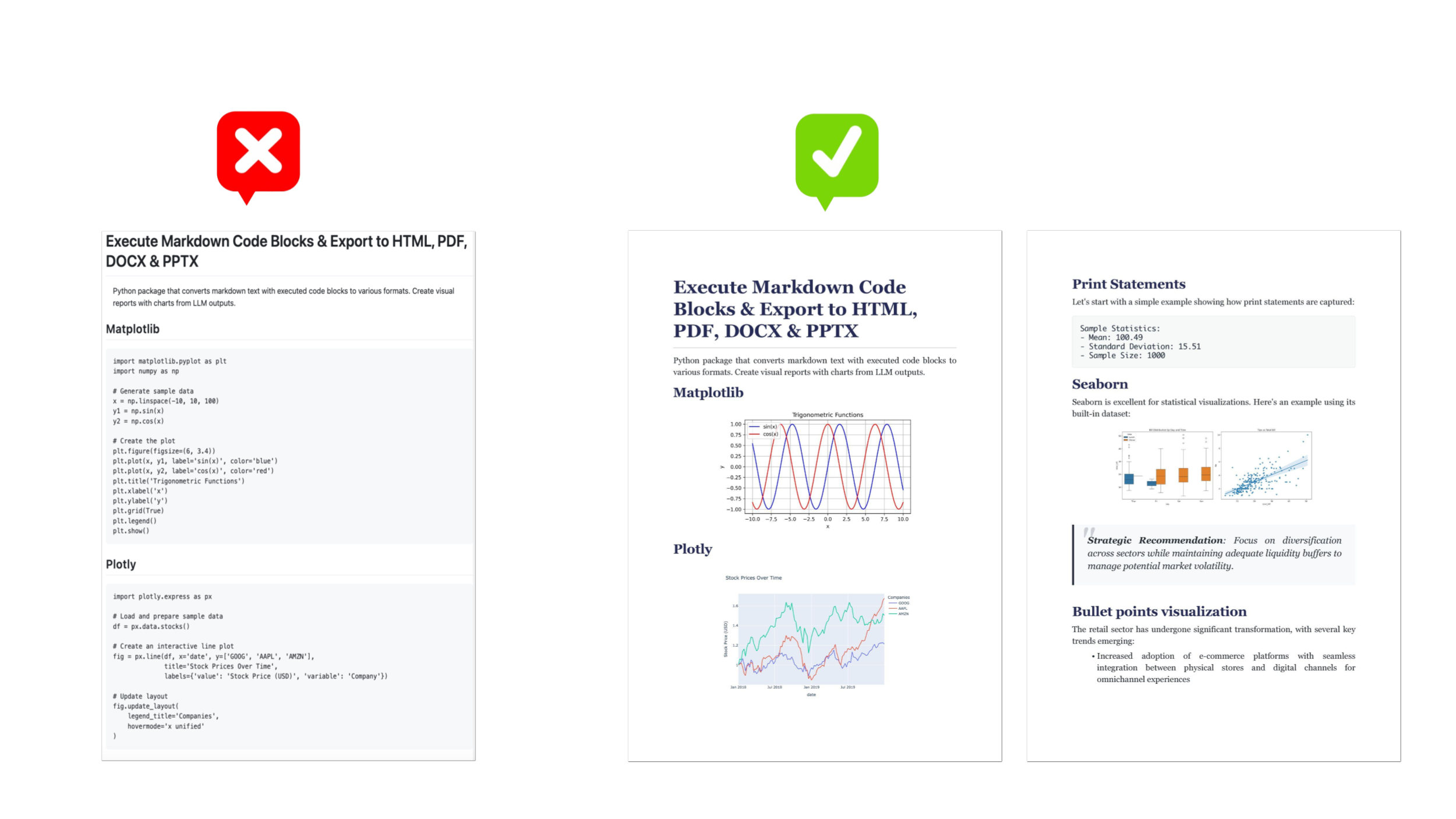
Python package that converts markdown to HTML, PDF, DOCX, and PPTX. Supports code block execution and plot rendering. Create stylish reports with charts and graphs from LLM outputs.
Display charts and graphs.
Features
- Code Execution: Execute Python code blocks directly in your markdown
- Multiple Export Formats: Markdown to PDF, Markdown to DOCX, Markdown to PPTX, and Markdown to HTML
- Data Visualization: Support for Matplotlib, Plotly, and Seaborn
- Custom Styling: Choose from built-in styles or define your own CSS
- Professional Output: Generate publication-ready documents
Installation
pip install convert-markdown
Quick Start
import convert_markdown

markdown_content = """
# Analysis Report

## Data Visualization

```python
import matplotlib.pyplot as plt
import numpy as np

x = np.linspace(0, 10, 100)
plt.plot(x, np.sin(x))
plt.title("Sine Wave")
plt.show()
```"""

# Method 1: Get bytes and save manually
output = convert_markdown.to(
    markdown=markdown_content,
    style='style1', # default: 'style', 'style1', 'style2', 'style3', 'custom'
    format='pdf'    # default: 'pdf', 'docx', 'pptx', 'html'
)
with open('output.pdf', 'wb') as f:
    f.write(output)

# Method 2: Direct to file (returns None)
convert_markdown.to(
    markdown=markdown_content,
    format='pdf',
    output_file='output.pdf'  # File is saved directly
)
Parameters:
markdown: Input markdown textformat: Output format ('pdf', 'docx', 'pptx', 'html')output_file: Optional path to save the output (if specified, returns None)style: CSS style to use (default: 'style', 'style1', 'style2', 'style3', 'custom')custom_css: Custom CSS string when style='custom'
Returns:
bytes: Converted document as bytes (or None if output_file is specified)
Code Block Support
Use standard markdown code blocks with Python:
# Print statements
print("Hello, World!")

# Matplotlib
import matplotlib.pyplot as plt
plt.plot([1, 2, 3], [1, 2, 3])
plt.show()

# Plotly
import plotly.express as px
df = px.data.iris()
fig = px.scatter(df, x="sepal_width", y="sepal_length")

# Seaborn
import seaborn as sns
tips = sns.load_dataset('tips')
sns.boxplot(data=tips, x='day', y='total_bill')
plt.show()
Styling Options
Built-in Styles
Choose from three built-in styles:
style: Default-plainstyle1: Corporate finance themestyle2: Modern business themestyle3: Clean documentation theme
convert_markdown.to(
    markdown=content,
    format='pdf',
    style='style2'
)
Custom CSS
Apply your own styling:
custom_css = """
body {
    font-family: Arial, sans-serif;
    max-width: 900px;
    margin: 0 auto;
}
"""

convert_markdown.to(
    markdown=content,
    format='pdf',
    style='custom',
    custom_css=custom_css
)
Pre-imported Libraries
The following libraries are available in Python code blocks:
- numpy (as np)
- pandas (as pd)
- matplotlib.pyplot (as plt)
- plotly.graph_objects (as go)
- plotly.express (as px)
- seaborn (as sns)
Examples
See the examples directory for more detailed examples, including:
- Basic print statements
- Matplotlib visualizations
- Plotly interactive charts
- Seaborn statistical plots
- Complex data analysis reports
License
MIT License - see LICENSE file for details.


Download files
Download the file for your platform. If you're not sure which to choose, learn more about installing packages.
Source Distribution
Built Distribution
Filter files by name, interpreter, ABI, and platform.
If you're not sure about the file name format, learn more about wheel file names.
Copy a direct link to the current filters
File details
Details for the file convert_markdown-0.1.5.tar.gz.
File metadata
- Download URL: convert_markdown-0.1.5.tar.gz
- Upload date:
- Size: 17.2 kB
- Tags: Source
- Uploaded using Trusted Publishing? No
- Uploaded via: twine/6.1.0 CPython/3.12.8
File hashes
| Algorithm | Hash digest | |
|---|---|---|
| SHA256 |
530485a43b8131f0b68eb26d04dd322ae1a6d3eb14c591c299f46c34737e2557
|
|
| MD5 |
dc8d191328a9280a051813e1980dbb4e
|
|
| BLAKE2b-256 |
4098364762876b5f68a8964d64e6389f1298e7160a85cdf88c9c02b82c4c421b
|
File details
Details for the file convert_markdown-0.1.5-py3-none-any.whl.
File metadata
- Download URL: convert_markdown-0.1.5-py3-none-any.whl
- Upload date:
- Size: 14.5 kB
- Tags: Python 3
- Uploaded using Trusted Publishing? No
- Uploaded via: twine/6.1.0 CPython/3.12.8
File hashes
| Algorithm | Hash digest | |
|---|---|---|
| SHA256 |
41d75cf1fe4f91586ac8bcb651560e0642c5fe80ad3dc6431e0f03aadceac7dc
|
|
| MD5 |
31bbfad6c8e03839bdaca738f8edaff6
|
|
| BLAKE2b-256 |
6be0652b3656ac853956b9b8bef0b07ad8ccbe9a3568a05fbced0417cb559d6b
|






