
convert-md
Right-click conversion between Markdown and Word, PDF, Excel, PowerPoint and HTML on Windows, built on Pandoc and Microsoft MarkItDown.


What it does
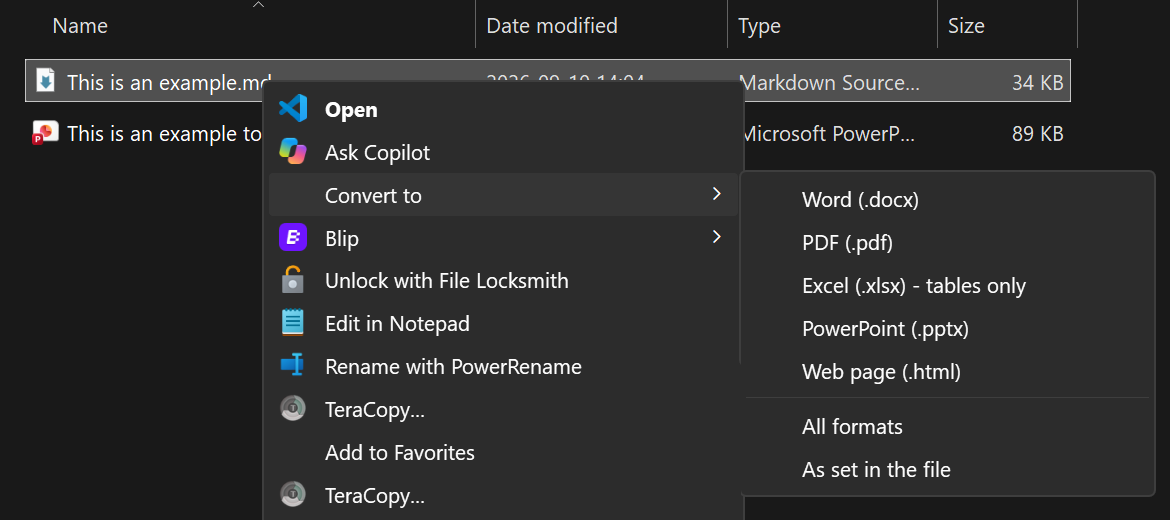
| Right-click on | Menu | Produces |
|---|---|---|
.md, .markdown |
Convert to → Word | .docx |
| Convert to → PDF | .pdf (through Microsoft Word, or a Pandoc PDF engine) |
|
| Convert to → Excel | .xlsx, one sheet per table |
|
| Convert to → PowerPoint | .pptx, one slide per heading |
|
| Convert to → Web page | self-contained .html |
|
| Convert to → All formats | all of the above | |
| Convert to → As set in the file | the formats the file asks for (see below) | |
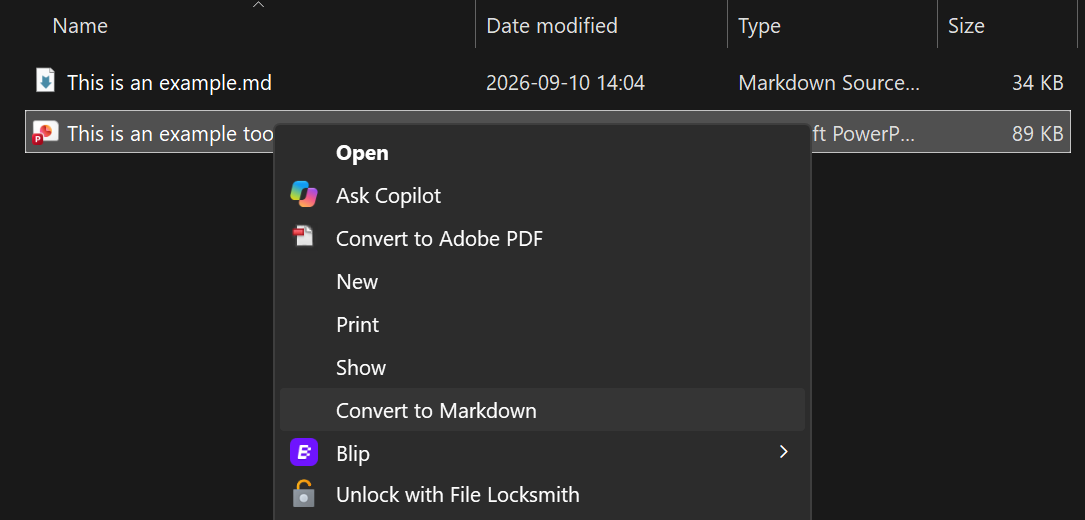
.docx .pdf .xlsx .xls .pptx .html .htm .csv .epub .msg |
Convert to Markdown | .md |
- Output is saved next to the original. Nothing is overwritten: a repeat run writes
Report (1).docx. - A small popup confirms what was created and lists any problems.
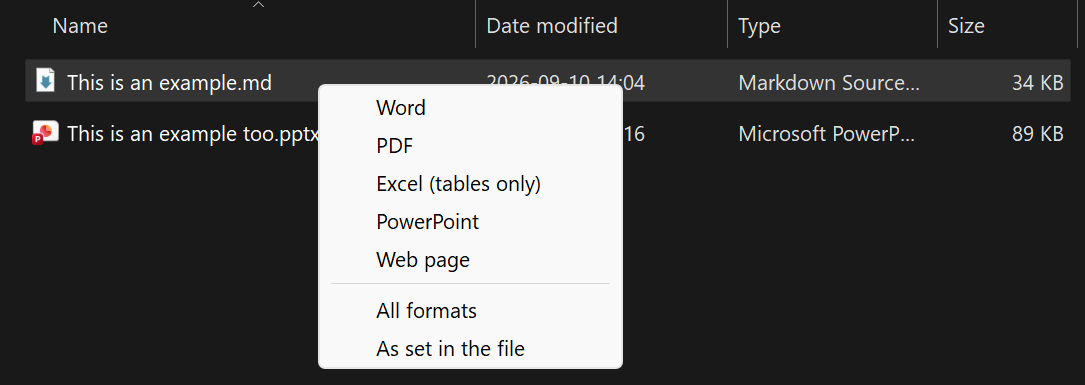
- Ctrl+Alt+M hotkey: select files in File Explorer and press it to get the same menu at the mouse pointer. Mixed selections work: Markdown files go out, everything else comes in.
| Ctrl+Alt+M on a Markdown file | Ctrl+Alt+M on any other file |
|---|---|
 |
 |
Install
Needs Windows 10 or 11 and Python 3.11 or newer from python.org
(winget install --id Python.Python.3.12 -e --scope user).
-
Download the latest release from the Releases page (Source code (zip)) and extract it, or
git clone https://github.com/W3i-io/convert-md. -
In PowerShell, in that folder:
powershell -ExecutionPolicy Bypass -File .\install.ps1
The installer sets up the right-click menus and the Ctrl+Alt+M hotkey for your Windows account,
installs AutoHotkey v2 for the hotkey if you don't have it, and runs a
test conversion. Use -NoHotkey for the right-click menus only.
Prefer pip? Install from PyPI, then run setup, which adds the menus and the hotkey (installing AutoHotkey if needed):
py -m pip install convert-md
py -m convert_md setup
pip can't run setup by itself, so convert-md reminds you until you have.
Updating, moving, uninstalling and troubleshooting: see DEPLOY.md.
On Windows 11 the menu entries are under Show more options, Shift + right-click, or Shift + F10.
Choosing formats inside the file
Convert to → As set in the file reads outputs: from the front-matter first, then the filename,
and otherwise makes a Word document.
---
outputs: [docx, pdf, xlsx]
---
Or name the file Proposal.docx.pdf.md to get Proposal.docx and Proposal.pdf.
House styling
convert-md templates
creates starter reference.docx and reference.pptx in %LOCALAPPDATA%\ConvertMd\templates and opens the
folder. Change their styles (fonts, heading colours, margins, slide masters) in Word or PowerPoint,
not their text. From then on every conversion uses them, and Word-made PDFs follow the Word styles.
Add a style.css in the same folder to style HTML output.
Command line
convert-md --to docx Report.md
convert-md --to docx,pdf,xlsx Report.md
convert-md --to all Report.md
convert-md --to md Contract.pdf Deck.pptx
convert-md doctor          # check the installation
If convert-md isn't found, use py -m convert_md instead: pip may have put the command in a folder
that isn't on your PATH.
Known limitations
| Area | Limitation |
|---|---|
| Platform | The menus and hotkey are Windows only. The command line also works on macOS and Linux. |
| Windows 11 menu | Entries appear under Show more options, not in the compact top-level menu. |
| Excel output | Only tables are exported. Text, lists and images outside tables are left out; there are no formulas. |
| PDF output | Needs Microsoft Word, or a PDF engine such as Typst (winget install Typst.Typst). Engine-made PDFs look different from Word-made ones. |
| PowerPoint output | One slide per heading with Pandoc's default layout; long sections overflow the slide. Use reference.pptx for your own master. |
| Scanned PDFs | Image-only PDFs have no text to extract; run OCR on them first. |
| Conversion quality | Complex layouts (multi-column PDFs, merged table cells, text boxes, charts) come through partially or as plain text. |
| Protected files | Password-protected or rights-managed documents can't be converted. |
| Legacy formats | Old .doc and .ppt files aren't supported; save them as .docx / .pptx first. |
| Several files at once | Windows starts one conversion per file from the right-click menu, so each shows its own popup. |
| Hotkey | Uses AutoHotkey v2, which setup installs with winget; without winget, install AutoHotkey yourself. Works in File Explorer windows only: not on the desktop, in Open/Save dialogs or in other file managers. |
| Output folder | Files are written next to the original, so read-only folders fail. |
| Remote images | Images linked by URL in Markdown are downloaded by Pandoc when embedded. |
Privacy and security
Conversions run entirely on your PC; convert-md sends nothing anywhere. It changes the registry only
under your own account (HKEY_CURRENT_USER). See SECURITY.md
for details and how to report a vulnerability.
Credits and licence
convert-md is MIT licensed. It relies on Pandoc (GPL, installed separately through
pypandoc_binary), MarkItDown (MIT),
openpyxl, Beautiful Soup,
pywin32 and, for the hotkey, AutoHotkey (GPL).
1 maintainer

Metadata
1 maintainer
Release files for convert-md 1.1.0
For a detailed explanation of source distributions (sdists) and built distributions (wheels), please see the package formats documentation.
Source distribution (sdist)
| File | Size | Uploaded | Provenance | Actions |
|---|---|---|---|---|
| convert_md-1.1.0.tar.gz | 33.8 kB | With provenance | Details for convert_md-1.1.0.tar.gz |
Built distribution (wheel)
| File | Interpreter | ABI | Platform | Actions Reset |
|---|---|---|---|---|
| convert_md-1.1.0-py3-none-any.whl | Python 3 | none | any | Details for convert_md-1.1.0-py3-none-any.whl |
Total release size: 53.7 kB
Release files / convert_md-1.1.0.tar.gz
| Download URL | convert_md-1.1.0.tar.gz |
|---|---|
| Size | 33.8 kB |
| Tags | Source |
|
SHA-256 checksum How to use checksums |
fdde369559e763435022e013dbcad3aace3b2971c23e7911979607d44346d9b0
|
|
BLAKE2b-256 checksum How to use checksums |
d94ea6c4290b739869deaa0ec6fe6915a32047e2fda4336aa57365ba883c2e2d
|
| Upload date | |
|
Uploaded using Trusted Publishing? What is trusted publishing? |
Yes |
| Uploaded via |
twine/7.0.0 CPython/3.13.16
|
Provenance
Provenance describes where a file came from. On PyPI, provenance is shared via attestations, which provide a verifiable record of the build or publishing details. View details, limitations and caveats.


PyPI Publish Attestation
PyPI verified that this artifact, at this checksum, originated from the publisher listed below.
Signed by GitHub Actions, verified by PyPI on Nov 16, 2026.
Transparency logRelease files / convert_md-1.1.0-py3-none-any.whl
| Download URL | convert_md-1.1.0-py3-none-any.whl |
|---|---|
| Size | 19.9 kB |
| Tags | Python 3 |
|
SHA-256 checksum How to use checksums |
cd3924a1bd353bfd8db0a7de0a25ef861f3a99398b4610255f041ef02c5aa2f4
|
|
BLAKE2b-256 checksum How to use checksums |
967755a100ac59beec1aae8174fc5d1b717ead50123f5cac83a25c8db9dadb6d
|
| Upload date | |
|
Uploaded using Trusted Publishing? What is trusted publishing? |
Yes |
| Uploaded via |
twine/7.0.0 CPython/3.13.16
|
Provenance
Provenance describes where a file came from. On PyPI, provenance is shared via attestations, which provide a verifiable record of the build or publishing details. View details, limitations and caveats.
PyPI Publish Attestation
PyPI verified that this artifact, at this checksum, originated from the publisher listed below.
Signed by GitHub Actions, verified by PyPI on Nov 16, 2026.
Transparency logSecurity for convert-md 1.1.0
Provenance
Provenance describes where a file came from. On PyPI, provenance is shared via attestations, which provide a verifiable record of the build or publishing details. View details, limitations and caveats.
Full provenance
Both files in this release have been uploaded with provenance metadata.
Attestation for convert_md-1.1.0.tar.gz
PyPI Publish Attestation
PyPI verified that this artifact, at this checksum, originated from the publisher listed below.
Signed by GitHub Actions, verified by PyPI on Nov 16, 2026.
Transparency logA note on package security
PyPI is a repository for distributing packages, not a service for auditing them. While third-party security researchers and our staff do their best to detect and remove malicious packages, PyPI cannot guarantee the quality, security or suitability of any given package.
To learn more about protecting yourself from malicious actors, visit our package security documentation.














