

Convo
Your files. A quiet conversation.
Convo is an open-source, local-first terminal app for chatting with a selected file. Qwen3 embeddings and PostgreSQL full-text search retrieve passages together; a local cross-encoder reranks them; your connected ChatGPT account returns a structured answer with supporting quotations.
It is released under the MIT License. Contributions are welcome—see CONTRIBUTING.md.
Install and start
Install Convo from PyPI with uv:
uv tool install --python 3.12 convo-cli
To update an existing installation, run uv tool upgrade --refresh convo-cli.
Convo needs Docker Desktop or Podman for its local database. The install downloads its Python dependencies. On first launch, it creates a private settings file at ~/.config/convo/.env, pulls docker.io/pgvector/pgvector:pg16, starts a loopback-only convo-postgres container, and runs migrations. It generates a random database password and preserves existing data. Later launches restart Convo's local container if needed and apply pending migrations.
On macOS, Convo starts or initializes a Podman machine when Podman is installed. First use downloads a database image and, when indexing your first file, the embedding and reranker models.
Convo 0.1.1 fixes Fedora/Podman startup failures reporting short-name resolution enforced but cannot prompt without a TTY. Upgrade if you see this error on an older version. Convo now uses the full Docker Hub image name, including when the docker command is a Podman compatibility wrapper.
If you already use PostgreSQL, set DATABASE_URL to a postgresql+psycopg://... URL, run convo --setup once to migrate that database, then run convo. Explicit database connections are used as configured; startup only manages storage created by Convo.
To install from a local checkout while developing, run this from the repository root:
uv sync --python 3.12
uv run convo
--directory ~/Documents changes the file browser root. Environment variables always override the user settings file; .env.example is only for checkout-based development.
Optional model download/warmup outside the TUI:
uv run convo --download-model
This prepares both Qwen3 and cross-encoder/ms-marco-MiniLM-L6-v2. Models otherwise load/download on demand in an isolated process. File preparation shows stages and elapsed time; Esc cancels it. Download/native logs stay in ~/.cache/convo/rag-worker.log (respecting XDG_CACHE_HOME). After storage preparation, startup restores account preferences locally; models and the account catalog load when needed.
For a UI preview without services or backend dependencies:
uv run convo --shell
How to use
1. Open the folder you want to ask about
Run Convo from your project directory. It starts its file browser there.
cd ~/path/to/your/project
convo
To browse another folder, pass it directly: convo --directory ~/Documents.
2. Connect your ChatGPT account
In Convo, type /login, press Enter, and finish sign-in in your browser. Then type /models to choose an account model. You can type / at any time to see command suggestions; use ↑/↓ to move, Tab to complete, Enter to run, and Esc to close the list.
3. Choose a file
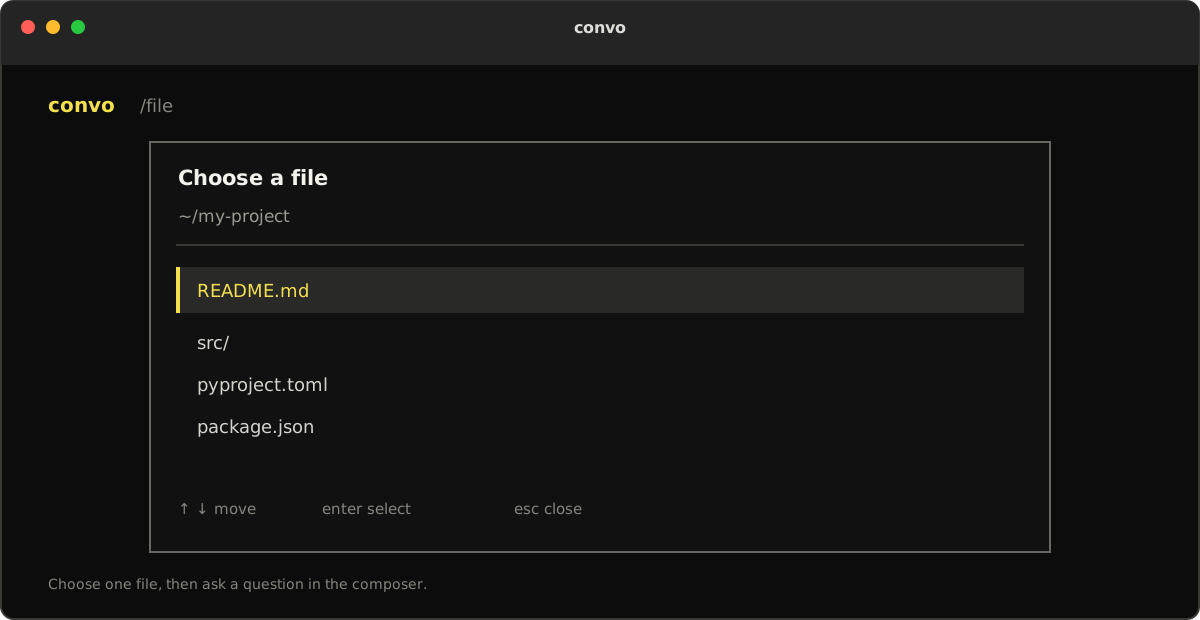
Type /file and press Enter, or use Ctrl+O. Choose a supported file from the current folder and press Enter. Convo prepares and indexes it before you ask questions.
4. Ask a question
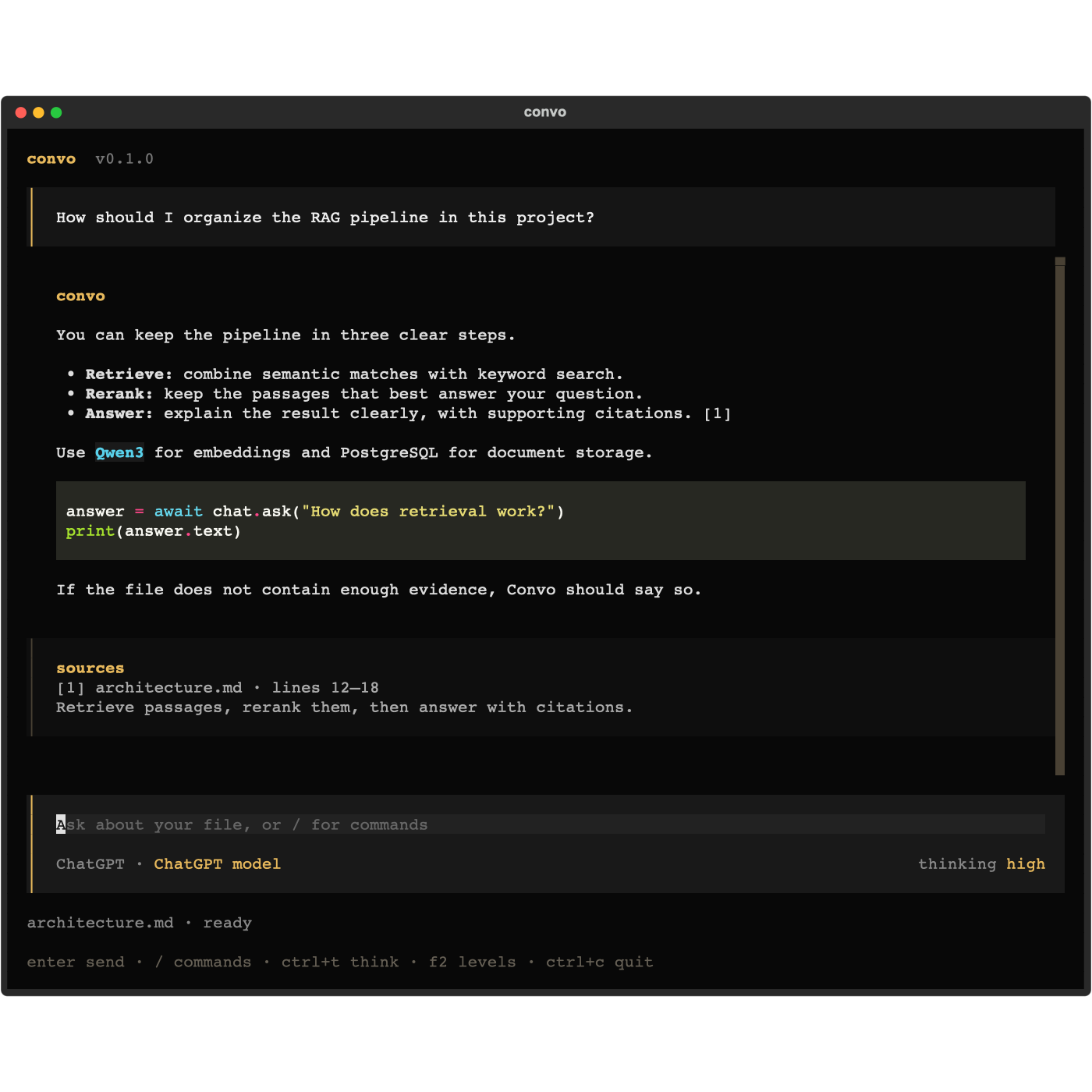
Type a question in plain language and press Enter. Convo searches the selected file and answers with numbered citations and a source block showing the file and line numbers.
5. Come back to a conversation
Type /sessions to search and resume a saved conversation. Type /new to start another conversation while keeping the selected file, or /reset to start fresh without one.
Commands and shortcuts
| Command/key | Action |
|---|---|
/login |
Connect your ChatGPT account through browser sign-in |
/models |
Search and select an account model |
/models <id> |
Select a model directly |
| Ctrl+T or Shift+Tab | Cycle auto and the model's supported thinking levels |
F2 or /thinking |
Choose a thinking level directly |
/thinking high, /thinking auto |
Set a supported level or restore the model default |
/file, Ctrl+O |
Select and index a file; create a saved conversation |
/sessions |
Search saved conversations by title, filename, or ID and resume one |
/sessions <uuid> |
Resume a conversation directly |
/new |
Create a new saved conversation, keeping the selected file |
/clear |
Same behavior as /new; previous conversations remain saved |
/reset |
Create a new saved conversation without a selected file |
| Esc during file preparation | Stop preparation and restore the input |
/help |
Show commands and keys |
/quit, /exit, Ctrl+C |
Exit |
| PageUp / PageDown | Scroll the transcript while keeping the input focused |
Questions appear in shaded blocks with a gold left edge. Answers use spaced Markdown with highlighted code, and source quotations appear in a separate subdued block. The composer groups your input with the gold model name and thinking level underneath. The ASCII title collapses once chatting starts and in smaller terminals, leaving more room to read. Long replies open at the question and the beginning of the answer; use PageUp/PageDown or the mouse wheel to keep reading.
Change the cycling shortcut with convo --thinking-key ctrl+g or set CONVO_THINKING_KEY=ctrl+g in .env (export it for --shell). The command-line flag takes precedence. Shift+Tab and F2 remain available. Choose a Ctrl/Alt letter or F3–F24; essential keys are reserved. /help shows the configured shortcut. Only thinking levels supported by the selected account model can be saved.
Sessions, completed message pairs, displayed source quotes, and structured answers persist in PostgreSQL. Use /sessions after restarting. Resuming uses the saved indexed snapshot, so the original file can have moved or disappeared. Use /file again to index changed content. A failed request never saves a partial turn. Account tokens remain in the OS keyring; model/thinking preferences remain in the local account profile.
Greetings such as hello and acknowledgements such as thank you receive a short local reply without retrieval or model calls. Mixed greetings and file questions still use retrieval. Specific questions use hybrid search, reciprocal rank fusion, cross-encoder reranking, and weak-match filtering. Broad file overviews sample sections across the snapshot and rerank their order without applying a QA relevance cutoff.
ChatGPT returns JSON sections containing text and citation objects. Python validates the schema, requires citations on answered sections, checks source IDs and exact supporting quotes, then renders readable Markdown with numbered citations. Only cited quotes appear under sources. An empty evidence set returns an insufficient-evidence response without an LLM call. These checks verify structure and quotations; they do not prove every generated claim is entailed by its quote.
Supported files: .txt, .md, .pdf, .docx, .csv, .json, .py, .rst, .log. Limits: 10 MB input, 500,000 extracted characters, and 2,000 chunks. LlamaIndex is used only for readers and chunking. The TUI supports terminals down to 50 columns × 18 rows.
Architecture
convo/
├── core/       settings, shared values and UI/backend contracts
├── ui/         Textual app, commands, file/model/session pickers
├── llm/        ChatGPT connection, credentials, catalog and Responses transport
├── pipeline/   chat flow, routing, ingestion, embeddings, reranking and worker
├── prompts/    answer instructions, context builder and structured schema
└── db/         SQLAlchemy models, connections, document/search/session queries
ARCHITECTURE.md explains the files, schema, data flow, tuning, and verification. changes.md records implementation approaches and validation.
Website
The Next.js, React, TypeScript, and Tailwind CSS landing page in apps/web is an independent app with its own package manifest and lockfile.
cd apps/web
npm install
npm run dev     # website at http://127.0.0.1:3000
npm run build   # Next.js production build in .next
npm run start   # serve the production website
npm run check   # website checks
Checks
uv run ruff format --check .
uv run ruff check .
uv run ty check
uv run pytest -q
PostgreSQL integration checks use a disposable database, enabled explicitly with CONVO_TEST_DATABASE_URL. CONVO_TEST_MODELS=1 also exercises real Qwen/reranking models. See ARCHITECTURE.md for these opt-in checks and their prerequisites.
Releasing to PyPI
Maintainers should test a release on TestPyPI first, then create a GitHub release. The included Publish to PyPI workflow uses PyPI Trusted Publishing, so it does not require a long-lived token in the repository. Configure the repository and .github/workflows/publish.yml as a Trusted Publisher in PyPI before publishing.
uv build --no-sources
uv publish --token "$PYPI_TOKEN" # one-time/manual alternative
1 maintainer

Metadata
1 maintainer
Release files for convo-cli 0.1.1
For a detailed explanation of source distributions (sdists) and built distributions (wheels), please see the package formats documentation.
Source distribution (sdist)
| File | Size | Uploaded | |
|---|---|---|---|
| convo_cli-0.1.1.tar.gz | 75.3 kB | Details |
Built distribution (wheel)
| File | Interpreter | ABI | Platform | Reset |
|---|---|---|---|---|
| convo_cli-0.1.1-py3-none-any.whl | Python 3 | none | any | Details |
Total release size: 145.3 kB
Release files / convo_cli-0.1.1.tar.gz
| Download URL | convo_cli-0.1.1.tar.gz |
|---|---|
| Size | 75.3 kB |
| Tags | Source |
|
SHA-256 checksum How to use checksums |
c84098752d8a17d48df8941875367a79f68b97e44ed8562467ef42d75f67a9ba
|
|
BLAKE2b-256 checksum How to use checksums |
b2e860ace94338216eda1b782f720b5291452c05d7053a452d3ab1745bb7fa51
|
| Upload date | |
|
Uploaded using Trusted Publishing? What is trusted publishing? |
Yes |
| Uploaded via |
uv/0.13.1 {"installer":{"name":"uv","version":"0.13.1","subcommand":["publish"]},"python":null,"implementation":{"name":null,"version":null},"distro":{"name":"Ubuntu","version":"24.04","id":"noble","libc":null},"system":{"name":null,"release":null},"cpu":null,"openssl_version":null,"setuptools_version":null,"rustc_version":null,"ci":true}
|
Release files / convo_cli-0.1.1-py3-none-any.whl
| Download URL | convo_cli-0.1.1-py3-none-any.whl |
|---|---|
| Size | 70.0 kB |
| Tags | Python 3 |
|
SHA-256 checksum How to use checksums |
9ffa0ced9d069e1453884f98f92dc7079c21f4c0f0df73e51889ba6564ced76a
|
|
BLAKE2b-256 checksum How to use checksums |
d906aca981471669264ee18134024e4a702219ac6ee7b2ad2b13b4364760d5a9
|
| Upload date | |
|
Uploaded using Trusted Publishing? What is trusted publishing? |
Yes |
| Uploaded via |
uv/0.13.1 {"installer":{"name":"uv","version":"0.13.1","subcommand":["publish"]},"python":null,"implementation":{"name":null,"version":null},"distro":{"name":"Ubuntu","version":"24.04","id":"noble","libc":null},"system":{"name":null,"release":null},"cpu":null,"openssl_version":null,"setuptools_version":null,"rustc_version":null,"ci":true}
|














