
A python cookiecutter application to create a new python project that uses poetry to manage its dependencies.

Project description








This is a cookiecutter repository to generate the file structure for a Python project that uses Poetry for its dependency management.
Documentation |
|
Example Repository |
|
Pypi |
Features
Feature |
Description |
|---|---|
Poetry |
Generates a poetry environment file, ready to be installed with a single command. |
Makefile |
A makefile with pre-configured commands, type make help to list the options. |
Pytest |
Adds a pytest template. |
Formatting |
|
CI/CD with Github actions |
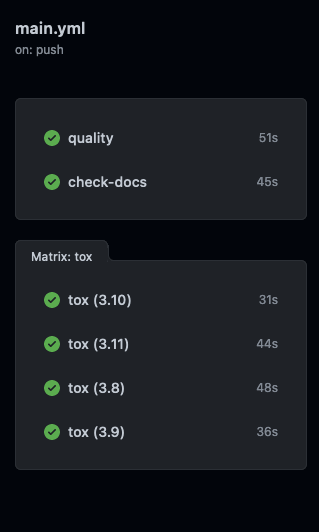
Adds Github actions that run the formatting checks and unittests for pull requests and when merged to main. |
Release to Pypi |
Release to Pypi by creating a new release on Github. |
Release to Artifactory |
Release to Artifactory by creating a new release on Github. |
Documentation with Sphinx |
Automatically add documentation to your project and its code with Sphinx. |
Tox testing |
Setup and CI/CD integration to easily test for different Python versions with Tox. |
Example CI/CD Pipeline
Quickstart
On your local machine, navigate to the directory in which you want to create a project directory, and run the following two commands:
pip install cookiecutter-poetry
ccp
Alternatively, install cookiecutter and directly pass the URL to this Github repository to the cookiecutter command:
pip install cookiecutter
cookiecutter https://github.com/fpgmaas/cookiecutter-poetry.git
Then run the following commands, replacing <project-name>, with the name that you also gave the Github repository and <github_author_handle> with your Github username.
cd <project_name>
git init -b main
git add .
git commit -m "Init commit"
git remote add origin git@github.com:<github_author_handle>/<project_name>.git
git push -u origin main
Finally, install the environment with make install.
If you want to deploy to Pypi or Artifactory automatically on each release, you need to set some secrets in your repository on Github. For more information, see the documentation.
Acknowledgements
This project is partially based on Audrey Feldroy’s’s great cookiecutter-pypackage repository.
Release history Release notifications | RSS feed


Download files
Download the file for your platform. If you're not sure which to choose, learn more about installing packages.
Source Distribution
Built Distribution
Filter files by name, interpreter, ABI, and platform.
If you're not sure about the file name format, learn more about wheel file names.
Copy a direct link to the current filters






