
CookieGuard for Python
cookieguard is CookieGuard's Python package. Integrations live under it; the first is
cookieguard.browser_use.
A successful agent login is not a secure session cookie. CookieGuard for Browser Use watches the browser your Browser Use agent drives, checks the authentication cookies it receives, and returns PASS / FAIL / INCOMPLETE with rule IDs, explanations, and fixes. The decision comes from the local CookieGuard policy engine, never from the model.
Overview · Install · Policy · How it works · Results · Limits & privacy · Demo & tests
Your policy decides what fails
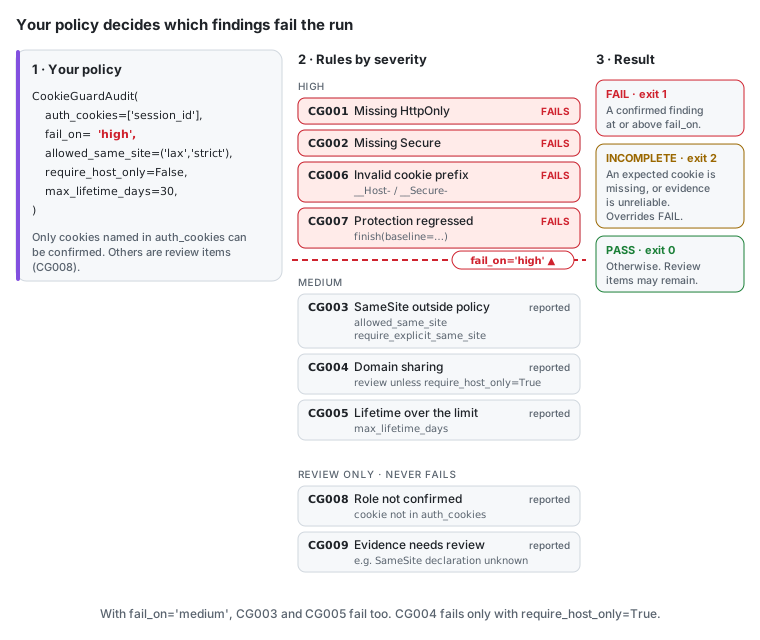
fail_on sets the line: a confirmed finding at or above it fails the run; anything below
is reported. Only cookies you name in auth_cookies can be confirmed.
All options and a stricter example: Policy.
See it run
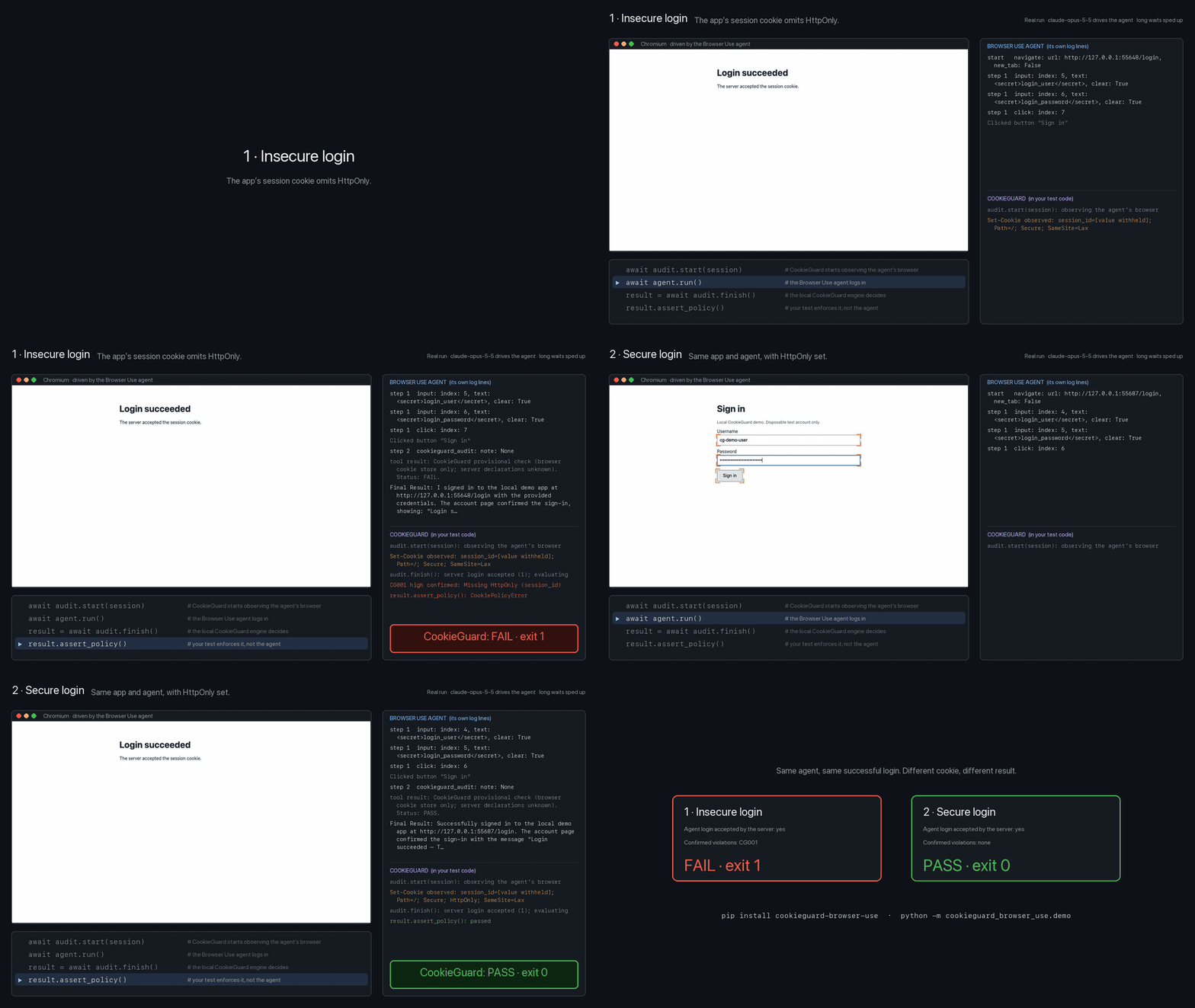
Claude (claude-opus-5-5) drives a real Browser Use agent through the same login twice.
The insecure app's cookie lacks HttpOnly, so CookieGuard returns FAIL — CG001 (exit 1).
The secure app gets PASS (exit 0). Recorded from a real run: Demo & tests.
Add it to your agent
from browser_use import Agent, BrowserProfile, BrowserSession, Tools
from cookieguard import CookieGuardAudit

audit = CookieGuardAudit(
    allowed_origins=['http://127.0.0.1:3000'],  # exact origins you are authorized to test
    auth_cookies=['session_id'],                # the real session cookie name(s)
    fail_on='high',
)
session = BrowserSession(browser_profile=BrowserProfile(
    keep_alive=True,                            # required: Agent.run() otherwise closes the browser
    enable_default_extensions=False,            # avoid the bundled cookie-consent extension
    allowed_domains=audit.browser_allowed_domains(),
))
tools = Tools()
audit.register_tools(tools)                     # optional agent-visible check

await session.start()
await audit.start(session)                      # before the login
agent = Agent(task=..., llm=..., browser_session=session, tools=tools,
              sensitive_data={'http://127.0.0.1': {'login_password': '...'}})
await agent.run()
result = await audit.finish()                   # decided by the CookieGuard engine
await session.kill()

print(result.summary)
result.assert_policy()                          # raises CookiePolicyError on FAIL or INCOMPLETE
assert_policy() raises even if the agent never called the tool, or reported
success. CookieGuardAudit is also an async context manager; close() stops
collection without a result. One instance audits one workflow.
Needs Python 3.11+, Node.js 24+, and Chrome or Chromium: Install.
Install version 0.2.0 from PyPI:
pip install cookieguard
Code that uses cookieguard-browser-use or import cookieguard_browser_use keeps working:
that package now installs cookieguard and re-exports it.
Status: 0.2.0, tested with browser-use 0.13.14 on Linux (Python 3.11–3.13) and macOS (Python 3.12).
See tested environments.
This is a community integration, not an official Browser Use package.
1 maintainer

Metadata
1 maintainer
Release files for cookieguard 0.2.0
For a detailed explanation of source distributions (sdists) and built distributions (wheels), please see the package formats documentation.
Source distribution (sdist)
| File | Size | Uploaded | Provenance | Actions |
|---|---|---|---|---|
| cookieguard-0.2.0.tar.gz | 96.5 kB | With provenance | Details for cookieguard-0.2.0.tar.gz |
Built distribution (wheel)
| File | Interpreter | ABI | Platform | Actions Reset |
|---|---|---|---|---|
| cookieguard-0.2.0-py3-none-any.whl | Python 3 | none | any | Details for cookieguard-0.2.0-py3-none-any.whl |
Total release size: 166.8 kB
Release files / cookieguard-0.2.0.tar.gz
| Download URL | cookieguard-0.2.0.tar.gz |
|---|---|
| Size | 96.5 kB |
| Tags | Source |
|
SHA-256 checksum How to use checksums |
3e08609b863a28754130a1a3fe8fabcc1fdfc6f195a78a7417f87b8953052f59
|
|
BLAKE2b-256 checksum How to use checksums |
f3947b1b4a96ff95e0c6fcaf1348ce69b0c76bc9c33c9b2349e3deed112346eb
|
| Upload date | |
|
Uploaded using Trusted Publishing? What is trusted publishing? |
Yes |
| Uploaded via |
twine/7.0.0 CPython/3.13.16
|
Provenance
Provenance describes where a file came from. On PyPI, provenance is shared via attestations, which provide a verifiable record of the build or publishing details. View details, limitations and caveats.


PyPI Publish Attestation
PyPI verified that this artifact, at this checksum, originated from the publisher listed below.
Signed by GitHub Actions, verified by PyPI on Nov 6, 2026.
Transparency logRelease files / cookieguard-0.2.0-py3-none-any.whl
| Download URL | cookieguard-0.2.0-py3-none-any.whl |
|---|---|
| Size | 70.3 kB |
| Tags | Python 3 |
|
SHA-256 checksum How to use checksums |
46906ddcbd3396d272bb7fab564c667faef14a46f848fea4ffd5add3f3b621ed
|
|
BLAKE2b-256 checksum How to use checksums |
a10c89999c7a0304dbac709ead62e68bd62d248ba7468ebfcadcb171f44660a1
|
| Upload date | |
|
Uploaded using Trusted Publishing? What is trusted publishing? |
Yes |
| Uploaded via |
twine/7.0.0 CPython/3.13.16
|
Provenance
Provenance describes where a file came from. On PyPI, provenance is shared via attestations, which provide a verifiable record of the build or publishing details. View details, limitations and caveats.
PyPI Publish Attestation
PyPI verified that this artifact, at this checksum, originated from the publisher listed below.
Signed by GitHub Actions, verified by PyPI on Nov 6, 2026.
Transparency logSecurity for cookieguard 0.2.0
Provenance
Provenance describes where a file came from. On PyPI, provenance is shared via attestations, which provide a verifiable record of the build or publishing details. View details, limitations and caveats.
Full provenance
Both files in this release have been uploaded with provenance metadata.
Attestation for cookieguard-0.2.0.tar.gz
PyPI Publish Attestation
PyPI verified that this artifact, at this checksum, originated from the publisher listed below.
Signed by GitHub Actions, verified by PyPI on Nov 6, 2026.
Transparency logA note on package security
PyPI is a repository for distributing packages, not a service for auditing them. While third-party security researchers and our staff do their best to detect and remove malicious packages, PyPI cannot guarantee the quality, security or suitability of any given package.
To learn more about protecting yourself from malicious actors, visit our package security documentation.














