
A hardware-accelerated SSH terminal emulator with authentic retro CRT effects, inspired by the Cool Retro Terminal project

Project description
CoolPyTerm
A hardware-accelerated SSH terminal emulator with authentic retro CRT effects, built with PyQt6 and OpenGL. Inspired by the Cool Retro Terminal project.
✨ Features
🔌 Advanced SSH Connection Management
- Connection Profiles: Save, organize, and manage multiple SSH connections
- Recent Connections: Quick access to recently used connections (marked with ⭐)
- Authentication Support: Password and SSH key authentication
- Connection Dialog: Enhanced UI with password fields and key file browser
- Profile Management: Create, edit, and delete connection profiles
🖥️ Hardware-Accelerated Terminal
- OpenGL Rendering: Smooth, hardware-accelerated text rendering
- Full Screen Support: Immersive full-screen terminal experience
- Dynamic Resizing: Automatic terminal resizing with proper PTY handling
- Character Grid: Efficient grid-based text rendering system
🎨 Authentic CRT Effects
- Phosphor Glow: Realistic phosphor afterglow effects
- Scanlines: Adjustable CRT scanline simulation
- Screen Curvature: Subtle barrel distortion for authenticity
- Ambient Background Glow: Subtle phosphor illumination across the screen
- Brightness & Contrast: Adjustable CRT-style image controls
- Auto-DPI Scaling: Automatic effect adjustment based on screen resolution
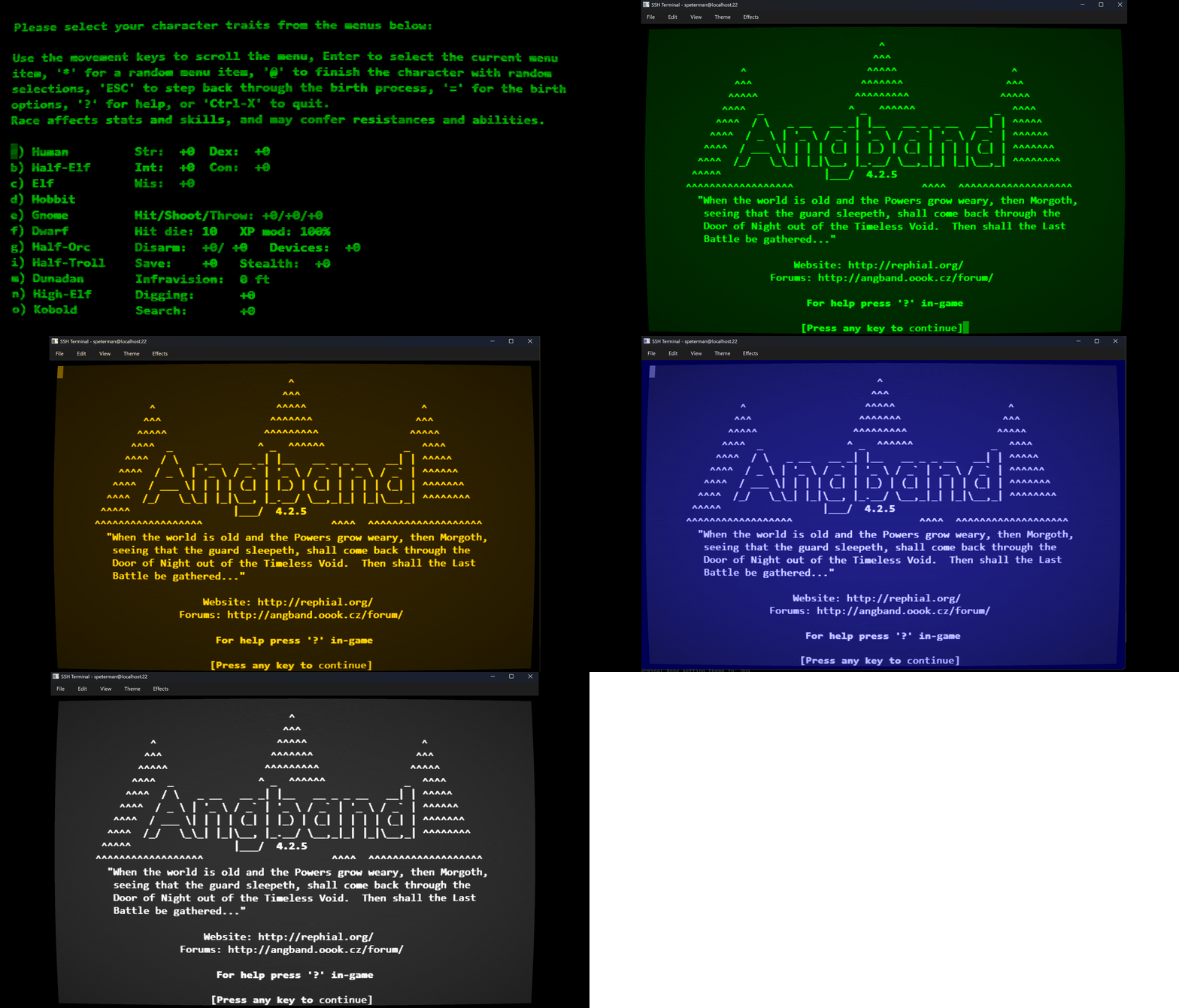
🎭 Retro Themes
- Green Phosphor: Classic green monochrome CRT terminal
- Amber Phosphor: Warm amber terminal with enhanced glow
- DOS Terminal: Retro blue DOS-style terminal
⌨️ Terminal Features
- Full ANSI Support: Complete terminal emulation with color support
- Scrollback Buffer: History navigation and scrolling
- Cursor Control: Blinking cursor with adjustable rate
- Key Mapping: Comprehensive SSH key handling
- Clipboard Support: Copy/paste functionality
🚀 Installation
Prerequisites
- Python 3.10+
- PyQt6
- PyOpenGL (for hardware acceleration)
- SSH client libraries
Install Dependencies
pip install -r requirements.txt
Required Packages
PyQt6
PyOpenGL
PyOpenGL_accelerate
paramiko
pyte
numpy
🎮 Usage
Starting the Application
python -m coolpyterm.cpt
First Run
- Connection Dialog: The application starts with a connection dialog
- Enter SSH Details: Hostname, username, password/key file
- Save Profile: Optionally save connection details for future use
- Connect: Click "Connect" to establish SSH session
Connection Management
- Ctrl+M: Open connection manager
- Ctrl+N: Create new connection
- Double-click: Connect to saved profile instantly
⌨️ Keyboard Shortcuts
Application Controls
- Ctrl+Alt+F11: Toggle full screen mode
- Ctrl+Q: Quit application
- Ctrl+V: Paste from clipboard
- Escape: Exit full screen (in full screen mode)
Visual Effects
- Ctrl+G: Toggle phosphor glow
- Ctrl+S: Toggle scanlines
- Ctrl+Shift+A: Toggle ambient background glow
- Ctrl+Alt+I: Increase ambient glow intensity
- Ctrl+Alt+O: Decrease ambient glow intensity
Terminal Controls
- Standard SSH keys: All standard terminal key combinations work
- Function keys: F1-F12 support
- Arrow keys: Navigation support
- Ctrl+C: Send SIGINT
- Ctrl+D: Send EOF
- Ctrl+Z: Send SIGTSTP
🎨 Themes
Green Phosphor (Default)
Classic green monochrome CRT appearance with moderate phosphor persistence and subtle background glow.
Amber Phosphor
Warm amber coloring reminiscent of early computer terminals, with enhanced background glow for that cozy retro feel.
DOS Terminal
Blue-tinted terminal mimicking classic DOS and early PC interfaces with crisp, high-contrast appearance.
⚙️ Configuration
Settings
- Connection profiles are automatically saved
- Window geometry and state persistence
- Theme preferences
- Effect intensity settings
Auto-Adjustment Features
- Scanline DPI Scaling: Automatically adjusts scanline intensity based on screen DPI
- Font Scaling: Responsive font sizing
- Effect Optimization: Performance-optimized rendering
🔧 Advanced Features
Full Screen Mode
- Borderless Display: True full screen experience
- Menu-Free Interface: Clean, distraction-free terminal
- Proper Geometry: Exact screen coverage
- Easy Exit: Escape key or Ctrl+Alt+F11
CRT Authenticity
- Phosphor Persistence: Realistic afterglow simulation
- Variable Intensity: Adjustable effect levels
- Theme Integration: Effects tailored to each theme
- Hardware Acceleration: Smooth 60fps rendering
Connection Features
- Recent History: Track and prioritize recent connections
- Profile Export/Import: (Planned feature)
- Connection Validation: Pre-connection testing
- Error Handling: Graceful connection failure management
🛠️ Development
Project Structure
coolpyterm/
├── cpt.py                    # Main application entry point
├── connection_manager.py     # SSH connection management
├── opengl_grid_widget.py    # Hardware-accelerated rendering
├── retro_theme_manager.py   # Theme system
├── ssh_backend.py           # SSH connection handling
├── key_handler_ssh.py       # Keyboard input processing
├── settings_manager.py      # Configuration management
└── logs/                    # Application logs
Key Components
- OpenGL Shaders: Custom fragment shaders for CRT effects
- SSH Backend: Paramiko-based SSH client
- Grid Rendering: Efficient character grid system
- Theme Engine: Extensible color scheme system
📋 System Requirements
Minimum Requirements
- OS: Windows 10, macOS 10.14, or Linux
- Python: 3.10 or higher
- Graphics: OpenGL 3.3 support
Recommended
- Graphics: Dedicated GPU for best performance
- Display: High DPI display for optimal scanline effects
- Memory: 1GB+ RAM for large scrollback buffers
🐛 Troubleshooting
OpenGL Issues
# Check OpenGL support
python -m coolpyterm.checkogl
Connection Problems
- Verify SSH credentials
- Check network connectivity
- Review connection logs in
logs/directory
Performance Issues
- Disable effects on slower systems
- Reduce font size for better performance
- Use windowed mode instead of full screen
Building Distributions with setup.py
1. Development Installation
# Install in development/editable mode
pip install -e .

# Install with development dependencies
pip install -e ".[dev]"

# Test the installation
coolpyterm
python -m coolpyterm
2. Building Wheel Distribution
# Install build dependencies
pip install wheel setuptools

# Build wheel (recommended format)
python setup.py bdist_wheel

# Creates: dist/coolpyterm-1.0.0-py3-none-any.whl
3. Building Source Distribution
# Build source distribution (tarball)
python setup.py sdist

# Creates: dist/coolpyterm-1.0.0.tar.gz
4. Building Both Wheel and Source
# Build both wheel and source distribution
python setup.py sdist bdist_wheel

# Creates both:
# dist/coolpyterm-1.0.0.tar.gz
# dist/coolpyterm-1.0.0-py3-none-any.whl
5. Clean Build (Recommended)
# Clean previous builds
python setup.py clean --all
rm -rf build/ dist/ *.egg-info/

# Fresh build
python setup.py sdist bdist_wheel

# Verify contents
twine check dist/*
Windows Build Commands
# Windows equivalent of clean build
python setup.py clean --all
if exist build rmdir /s /q build
if exist dist rmdir /s /q dist
for /d %%i in (*.egg-info) do rmdir /s /q "%%i"

# Build distributions
python setup.py sdist bdist_wheel

# Verify
twine check dist\*
Upload to PyPI
# Install upload tools
pip install twine

# Check distributions before upload
twine check dist/*

# Upload to Test PyPI first (recommended)
twine upload --repository testpypi dist/*

# Upload to real PyPI
twine upload dist/*
📜 License
[Add your license information here]
🏆 Acknowledgments
- PyQt6: For the excellent GUI framework
- OpenGL: For hardware acceleration capabilities
- Paramiko: For robust SSH connectivity
- Pyte: For terminal emulation support
CoolPyTerm - Where modern technology meets retro aesthetics. Experience the nostalgia of classic terminals with the power of contemporary hardware acceleration.
Release history Release notifications | RSS feed


Download files
Download the file for your platform. If you're not sure which to choose, learn more about installing packages.
Source Distribution
Built Distribution
Filter files by name, interpreter, ABI, and platform.
If you're not sure about the file name format, learn more about wheel file names.
Copy a direct link to the current filters
File details
Details for the file coolpyterm-0.1.2.tar.gz.
File metadata
- Download URL: coolpyterm-0.1.2.tar.gz
- Upload date:
- Size: 72.6 kB
- Tags: Source
- Uploaded using Trusted Publishing? No
- Uploaded via: twine/6.1.0 CPython/3.12.8
File hashes
| Algorithm | Hash digest | |
|---|---|---|
| SHA256 |
dc14e145794b813d60eb43ea796004195ea89f88f8f6e60fea5429165ad5a50a
|
|
| MD5 |
3c5ec68fdf7c23dc8bcca189300900f1
|
|
| BLAKE2b-256 |
5fdc89b87f27e36c8466ff94bc2594508e36c1fb611f316e7b3a7266d7787b5f
|
File details
Details for the file coolpyterm-0.1.2-py3-none-any.whl.
File metadata
- Download URL: coolpyterm-0.1.2-py3-none-any.whl
- Upload date:
- Size: 72.0 kB
- Tags: Python 3
- Uploaded using Trusted Publishing? No
- Uploaded via: twine/6.1.0 CPython/3.12.8
File hashes
| Algorithm | Hash digest | |
|---|---|---|
| SHA256 |
3f296e95c3176129f61884629f2f72c534ec7c882c03aec04aa516c8154f5ebc
|
|
| MD5 |
7e2220d18b5ff9e0d6b438c1ba007b70
|
|
| BLAKE2b-256 |
e83a9b11c630a71a669299f76f2cd7bfa38ea46e76389341ad43da3df42f6875
|






