
A library for working with hierarchical coordinate systems and transformations
Verified details
These details have been verified by PyPIProject links
GitHub Statistics
Maintainers

Project description
- Coordinatus
Coordinatus
Simple coordinate transformations with hierarchical frames
Ever needed to convert coordinates between different spaces? Coordinatus makes it easy to work with nested coordinate systems—like transforming from a character's local space to world space, or from one object to another.
Note: Currently supports 2D Cartesian coordinates. Support for 3D, polar, and spherical coordinate systems is planned.
Why Coordinatus?
- Intuitive API: Work with Points and Vectors that transform correctly (vectors ignore translation!)
- Hierarchical Frames: Build parent-child relationships just like scene graphs in game engines
- Clean transformations: Simple functions for translation, rotation, and scaling
- Type-safe: Points and Vectors are distinct types with correct transformation behavior
Installation with uv
Modern python package manager uv is recommended for managing dependencies, but pip can also be used (simply replace uv add with pip install in example below).
uv add coordinatus
Installing the Development Version
To install the latest development version from the develop branch:
Using uv:
uv add git+https://github.com/ManuGira/Coordinatus.git@develop
Optional: Visualization Support
For plotting and visualization features (used in examples):
Using uv:
uv add coordinatus[plotting]
This installs matplotlib for the coordinatus.visualization module.
Quick Start
from coordinatus import Frame, Point, create_frame
import numpy as np

# Create a world frame
world = Frame()

# Create a car frame, positioned at (100, 50) in the world
car = create_frame(parent=world, tx=100, ty=50, angle_rad=np.pi/4)

# Create a wheel frame, offset (10, 0) from the car
wheel = create_frame(parent=car, tx=10, ty=0)

# A point at the wheel's center
point_in_wheel = Point(x=0, y=0, frame=wheel)

# Convert to world coordinates
point_in_world = point_in_wheel.to_absolute()
print(f"Wheel center in world: ({point_in_world.x}, {point_in_world.y})")

# Convert between any two frames
point_in_car = point_in_wheel.relative_to(car)
print(f"Wheel center in car frame: ({point_in_car.x}, {point_in_car.y})")
Core Concepts
Frames
A Frame represents a coordinate system with its own position, rotation, and scale. Frames can be nested to create hierarchies.
Points vs Vectors
- Points represent positions and are affected by translation
- Vectors represent directions/offsets and ignore translation
from coordinatus import Point, Vector, Frame, create_frame

frame = create_frame(parent=None, tx=10, ty=5)

# Point gets translated
point = Point(x=0, y=0, frame=frame)
absolute = point.to_absolute()  # (10, 5)

# Vector does NOT get translated
vector = Vector(x=1, y=0, frame=frame)
absolute_vec = vector.to_absolute()  # (1, 0) - only rotation/scale applied
Coordinate Conversion
Convert between any two frames in your hierarchy:
# Convert from frame_a to frame_b
point_in_a = Point(np.array([5, 3]), frame=frame_a)
point_in_b = point_in_a.relative_to(frame_b)

# Or get absolute (world) coordinates
point_in_world = point_in_a.to_absolute()
The Relativity of Coordinates
A fundamental concept in coordinate transformations is that the same geometry looks different depending on your point of view. The same F-shaped object can appear rotated, scaled, or sheared simply by changing which reference frame you're observing from.
Consider these three views of the same scene with an F-shaped object and two coordinate frames:
View from Frame 1
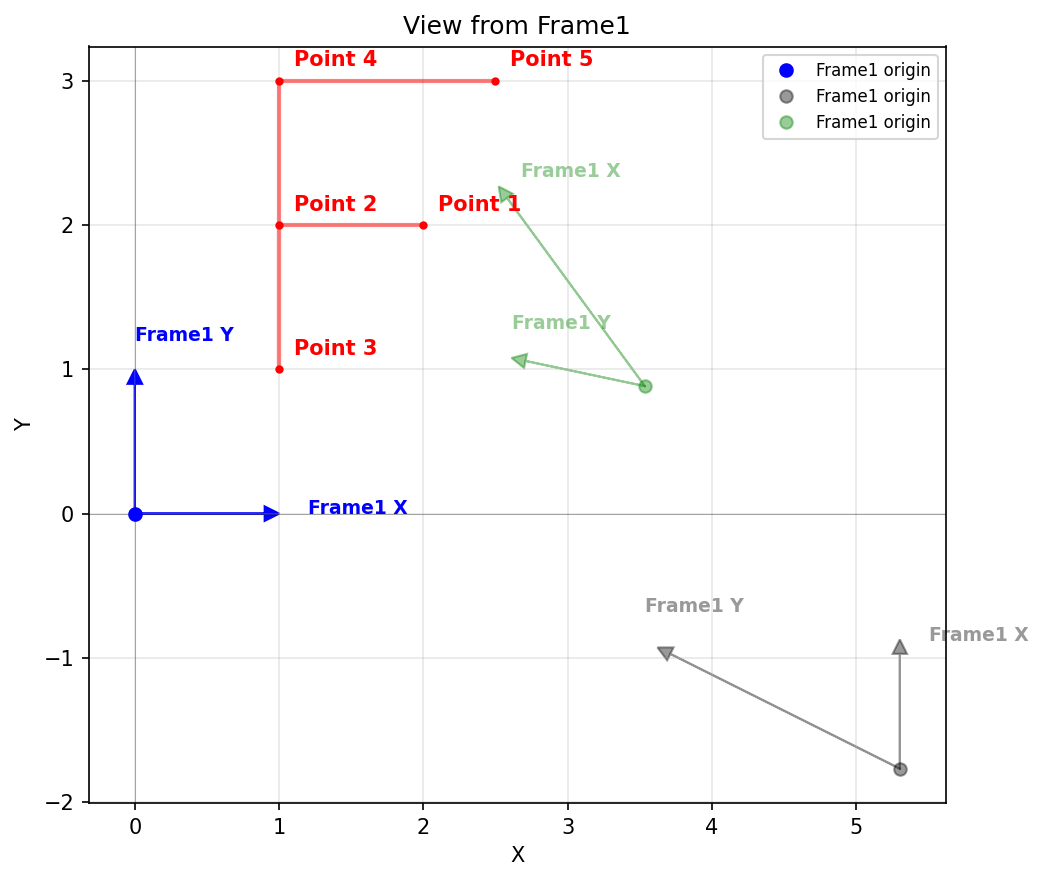
The F shape appears undistorted in its canonical form because it was defined using Frame 1 coordinates. From this perspective, Frame 1's axes are the standard orthogonal x and y axes at the origin. Frame 2 (green) appears in a different position and orientation relative to Frame 1.
View from Absolute Space
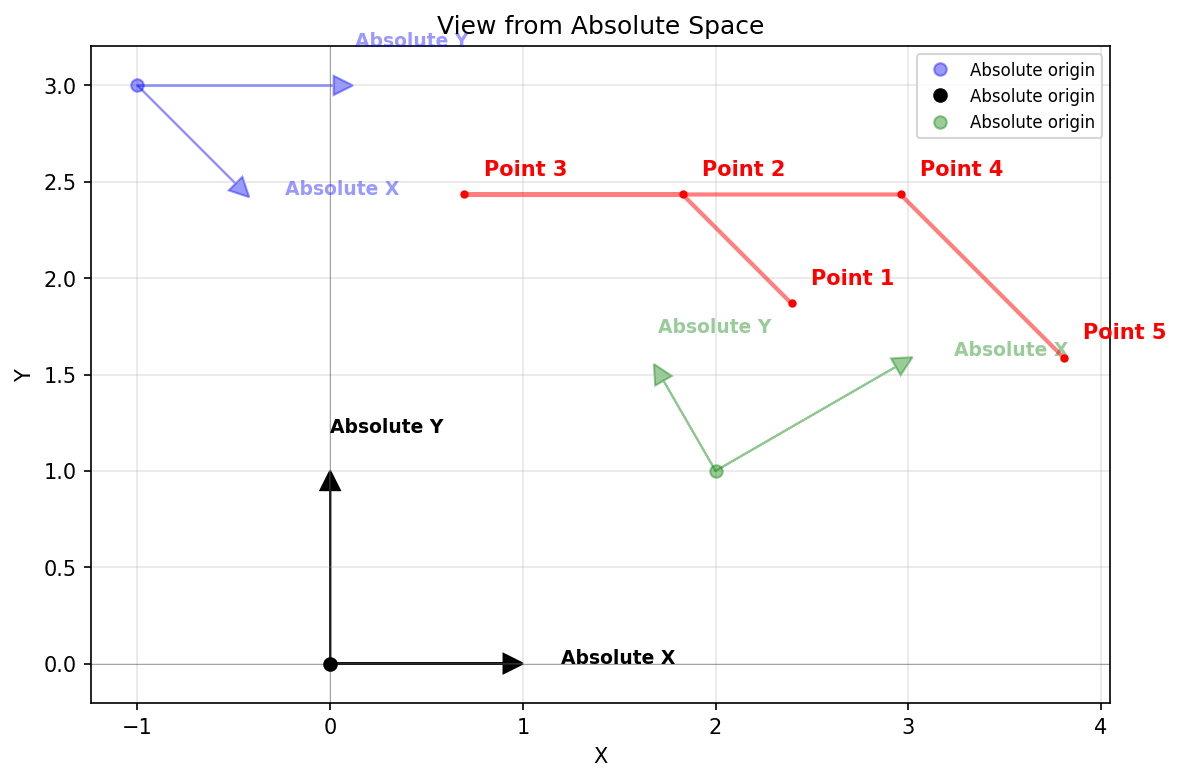
In absolute (world) space, we see how the F shape actually looks in reality. Frame 1 (blue) is sheared and the F inherits this shearing. Frame 2 (green) is rotated and scaled. This reveals the true geometric relationships between all elements.
View from Frame 2
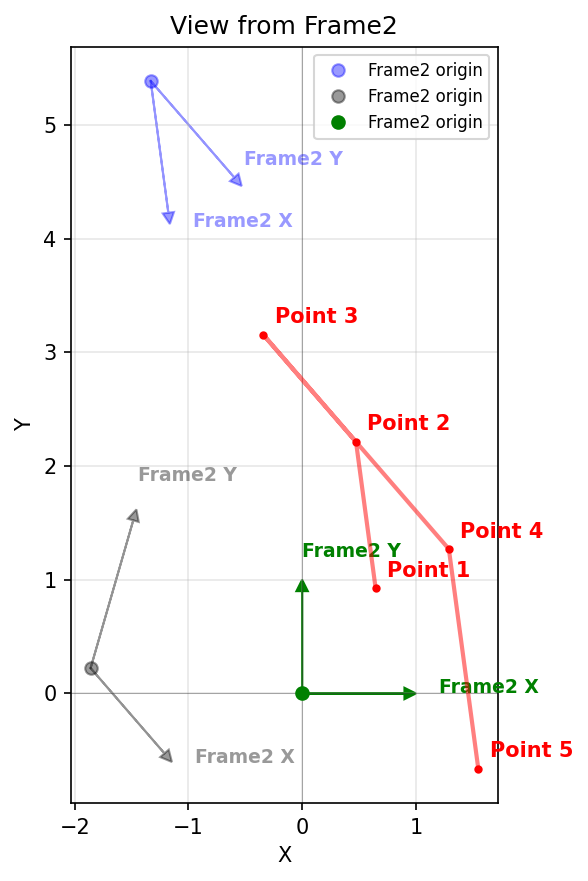
From Frame 2's perspective, Frame 2 is now at the origin with standard axes. The same F shape appears with a completely different orientation and distortion, even though the geometry itself hasn't changed—only our reference frame has.
Key insight: Coordinates are not absolute—they depend on the observer. The F shape's numerical coordinates change in each view, but the shape's position in physical space remains constant. This is the essence of relative coordinate systems.
API Overview
Creating Frames
from coordinatus import Frame, create_frame
import numpy as np

# Manually with a transform matrix
frame = Frame(transform=my_matrix, parent=parent_frame)

# Or use the convenient factory
frame = create_frame(
    parent=parent_frame,
    tx=10, ty=5,           # Translation
    angle_rad=np.pi/4,     # Rotation
    sx=2, sy=2             # Scale
)
Transformation Utilities
from coordinatus.transforms import translate2D, rotate2D, scale2D, trs2D

# Individual transformations (2D)
t = translate2D(tx=10, ty=5)
r = rotate2D(angle_rad=np.pi/2)
s = scale2D(sx=2, sy=3)

# Combined TRS (Translation-Rotation-Scale)
transform = trs2D(tx=10, ty=5, angle_rad=np.pi/4, sx=2, sy=2)
Visualization (Optional)
from coordinatus.visualization import draw_frame_axes, draw_points
import matplotlib.pyplot as plt

# Create figure
fig, ax = plt.subplots()

# Draw frames and points
draw_frame_axes(ax, frame1, color='blue', label='Frame1')
draw_frame_axes(ax, frame2, color='green', label='Frame2')
draw_points(ax, [point1, point2], color='red')

plt.show()
Note: Requires uv add coordinatus[plotting]
Examples
Check out the examples/ folder for complete, runnable examples:
Testing
uv run pytest tests
License
MIT
Project details
Verified details
These details have been verified by PyPIProject links
GitHub Statistics
Maintainers
Release history Release notifications | RSS feed


Download files
Download the file for your platform. If you're not sure which to choose, learn more about installing packages.
Source Distribution
Built Distribution
Filter files by name, interpreter, ABI, and platform.
If you're not sure about the file name format, learn more about wheel file names.
Copy a direct link to the current filters
File details
Details for the file coordinatus-0.3.0.tar.gz.
File metadata
- Download URL: coordinatus-0.3.0.tar.gz
- Upload date:
- Size: 12.3 kB
- Tags: Source
- Uploaded using Trusted Publishing? Yes
- Uploaded via: twine/6.1.0 CPython/3.13.7
File hashes
| Algorithm | Hash digest | |
|---|---|---|
| SHA256 |
e5f1e42c9c2750bdaaecd574ce9f3def856aa6586d383e92fd8ec454fd21d78a
|
|
| MD5 |
a033e31ebb373b876d311d21edd5bec0
|
|
| BLAKE2b-256 |
652433b388a1a1e54edc8f54eeb46e0239600e25669b2c1f7ee710f78f4cc0ed
|
Provenance
The following attestation bundles were made for coordinatus-0.3.0.tar.gz:
Publisher:
publish.yml on ManuGira/Coordinatus
-
Statement:
-
Statement type:
https://in-toto.io/Statement/v1 -
Predicate type:
https://docs.pypi.org/attestations/publish/v1 -
Subject name:
coordinatus-0.3.0.tar.gz -
Subject digest:
e5f1e42c9c2750bdaaecd574ce9f3def856aa6586d383e92fd8ec454fd21d78a - Sigstore transparency entry: 788395086
- Sigstore integration time:
-
Permalink:
ManuGira/Coordinatus@9fc3da0c0709e793da2b9dc4cde75ac0db2f20b7 -
Branch / Tag:
refs/tags/v0.3.0 - Owner: https://github.com/ManuGira
-
Access:
public
-
Token Issuer:
https://token.actions.githubusercontent.com -
Runner Environment:
github-hosted -
Publication workflow:
publish.yml@9fc3da0c0709e793da2b9dc4cde75ac0db2f20b7 -
Trigger Event:
release
-
Statement type:
File details
Details for the file coordinatus-0.3.0-py3-none-any.whl.
File metadata
- Download URL: coordinatus-0.3.0-py3-none-any.whl
- Upload date:
- Size: 16.4 kB
- Tags: Python 3
- Uploaded using Trusted Publishing? Yes
- Uploaded via: twine/6.1.0 CPython/3.13.7
File hashes
| Algorithm | Hash digest | |
|---|---|---|
| SHA256 |
6033f79d8d2bff49961e2e65f5b45fe9b70e2989bc7a4d41024a884fd849a34e
|
|
| MD5 |
cec0cb3c1279e7bd01512ae86443dc7a
|
|
| BLAKE2b-256 |
3f3f908aaeff8d78af438775f92d140ae6ea64d3810e998a6ad5d2b5edf88e82
|
Provenance
The following attestation bundles were made for coordinatus-0.3.0-py3-none-any.whl:
Publisher:
publish.yml on ManuGira/Coordinatus
-
Statement:
-
Statement type:
https://in-toto.io/Statement/v1 -
Predicate type:
https://docs.pypi.org/attestations/publish/v1 -
Subject name:
coordinatus-0.3.0-py3-none-any.whl -
Subject digest:
6033f79d8d2bff49961e2e65f5b45fe9b70e2989bc7a4d41024a884fd849a34e - Sigstore transparency entry: 788395088
- Sigstore integration time:
-
Permalink:
ManuGira/Coordinatus@9fc3da0c0709e793da2b9dc4cde75ac0db2f20b7 -
Branch / Tag:
refs/tags/v0.3.0 - Owner: https://github.com/ManuGira
-
Access:
public
-
Token Issuer:
https://token.actions.githubusercontent.com -
Runner Environment:
github-hosted -
Publication workflow:
publish.yml@9fc3da0c0709e793da2b9dc4cde75ac0db2f20b7 -
Trigger Event:
release
-
Statement type:






