
copilot-service
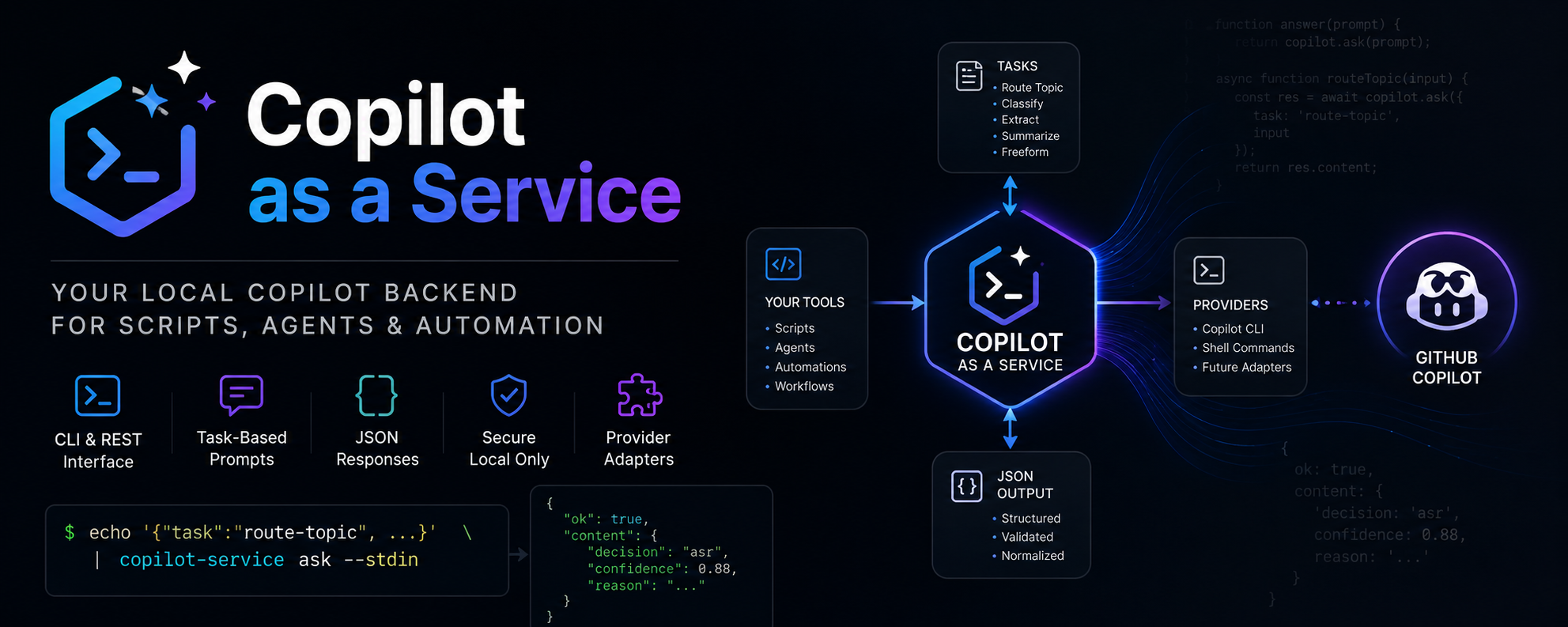
copilot-service provides a stable local CLI and REST wrapper around Copilot/LLM CLI tooling so scripts and agents can call a normalized task API.
What problem this solves
Different LLM CLIs have different prompt formats and output styles. This project gives one stable contract for task-based calls (route-topic, freeform) and isolates provider setup in local config.
Releases
Automated releases are available through GitHub Actions. See docs/release.md for full instructions.
Python client
from copilot_service.client import CopilotServiceClient

client = CopilotServiceClient()  # connects to http://127.0.0.1:8765

result = client.freeform("Explain this error")
if result.ok:
    print(result.content["text"])

result = client.route_topic(
    title="Article title",
    message="Full message",
    article_excerpt="...",
    topics={"asr": "Speech Recognition", "nlp": "NLP"},
)
print(result.content["decision"])
See docs/api-contract.md for the full API contract.
CLI UX
Running copilot-caas with no arguments shows a colorful welcome screen and exits 0:
copilot-caas
Check the installed version:
copilot-caas --version
Run a task:
copilot-caas ask --input examples/route-topic-request.json
Colors are automatically disabled when NO_COLOR is set or output is not a TTY.
Quickstart (fake provider)
python -m venv .venv
. .venv/bin/activate
pip install -e .

export COPILOT_SERVICE_PROVIDER=fake
export COPILOT_SERVICE_FAKE_RESPONSE='{"decision":"asr","confidence":0.8,"reason":"fake"}'
copilot-service ask --input examples/route-topic-request.json
Systemd user service management
copilot-caas includes a service command group for managing a persistent local systemd user service.
Install
pip install -e .
copilot-caas service install
Or with explicit options:
copilot-caas service install \
  --source-dir /path/to/repo \
  --copilot-bin /path/to/copilot \
  --model gpt-5-mini \
  --host 127.0.0.1 \
  --port 8765
The installer:
- Detects and validates the Copilot CLI binary (with a 20-second timeout per candidate).
- Creates
~/.local/share/copilot-service/with a dedicated venv. - Writes
~/.config/copilot-service/envwithCOPILOT_SERVICE_SHELL_MODE=argv. - Writes
~/.config/systemd/user/copilot-service.serviceand enables it. - Runs a health check and a provider smoke test.
Skip the smoke test (e.g. for CI):
copilot-caas service install --skip-provider-smoke
# or
COPILOT_SERVICE_SKIP_PROVIDER_SMOKE=1 copilot-caas service install
Other service commands
copilot-caas service status    # systemctl status + /health
copilot-caas service restart   # restart + health check
copilot-caas service logs      # journalctl (last 120 lines)
copilot-caas service logs -f   # follow logs
copilot-caas service logs -n 50
copilot-caas service test      # diagnostics + provider smoke test
copilot-caas service uninstall
copilot-caas service uninstall --remove-config --remove-install-dir --yes
Autostart after reboot
The service runs as a systemd user unit — it only starts when you log in. For headless/server setups where no interactive session exists:
sudo loginctl enable-linger "$USER"
Security: The REST server binds to
127.0.0.1by default. Do not bind to0.0.0.0unless you have auth, a reverse proxy, or a firewall in place.
Quickstart (shell provider)
export COPILOT_SERVICE_PROVIDER=shell
export COPILOT_SERVICE_SHELL_COMMAND='python -c "import sys; print(sys.stdin.read())"'
copilot-service ask --task freeform --prompt "Explain this"
REST usage
copilot-service serve --host 127.0.0.1 --port 8765

curl -sS http://127.0.0.1:8765/health
curl -sS http://127.0.0.1:8765/v1/ask \
  -H 'content-type: application/json' \
  --data @examples/freeform-request.json
curl -sS http://127.0.0.1:8765/v1/tasks/route-topic \
  -H 'content-type: application/json' \
  --data @examples/route-topic-request.json
Article-ingestion integration example
See examples/article-ingestion-usage.sh for a simple pipeline wrapper around the route-topic task.
Environment
COPILOT_SERVICE_PROVIDER(shellfor MVP,fakefor tests)COPILOT_SERVICE_SHELL_COMMAND(provider command)COPILOT_SERVICE_MODEL(defaultgpt-5-mini)COPILOT_SERVICE_TIMEOUT_SECONDS(default90)COPILOT_SERVICE_HOST(default127.0.0.1)COPILOT_SERVICE_PORT(default8765)
Limitations
- MVP ships only with shell/fake providers.
- Output quality depends on your configured local command and prompt discipline.
route-topicfallback behavior can mask model errors when enabled (default true).
Security note
REST binds to 127.0.0.1 by default. The shell command is loaded only from local environment/config (never from request payload).
Debug systemd service
If the service is installed via scripts/install-systemd-user.sh and requests fail, use these commands to diagnose.
Check the env file written by the installer:
cat ~/.config/copilot-service/env
Check service status:
systemctl --user status copilot-service.service --no-pager
Tail recent logs:
journalctl --user -u copilot-service.service -n 120 --no-pager
Show unit configuration (env file path and ExecStart):
systemctl --user show copilot-service.service -p EnvironmentFiles -p ExecStart
Health check:
curl -s http://127.0.0.1:8765/health | jq .
Route-topic API call:
curl -s http://127.0.0.1:8765/v1/tasks/route-topic \
  -H 'Content-Type: application/json' \
  --data-binary @/tmp/route-topic-request.json | jq .
Direct provider check (replace /path/to/copilot with the value of COPILOT_SERVICE_SHELL_COMMAND in the env file):
/path/to/copilot \
  -p 'Return only this exact JSON and nothing else: {"ok":true}' \
  --model gpt-5-mini \
  --silent \
  --no-color \
  --no-auto-update \
  --stream off \
  --no-custom-instructions \
  --no-ask-user \
  --available-tools=
Expected output (the leading ● bullet is stripped automatically by the JSON extractor):
● {"ok":true}
Shell provider modes (COPILOT_SERVICE_SHELL_MODE):
| Value | Behavior |
|---|---|
argv |
Prompt passed via -p flag; uses shell=False. Required for GitHub Copilot CLI. |
stdin |
Prompt piped to subprocess stdin; uses shell=True. Original default. |
| `` (empty) | Same as stdin — backward-compatible default. |
The installer sets COPILOT_SERVICE_SHELL_MODE=argv automatically.
1 maintainer

Metadata
1 maintainer
Release files for copilot-caas 1.1.0
For a detailed explanation of source distributions (sdists) and built distributions (wheels), please see the package formats documentation.
Source distribution (sdist)
| File | Size | Uploaded | |
|---|---|---|---|
| copilot_caas-1.1.0.tar.gz | 1.4 MB | Details |
Built distribution (wheel)
| File | Interpreter | ABI | Platform | Reset |
|---|---|---|---|---|
| copilot_caas-1.1.0-py3-none-any.whl | Python 3 | none | any | Details |
Total release size: 1.5 MB
Release files / copilot_caas-1.1.0.tar.gz
| Download URL | copilot_caas-1.1.0.tar.gz |
|---|---|
| Size | 1.4 MB |
| Tags | Source |
|
SHA-256 checksum How to use checksums |
bb0b8036623619d2cbce235bce8708a6d061fadee8a04a16e2f297191ed618b7
|
|
BLAKE2b-256 checksum How to use checksums |
9b0c4399bbec6c2285e0f77acabb3d03c69466fe1886cca2a51a48de76d96744
|
| Upload date | |
|
Uploaded using Trusted Publishing? What is trusted publishing? |
Yes |
| Uploaded via |
twine/6.1.0 CPython/3.13.12
|
Provenance
Provenance describes where a file came from. On PyPI, provenance is shared via attestations, which provide a verifiable record of the build or publishing details. View details, limitations and caveats.


PyPI Publish Attestation
PyPI verified that this artifact, at this checksum, originated from the publisher listed below.
Signed by GitHub Actions, verified by PyPI on May 9, 2026.
Transparency logRelease files / copilot_caas-1.1.0-py3-none-any.whl
| Download URL | copilot_caas-1.1.0-py3-none-any.whl |
|---|---|
| Size | 26.8 kB |
| Tags | Python 3 |
|
SHA-256 checksum How to use checksums |
d607726f70c882fe2e4090d52927058d6b30e34e58881b493b5150b9d1a0939b
|
|
BLAKE2b-256 checksum How to use checksums |
b388e536a65b10ed3f9891a480591924c3f8eddd61da7e0c5691b3b92ebf56b7
|
| Upload date | |
|
Uploaded using Trusted Publishing? What is trusted publishing? |
Yes |
| Uploaded via |
twine/6.1.0 CPython/3.13.12
|
Provenance
Provenance describes where a file came from. On PyPI, provenance is shared via attestations, which provide a verifiable record of the build or publishing details. View details, limitations and caveats.
PyPI Publish Attestation
PyPI verified that this artifact, at this checksum, originated from the publisher listed below.
Signed by GitHub Actions, verified by PyPI on May 9, 2026.
Transparency log













