

CopyKat Studio by Oso
Copy the style of any reel, story, post or TikTok — and make it with your own photos and texts.
Plus a video downloader, a halftone paper-collage maker and 51 film looks. Runs on your computer, with your own AI.





npx copykat-studio
What it does
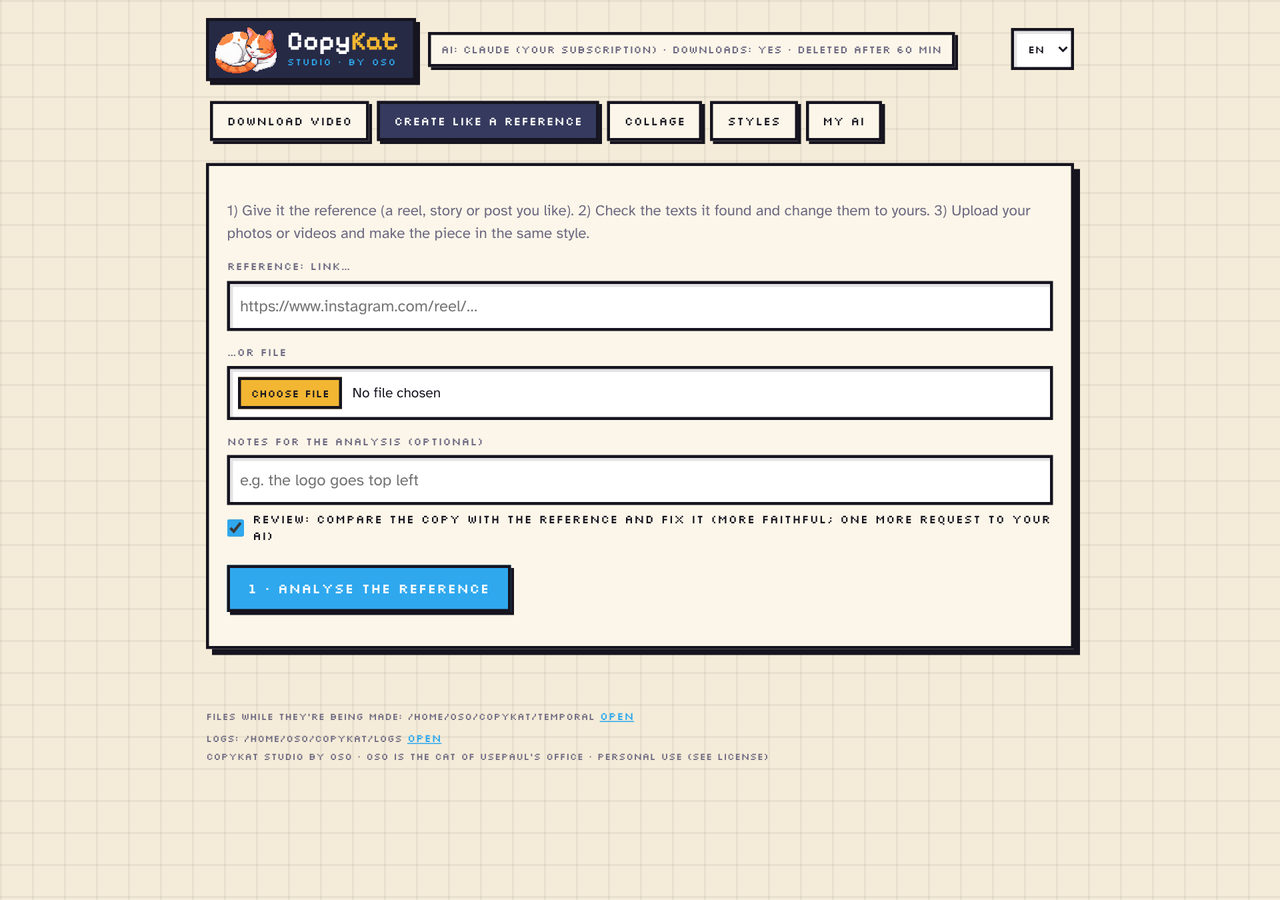
🎬 Create like a reference
Give it a reel, story, post, carousel or TikTok you like — a link or a file — and your photos or clips. CopyKat measures the reference instead of guessing: cuts (including fades and soft transitions), how long each shot lasts, the music's beat, camera motion and colour. Your AI then reads the layout and the texts, CopyKat measures the real size, weight, box and colour of each text to pick the closest font, and it reviews itself: it renders its copy next to the reference and fixes what doesn't match.
- MP4 for videos, PNG for images and carousels — or an image reference turned into an animated MP4.
- Smart framing: each photo is cropped around the face or the product, not the centre.
- Set the length in seconds, write variants of your texts and make them in a batch.
- Three engines: the built-in renderer, HyperFrames (HTML + GSAP), or art director mode, where your own Claude or ChatGPT designs the piece with tools — it looks at its frames, compares them with the reference and fixes them.
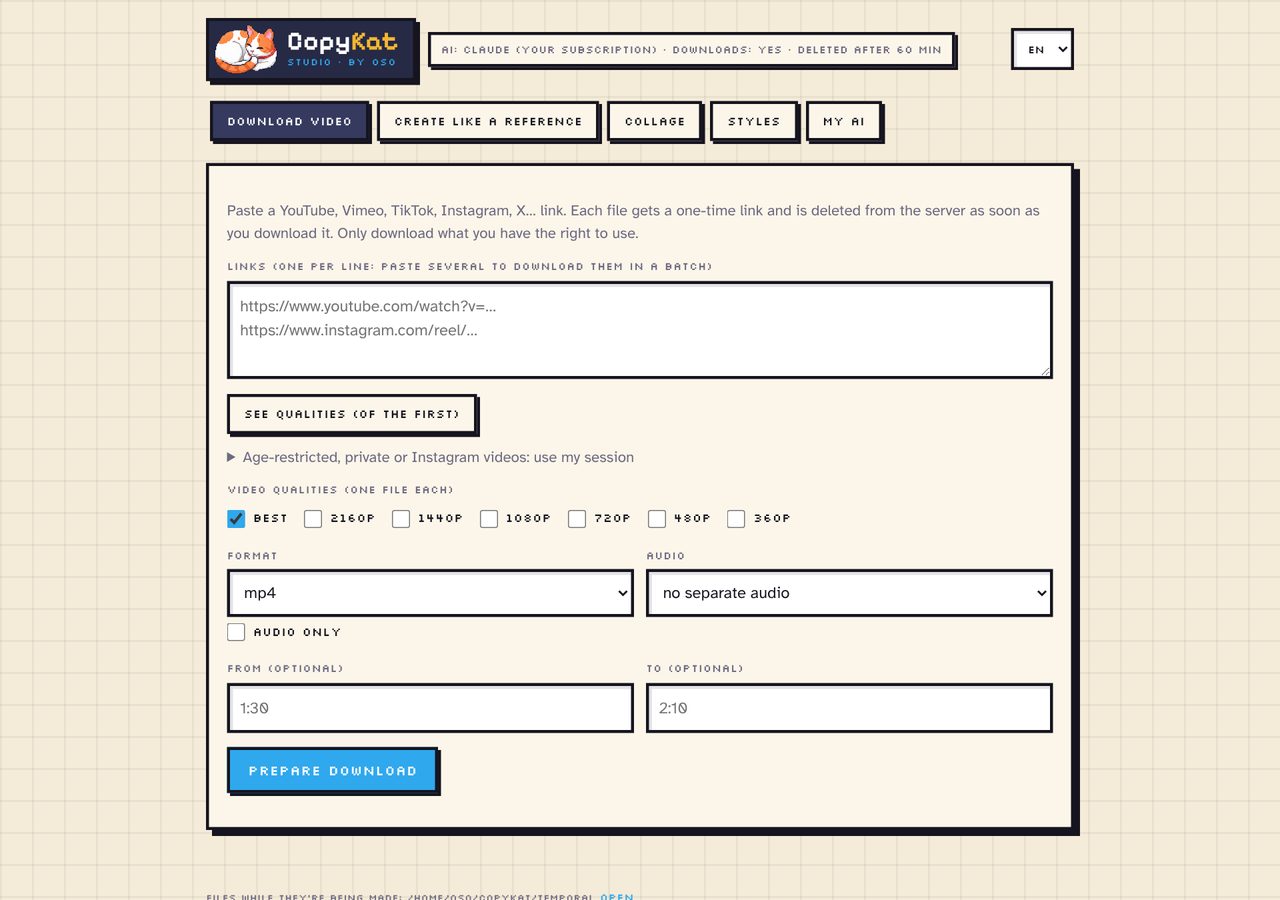
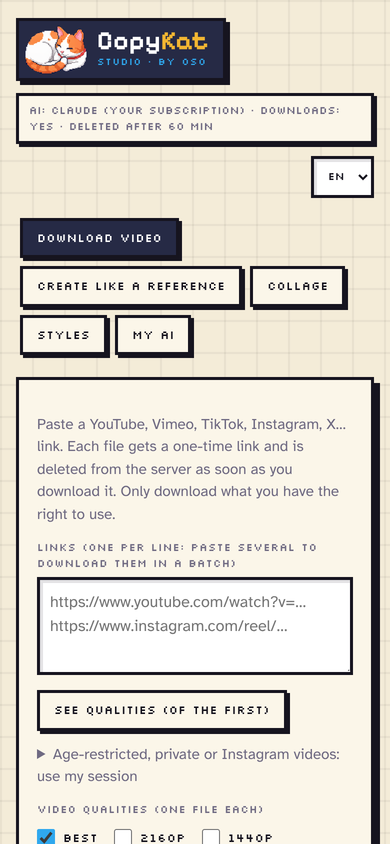
⬇️ Download videos
YouTube, Instagram, TikTok, Vimeo, X and many more sites (through yt-dlp).
- Pick one or several qualities (2160p … 360p), mp4/mkv/webm/mov, or audio only (mp3, m4a, opus, wav, flac).
- Cut a range (
1:30→2:10), get subtitles, a whole playlist, or paste many links for a batch. - Age-restricted, private or Instagram videos: use your own browser session or a
cookies.txt.
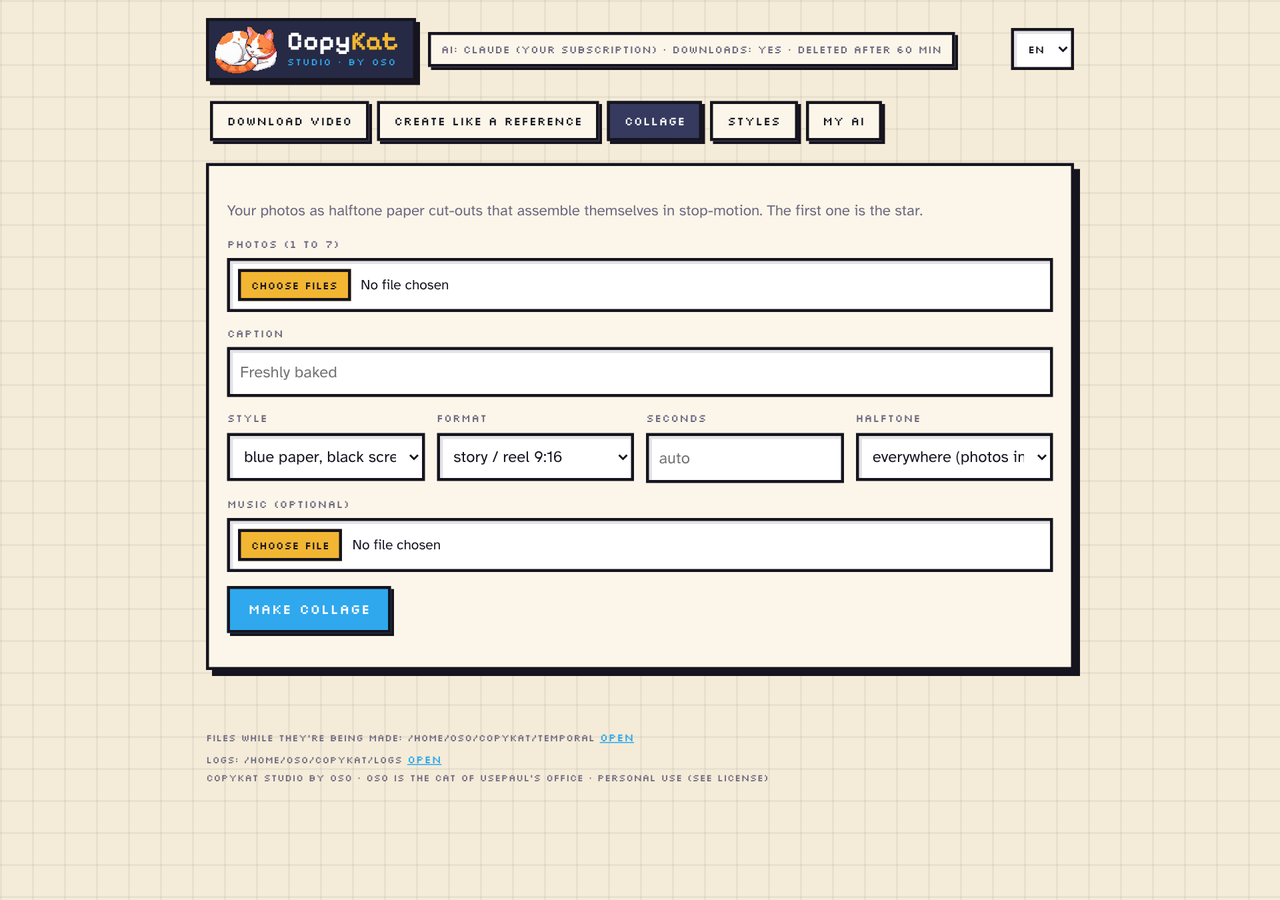
✂️ Halftone paper collage
Your photos as halftone paper cut-outs that assemble themselves in stop-motion, with a caption and optional music. Halftone on everything, only on the background, or off.

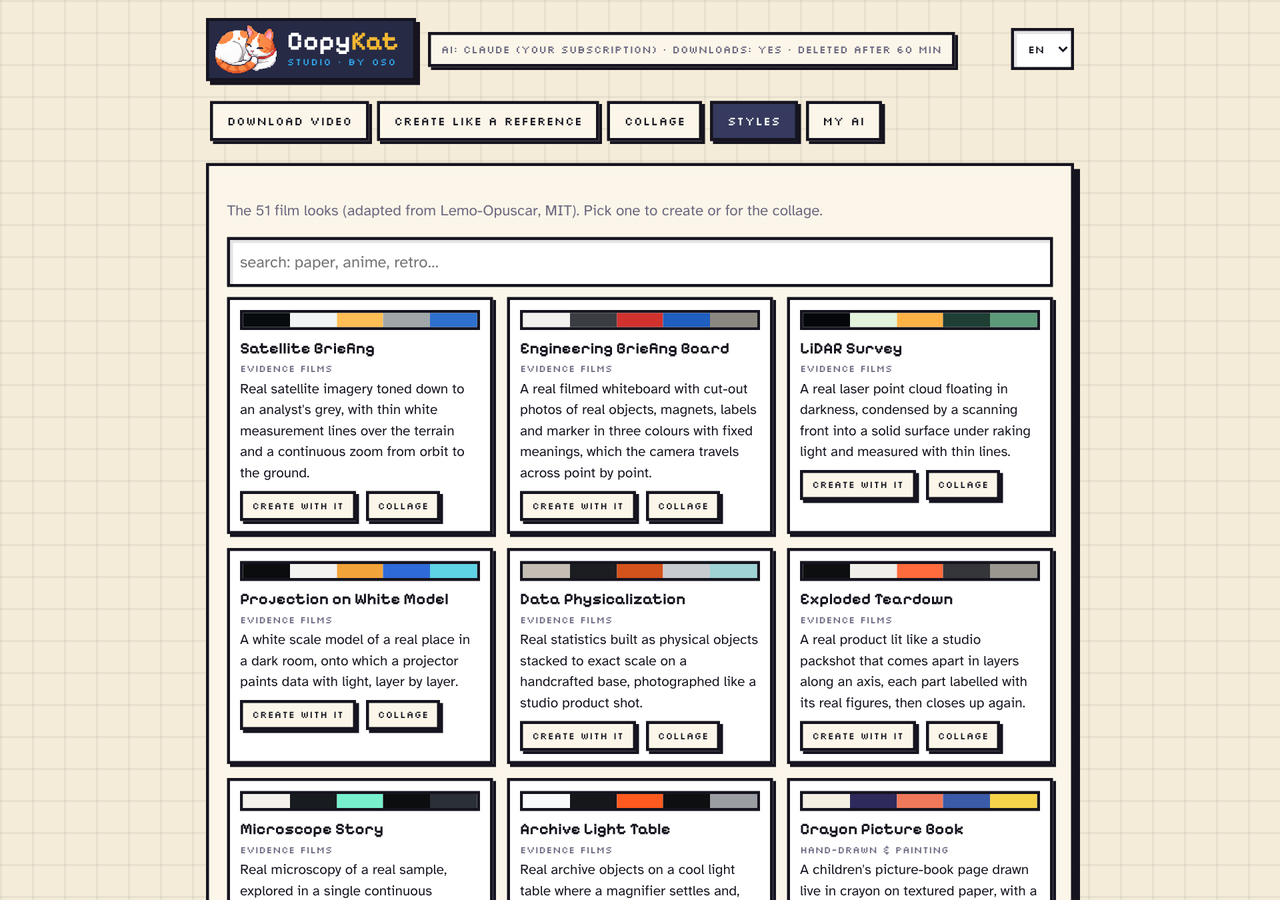
🎨 51 film looks
Risograph print, ukiyo-e, 16-bit pixel RPG, 80s cel anime, 1920s silent film, LiDAR survey… Each look brings its palette, fonts, grade, transitions and motion. Use one to create or for a collage. (Adapted from Lemo-Opuscar, MIT.)
🤖 Your own AI
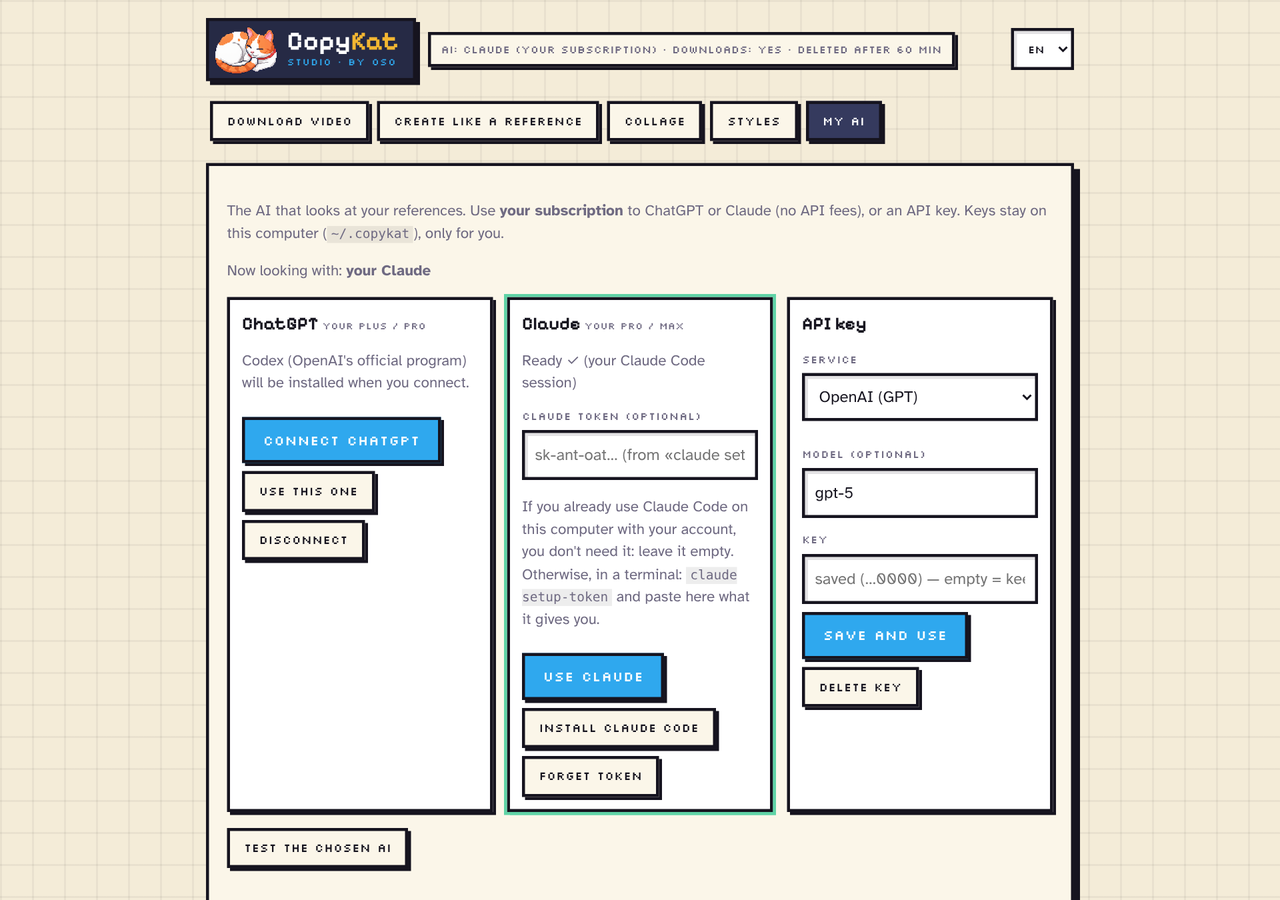
Use what you already pay for — no extra API fees with a subscription:
| Option | How |
|---|---|
| ChatGPT Plus / Pro | Through Codex, OpenAI's official program. One click: CopyKat installs it and you sign in. |
| Claude Pro / Max | Through Claude Code: your existing session, or a token from claude setup-token. |
| API key | OpenAI, Anthropic, Google Gemini, OpenRouter, xAI, any OpenAI-compatible service, or Ollama on your computer. |
Without an AI, CopyKat only copies the rhythm, length and cuts — no texts, colours or layout — and it tells you so. Downloading and collages don't need an AI.
🔒 Private by design
The studio runs on your computer at http://127.0.0.1:8080, only for you. Your keys stay in ~/.copykat (readable only
by your user), and files are deleted when you download them or after 60 minutes. Every job keeps a log you can open
from its card, so when something fails you see why. English, Spanish and French.
Screenshots
| Download | My AI |
|---|---|
 |
 |
| Collage | Styles |
 |
 |
The layout adapts to small windows too.
Install
Windows: download CopyKat-Studio-…-Setup.exe from the latest release, run it and open
CopyKat Studio from the Start menu or the desktop. Everything is included (Python, ffmpeg and Node): nothing
else to install. Windows may warn that the app is unknown: click «More info» → «Run anyway».
Any system (Windows, macOS, Linux):
You need Python 3.10–3.13 and ffmpeg. For npx (and the HyperFrames engine) you also need Node 18+.
# Easiest: installs everything the first time and opens the studio
npx copykat-studio

# Or with Python only
pipx install "copykat-studio[all]"
copykat studio
Getting ffmpeg: winget install ffmpeg (Windows) · brew install ffmpeg (macOS) · sudo apt install ffmpeg (Linux).
The npm launcher installs CopyKat in its own environment (~/.copykat/venv), without touching your system Python,
and updates it when a new version comes out. Ready-made packages for Windows (x64), macOS (Intel and Apple Silicon)
and Linux (x86_64).
Command line
copykat download "https://youtu.be/…" -q 1080 720           # one file per quality
copykat download "https://youtu.be/…" --audio-only           # just the mp3
copykat download --lista links.txt -q best                    # a batch, one link per line
copykat download "https://youtu.be/…" --from 1:30 --to 2:10 --cookies-from-browser firefox
copykat collage photo1.jpg photo2.jpg --label "Freshly baked" --format story -o collage.mp4
copykat --help
There's also an MCP server (copykat-mcp) so an AI assistant can analyse references and render pieces for you.
FAQ
YouTube asks me to confirm my age. Open «Age-restricted, private or Instagram videos: use my session» and pick a
browser where you're signed in, or upload a cookies.txt. On Windows, Chrome and Edge encrypt their session: use
Firefox, or export cookies.txt with the «Get cookies.txt LOCALLY» extension.
The result doesn't look like the reference. Check the top bar says your AI is connected (not «none»), keep «Review» on, and try the art director engine.
Something failed. Open the job's log from its card, or the logs folder shown at the bottom of the studio.
License
Elastic License 2.0. Free to use for yourself and your business. Offering it to others as a hosted or managed service (SaaS) requires a commercial license. Third-party parts keep their own licenses (MIT, OFL) — see NOTICE. Oso, the cat, belongs to usepaul's pixel-art office and isn't covered by the license grant.
Download only what you have the right to use, and respect each site's terms.
Made by PaulVentseck / usepaul · Oso says miau 🐾
1 maintainer

Metadata
1 maintainer
Release files for copykat-studio 0.6.9
For a detailed explanation of source distributions (sdists) and built distributions (wheels), please see the package formats documentation.
Built distributions (wheels)
Total release size: 43.0 MB
Release files / copykat_studio-0.6.9-cp313-cp313-win_amd64.whl
| Download URL | copykat_studio-0.6.9-cp313-cp313-win_amd64.whl |
|---|---|
| Size | 2.4 MB |
| Tags | CPython 3.13 Windows x86-64 |
|
SHA-256 checksum How to use checksums |
e272159da19e080b34a75f6d461a0171b5aaf067eccb54fc65e343aded9d386b
|
|
BLAKE2b-256 checksum How to use checksums |
2194297ea2b17913f4645a341c160524bd1558f7c5b679abf5956c82ebbf9709
|
| Upload date | |
|
Uploaded using Trusted Publishing? What is trusted publishing? |
Yes |
| Uploaded via |
twine/7.0.0 CPython/3.13.16
|
Provenance
Provenance describes where a file came from. On PyPI, provenance is shared via attestations, which provide a verifiable record of the build or publishing details. View details, limitations and caveats.


PyPI Publish Attestation
PyPI verified that this artifact, at this checksum, originated from the publisher listed below.
Signed by GitHub Actions, verified by PyPI on Oct 26, 2026.
Transparency logRelease files / copykat_studio-0.6.9-cp313-cp313-manylinux_2_17_x86_64.manylinux2014_x86_64.manylinux_2_28_x86_64.whl
| Download URL | copykat_studio-0.6.9-cp313-cp313-manylinux_2_17_x86_64.manylinux2014_x86_64.manylinux_2_28_x86_64.whl |
|---|---|
| Size | 3.2 MB |
| Tags | CPython 3.13 Linux glibc 2.17+ x86-64 Linux glibc 2.28+ x86-64 |
|
SHA-256 checksum How to use checksums |
2e74f3d7a41af1823520aee8ce0a0a9a2168357a92b305c92726c629f18c2619
|
|
BLAKE2b-256 checksum How to use checksums |
781a1d3582b969cd4412b88748930c10e5f0efeb1e2f47c251d58c9e54a0c826
|
| Upload date | |
|
Uploaded using Trusted Publishing? What is trusted publishing? |
Yes |
| Uploaded via |
twine/7.0.0 CPython/3.13.16
|
Provenance
Provenance describes where a file came from. On PyPI, provenance is shared via attestations, which provide a verifiable record of the build or publishing details. View details, limitations and caveats.
PyPI Publish Attestation
PyPI verified that this artifact, at this checksum, originated from the publisher listed below.
Signed by GitHub Actions, verified by PyPI on Oct 26, 2026.
Transparency logRelease files / copykat_studio-0.6.9-cp313-cp313-macosx_11_0_arm64.whl
| Download URL | copykat_studio-0.6.9-cp313-cp313-macosx_11_0_arm64.whl |
|---|---|
| Size | 2.5 MB |
| Tags | CPython 3.13 macOS 11.0+ ARM64 |
|
SHA-256 checksum How to use checksums |
e965e75e56b79db8585890cf5727a6c6f0c1a1ff1213a875e8768cb5f540d913
|
|
BLAKE2b-256 checksum How to use checksums |
73d8545a07bac950d5a7ef33fb5dd248e768400c61e43d685e9d2ca548d623c5
|
| Upload date | |
|
Uploaded using Trusted Publishing? What is trusted publishing? |
Yes |
| Uploaded via |
twine/7.0.0 CPython/3.13.16
|
Provenance
Provenance describes where a file came from. On PyPI, provenance is shared via attestations, which provide a verifiable record of the build or publishing details. View details, limitations and caveats.
PyPI Publish Attestation
PyPI verified that this artifact, at this checksum, originated from the publisher listed below.
Signed by GitHub Actions, verified by PyPI on Oct 26, 2026.
Transparency logRelease files / copykat_studio-0.6.9-cp313-cp313-macosx_10_13_x86_64.whl
| Download URL | copykat_studio-0.6.9-cp313-cp313-macosx_10_13_x86_64.whl |
|---|---|
| Size | 2.7 MB |
| Tags | CPython 3.13 macOS 10.13+ x86-64 |
|
SHA-256 checksum How to use checksums |
5bbfbf98ce66ce2201bb1f9a6115ecefc86c21eda0cdba240a8562c6df294400
|
|
BLAKE2b-256 checksum How to use checksums |
fef1b01192e78f68e49ef16402f726df4752d63d437141922ae0ff5ece5b1279
|
| Upload date | |
|
Uploaded using Trusted Publishing? What is trusted publishing? |
Yes |
| Uploaded via |
twine/7.0.0 CPython/3.13.16
|
Provenance
Provenance describes where a file came from. On PyPI, provenance is shared via attestations, which provide a verifiable record of the build or publishing details. View details, limitations and caveats.
PyPI Publish Attestation
PyPI verified that this artifact, at this checksum, originated from the publisher listed below.
Signed by GitHub Actions, verified by PyPI on Oct 26, 2026.
Transparency logRelease files / copykat_studio-0.6.9-cp312-cp312-win_amd64.whl
| Download URL | copykat_studio-0.6.9-cp312-cp312-win_amd64.whl |
|---|---|
| Size | 2.4 MB |
| Tags | CPython 3.12 Windows x86-64 |
|
SHA-256 checksum How to use checksums |
7a62df920e44bef3637f5a7228e230ff7a06b54782786bc3fbbc3f9bfdee9ac9
|
|
BLAKE2b-256 checksum How to use checksums |
a6f45b1814f481132961436efb27f6f4a268e17616322e8311791e474640bd9b
|
| Upload date | |
|
Uploaded using Trusted Publishing? What is trusted publishing? |
Yes |
| Uploaded via |
twine/7.0.0 CPython/3.13.16
|
Provenance
Provenance describes where a file came from. On PyPI, provenance is shared via attestations, which provide a verifiable record of the build or publishing details. View details, limitations and caveats.
PyPI Publish Attestation
PyPI verified that this artifact, at this checksum, originated from the publisher listed below.
Signed by GitHub Actions, verified by PyPI on Oct 26, 2026.
Transparency logRelease files / copykat_studio-0.6.9-cp312-cp312-manylinux_2_17_x86_64.manylinux2014_x86_64.manylinux_2_28_x86_64.whl
| Download URL | copykat_studio-0.6.9-cp312-cp312-manylinux_2_17_x86_64.manylinux2014_x86_64.manylinux_2_28_x86_64.whl |
|---|---|
| Size | 3.1 MB |
| Tags | CPython 3.12 Linux glibc 2.17+ x86-64 Linux glibc 2.28+ x86-64 |
|
SHA-256 checksum How to use checksums |
26028f5d82512aa1d622d81cb2c665ca9b4bac6084f4d9981579f342b82f2635
|
|
BLAKE2b-256 checksum How to use checksums |
b3875dd3f99e98665bfb60df08ee991ffe25f0b4c7a064fa360635e20992b6db
|
| Upload date | |
|
Uploaded using Trusted Publishing? What is trusted publishing? |
Yes |
| Uploaded via |
twine/7.0.0 CPython/3.13.16
|
Provenance
Provenance describes where a file came from. On PyPI, provenance is shared via attestations, which provide a verifiable record of the build or publishing details. View details, limitations and caveats.
PyPI Publish Attestation
PyPI verified that this artifact, at this checksum, originated from the publisher listed below.
Signed by GitHub Actions, verified by PyPI on Oct 26, 2026.
Transparency logRelease files / copykat_studio-0.6.9-cp312-cp312-macosx_11_0_arm64.whl
| Download URL | copykat_studio-0.6.9-cp312-cp312-macosx_11_0_arm64.whl |
|---|---|
| Size | 2.5 MB |
| Tags | CPython 3.12 macOS 11.0+ ARM64 |
|
SHA-256 checksum How to use checksums |
e068df03f2b1744637d954aac3a8b00c570beda93564bd2c54a4773744ff45c6
|
|
BLAKE2b-256 checksum How to use checksums |
eb3470b7dc09e7e34d73f0da2dbe5dee5c9220492ee8a51500fc5b5c9c133cf0
|
| Upload date | |
|
Uploaded using Trusted Publishing? What is trusted publishing? |
Yes |
| Uploaded via |
twine/7.0.0 CPython/3.13.16
|
Provenance
Provenance describes where a file came from. On PyPI, provenance is shared via attestations, which provide a verifiable record of the build or publishing details. View details, limitations and caveats.
PyPI Publish Attestation
PyPI verified that this artifact, at this checksum, originated from the publisher listed below.
Signed by GitHub Actions, verified by PyPI on Oct 26, 2026.
Transparency logRelease files / copykat_studio-0.6.9-cp312-cp312-macosx_10_13_x86_64.whl
| Download URL | copykat_studio-0.6.9-cp312-cp312-macosx_10_13_x86_64.whl |
|---|---|
| Size | 2.7 MB |
| Tags | CPython 3.12 macOS 10.13+ x86-64 |
|
SHA-256 checksum How to use checksums |
7b60134396ae5fe0c7f8404a5bd60d43bd12081b5cceb4cd227205e81868f4fd
|
|
BLAKE2b-256 checksum How to use checksums |
25ccc3e4caf644ff62f3e6ef431fe9ac871099004e519d1af677ea2d57ad1e34
|
| Upload date | |
|
Uploaded using Trusted Publishing? What is trusted publishing? |
Yes |
| Uploaded via |
twine/7.0.0 CPython/3.13.16
|
Provenance
Provenance describes where a file came from. On PyPI, provenance is shared via attestations, which provide a verifiable record of the build or publishing details. View details, limitations and caveats.
PyPI Publish Attestation
PyPI verified that this artifact, at this checksum, originated from the publisher listed below.
Signed by GitHub Actions, verified by PyPI on Oct 26, 2026.
Transparency logRelease files / copykat_studio-0.6.9-cp311-cp311-win_amd64.whl
| Download URL | copykat_studio-0.6.9-cp311-cp311-win_amd64.whl |
|---|---|
| Size | 2.5 MB |
| Tags | CPython 3.11 Windows x86-64 |
|
SHA-256 checksum How to use checksums |
0104743ba4ef5be0c83ca3094f6633360f1ce2f1d3325ee0ed620ce9ec27ee74
|
|
BLAKE2b-256 checksum How to use checksums |
52c09017e736a7a09177e08c1f7384be97724f752cfb426479ecd2f0db5fcd1c
|
| Upload date | |
|
Uploaded using Trusted Publishing? What is trusted publishing? |
Yes |
| Uploaded via |
twine/7.0.0 CPython/3.13.16
|
Provenance
Provenance describes where a file came from. On PyPI, provenance is shared via attestations, which provide a verifiable record of the build or publishing details. View details, limitations and caveats.
PyPI Publish Attestation
PyPI verified that this artifact, at this checksum, originated from the publisher listed below.
Signed by GitHub Actions, verified by PyPI on Oct 26, 2026.
Transparency logRelease files / copykat_studio-0.6.9-cp311-cp311-manylinux_2_17_x86_64.manylinux2014_x86_64.manylinux_2_28_x86_64.whl
| Download URL | copykat_studio-0.6.9-cp311-cp311-manylinux_2_17_x86_64.manylinux2014_x86_64.manylinux_2_28_x86_64.whl |
|---|---|
| Size | 3.1 MB |
| Tags | CPython 3.11 Linux glibc 2.17+ x86-64 Linux glibc 2.28+ x86-64 |
|
SHA-256 checksum How to use checksums |
c9d00f0d66f6f453e7ca6cd5d10b041ea651613b7413294b7bc0b6ceedbe3f83
|
|
BLAKE2b-256 checksum How to use checksums |
1257f70e7f24a066ecec4db4ff5d7024b99243b8373f63165eb36bdf8d6701a7
|
| Upload date | |
|
Uploaded using Trusted Publishing? What is trusted publishing? |
Yes |
| Uploaded via |
twine/7.0.0 CPython/3.13.16
|
Provenance
Provenance describes where a file came from. On PyPI, provenance is shared via attestations, which provide a verifiable record of the build or publishing details. View details, limitations and caveats.
PyPI Publish Attestation
PyPI verified that this artifact, at this checksum, originated from the publisher listed below.
Signed by GitHub Actions, verified by PyPI on Oct 26, 2026.
Transparency logRelease files / copykat_studio-0.6.9-cp311-cp311-macosx_11_0_arm64.whl
| Download URL | copykat_studio-0.6.9-cp311-cp311-macosx_11_0_arm64.whl |
|---|---|
| Size | 2.5 MB |
| Tags | CPython 3.11 macOS 11.0+ ARM64 |
|
SHA-256 checksum How to use checksums |
9c78c24fae78e83568c0ce906727f6b8ef2355d8ed951412a6cd795d4ad086f7
|
|
BLAKE2b-256 checksum How to use checksums |
2a27f0daef064a534a05859c8dc1691ddb81ed780f0516aac1e16c4bf5d14ddb
|
| Upload date | |
|
Uploaded using Trusted Publishing? What is trusted publishing? |
Yes |
| Uploaded via |
twine/7.0.0 CPython/3.13.16
|
Provenance
Provenance describes where a file came from. On PyPI, provenance is shared via attestations, which provide a verifiable record of the build or publishing details. View details, limitations and caveats.
PyPI Publish Attestation
PyPI verified that this artifact, at this checksum, originated from the publisher listed below.
Signed by GitHub Actions, verified by PyPI on Oct 26, 2026.
Transparency logRelease files / copykat_studio-0.6.9-cp311-cp311-macosx_10_9_x86_64.whl
| Download URL | copykat_studio-0.6.9-cp311-cp311-macosx_10_9_x86_64.whl |
|---|---|
| Size | 2.7 MB |
| Tags | CPython 3.11 macOS 10.9+ x86-64 |
|
SHA-256 checksum How to use checksums |
777803b20cf776957b53a682109205c41a93c72f56c06c6bf90982928f0b3087
|
|
BLAKE2b-256 checksum How to use checksums |
7f287d9d070699bda56bf400f38a8abb04d58850818e9ec7fe1953d6e98ce62b
|
| Upload date | |
|
Uploaded using Trusted Publishing? What is trusted publishing? |
Yes |
| Uploaded via |
twine/7.0.0 CPython/3.13.16
|
Provenance
Provenance describes where a file came from. On PyPI, provenance is shared via attestations, which provide a verifiable record of the build or publishing details. View details, limitations and caveats.
PyPI Publish Attestation
PyPI verified that this artifact, at this checksum, originated from the publisher listed below.
Signed by GitHub Actions, verified by PyPI on Oct 26, 2026.
Transparency logRelease files / copykat_studio-0.6.9-cp310-cp310-win_amd64.whl
| Download URL | copykat_studio-0.6.9-cp310-cp310-win_amd64.whl |
|---|---|
| Size | 2.5 MB |
| Tags | CPython 3.10 Windows x86-64 |
|
SHA-256 checksum How to use checksums |
90c513fdbb6f39c8318532d871bb2370e1bd339151470ddea86655543d8af238
|
|
BLAKE2b-256 checksum How to use checksums |
04dd171be3937184fd49101d0c5488537d34b0281a87a776d6abc10e10db427f
|
| Upload date | |
|
Uploaded using Trusted Publishing? What is trusted publishing? |
Yes |
| Uploaded via |
twine/7.0.0 CPython/3.13.16
|
Provenance
Provenance describes where a file came from. On PyPI, provenance is shared via attestations, which provide a verifiable record of the build or publishing details. View details, limitations and caveats.
PyPI Publish Attestation
PyPI verified that this artifact, at this checksum, originated from the publisher listed below.
Signed by GitHub Actions, verified by PyPI on Oct 26, 2026.
Transparency logRelease files / copykat_studio-0.6.9-cp310-cp310-manylinux_2_17_x86_64.manylinux2014_x86_64.manylinux_2_28_x86_64.whl
| Download URL | copykat_studio-0.6.9-cp310-cp310-manylinux_2_17_x86_64.manylinux2014_x86_64.manylinux_2_28_x86_64.whl |
|---|---|
| Size | 3.1 MB |
| Tags | CPython 3.10 Linux glibc 2.17+ x86-64 Linux glibc 2.28+ x86-64 |
|
SHA-256 checksum How to use checksums |
fe31a7c9354f3fe37a938206a10d0bf5a9ea28ed4a7c47cc188039fc3200a8a8
|
|
BLAKE2b-256 checksum How to use checksums |
66cf397cbda21ee39d1a48232d4df6024a10d6fc7a70d66434a3876b73b33d68
|
| Upload date | |
|
Uploaded using Trusted Publishing? What is trusted publishing? |
Yes |
| Uploaded via |
twine/7.0.0 CPython/3.13.16
|
Provenance
Provenance describes where a file came from. On PyPI, provenance is shared via attestations, which provide a verifiable record of the build or publishing details. View details, limitations and caveats.
PyPI Publish Attestation
PyPI verified that this artifact, at this checksum, originated from the publisher listed below.
Signed by GitHub Actions, verified by PyPI on Oct 26, 2026.
Transparency logRelease files / copykat_studio-0.6.9-cp310-cp310-macosx_11_0_arm64.whl
| Download URL | copykat_studio-0.6.9-cp310-cp310-macosx_11_0_arm64.whl |
|---|---|
| Size | 2.5 MB |
| Tags | CPython 3.10 macOS 11.0+ ARM64 |
|
SHA-256 checksum How to use checksums |
76685049bde1a80cb6f54c5e9f2e457bd6f9524f6247c749933caee18c10d2b0
|
|
BLAKE2b-256 checksum How to use checksums |
a42853b44c8991e873713f6004a68a51850b7023e76ede41e6816c7886224eb0
|
| Upload date | |
|
Uploaded using Trusted Publishing? What is trusted publishing? |
Yes |
| Uploaded via |
twine/7.0.0 CPython/3.13.16
|
Provenance
Provenance describes where a file came from. On PyPI, provenance is shared via attestations, which provide a verifiable record of the build or publishing details. View details, limitations and caveats.
PyPI Publish Attestation
PyPI verified that this artifact, at this checksum, originated from the publisher listed below.
Signed by GitHub Actions, verified by PyPI on Oct 26, 2026.
Transparency logRelease files / copykat_studio-0.6.9-cp310-cp310-macosx_10_9_x86_64.whl
| Download URL | copykat_studio-0.6.9-cp310-cp310-macosx_10_9_x86_64.whl |
|---|---|
| Size | 2.8 MB |
| Tags | CPython 3.10 macOS 10.9+ x86-64 |
|
SHA-256 checksum How to use checksums |
dfd3faa0f1fb30f60367f31cdda7ee472d4cb46a3e320feddb8659be70aa5ed1
|
|
BLAKE2b-256 checksum How to use checksums |
e7cf98fd3c202cc6afd7ddc0028fa5e431a5591c0381f93a30d0ac2168f8053c
|
| Upload date | |
|
Uploaded using Trusted Publishing? What is trusted publishing? |
Yes |
| Uploaded via |
twine/7.0.0 CPython/3.13.16
|
Provenance
Provenance describes where a file came from. On PyPI, provenance is shared via attestations, which provide a verifiable record of the build or publishing details. View details, limitations and caveats.
PyPI Publish Attestation
PyPI verified that this artifact, at this checksum, originated from the publisher listed below.
Signed by GitHub Actions, verified by PyPI on Oct 26, 2026.
Transparency logSecurity for copykat-studio 0.6.9
Provenance
Provenance describes where a file came from. On PyPI, provenance is shared via attestations, which provide a verifiable record of the build or publishing details. View details, limitations and caveats.
Full provenance
All 16 files in this release have been uploaded with provenance metadata.
Attestation for copykat_studio-0.6.9-cp313-cp313-win_amd64.whl
PyPI Publish Attestation
PyPI verified that this artifact, at this checksum, originated from the publisher listed below.
Signed by GitHub Actions, verified by PyPI on Oct 26, 2026.
Transparency logA note on package security
PyPI is a repository for distributing packages, not a service for auditing them. While third-party security researchers and our staff do their best to detect and remove malicious packages, PyPI cannot guarantee the quality, security or suitability of any given package.
To learn more about protecting yourself from malicious actors, visit our package security documentation.














