
A tool to copy directory trees

Project description
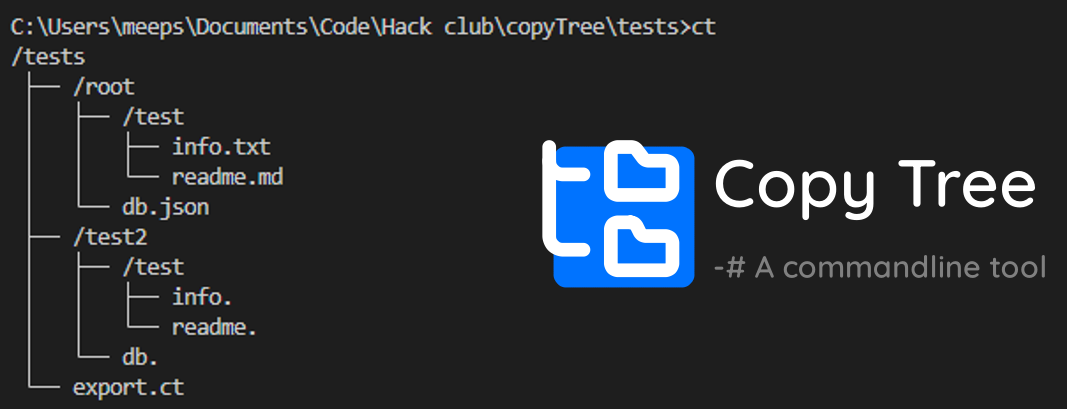
CopyTree
CopyTree is a command-line tool for creating ASCII file trees and replicating file trees using .ct files. It allows you to easily visualize and duplicate directory structures.
Features
- Generate ASCII representations of directory trees
- Replicate directory structures using
.ctfiles - Export directory structures to
.ctfiles - Enable pirate-speak mode for fun logging messages
- uhh copytree = cool
Installation
To install CopyTree, you can use pip:
Install via pip
pip install copytree-cli
Usage
To use CopyTree, run the following command:
copytree [options]
or
ct [options]
Options
-v, --verbose: Enable verbose output-e, --export [file]: Export the structure to a file (default: export.ct)-d, --directory [directory]: Directory to copy-b, --build [file]: Build structure based on a.ctfile-h, --help: Display help information
Examples
Generate an ASCII file tree for the current directory:
copytree
Replicate a directory tree from a .ct file:
copytree -b tree.ct
Export the current directory structure to a .ct file:
copytree -e my_structure.ct
Configuration
CopyTree uses a configuration file located at ~/.copytree/config.json. The configuration file allows you to customize the appearance of the ASCII tree and enable pirate-speak mode.
Default Configuration
{
    "folder-prefix": "/",
    "sub-file-indicator": "├──",
    "end-cap-indicator": "└──",
    "indent-space-indicator": "│",
    "pirate-speak": false
}
Configuration Options
folder-prefix: The prefix used for folders in the ASCII tree.sub-file-indicator: The indicator used for sub-files in the ASCII tree.end-cap-indicator: The indicator used for the end of a branch in the ASCII tree.indent-space-indicator: The indicator used for indentation in the ASCII tree.pirate-speak: Enable or disable pirate-speak mode for logging messages.
Contributing
Contributions are welcome! Please open an issue or submit a pull request on GitHub.
License
This project is licensed under the MIT License. See the LICENSE file for details.
Contact
For any questions or suggestions, please contact meepstertron@gmail.com.


Download files
Download the file for your platform. If you're not sure which to choose, learn more about installing packages.
Source Distribution
Built Distribution
Filter files by name, interpreter, ABI, and platform.
If you're not sure about the file name format, learn more about wheel file names.
Copy a direct link to the current filters
File details
Details for the file copytree_cli-0.2.0.tar.gz.
File metadata
- Download URL: copytree_cli-0.2.0.tar.gz
- Upload date:
- Size: 6.3 kB
- Tags: Source
- Uploaded using Trusted Publishing? No
- Uploaded via: twine/6.0.1 CPython/3.10.0
File hashes
| Algorithm | Hash digest | |
|---|---|---|
| SHA256 |
bdf7876b5bcbe63218b8a128cddd55d652f839e4893116bcfc77ed139121477c
|
|
| MD5 |
093716879b18426822e84616005faf6d
|
|
| BLAKE2b-256 |
60d3cfa2f9055333dbc080bda911090bdfb5cf6a80187279598b6a2425835767
|
File details
Details for the file copytree_cli-0.2.0-py3-none-any.whl.
File metadata
- Download URL: copytree_cli-0.2.0-py3-none-any.whl
- Upload date:
- Size: 6.9 kB
- Tags: Python 3
- Uploaded using Trusted Publishing? No
- Uploaded via: twine/6.0.1 CPython/3.10.0
File hashes
| Algorithm | Hash digest | |
|---|---|---|
| SHA256 |
607500fabfcf17699db9d2ad52f7d9c890d4d90ba625438a0ef972ce67ab9c85
|
|
| MD5 |
7d99fdc445653226d77b57649fcf91d8
|
|
| BLAKE2b-256 |
3f04fb7719ffa48f4b6730de1b8fa18eb1e3aefd9e609827ed3ca4235314a35f
|






