
Corec






Corec is a flexible and configurable framework designed for context-aware recommenders. It includes several object-oriented modules aimed at simplifying recommendation generation and metric evaluation.
The recommendation module supports Elliot-based models for non-contextual recommendations, and RecBole-based models and several library-specific contextual heuristic models for context-aware predictions. The evaluation module allows you to compute various metrics from prediction files, which can either be generated by the recommendation module or externally. It includes support for metrics from the Ranx library, along with some custom Corec contextual metrics.
It is important to note that Corec is part of a final degree project, and its goal is to provide a solid framework structure that allows users to easily extend the library with their own recommenders and metrics, making it a flexible foundation for further development.
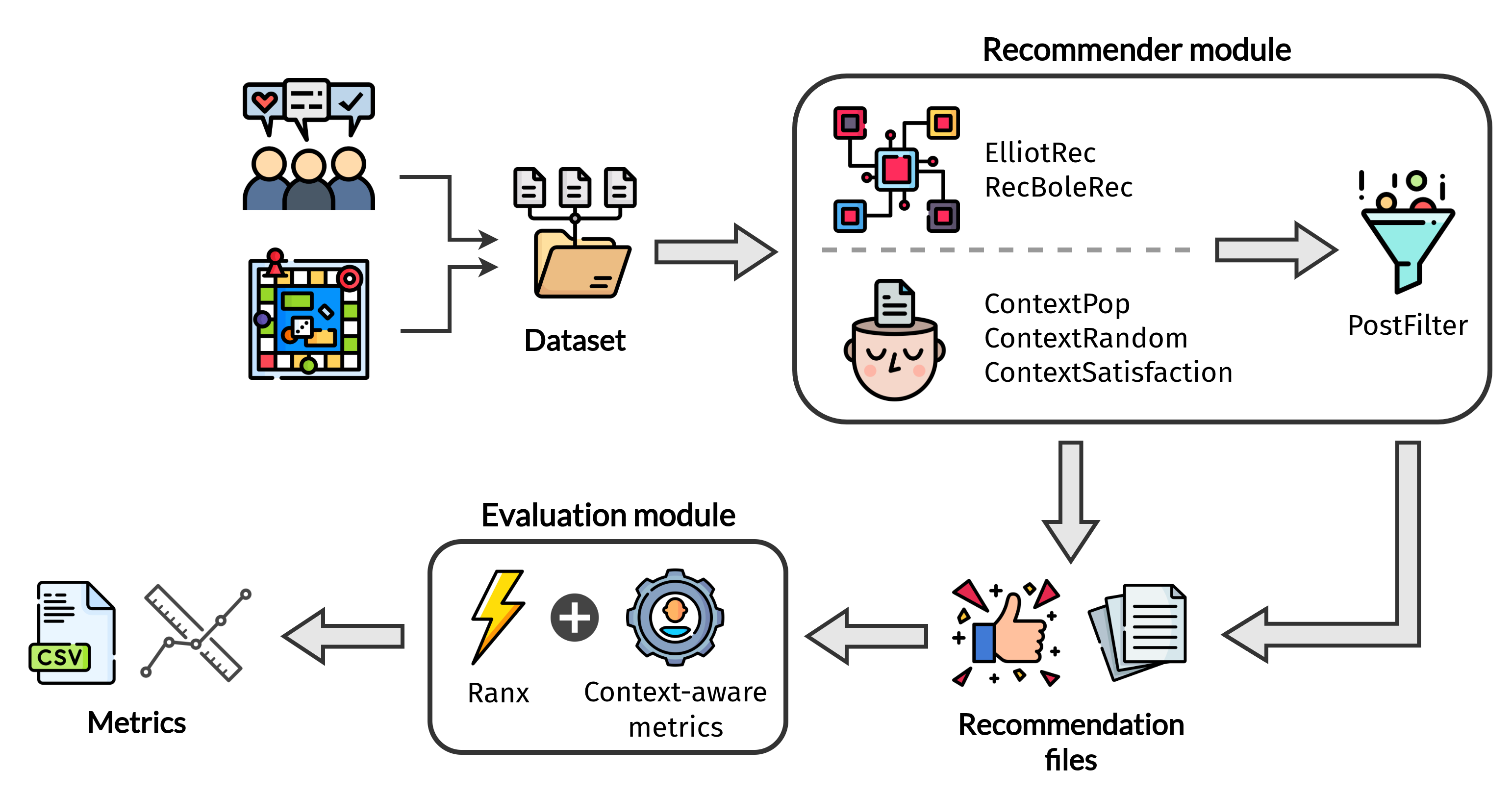
Corec Modules List 🔍
Below is a complete list of the currently available classes in Corec. In the repository code, you can find the specific descriptions of the attributes, methods, and behavior of each module.
| Integrated recommenders | Heuristic recommenders | Evaluation | Postfiltering |
|---|---|---|---|
ElliotRec |
ContextPopRec |
QrelsGenerator |
Postfilter |
RecBoleRec |
ContextRandomRec |
RunGenerator |
|
ContextSatisfactionRec |
MetricGenerator |
||
Evaluator |
👀: In case you want to implement your own recommender, you might find it helpful to use
BaseRecas your parent class.
Installation 💻
To install Corec, simply use pip:
pip install corec
If you want to use the evaluation module, then run:
pip install corec[evaluator]
👀: If you plan to use any integrated recommender, please remember to download the necessary extra packages.
Data Structure 📁
Dataset Input Format
Corec assumes the following structure for the input datasets:
- Training Set: A file containing training data for recommender model training.
- Test Set: A file containing test data for generating recommendations.
- Optional Validation Set: An optional file for validation during model training or evaluation.
Each dataset should have the following columns:
- User ID: A column representing the unique identifier for each user (either
strorint). - Item ID: A column representing the unique identifier for each item (either
strorint). - Rating: A column representing the rating given by the user (usually a
float). - Context Columns: Additional columns representing the context for each recommendation (all
int).
| User ID | Item ID | Rating | Context 1 | Context 2 | Context 3 | ... |
|---|---|---|---|---|---|---|
| 1 | 101 | 4.5 | 1 | 0 | 1 | ... |
| 1 | 102 | 3.8 | 0 | 1 | 0 | ... |
| 2 | 110 | 9.6 | 0 | 1 | 1 | ... |
Recommendation Output Format
The output of the recommendation process is stored in files containing tuples in the following format: (user ID, item ID, score, query item ID).
⚠️: The inclusion of the query item ID in the predictions file is intentional, as it serves to indicate the contextual anchor of the recommendation. The current approach assumes that each item in the dataset is associated with a single, fixed context. Therefore, by storing the query item, we can indirectly infer the context in which the recommendation was made. That said, this is a known limitation of the current design (there's room for improvement here). In future iterations, the methodology could be extended and refined to handle more flexible or multi-context scenarios, making it applicable to a wider range of datasets.
Metrics Output Format
The evaluation metrics are stored in a CSV file, where each row corresponds to a particular experimental setting. The file includes the following columns:
- Models (
str): The model or combination of models being evaluated. - Fuse norm (
str): The normalization strategy used during model fusion (if applicable). - Fuse method (
str): The method applied to combine scores from multiple models (if applicable). - Metric (
str): The specific evaluation metric (e.g., precision, recall, etc.). - Cutoff (
int): The ranking cutoff value (e.g., 5, 10, etc.). - Score (
float): The resulting score obtained for the given metric and cutoff.
Usage 💡
Recommendation Module Examples
Here’s an example of how to use the Elliot Recommendation Module to generate predictions based on the library Elliot:
from corec.recommenders.elliot_rec import ElliotRec

# Instantiate the Elliot recommender
elliot_rec = ElliotRec(
    train_path="dataset/train.tsv",
    test_path="dataset/test.tsv",
    valid_path="dataset/valid.tsv",
    preds_path_template="preds/{model}.tsv.gzip",
    elliot_work_dir="elliot_work_dir",
)

# Setup the model parameters according to the official docs from Elliot
models_config = {
    "ItemKNN": {
        "implementation": "classic",
        "neighbors": 40,
        "similarity": "cosine",
    },
    "FM": {
        "epochs": 10,
        "batch_size": 512,
        "factors": 10,
        "lr": 0.001,
        "reg": 0.1,
    }
}

# You are ready to compute the predictions
elliot_rec.recommend(
    models_config,
    K=50,
    clean_elliot_work_dir=True,
    clean_temp_dataset_files=True,
)
Here is shown an example of usage of RecBole Recommendation Module:
from recbole.model.context_aware_recommender.widedeep import WideDeep
from corec.recommenders.recbole_rec import RecBoleRec

# Instantiate the RecBole recommender
recbole_rec = RecBoleRec(
    train_path="dataset/train.tsv",
    test_path="dataset/test.tsv",
    valid_path="dataset/valid.tsv",
    logs_path="recbole_rec.log",
    rating_thr=7,
)

# You are ready to compute the predictions
recbole_rec.recommend(
    recbole_model=WideDeep,
    extra_config={"device": "gpu"},
    output_path="preds/WideDeep.tsv.gzip",
)
And here is shown an example of usage of Heuristic Recommendation Module:
from corec.recommenders import ContextRandomRec

# Instantiate the context-aware recommender
cp_rec = ContextPopRec(
    train_path="dataset/train.tsv",
    test_path="dataset/test.tsv",
    valid_path="dataset/valid.tsv",
    preds_compression=None,
    chunk_size=100,
)

# You are ready to compute the predictions
cp_rec.compute_predictions(
    output_path="preds/ContextPop.tsv",
    K=5,
)
Post-filter Module Example
After generating the predictions, you might want to post-filter those without a matching context between the test item (query) and the recommended one. Below is an example of how to perform that filtering:
from corec.postfilters import PostFilter

# Instantiate the post-filter
pf = PostFilter(
    dataset_ctx_idxs=range(3, 15),
    train_path="dataset/train.tsv",
    valid_path="dataset/valid.tsv",
)

# You are ready to filter the predictions
pf.postfilter(
    preds_path="my_preds/WideDeep.tsv.gzip",
    output_path="my_preds/Postfiltered_WideDeep.tsv.gzip",
)
Evaluation Module Example
Finally, you can evaluate the recommendations with the Evaluation Module. Here's an example of how to use the module to compute metrics:
from corec.evaluation.evaluator import Evaluator

# Instantiate the evaluator
evaluator = Evaluator(
    train_path="dataset/train.tsv",
    test_path="dataset/test.tsv",
    valid_path="dataset/valid.tsv",
    preds_path_template="my_preds/{model}.tsv.gzip",
    runs_path_template="runs/{run}.run.json",
    output_path="metrics.csv",
    metrics=["precision", "recall", "mean_ctx_sat", "sum_ctx_sat"],
    cutoffs=[5, 15, 25],
    rating_thr=7,
)

# First, compute the Qrels
evaluator.compute_qrels()

# Then, you are ready to compute metrics for standard Runs
for model in ["ContextPop", "Postfilter_WideDeep"]:
    evaluator.compute_run_metrics(model_name=model)

# Additionally, you can compute metrics for fuse Runs
for method in ["sum", "med", "mnz"]:
    evaluator.compute_fuse_metrics(
        run_names=["ContextSatisfaction"],
        model_names=["FM"],
        method=method,
    )
1 maintainer

Metadata
1 maintainer
Release files for corec 1.1.7
For a detailed explanation of source distributions (sdists) and built distributions (wheels), please see the package formats documentation.
Source distribution (sdist)
| File | Size | Uploaded | Provenance | Actions |
|---|---|---|---|---|
| corec-1.1.7.tar.gz | 27.4 kB | Without provenance | Details for corec-1.1.7.tar.gz |
Built distribution (wheel)
| File | Interpreter | ABI | Platform | Actions Reset |
|---|---|---|---|---|
| corec-1.1.7-py3-none-any.whl | Python 3 | none | any | Details for corec-1.1.7-py3-none-any.whl |
Total release size: 61.0 kB
Release files / corec-1.1.7.tar.gz
| Download URL | corec-1.1.7.tar.gz |
|---|---|
| Size | 27.4 kB |
| Tags | Source |
|
SHA-256 checksum How to use checksums |
7b2055e269a5a414c33071ee4e416aa54acbd0bf32e90d1266d0091dd976bde7
|
|
BLAKE2b-256 checksum How to use checksums |
185489db79b97b6116fe68c4a7416dbe425497d0708950eedbf45d3d097704d6
|
| Upload date | |
|
Uploaded using Trusted Publishing? What is trusted publishing? |
No |
| Uploaded via |
twine/7.0.0 CPython/3.12.3
|
Release files / corec-1.1.7-py3-none-any.whl
| Download URL | corec-1.1.7-py3-none-any.whl |
|---|---|
| Size | 33.5 kB |
| Tags | Python 3 |
|
SHA-256 checksum How to use checksums |
0ec1f93f39bf5b9d6980c021cde6e5c9be4eef318262eff63067010898bbc79e
|
|
BLAKE2b-256 checksum How to use checksums |
e2bab3c2f9155f9ac6a0d130a0d7322cb623d30bd72c5f306faaf89a02b14b40
|
| Upload date | |
|
Uploaded using Trusted Publishing? What is trusted publishing? |
No |
| Uploaded via |
twine/7.0.0 CPython/3.12.3
|
Security for corec 1.1.7
Provenance
Provenance describes where a file came from. On PyPI, provenance is shared via attestations, which provide a verifiable record of the build or publishing details. View details, limitations and caveats.
No provenance found
None of the files in this release were uploaded with provenance metadata.
A note on package security
PyPI is a repository for distributing packages, not a service for auditing them. While third-party security researchers and our staff do their best to detect and remove malicious packages, PyPI cannot guarantee the quality, security or suitability of any given package.
To learn more about protecting yourself from malicious actors, visit our package security documentation.














