
Elegant command line parsing

Project description
corgy
Elegant command line parsing for Python.
Corgy allows you to create a command line interface in Python, without worrying about boilerplate code. This results in cleaner, more modular code.
from corgy import Corgy

class ArgGroup(Corgy):
    arg1: Annotated[Optional[int], "optional number"]
    arg2: Annotated[bool, "a boolean"]

class MyArgs(Corgy):
    arg1: Annotated[int, "a number"] = 1
    arg2: Annotated[Sequence[float], "at least one float"]
    grp1: Annotated[ArgGroup, "group 1"]

args = MyArgs.parse_from_cmdline()
Compare this to the equivalent code which uses argparse:
from argparse import ArgumentParser, BooleanOptionalAction

parser = ArgumentParser()
parser.add_argument("--arg1", type=int, help="a number", default=1)
parser.add_argument("--arg2", type=float, nargs="+", help="at least one float", required=True)

grp_parser = parser.add_argument_group("group 1")
grp_parser.add_argument("--grp1:arg1", type=int, help="optional number")
grp_parser.add_argument("--grp1:arg2", help="a boolean", action=BooleanOptionalAction)

args = parser.parse_args()
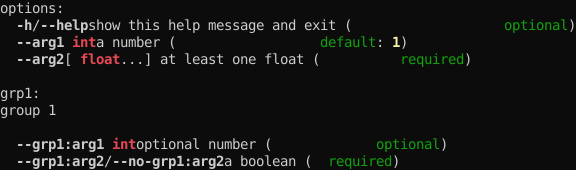
Corgy also provides support for more informative help messages from argparse, and colorized output:
Install
corgy is available on PyPI, and can be installed with pip:
pip install corgy
The full corgy package requires Python 3.9 or higher. Python 3.7 and 3.8 are also supported, but only have access to CorgyHelpFormatter, and corgy.types.
Support for colorized output requires the crayons package, also available on PyPI. You can pull it as a dependency for corgy by installing with the colors extra:
pip install corgy[colors]
Usage
For documentation on usage, refer to docs/index.md.
Release history Release notifications | RSS feed


Download files
Download the file for your platform. If you're not sure which to choose, learn more about installing packages.
Source Distribution
Built Distribution
Filter files by name, interpreter, ABI, and platform.
If you're not sure about the file name format, learn more about wheel file names.
Copy a direct link to the current filters
File details
Details for the file corgy-2.1.0.tar.gz.
File metadata
- Download URL: corgy-2.1.0.tar.gz
- Upload date:
- Size: 33.9 kB
- Tags: Source
- Uploaded using Trusted Publishing? No
- Uploaded via: poetry/1.1.11 CPython/3.9.8 Linux/5.11.0-1021-azure
File hashes
| Algorithm | Hash digest | |
|---|---|---|
| SHA256 |
8536e3247238e61fe9501d356e2eb5d41af32bf9aa8a0defc899bebf62e54da7
|
|
| MD5 |
03a5adf1398b98c97312611f921a0c0f
|
|
| BLAKE2b-256 |
8db560bdc6ec5eaf9bf02d8a3da8681ab47b38fb01e56a640c4864966254a833
|
File details
Details for the file corgy-2.1.0-py3-none-any.whl.
File metadata
- Download URL: corgy-2.1.0-py3-none-any.whl
- Upload date:
- Size: 20.4 kB
- Tags: Python 3
- Uploaded using Trusted Publishing? No
- Uploaded via: poetry/1.1.11 CPython/3.9.8 Linux/5.11.0-1021-azure
File hashes
| Algorithm | Hash digest | |
|---|---|---|
| SHA256 |
cb980b1f27d998c093dbd3520981c5b9cce01b13a413652c782ecf9d3408476c
|
|
| MD5 |
41bfb5eff46faf8aeb46ba2577168e76
|
|
| BLAKE2b-256 |
f51812406dc8b206f93a256eca2e183171a5aced76840d143666a806c011f287
|






