
Cornell: record & replay mock server


Project description
Cornell: record & replay mock server




Cornell makes it dead simple, via its record and replay features to perform end-to-end testing in a fast and isolated testing environment.
When your application integrates with multiple web-based services, end-to-end testing is crucial before deploying to production. Mocking is often a tedious task. It becomes even more tiresome when working with multiple APIs from multiple vendors.
vcrpy is an awesome library that records and replays HTTP interactions for unit tests. Its output is saved to reusable "cassette" files.
By wrapping vcrpy with Flask, Cornell provides a lightweight record and replay server that can be easily used during distributed system testing and simulate all HTTP traffic needed for your tests.
Basic Use Case
When you're working with distributed systems, the test client entry point triggers a cascade of events that eventually send HTTP requests to an external server
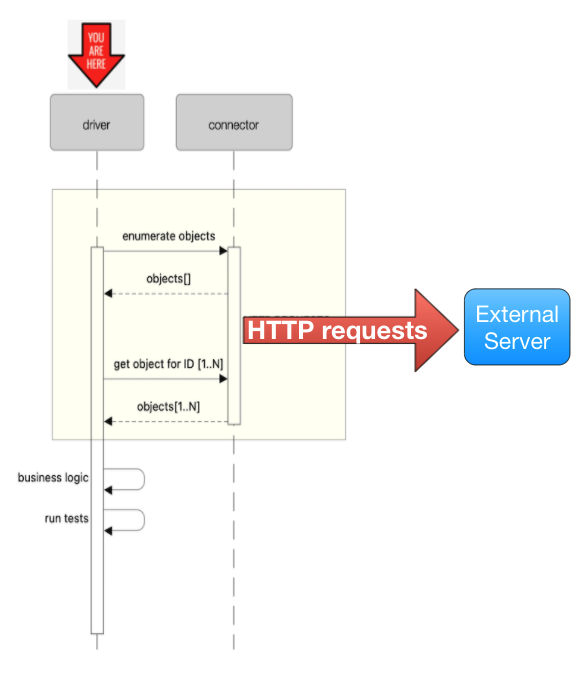
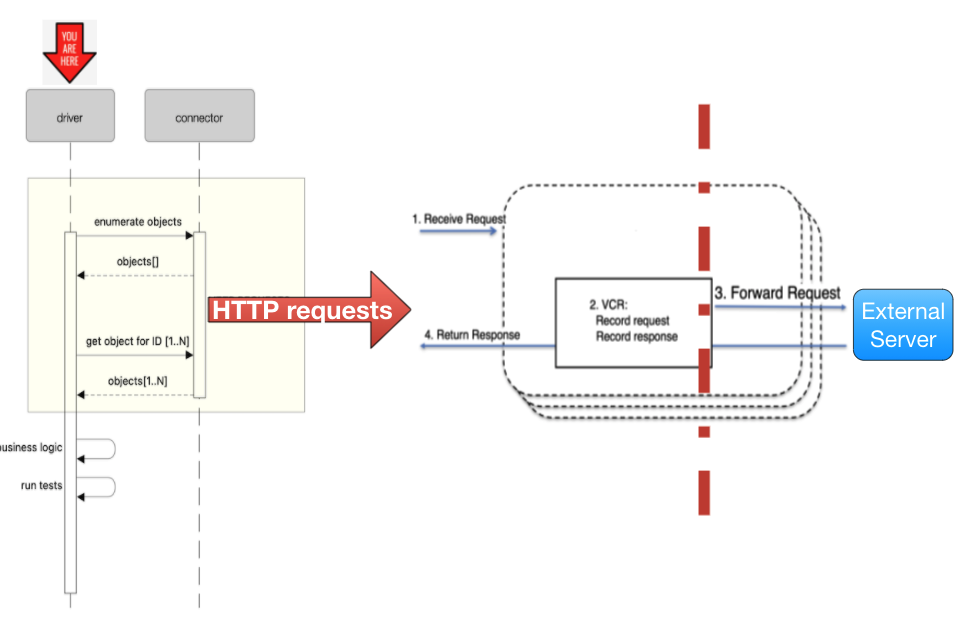
With Cornell server started, it will act as a proxy (record mode) between the outgoing HTTP requests and the external server and will record all relevant interactions. Once interactions are recorded, Cornell can work in replay mode, replacing the external server entirely, short-circuiting the calls and instead, replying back instantly with the previously recorded response.
Installation
To install from PyPI, all you need to do is this:
pip install cornell
Usage
Usage: cornell_server.py [OPTIONS]

  Usage Examples: Record mode: `cornell --forward_uri="https://remote_server/api" --record -cd custom_cassette_dir`
  Replay mode: `cornell -cd custom_cassette_dir

Options:
  -h, --host TEXT                 Set listen ip address
  -p, --port INTEGER
  -ff, --forward_uri TEXT         Must be provided in case of recording mode
  - , --record-once / --record-all
                                  Record each scenario only once, ignore the
                                  rest

  -r, --record                    Start server in record mode
  -fp, --fixed-path               Fixed cassettes path. If enabled, Cornell
                                  will support only one server for recording

  -cd, --cassettes-dir TEXT       Cassettes parent directory, If not
                                  specified, Cornell parent dir will be used

  -re, --record-errors BOOLEAN    If enabled, Cornell will record erroneous
                                  responses
  --help                          Show this message and exit.
Demo - Full Example
Start Cornell in record mode:
cornell -ff https://api.github.com/ --record -cd cassettes
This will start the server in record-proxy mode on port 9000, and will forward all requests to https://api.github.com/
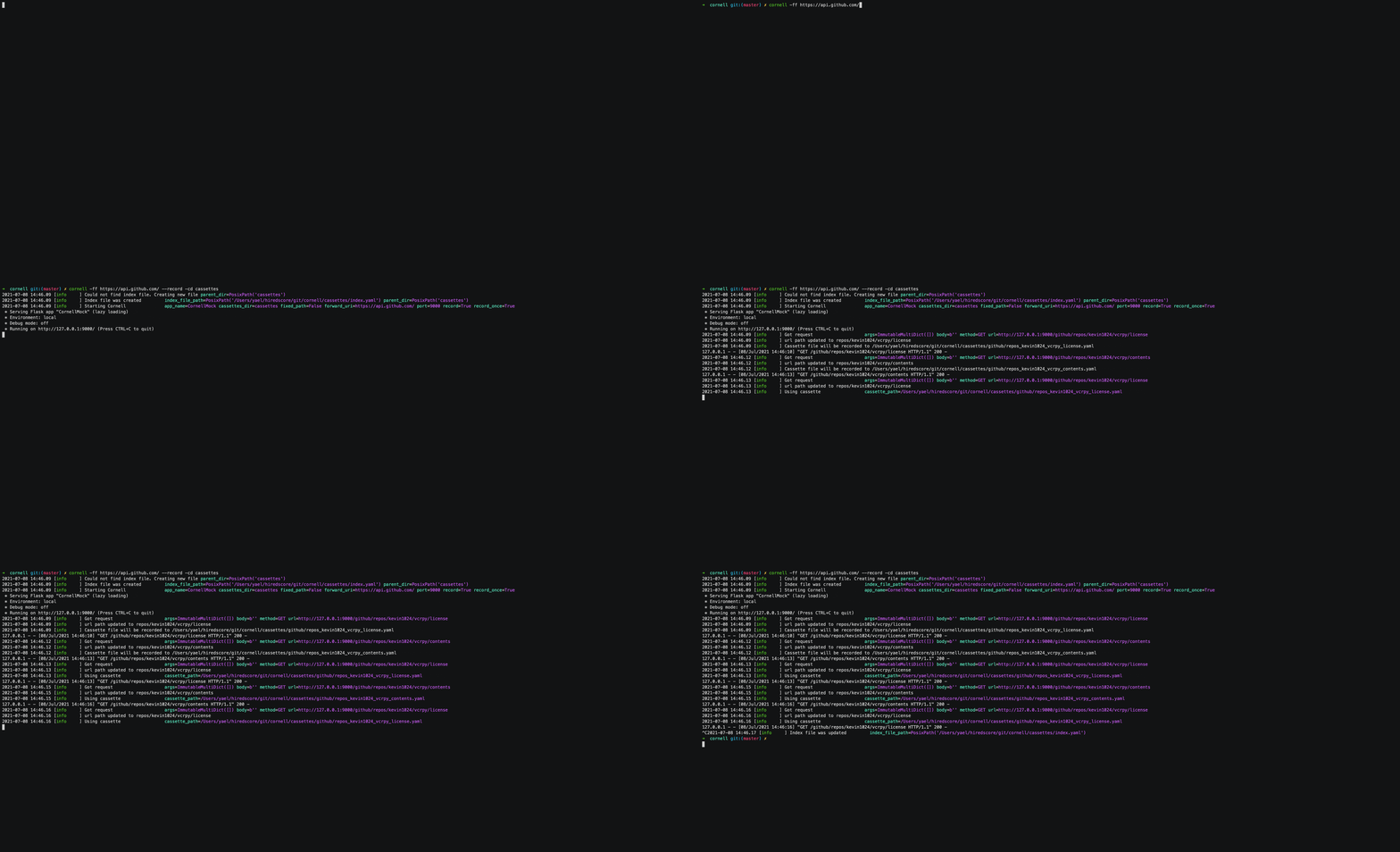
When cornell is in record mode, it will forward all request to the specified forwarding URL, for example:
requests.get("http://127.0.0.1:9000/github/repos/kevin1024/vcrpy/license").json()
or
requests.get("http://127.0.0.1:9000/github/repos/kevin1024/vcrpy/contents").json()
or you can browse to the URL using your browser
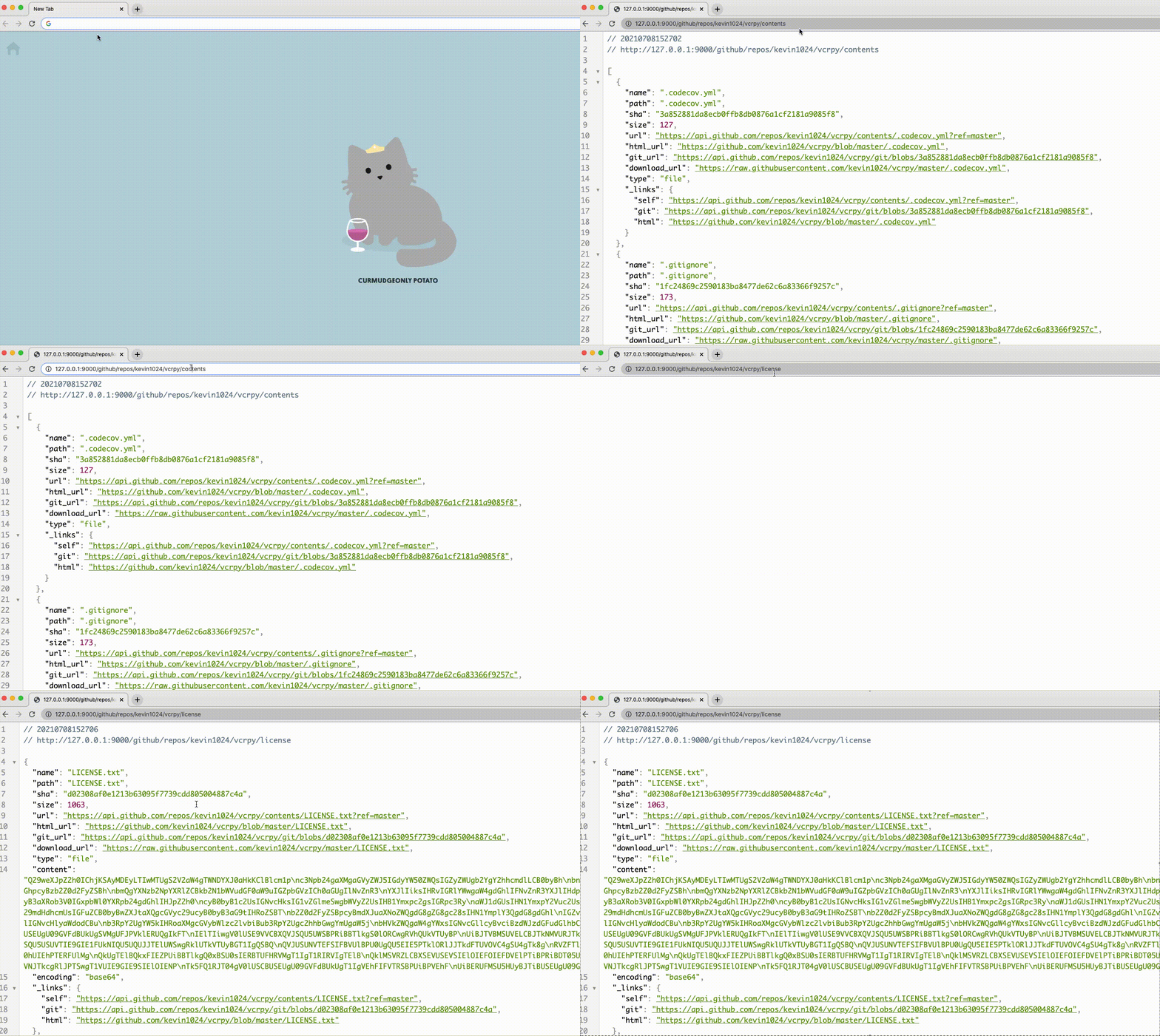
Cornell will forward the request to the specified URL and will record both the request and the response.
The yaml cassettes will be recorded to a dedicated directory (by default, cassettes in the root dir)
For example:
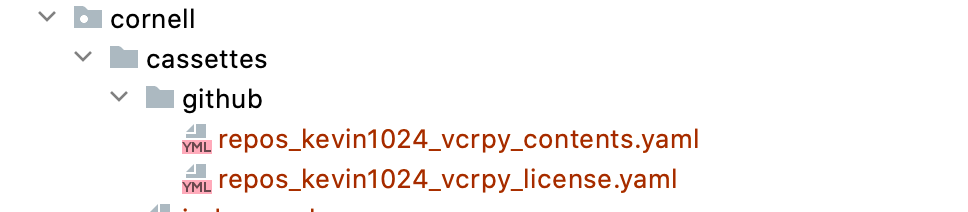
Note
By default, `cassettes` directory will be created in cornell's root dir and will contain the cassette by destination hierarchy.
Use `-cd` to specify custom directory for your cassettes.
Mind that `-cd <custom_dir> should match for both record and replay modes
Once all the necessary interactions were recorded, stop cornell server using ctrl+c.
Once stopped, all interactions will be mapped via an auto-generated index.yaml file.
Note
In case the `index.yaml` is already present, it will be updated with new interactions. Otherwise, a new file will be created.
Note
Cornell doesn't record interactions with an erroneous response, by default (i.e response with 404, will omitted). If you wish to enable this option, run cornell with --record-errors flag
In this specific example, we can see that the 2 requests are mapped to the saved cassettes:

Start cornell as docker container
docker run hiredscorelabs/cornell:latest
Build cornell as docker container
docker build -t cornell .
docker run cornell --help
You will probably need to import cassettes from a local directory from your computer. To do that, use the following command to mount a local directory as a volume in the container.
docker run -v ~/cassettes:/var/cassettes cornell -cd /var/cassettes
In some case, you want to use another port with cornell. If you need to do that, you should use
docker port mapping as in the following where cornell will listen on port 9020.
docker run -p 9020:9000 cornell
Features
Request Matchers
In addition to the vcrpy matchers, cornell provides the following custom request matchers:
Environment Variables
Since Cornell is a testing server it's executed by default with FLASK_ENV=local.
You can modify this as described in flask configuration
Advanced Features
Can be found in the documentation
Contributing
Yes please! contributions are more than welcome!
Please follow PEP8 and the Python Naming Conventions
Add tests when you're adding new functionality and make sure all the existing tests are happy and green :)
To set up development environment:
  python -m venv venv
  source venv/bin/activate
  make configure
Running Tests
To run tests, run the following command
  python -m venv venv
  source venv/bin/activate
  make test
Release history Release notifications | RSS feed


Download files
Download the file for your platform. If you're not sure which to choose, learn more about installing packages.
Source Distribution
Built Distribution
Filter files by name, interpreter, ABI, and platform.
If you're not sure about the file name format, learn more about wheel file names.
Copy a direct link to the current filters
File details
Details for the file cornell-1.1.1.tar.gz.
File metadata
- Download URL: cornell-1.1.1.tar.gz
- Upload date:
- Size: 18.5 kB
- Tags: Source
- Uploaded using Trusted Publishing? No
- Uploaded via: twine/6.2.0 CPython/3.11.13
File hashes
| Algorithm | Hash digest | |
|---|---|---|
| SHA256 |
f6e76b3960d6f18b9be825ac3b3626a4a2e8a547d5f4d50e19f2c0fdeae43652
|
|
| MD5 |
32f0becad34962e247f07aed795d3d9b
|
|
| BLAKE2b-256 |
cab6e3f1a2b33827f6efb1750047b30e2d43d986b3e3fbaf87946a83550be2c7
|
File details
Details for the file cornell-1.1.1-py3-none-any.whl.
File metadata
- Download URL: cornell-1.1.1-py3-none-any.whl
- Upload date:
- Size: 20.0 kB
- Tags: Python 3
- Uploaded using Trusted Publishing? No
- Uploaded via: uv/0.11.19 {"installer":{"name":"uv","version":"0.11.19","subcommand":["publish"]},"python":null,"implementation":{"name":null,"version":null},"distro":{"name":"macOS","version":null,"id":null,"libc":null},"system":{"name":null,"release":null},"cpu":null,"openssl_version":null,"setuptools_version":null,"rustc_version":null,"ci":null}
File hashes
| Algorithm | Hash digest | |
|---|---|---|
| SHA256 |
697414e9e1c9dd1949567b81ae6a18db5c063e9fee0d9d70b213d37483f78a63
|
|
| MD5 |
87cc21e76b84d5b12bd6ebf21b8c5bff
|
|
| BLAKE2b-256 |
934f2764f24b3eec7f7f59cecfc089572e7e88f21b751684a0d9b8433f21308d
|






