
CoSaMP
CoSaMP algorithm in Python.
Installation
How to install:
pip install cosamp
or
pip3 install cosamp
Dependencies: numpy.
Usage example
@Input:  Phi - Sampling matrix
          u   - Noisy sample vector
          s   - Sparsity vector

@Return: A s-sparse approximation "a" of the target signal
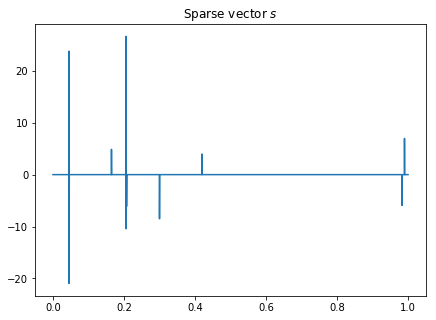
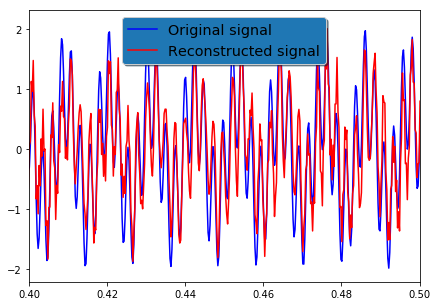
Using CoSaMP algorithm to reconstruct a high-frequency signal from sparse measurements:
import numpy as np
import scipy.linalg
import scipy.signal
import matplotlib.pyplot as plt
from cosamp import cosamp


n = 100 # number of measurements
t = np.linspace(0.0, 1.0, num=n)

x = np.sin(91*2*np.pi*t) + np.sin(412*2*np.pi*t) # original signal (to be reconstructed)

# randomly sample signal
p = 103 # random sampling (Note that this is one eighth of the Shannon–Nyquist rate!)
aquis = np.round((n-1) * np.random.rand(p)).astype(int)
y = x[aquis] # our compressed measurement from the random sampling

# Here {y} = [C]{x} = [C][Phi]{s}, where Phi is the inverse discrete cosine transform

Phi = scipy.fft.dct(np.eye(n), axis=0, norm='ortho')
CPhi = Phi[aquis,:]

# l1 minimization (through linear programming)
s = cosamp.cosamp(CPhi, y, 10) # obtain the sparse vector through CoSaMP algorithm
xrec = scipy.fft.idct(s, axis=0, norm='ortho') # Reconstructed signal


figw, figh = 7.0, 5.0 # figure width and height
plt.figure(figsize=(figw, figh))
plt.plot(t, s)
plt.title('Sparse vector $s$')
plt.show()


# Visualize the compressed-sensing reconstruction signal
figw, figh = 7.0, 5.0 # figure width and height
plt.figure(figsize=(figw, figh))
plt.plot(t, x,    'b', label='Original signal')
plt.plot(t, xrec, 'r', label='Reconstructed signal')
plt.xlim(0.4, 0.5)
legend = plt.legend(loc='upper center', shadow=True, fontsize='x-large')
# Put a nicer background color on the legend.
legend.get_frame().set_facecolor('C0')
plt.show()
Other info
MATLAB versions of the algorithm are readly available (see here for instance). This Python method is based on the MATLAB routine written by Prof. Bob L. Sturm.
The original Needell and Tropp's 2008 paper can be found here.
1 maintainer

Metadata
1 maintainer
Release files for cosamp 0.0.2
For a detailed explanation of source distributions (sdists) and built distributions (wheels), please see the package formats documentation.
Source distribution (sdist)
| File | Size | Uploaded | Provenance | |
|---|---|---|---|---|
| cosamp-0.0.2.tar.gz | 3.5 kB | Without provenance | Details |
Built distribution (wheel)
| File | Interpreter | ABI | Platform | Reset |
|---|---|---|---|---|
| cosamp-0.0.2-py3-none-any.whl | Python 3 | none | any | Details |
Total release size: 7.7 kB
Release files / cosamp-0.0.2.tar.gz
| Download URL | cosamp-0.0.2.tar.gz |
|---|---|
| Size | 3.5 kB |
| Tags | Source |
|
SHA-256 checksum How to use checksums |
bb010324054aed2ee1c94ce887934cf495ef9243a0425590b5bca9d8e43503e2
|
|
BLAKE2b-256 checksum How to use checksums |
19587567ad5549c4c1a18995fdae9e1bd330f67a645c2b7da7e2d7e33359039c
|
| Upload date | |
|
Uploaded using Trusted Publishing? What is trusted publishing? |
No |
| Uploaded via |
twine/3.7.1 importlib_metadata/4.10.0 pkginfo/1.8.2 requests/2.24.0 requests-toolbelt/0.9.1 tqdm/4.46.1 CPython/3.8.10
|
Release files / cosamp-0.0.2-py3-none-any.whl
| Download URL | cosamp-0.0.2-py3-none-any.whl |
|---|---|
| Size | 4.2 kB |
| Tags | Python 3 |
|
SHA-256 checksum How to use checksums |
8ee71e63ed5c8c3ecaeea8bcee2eafbb4ee85341ba03ec9b06a72667194d89f1
|
|
BLAKE2b-256 checksum How to use checksums |
92ebcbd915ed36a51e3cd7b1c21bb5ea45448a5c2f07d1f86a43663bcbdb0757
|
| Upload date | |
|
Uploaded using Trusted Publishing? What is trusted publishing? |
No |
| Uploaded via |
twine/3.7.1 importlib_metadata/4.10.0 pkginfo/1.8.2 requests/2.24.0 requests-toolbelt/0.9.1 tqdm/4.46.1 CPython/3.8.10
|
Security for cosamp 0.0.2
Provenance
Provenance describes where a file came from. On PyPI, provenance is shared via attestations, which provide a verifiable record of the build or publishing details. View details, limitations and caveats.
No provenance found
None of the files in this release were uploaded with provenance metadata.
A note on package security
PyPI is a repository for distributing packages, not a service for auditing them. While third-party security researchers and our staff do their best to detect and remove malicious packages, PyPI cannot guarantee the quality, security or suitability of any given package.













