
Hardware token approval for AI agent tool calls - WebAuthn security layer for MCP tools

Project description
CoSig






⚠️ ALPHA RELEASE (v0.2.0a1) CoSig is in early development. APIs may change. Security audit recommended before production use. See KNOWN_ISSUES.md for current limitations and known issues.
WebAuthn co-signing library for MCP servers — require human approval via hardware token (YubiKey) for AI tool calls.
What is CoSig?
CoSig adds a security layer to MCP (Model Context Protocol) servers. When an AI agent wants to execute a sensitive operation, the human must co-sign the request by tapping their hardware security key (YubiKey, Touch ID, Windows Hello).
Use case: Add YubiKey approval to FastMCP tools using a simple decorator.
Security guarantees:
- ✅ Unauthorized execution blocked — AI can't run tools without human tap
- ✅ Replay attacks prevented — Each signature has a unique counter
- ✅ Non-repudiation — Cryptographic proof the user approved
- ✅ Audit trail — Every action logged
- ✅ Enterprise-grade encryption — AES-256-GCM with HMAC tamper detection
- ✅ Immutable audit logs — Blockchain-style hash chaining prevents tampering
Demo
See CoSig in action:
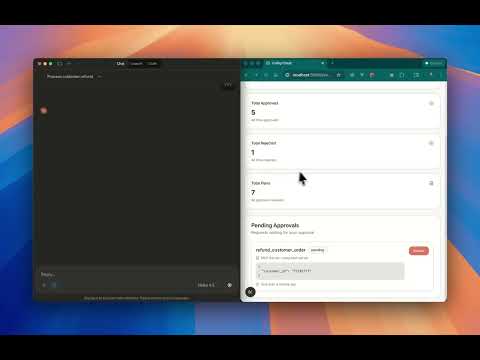
Watch the video demonstration to see how YubiKey approval works with MCP servers.
Server Requirements
⚠️ Important: CoSig requires a CoSig Cloud server to handle WebAuthn approvals.
You have two options:
- Self-hosted: Deploy cosig-cloud on your own infrastructure
- Enterprise hosting: Contact us about CoSig Enterprise for managed hosting
The CoSig Cloud server provides:
- WebAuthn approval flow UI
- Credential verification
- Audit log storage
- API endpoints for approval status
See the cosig-cloud repository for deployment instructions.
Quick Start
Installation
pip install cosig fastmcp
FastMCP Integration
# my_mcp_server.py
from fastmcp import FastMCP
from cosig import require_approval
import asyncpg

mcp = FastMCP("Enterprise Server")

# Dangerous operation - requires YubiKey approval
@mcp.tool()
@require_approval()
async def delete_customer_data(customer_id: str) -> str:
    """Delete customer PII - requires YubiKey tap for GDPR compliance"""
    conn = await asyncpg.connect('postgresql://...')
    await conn.execute('DELETE FROM customers WHERE id = $1', customer_id)
    await conn.close()
    return f"Deleted customer {customer_id}"

# Another sensitive operation
@mcp.tool()
@require_approval()
async def deploy_to_production(service: str, version: str) -> str:
    """Deploy to production - requires SRE approval via YubiKey"""
    result = await deploy_service(service, version, environment="production")
    return f"Deployed {service} v{version} to production"

# Safe operation - no approval needed
@mcp.tool()
async def get_customer_info(customer_id: str) -> str:
    """Read-only operation - no approval required"""
    conn = await asyncpg.connect('postgresql://...')
    data = await conn.fetchrow('SELECT * FROM customers WHERE id = $1', customer_id)
    await conn.close()
    return str(data)
How It Works
- First call → Tool raises
ApprovalRequiredErrorwith URL - User opens URL → Approval page shows tool call details
- User taps YubiKey → WebAuthn verification
- Client retries → Tool executes successfully
# In your MCP client:
try:
    result = await mcp.call_tool("delete_customer_data", {"customer_id": "cust_123"})
except ApprovalRequiredError as e:
    print(f"Approval required: {e.approval_url}")
    # User taps YubiKey at the URL
    # Then retry:
    result = await mcp.call_tool("delete_customer_data", {"customer_id": "cust_123"})
    print(result)  # "Deleted customer cust_123"
Real-World Use Cases
Financial Services
from fastmcp import FastMCP
from cosig import require_approval

mcp = FastMCP("Financial Services")

@mcp.tool()
@require_approval()
async def release_hold(account_id: str, hold_id: str) -> str:
    """Release payment hold - requires compliance officer YubiKey approval"""
    # Release hold...
    return f"Released hold {hold_id}"

@mcp.tool()
@require_approval()
async def modify_credit_limit(customer_id: str, new_limit: float) -> str:
    """Modify customer credit limit - requires manager YubiKey approval"""
    # Update limit...
    return f"Updated limit to ${new_limit}"
Healthcare
@mcp.tool()
@require_approval()
async def access_patient_records(patient_id: str) -> str:
    """Access PHI - requires HIPAA-compliant YubiKey approval"""
    # Log access, retrieve records...
    return "Records retrieved"

@mcp.tool()
@require_approval()
async def edit_medical_billing_code(patient_id: str, old_code: str, new_code: str) -> str:
    """Edit medical billing code - requires billing manager YubiKey approval"""
    # Update billing code...
    return f"Updated code from {old_code} to {new_code}"
Infrastructure & DevOps
@mcp.tool()
@require_approval()
async def scale_production_cluster(cluster_name: str, node_count: int) -> str:
    """Scale production Kubernetes cluster - requires SRE YubiKey approval"""
    # Scale cluster...
    return f"Scaled to {node_count} nodes"

@mcp.tool()
@require_approval()
async def modify_firewall_rules(rule_id: str, action: str) -> str:
    """Modify production firewall - requires security team YubiKey approval"""
    # Update firewall...
    return "Firewall updated"

@mcp.tool()
@require_approval()
async def rotate_api_keys(service_name: str) -> str:
    """Rotate production API keys - requires YubiKey approval"""
    # Rotate keys...
    return "Keys rotated"
Data & Analytics
@mcp.tool()
@require_approval()
async def export_customer_data(dataset_name: str, destination: str) -> str:
    """Export customer PII - requires data governance YubiKey approval"""
    # Export data...
    return "Data exported"

@mcp.tool()
@require_approval()
async def run_expensive_query(query: str) -> str:
    """Run expensive analytics query - requires YubiKey approval to prevent cost overruns"""
    # Execute query...
    return "Query completed"
Higher Education Administration
@mcp.tool()
@require_approval()
async def release_course_signup_hold(student_id: str, hold_id: str) -> str:
    """Release course registration hold - requires registrar YubiKey approval"""
    # Release hold in student information system...
    return f"Released hold {hold_id} for student {student_id}"

@mcp.tool()
@require_approval()
async def access_student_records(student_id: str) -> str:
    """Access student records - requires FERPA-compliant YubiKey approval"""
    # Log access, retrieve records...
    return "Student records retrieved"

@mcp.tool()
@require_approval()
async def release_student_record(student_id: str, recipient: str) -> str:
    """Release student transcript - requires registrar YubiKey approval"""
    # Release transcript to authorized recipient...
    return f"Released transcript for {student_id} to {recipient}"
Configuration
Configure CoSig programmatically in your application:
from cosig import configure

configure(
    cosig_url="https://cosig.example.com",     # CoSig approval server URL
    api_key="your-api-key",                     # API key for authentication
    timeout=300,                                # Approval timeout in seconds
)
For production deployments:
- Use HTTPS and set the CoSig URL to your domain
- Store API keys in a secrets manager (AWS Secrets Manager, Azure Key Vault, HashiCorp Vault)
- See SECURITY.md for enterprise security architecture details
How It Works
┌─────────────┐     1. Create Plan      ┌─────────────┐
│   AI Agent  │ ───────────────────────▶│   CoSig     │
│             │                         │             │
│ "Delete     │                         │ Plan:       │
│  customer   │                         │ - Action    │
│  cust_123"  │                         │ - Status:   │
└─────────────┘                         │   PENDING   │
                                        └──────┬──────┘
                                               │
                                     2. Challenge
                                               ▼
┌─────────────┐     3. Tap YubiKey     ┌─────────────┐
│    Human    │ ◀──────────────────────│   Browser   │
│ (Compliance │                        │             │
│  Officer)   │                        │ "Approve    │
└──────┬──────┘                        │  deletion?" │
       │                               └─────────────┘
       │ 4. Signed Credential
       ▼
┌─────────────┐     5. Execute         ┌─────────────┐
│   CoSig     │ ───────────────────────▶│  Database   │
│             │                         │             │
│ Verifies:   │                         │ DELETE FROM │
│ - Signature │                         │ customers   │
│ - Counter   │                         │ WHERE...    │
│ - Binding   │                         └─────────────┘
└─────────────┘
       │
       │ 6. Audit Log
       ▼
┌─────────────────────────────────────────────────────┐
│ Audit Trail                                         │
│ [2025-12-22 10:00:00] alice approved deletion      │
│ [2025-12-22 10:00:01] Deleted customer cust_123    │
│ YubiKey: credential_abc123, sign_count: 42         │
└─────────────────────────────────────────────────────┘
Why CoSig?
For Compliance Teams
- GDPR/CCPA: Prove human approved data deletion
- SOX: Audit trail for financial operations
- HIPAA: Log PHI access with non-repudiable proof
- PCI-DSS: Require approval for sensitive operations
For Security Teams
- Zero Trust: AI can't act without human approval
- Phishing-resistant: Hardware token can't be stolen remotely
- Replay prevention: Each signature is unique
- Audit trail: Every action logged with cryptographic proof
For DevOps Teams
- Production safety: Prevent accidental deployments
- Cost control: Approve expensive operations
- Change management: Require approval for infrastructure changes
Development
# Clone the repo
git clone https://github.com/skyforest/cosig
cd cosig

# Install dev dependencies
make dev

# Run tests
make test

# Lint and type check
make lint

# Format code
make format
Requirements
- Python 3.12+
- FIDO2 hardware key (YubiKey 5, Titan, SoloKey, etc.)
- Modern browser with WebAuthn support
License
BSD-3-Clause - See LICENSE for details.
Release history Release notifications | RSS feed


Download files
Download the file for your platform. If you're not sure which to choose, learn more about installing packages.
Source Distribution
Built Distribution
Filter files by name, interpreter, ABI, and platform.
If you're not sure about the file name format, learn more about wheel file names.
Copy a direct link to the current filters
File details
Details for the file cosig-0.2.0a4.tar.gz.
File metadata
- Download URL: cosig-0.2.0a4.tar.gz
- Upload date:
- Size: 21.8 kB
- Tags: Source
- Uploaded using Trusted Publishing? No
- Uploaded via: twine/6.2.0 CPython/3.12.8
File hashes
| Algorithm | Hash digest | |
|---|---|---|
| SHA256 |
2b35c8b5792fb4854691d7d5d68198cb6267535c3ba13f2fa65ff73706dc55cd
|
|
| MD5 |
70a46e946151ba16e476151c9d52d30e
|
|
| BLAKE2b-256 |
929bc4f6cba6418fa6d9bef0f47d3ae3305182212958d74e4bfea6298f1dc4fb
|
File details
Details for the file cosig-0.2.0a4-py3-none-any.whl.
File metadata
- Download URL: cosig-0.2.0a4-py3-none-any.whl
- Upload date:
- Size: 19.3 kB
- Tags: Python 3
- Uploaded using Trusted Publishing? No
- Uploaded via: twine/6.2.0 CPython/3.12.8
File hashes
| Algorithm | Hash digest | |
|---|---|---|
| SHA256 |
93614209d3e1c951a9c28838283bd7a8ba1641588b0c3e71a6a2c1487d3ae465
|
|
| MD5 |
570c6faaf0b9728ccfeb284191479ecf
|
|
| BLAKE2b-256 |
ffd297822c3cddd143070c8277ee1ddf2303574064df76068c0d2d2add875a67
|






