
Cosmological distance computations in FLRW universe using JAX

Project description

Cosmologix
Cosmologix is a Python package for computing cosmological distances in a Friedmann–Lemaître–Robertson–Walker (FLRW) universe using JAX for high-performance and differentiable computations. This package is mostly intended to fit the Hubble diagram of the LEMAITRE supernovae compilation and as such has a slightly different (and smaller) scope than jax-cosmo, with a focus on accurate and fast luminosity distances. It has been tested against the CCL.
Features
- Cosmological Distance Calculations: Compute various distances (comoving, luminosity, angular diameter) in an FLRW universe.
- Hubble Diagram Fitting: Tools to fit supernovae data to cosmological models.
- JAX Integration: Leverage JAX's automatic differentiation and JIT compilation for performance.
- Neutrino Contributions: Account for both relativistic and massive neutrinos in cosmological models.
- CMB Prior Handling: Includes functionality to incorporate geometric priors from CMB and BAO measurements.
Installation
To install cosmologix, you need Python 3.10 or newer. Use pip:
pip install cosmologix
Note: Make sure you have JAX installed, along with its dependencies. If you're using GPU acceleration, ensure CUDA and cuDNN are properly set up.
Usage
Here's a quick example to get you started:
from cosmologix import mu, Planck18
import jax.numpy as jnp

# Best-fit parameters to Planck 2018 are:
print(Planck18)

# Redshift values for supernovae
z_values = jnp.linspace(0.1, 1.0, 10)

# Compute distance modulus
distance_modulus = mu(Planck18, z_values)
print(distance_modulus)

# Find bestfit flat w-CDM cosmology
from cosmologix import likelihoods, fit
priors = [likelihoods.Planck2018Prior(), likelihoods.DES5yr()]
fixed = {'Omega_k':0., 'm_nu':0.06, 'Neff':3.046, 'Tcmb': 2.7255, 'wa':0.0}

result = fit(priors, fixed=fixed, verbose=True)
print(result['bestfit'])

# Compute frequentist confidence contours
# The progress bar provides a rough upper bound on computation time because
# the actual size of the explored region is unknown at the start of the calculation.
# Improvements to this feature are planned.

from cosmologix import contours
grid = contours.frequentist_contour_2D_sparse(
    priors,
    grid={'Omega_m': [0.18, 0.48, 30], 'w': [-0.6, -1.5, 30]},
    fixed=fixed
    )

import matplotlib.pyplot as plt
contours.plot_contours(grid, filled=True, label='CMB+SN')
plt.ion()
plt.legend(loc='lower right', frameon=False)
plt.show()
#Further guidance can be found reading files in the examples directory.
Command line interface
For most common use cases, there is also a simple command line interface to the library. You can perform fit, contour exploration and contour plotting as follows:
cosmologix fit --priors Planck18 DESI2024 --cosmology FwCDM
cosmologix explore Omega_m w --priors Planck18 DESI2024 --cosmology FwCDM -o contours.pkl
cosmologix contour contours.pkl -o contour.png
More advanced topics
Fixing Unconstrained Parameters
Cosmologix uses a default set of cosmological parameters in its
computations: {'Tcmb', 'Omega_m', 'H0', 'Omega_b_h2', 'Omega_k', 'w', 'wa', 'm_nu', 'Neff'}. However, certain combinations of cosmological
probes may be entirely insensitive to some of these parameters,
requiring their values to be fixed for the fitting process to
converge. For instance, the cosmic microwave background temperature
(Tcmb) is usually assumed constant in many analyses. Late-time
probes of the expansion history—like supernovae or uncalibrated baryon
acoustic oscillations (BAOs)—do not distinguish between baryon and
dark matter contributions (Omega_b_h2) or constrain the absolute
distance scale (H0), leaving these parameters effectively
unconstrained without additional data.
Setting Fixed Parameters
In Cosmologix, you can fix parameters by passing the optional fixed
argument to the fit and contours.frequentist_contour_2D_sparse
functions. This mechanism also enables exploration of simplified
cosmological models, such as enforcing flatness (Omega_k = 0) or a
cosmological constant dark energy behavior (w = -1, wa = 0):
fixed = {'Omega_k': 0.0, 'm_nu': 0.06, 'Neff': 3.046, 'Tcmb': 2.7255, 'wa': 0.0}
result = fit(priors, fixed=fixed)
grid = contours.frequentist_contour_2D_sparse(
    priors,
    grid={'Omega_m': [0.18, 0.48, 30], 'w': [-0.6, -1.5, 30]},
    fixed=fixed
)
Degeneracy Checks
Recent versions of Cosmologix include a safeguard in the fit
function: it checks for perfect degeneracies among the provided priors
and fixed parameters before proceeding, raising an explicit error
message if any remain. The contours.frequentist_contour_2D_sparse
function, however, skips this check to allow exploration of partially
degenerate parameter combinations, offering flexibility for diagnostic
purposes.
Command-Line Interface
From the command line, you can specify fixed parameters using the -F
or --fixed option, available for both fit and explore
commands. Additionally, the -c or --cosmo shortcut simplifies
restricting the model to predefined configurations (e.g., flat ( w
)CDM):
cosmologix fit -p DESI2024 -F H0 -c FwCDM
cosmologix explore Omega_m w -p DESI2024 -c FwCDM -F H0 -o desi_fwcdm.pkl
Automatic Parameter Fixing
For convenience, the fit command offers the -A or
--auto-constrain option, which automatically identifies and fixes
poorly constrained parameters. Use this with caution, as it may alter
the model by trimming parameters that lack sufficient constraints,
potentially affecting your results:
cosmologix fit -p DES-5yr -A -c FwCDM
Example output:
Unconstrained Parameters:
  Omega_b_h2: FIM = 0.00 (effectively unconstrained)
Fixing unconstrained parameter Omega_b_h2
Try again fixing H0
Omega_m = 0.272 ± 0.089
w = -0.82 ± 0.17
M = -0.053 ± 0.013
Cache Mechanism
Cosmologix includes a caching system to optimize performance by storing results from time-consuming operations. This mechanism applies to:
- Downloading external files, such as datasets.
- Expensive computations, like matrix inversions or factorizations used in ( \chi^2 ) calculations.
- Lengthy
jax.jitcompilations, which can have noticeable pre-run delays.
Caching helps reduce the initial overhead (sometimes called "preburn time") introduced by JAX’s just-in-time compilation and other resource-intensive tasks, making subsequent runs significantly faster.
Accessing the Cache Directory
You can retrieve the location of the cache directory using the tools module:
from cosmologix import tools
print(tools.get_cache_dir())
This returns the path where cached files are stored, typically a platform-specific directory (e.g., ~/.cache/cosmologix on Unix-like systems).
Managing the Cache
If the cache grows too large or if you suspect outdated results are being loaded due to code changes, you can clear it entirely:
tools.clear_cache()
This removes all cached files, forcing Cosmologix to recompute or redownload as needed on the next run.
Notes
- The caching system is particularly useful for mitigating JAX’s compilation delays, but its effectiveness depends on consistent inputs and code stability.
- Use
clear_cache()judiciously, as it deletes all cached data, including potentially large datasets, and will require internet connexion to download.
Dependencies
- JAX for numerical computations and automatic differentiation.
- NumPy for array operations (used indirectly via JAX).
- Matplotlib for plotting.
- Requests to retrieve external data files.
- tqdm to display progression of contour computation
Roadmap
- Improve the estimation of contour computation time
- Make SH0ES prior available and check its interaction with PantheonPlus
Accuracy of the distance modulus computation
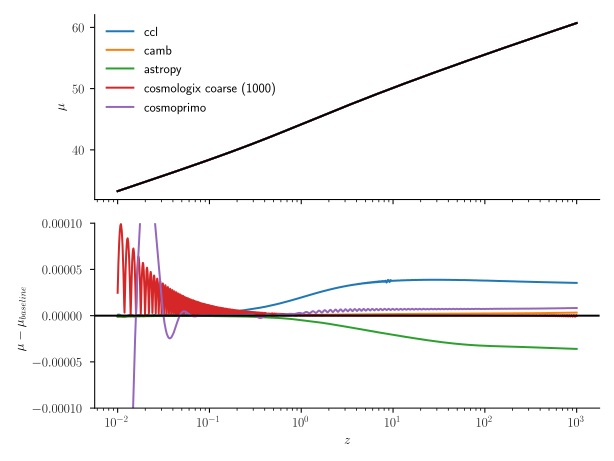
The plot below compares the distance modulus computation for the baseline Planck 2018 flat Λ-CDM cosmological model across several codes, using the fine quadrature of Cosmologix as the reference. It demonstrates agreement within a few 10⁻⁵ magnitudes over a broad redshift range. Residual discrepancies between libraries stem from differences in handling the effective number of neutrino species. We adopt the convention used in CAMB (assuming all species share the same temperature), which explains the closer alignment. A comparison with the coarse quadrature (Cosmologix 1000) highlights the magnitude of numerical errors.
Speed test
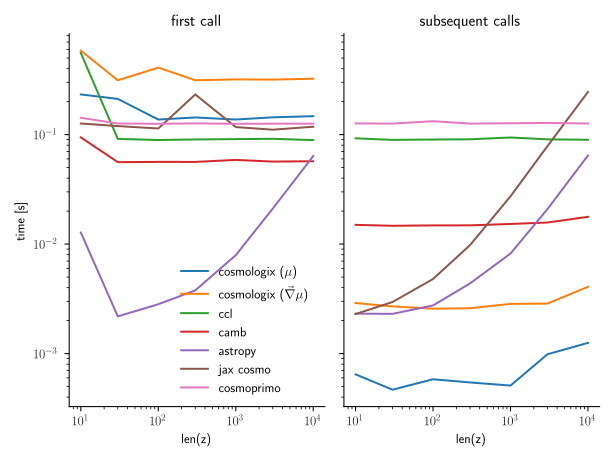
The plot below illustrates the computation time for a vector of distance moduli across various redshifts, plotted against the number of redshifts. Generally, the computation time is dominated by precomputation steps and remains largely independent of vector size, except in the case of Astropy. We differentiate between the first call and subsequent calls, as the initial call may involve specific overheads. For Cosmologix, this includes JIT-compilation times, which introduce a significant delay. Efforts are underway to optimize this aspect.
Contributing
Contributions are welcome! Please fork the repository, make changes, and submit a pull request. Here are some guidelines:
- Follow PEP 8 style. The commited code has to go through black.
- Write clear commit messages.
- Include tests for new features or bug fixes.
Documentation
Detailed documentation for each function and module can be found in the source code. Autodocs is in preparation here.
Release history
v0.9.3 (current)
- Implement a cache mechanism to mitigate pre-computation delays
- Extend the set of cosmological computation available, by adding comoving volume and lookback time
- Improvements to the command line interfacements (ability to change contour thresholds)
- Add Union3 to the set of available likelihoods
v0.9.2
- Rewrite some of the core function to improve speed of contour exploration by about 10x
- Enable exploration of curved cosmologies (solving nan issue around Omega_k = 0)
v0.9.1
- Add a command line interface. Makes it easy to compute bestfits, and 2D Bayesian contours for a given set of constraints
- Auto-detect under-constrained parameters
v0.9.0
- First release with complete feature set
- Accuracy tested against CAMB and CCL
- Build-in fitter and frequentist contour exploration, taking advantage of auto-diff
v0.1.0
- Initial release
- Core distance computation available
License
This project is licensed under the GPLV2 License - see the LICENSE.md file for details.
Contact
For any questions or suggestions, please open an issue.
Acknowledgments
Thanks to the JAX team for providing such an incredible tool for numerical computation in Python. To the cosmology and astronomy community for the valuable datasets and research that inform this package. We are especially grateful to the contributors to the Core Cosmology Library CCL against which the accuracy of this code has been tested, astropy.cosmology for its clean and inspiring interface and of course jax-cosmo, pioneer and much more advanced in differentiable cosmology computations.
Release history Release notifications | RSS feed


Download files
Download the file for your platform. If you're not sure which to choose, learn more about installing packages.
Source Distribution
Built Distribution
Filter files by name, interpreter, ABI, and platform.
If you're not sure about the file name format, learn more about wheel file names.
Copy a direct link to the current filters
File details
Details for the file cosmologix-0.9.3.tar.gz.
File metadata
- Download URL: cosmologix-0.9.3.tar.gz
- Upload date:
- Size: 62.3 kB
- Tags: Source
- Uploaded using Trusted Publishing? No
- Uploaded via: twine/6.1.0 CPython/3.10.16
File hashes
| Algorithm | Hash digest | |
|---|---|---|
| SHA256 |
b6aa3bc5fa9a8342ac9c5a7bf4e63ce69e1b552c6c39d3f8fb7a405c83b0bab9
|
|
| MD5 |
124d556c21f449e47996da1feebc756c
|
|
| BLAKE2b-256 |
9f1a422042c068b7759174decebd74b2c75c07cf9bb7aef2cddf007222e82ca6
|
File details
Details for the file cosmologix-0.9.3-py3-none-any.whl.
File metadata
- Download URL: cosmologix-0.9.3-py3-none-any.whl
- Upload date:
- Size: 52.4 kB
- Tags: Python 3
- Uploaded using Trusted Publishing? No
- Uploaded via: twine/6.1.0 CPython/3.10.16
File hashes
| Algorithm | Hash digest | |
|---|---|---|
| SHA256 |
7f2fb22b6248f13e0fe96c82305ee45e59ff2c71b4a13234f08e47b7d325ae32
|
|
| MD5 |
56f2782d032f474408c3282bea61529c
|
|
| BLAKE2b-256 |
3a7bff9851eee6031fe31f78e9d7de6b1063b907ff3c082ebe6f8b11611bd692
|






