

The AI chatbot that lives in your terminal.
Twenty-five frontier models. Streaming responses. Cloud-synced history. No subscription. No credit card. No config files.
pip install cosmos-ai
Website · Get Started · Features · Models



What is Cosmos?
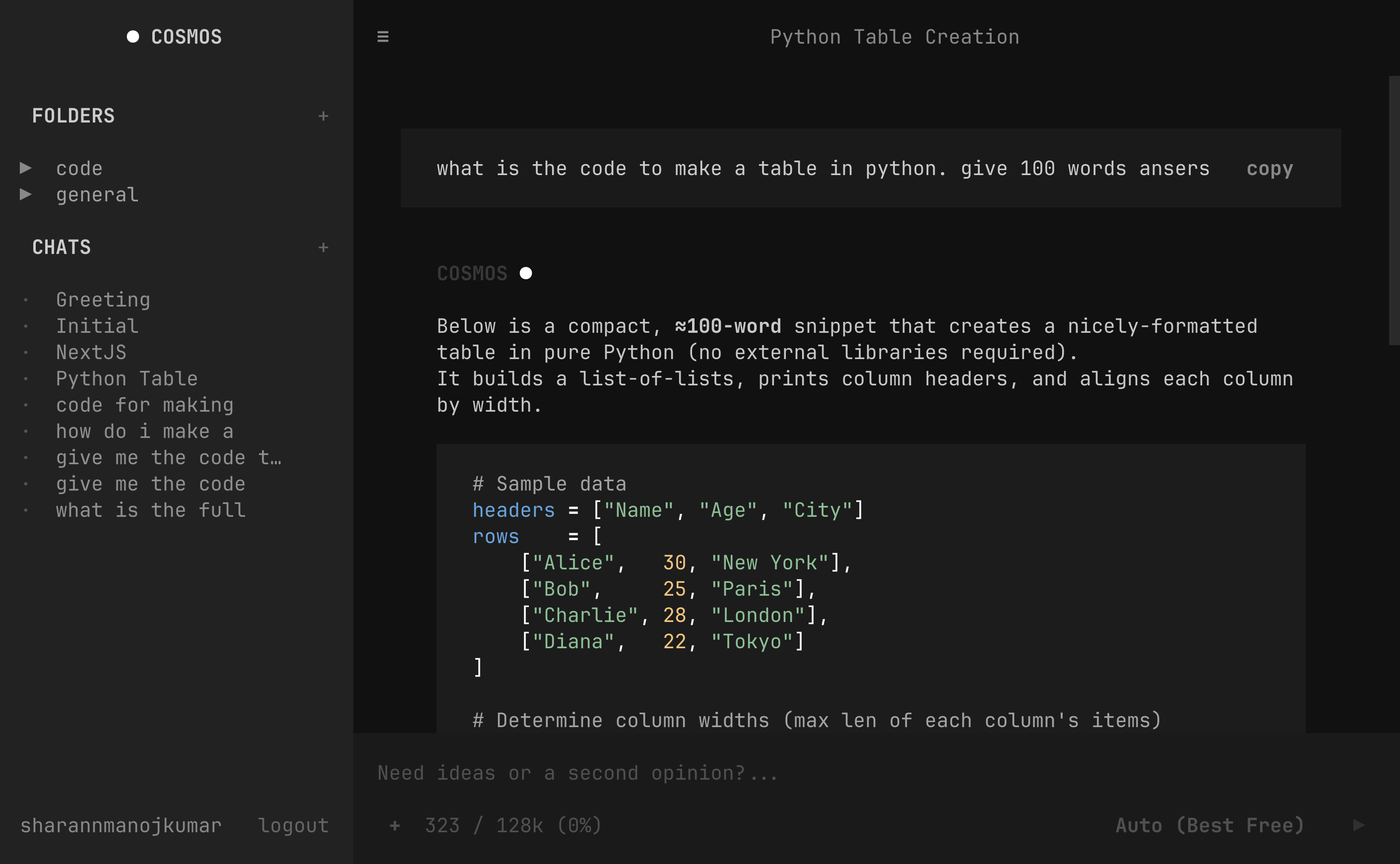
Cosmos is a fast, keyboard-driven AI chat client that runs entirely in your terminal. It speaks to 25+ free models through OpenRouter — DeepSeek R1, Llama 3.3, Gemini 2.0 Flash, and more — and renders their answers as live-streaming Markdown, syntax-highlighted code, tables, and charts, all inside a clean monochrome TUI.
No browser tab. No mouse. No .env files to babysit. You log in once, and your models, history, and folders follow you to every machine you touch.

Quickstart
1. Install
pip install cosmos-ai
2. Sign up at cosmos-tui.app
Enter your name and your OpenRouter API key. That's it — your key is stored securely in your account, so there's nothing to configure locally.
3. Launch
cosmos
Log in once, and you're talking to frontier models in under a minute. Your key, history, and folders sync from the cloud automatically.
Windows: If
cosmosis not recognized after install, add your Python Scripts folder to PATH:C:\Users\<YourName>\AppData\Local\Programs\Python\Python3xx\ScriptsOr runpython -m cosmosas an alternative.
Features
25+ free models, switchable mid-conversation
Start a thread on Gemini 2.0 Flash for speed, hit /models, and finish it on DeepSeek R1 for deep reasoning — without losing context. Every model OpenRouter offers for free is one keystroke away.
Real-time streaming
Tokens render the instant they arrive, with a pulsing ● indicator so you always know the model is still thinking. No spinners, no waiting for the full response to land.
Cloud-synced chat history
Every conversation is saved, organized into folders, and synced to your account. Close your laptop, open your desktop, pick up exactly where you left off.
File attachments
Drop in images, PDFs, DOCX, code files, or plain text and ask questions about them. Cosmos handles the parsing — you handle the curiosity.
Rich terminal output
Full Markdown rendering with tables, syntax-highlighted code blocks, Mermaid diagrams, and ASCII bar charts. Your terminal has never looked this good.
Models
A taste of what's available out of the box, all completely free via OpenRouter:
| Model | Best for |
|---|---|
| DeepSeek R1 | Deep reasoning, math, hard logic |
| Llama 3.3 70B | General chat, reliable all-rounder |
| Gemini 2.0 Flash | Speed, long context, quick answers |
| Qwen 2.5 | Code generation, multilingual |
| Mistral | Lean, fast, efficient responses |
| GPT-4o mini | Balanced quality and latency |
…and 19 more.
Pricing
Free. All of it.
No subscription, no credit card, no usage caps from us. You bring an OpenRouter API key (also free to create), and you only ever touch the free model tier. Cosmos is the interface; OpenRouter is the engine; your wallet stays closed.
Built with
- Textual — the modern Python TUI framework
- OpenRouter — unified access to dozens of models
- Python 3.10+
Contributing
Issues, ideas, and pull requests are welcome. Open an issue to start a discussion, or check the open issues for somewhere to jump in.
git clone https://github.com/Sharann-del/Cosmos.git
cd Cosmos
pip install -e .
License
MIT — see LICENSE.
1 maintainer

Metadata
1 maintainer
Release files for cosmos-ai 0.2.3
For a detailed explanation of source distributions (sdists) and built distributions (wheels), please see the package formats documentation.
Source distribution (sdist)
| File | Size | Uploaded | Provenance | Actions |
|---|---|---|---|---|
| cosmos_ai-0.2.3.tar.gz | 3.4 MB | Without provenance | Details for cosmos_ai-0.2.3.tar.gz |
Built distribution (wheel)
| File | Interpreter | ABI | Platform | Actions Reset |
|---|---|---|---|---|
| cosmos_ai-0.2.3-py3-none-any.whl | Python 3 | none | any | Details for cosmos_ai-0.2.3-py3-none-any.whl |
Total release size: 3.4 MB
Release files / cosmos_ai-0.2.3.tar.gz
| Download URL | cosmos_ai-0.2.3.tar.gz |
|---|---|
| Size | 3.4 MB |
| Tags | Source |
|
SHA-256 checksum How to use checksums |
3c56fe4de712201d7224c9cce416c206d460b3ecf296d8ba56a50479d4390c87
|
|
BLAKE2b-256 checksum How to use checksums |
17f230c317bfce00331283ca30883c4f01f0112d96cbc757f4f0ff54137c8ced
|
| Upload date | |
|
Uploaded using Trusted Publishing? What is trusted publishing? |
No |
| Uploaded via |
twine/6.2.0 CPython/3.12.13
|
Release files / cosmos_ai-0.2.3-py3-none-any.whl
| Download URL | cosmos_ai-0.2.3-py3-none-any.whl |
|---|---|
| Size | 34.6 kB |
| Tags | Python 3 |
|
SHA-256 checksum How to use checksums |
2f3eadf9f698fa7e256c0bfaee31edd73c8c40445779cec76361da8431911a58
|
|
BLAKE2b-256 checksum How to use checksums |
4e7ef101583d2161e107cdf9d906227a3c9d4bd719942f7c07ae8bc585aeba4a
|
| Upload date | |
|
Uploaded using Trusted Publishing? What is trusted publishing? |
No |
| Uploaded via |
twine/6.2.0 CPython/3.12.13
|
Security for cosmos-ai 0.2.3
Provenance
Provenance describes where a file came from. On PyPI, provenance is shared via attestations, which provide a verifiable record of the build or publishing details. View details, limitations and caveats.
No provenance found
None of the files in this release were uploaded with provenance metadata.
A note on package security
PyPI is a repository for distributing packages, not a service for auditing them. While third-party security researchers and our staff do their best to detect and remove malicious packages, PyPI cannot guarantee the quality, security or suitability of any given package.
To learn more about protecting yourself from malicious actors, visit our package security documentation.














