
Cosmos Semantic





An open-source semantic layer with an ontology at its core, so AI agents and apps get the same number on every database, with the proof in every answer.
Live demo of the console · Quickstart · Docs · Article (Portuguese)
AI agents that write SQL over raw tables return numbers that look right and that nobody can explain: "revenue" has three definitions, "active customer" means 60 days to one team and 90 to another. Cosmos Semantic defines metrics, business rules and concepts once, serves them to agents over MCP instead of letting them guess SQL, and attaches evidence to every answer.
| Multi-database | One model, the same number on Databricks, Snowflake, Oracle, SQL Server, Postgres, MySQL, MariaDB and DuckDB, checked by the test suite on every change |
| Ontology | A bilingual business glossary (SKOS), versioned business rules with owners and tests, and a knowledge graph of teams, systems and processes |
| Built for AI agents | A native MCP server: agents find the concept, ask for a governed metric and get deterministic SQL; personal data never reaches them |
| Verifiable numbers | Every answer carries the expanded formula, rules, row filters, reference date and hashes; cosmos replay tells whether a number changed and why |
| Reconciliation | Compares a governed metric with the legacy SQL a team already uses and names the likely cause of each divergence |
| Open, no lock-in | Apache 2.0, its own engine, and import from dbt, Power BI, Cube and Apache Ossie |
The YAML format uses the dbt Semantic Layer vocabulary and ships a JSON Schema; Cube and dbt are import sources and export targets, not dependencies. The core is Apache 2.0 within an open-core model (ADR 0005).
Status: phases 0 to 3 are implemented: the engine, the ontology (glossary and business rules), the REST API, the MCP server, OIDC identity, verifiable numbers (evidence, replay, reconciliation, impact, bootstrap), business context (rule versions, usage and cost, knowledge graph, Power BI import, AI-assisted discovery, the retail pack, SKOS export) and the read-only console. See the roadmap.
Quickstart
pip install "cosmos-semantic[duckdb,testdata]"
cosmos init demo && cd demo
cosmos demo-data
cosmos query revenue average_order_value --by orders.status --evidence
cosmos explain rule:active_customer
That is a governed metric with its evidence (formula, rules, policies, as_of and hashes) in about
a minute, on a local DuckDB file. The quickstart continues with business
rules, row filters, personal data and connecting an AI agent over MCP. Extras: duckdb,
postgres, sqlserver, mysql (MySQL and MariaDB), oracle, databricks, snowflake, server (REST and MCP), ai (cosmos suggest), testdata.
Console
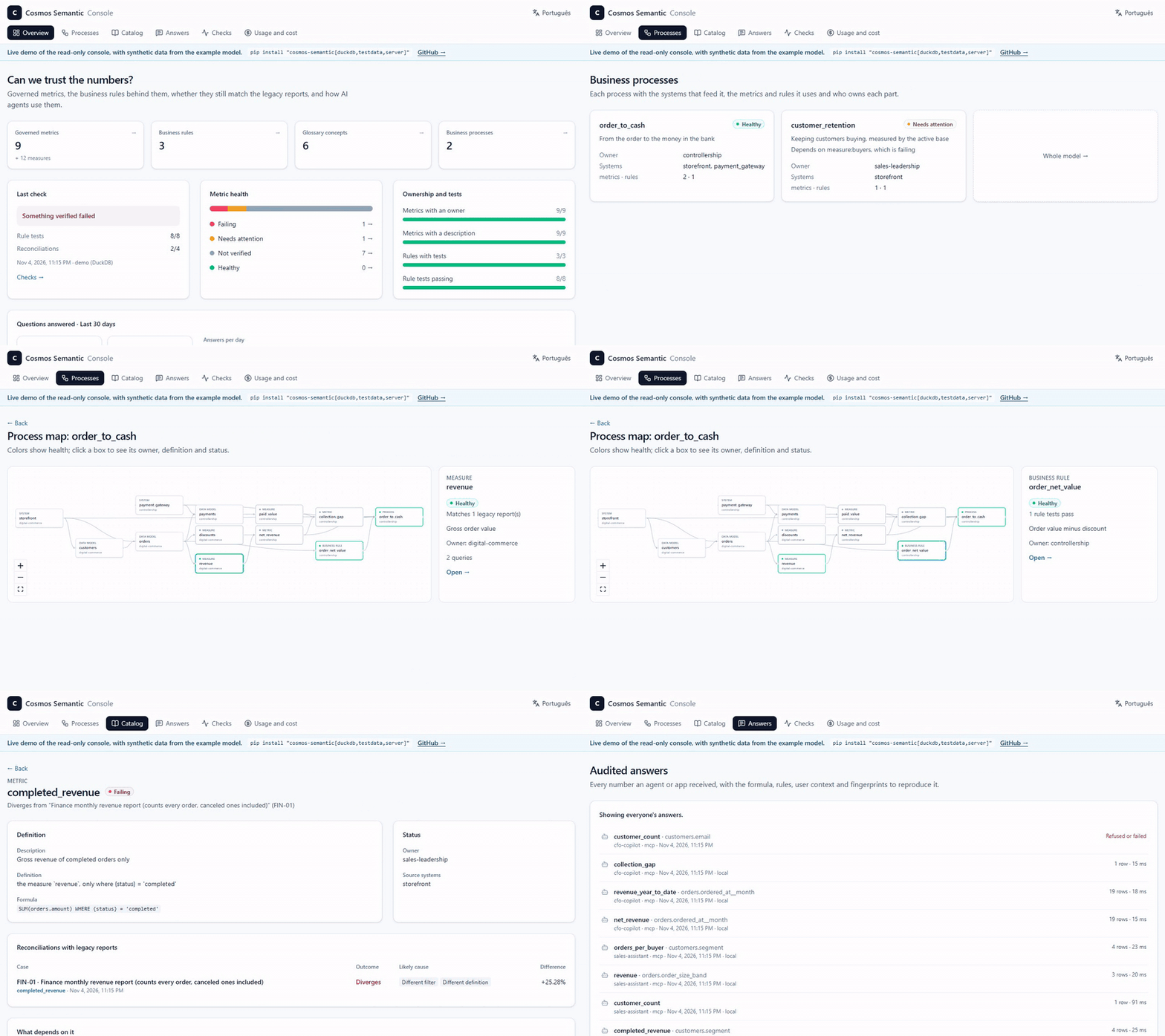
cosmos serve also serves a read-only console at /console, in English or Portuguese, for people who decide rather than build:
- metric health and ownership;
- business processes as graphs colored by health;
- the catalog in business words;
- every audited answer, with a button to reproduce it;
- usage and cost per agent.
cosmos check records rule tests and reconciliations against legacy reports, so the console shows health over time.
Development
Requires Python 3.11+ and uv. From a clone of this repository:
uv sync --all-extras

# Generate synthetic e-commerce data into a local DuckDB (data/ecommerce.duckdb)
uv run cosmos demo-data -c examples/ecommerce/connections.yml   # --locale pt_BR for Brazilian data with CPF

# Validate the example model
uv run cosmos validate -m examples/ecommerce/semantic

# Revenue and average order value by status
uv run cosmos query revenue average_order_value --by orders.status \
  -m examples/ecommerce/semantic -c examples/ecommerce/connections.yml

# Metrics from different models, with the user's row filter; --show-sql prints the generated SQL
uv run cosmos query revenue paid_value customer_count --by customers.region -u region=Midwest --show-sql \
  -m examples/ecommerce/semantic -c examples/ecommerce/connections.yml

# Business rules as a filter and as a grouping; --as-of pins "today"
uv run cosmos query customer_count --where "{rule.active_customer}" --by customers.segment \
  -u region=Northeast --as-of 2026-10-22 -m examples/ecommerce/semantic -c examples/ecommerce/connections.yml

# Evidence envelope: formulas, rules, policies, as_of and hashes; then replay the audited query
export COSMOS_AUDIT_LOG=data/audit.jsonl
uv run cosmos query average_order_value --by customers.segment --where "{rule.active_customer}"   -u region=Northeast --evidence -m examples/ecommerce/semantic -c examples/ecommerce/connections.yml
uv run cosmos replay <query_id> -m examples/ecommerce/semantic -c examples/ecommerce/connections.yml

# Reconcile a governed metric with legacy SQL or another model, and explain the divergence
uv run cosmos reconcile revenue --by orders.status --sql legacy_revenue.sql   -m examples/ecommerce/semantic -c examples/ecommerce/connections.yml
uv run cosmos reconcile --cases examples/ecommerce/divergence_zoo.yml   -m examples/ecommerce/semantic -c examples/ecommerce/connections.yml

# What a change affects, and who queried it (also: --changes-from <previous model>)
uv run cosmos impact rule:active_customer -m examples/ecommerce/semantic --audit data/audit.jsonl

# Past numbers under the rule in effect then, or under today's rule
uv run cosmos query customer_count -w "{rule.active_customer}" --as-of 2026-06-30 --rules-as-of 2026-10-23   -u region=Midwest -m examples/ecommerce/semantic -c examples/ecommerce/connections.yml

# Usage and estimated cost per metric, user, agent and data source (rates: `cost` in connections.yml)
uv run cosmos usage --audit data/audit.jsonl -m examples/ecommerce/semantic -c examples/ecommerce/connections.yml

# The business knowledge graph: owners, source systems and processes (Mermaid, DOT or JSON)
uv run cosmos graph --focus process:order_to_cash -m examples/ecommerce/semantic
uv run cosmos impact system:payment_gateway -m examples/ecommerce/semantic

# AI-assisted discovery: concepts, rules, metrics and descriptions, validated by the engine, for review
# (repeat --source to require that each suggestion runs on every database the model serves)
uv run cosmos suggest --source local -m examples/ecommerce/semantic -c examples/ecommerce/connections.yml -o suggestions.yml

# Industry pack mapped onto your tables by name (draft + report for review)
uv run cosmos pack list
uv run cosmos pack apply retail --source local --schema public -c examples/ecommerce/connections.yml -o semantic/retail.yml

# The business glossary as SKOS/RDF for data catalogs (turtle, jsonld or ntriples)
uv run cosmos export skos -m examples/ecommerce/semantic -o glossary.ttl --base https://data.example.com/glossary/

# Draft a model from the database catalog (keys, joins, measures, LGPD suggestions), then review it
uv run cosmos bootstrap -c examples/ecommerce/connections.yml -o semantic/draft.yml

# Business rule examples (on DuckDB, without touching the data sources) and reference queries
uv run cosmos test -m examples/ecommerce/semantic
uv run cosmos reference

# Import models from other tools
uv run cosmos import cube path/to/model -o semantic/imported.yml
uv run cosmos import dbt path/to/dbt/models --schema analytics -o semantic/dbt.yml
uv run cosmos import ossie model.yaml -o semantic/ossie.yml
uv run cosmos import powerbi model.bim -o semantic/powerbi.yml   # or a TMDL folder
REST API and MCP
cosmos serve starts the REST API at /v1 and the MCP server at /mcp in the same process; interactive docs are at /docs.
# Production: tokens from the OIDC provider (Cosmos only validates, never issues)
export COSMOS_OIDC_ISSUER=https://login.microsoftonline.com/<tenant>/v2.0
export COSMOS_OIDC_AUDIENCE=api://cosmos-semantic
# Development: API keys bound to a fixed context (a file with `keys: {<key>: {subject, user}}`)
export COSMOS_DEV_API_KEYS=dev-keys.yml

uv run cosmos serve -m examples/ecommerce/semantic -c examples/ecommerce/connections.yml
curl -X POST localhost:8080/v1/query -H "X-API-Key: <key>" -H "content-type: application/json" \
  -d '{"metrics": ["revenue"], "dimensions": ["customers.segment"]}'
Remote MCP clients use /mcp as an OAuth protected resource: requests without a valid token get HTTP 401 with a WWW-Authenticate header pointing to /.well-known/oauth-protected-resource, which names the identity provider (set COSMOS_PUBLIC_URL behind a proxy).
For local MCP clients (Claude Desktop, Claude Code), use the stdio transport: cosmos mcp -m ... -c ... with COSMOS_API_KEY set. The tools are search_concepts, explain, list_members, query and show_sql. Every call runs as the user who owns the token; personal data never reaches agents.
Data sources
Local Postgres: docker compose -p cosmos-semantic -f deploy/docker-compose.yml up -d, then cosmos demo-data --target postgres and cosmos reference --source postgres. To also run the tests on Postgres, set COSMOS_PG_URI=postgresql://cosmos:cosmos@localhost:15432/cosmos.
Local SQL Server: docker compose -p cosmos-semantic -f deploy/docker-compose.yml --profile sqlserver up -d and COSMOS_MSSQL_URI='mssql+pymssql://sa:Cosmos!Passw0rd@localhost:14330/master'. Every data source accepts a schema_map in connections.yml (for example public: dbo) to use the same model with different schemas.
Local MySQL, MariaDB and Oracle Database Free: docker compose -p cosmos-semantic -f deploy/docker-compose.yml --profile mysql --profile mariadb --profile oracle up -d, then COSMOS_MYSQL_URI=mysql+pymysql://root:cosmos@127.0.0.1:13306/, COSMOS_MARIADB_URI=mysql+pymysql://root:cosmos@127.0.0.1:13307/, COSMOS_ORACLE_DSN=127.0.0.1:11521/FREEPDB1 and COSMOS_ORACLE_PASSWORD=cosmos. Once the Oracle container is healthy, run deploy/oracle-setup.sql as SYSTEM (the command is in the file). In Oracle a schema is a user, so an Oracle source maps the model's public to its owner (schema_map: { public: cosmos }).
Databricks: set DATABRICKS_HTTP_PATH (SQL warehouse) and DATABRICKS_TOKEN with DATABRICKS_SERVER_HOSTNAME, or DATABRICKS_CONFIG_PROFILE with a Databricks CLI profile (databricks auth login --profile <name>). The tests load the example data into the catalog in DATABRICKS_CATALOG (default cosmos_demo, which must exist). On Git Bash for Windows, also set MSYS_NO_PATHCONV=1, or the shell rewrites /sql/1.0/... into a Windows path and the warehouse answers 404.
Snowflake: set SNOWFLAKE_ACCOUNT (<org>-<account>), SNOWFLAKE_USER and SNOWFLAKE_PRIVATE_KEY_FILE (key-pair login), or SNOWFLAKE_CONNECTION_NAME with a connection from ~/.snowflake/connections.toml; plus SNOWFLAKE_ROLE and SNOWFLAKE_WAREHOUSE. The tests load the example data into SNOWFLAKE_DATABASE (default COSMOS_DEMO). deploy/snowflake-setup.sql creates the warehouse, database, role and service user they need.
Editors validate and autocomplete model files through the JSON Schema in schema/, referenced on the first line of each file (# yaml-language-server: $schema=...). After changing spec.py, regenerate it with uv run cosmos schema -o schema/cosmos-semantic.v1.schema.json.
Principles
- The engine is ours. The semantic model, metric planner and SQL generation are the core of the product.
- Compatible, not dependent. Cube, dbt and Ossie are import and export formats.
- Query the source directly. No intermediate infrastructure in the MVP; caching comes later.
- Same number everywhere. The same request returns the same result on every supported database.
- One differentiator per phase. Scope only grows after it is validated.
- Open core. Everything that defines or computes a number is Apache 2.0; the paid part covers enterprise identity, auditing, managed operations and support.
Documentation
| Document | Contents |
|---|---|
| Quickstart | From pip install to a governed metric, business rules, policies and an AI agent over MCP |
| Console | The read-only web console: views, cosmos check, access and development |
| Product vision | Problem, audience, positioning, free and paid editions |
| Architecture | Components, query planner, cross-database guarantees, security, deployment |
| Semantic model | The authoring format, the generated SQL and the exports |
| Interoperability | Mapping to Apache Ossie, and dbt and Cube import |
| Roadmap | Phases, MVP scope and exit criteria |
| Changelog | What changed in each release |
| Architecture decisions | Decision records (ADRs); 0004 supersedes 0001, 0005 sets the name and license, 0006 puts the ontology in the MVP, 0007 sets connectors, data sources, identity and import, 0008 makes verifiable numbers the phase 2 differentiator, 0009 makes business context the phase 3 differentiator and pauses connected BI and the managed product, 0010 adds Snowflake as a data source, 0011 adds MySQL, MariaDB and Oracle, 0012 adds the read-only console |
Repository layout
src/cosmos_semantic/
  spec.py            v1 authoring format (Pydantic); source of the JSON Schema
  loader.py          reading YAML files
  compiler.py        validation and semantic graph, with joins inferred from entities
  expressions.py     {member} and $user references, and protection of caller filters
  planner.py         query plan and per-dialect SQL (SQLGlot)
  connectors.py      DuckDB, Postgres (ADBC), Databricks, Snowflake, Oracle, SQL Server and MySQL/MariaDB, always Arrow
  dialects.py        per-dialect rewrites SQLGlot does not cover (MySQL, Oracle)
  engine.py          model + connections -> executed queries
  ontology.py        business rules (virtual dimensions and tests) and SKOS glossary
  catalog.py         members, concept search and explanations
  auth.py            OIDC token validation and development keys
  evidence.py        evidence envelope: formulas, rules, policies, hashes
  reconcile.py       reconciliation with legacy SQL or another model, and divergence probes
  impact.py          impact analysis over the model graph and the audit log
  bootstrap.py       draft model from the database catalog
  service.py         querying with evidence, auditing and replay, shared by REST, MCP and CLI
  api.py             REST API (FastAPI) and the console at /console
  console.py         read-only console views: health, process graphs, catalog, answers
  checks.py          `cosmos check` runs (rule tests, reconciliations) and their log
  mcp_server.py      MCP server
  interchange/       dbt, Ossie and Cube import
  demo_data.py       synthetic data (en_US default, pt_BR optional)
  reference.py       running the reference queries
  cli.py             the `cosmos` command
schema/              JSON Schema of the format
examples/ecommerce/  example model, connections, the divergence zoo and reconciliation cases
reference/           reference queries (basic and advanced)
tests/fixtures/      example models in dbt, Ossie and Cube
console/             the console's web app (Next.js, React, Tailwind CSS)
deploy/              local docker compose
docs/                documentation and ADRs
License and contributing
The core is licensed under Apache 2.0 (ADR 0005). Contributions are welcome under the Developer Certificate of Origin; see CONTRIBUTING.md. Report vulnerabilities privately as described in SECURITY.md.
1 maintainer

Metadata
1 maintainer
Release files for cosmos-semantic 0.3.0
For a detailed explanation of source distributions (sdists) and built distributions (wheels), please see the package formats documentation.
Source distribution (sdist)
| File | Size | Uploaded | Provenance | Actions |
|---|---|---|---|---|
| cosmos_semantic-0.3.0.tar.gz | 4.8 MB | With provenance | Details for cosmos_semantic-0.3.0.tar.gz |
Built distribution (wheel)
| File | Interpreter | ABI | Platform | Actions Reset |
|---|---|---|---|---|
| cosmos_semantic-0.3.0-py3-none-any.whl | Python 3 | none | any | Details for cosmos_semantic-0.3.0-py3-none-any.whl |
Total release size: 5.4 MB
Release files / cosmos_semantic-0.3.0.tar.gz
| Download URL | cosmos_semantic-0.3.0.tar.gz |
|---|---|
| Size | 4.8 MB |
| Tags | Source |
|
SHA-256 checksum How to use checksums |
e9970f234da7eca1c58e7a2e38bd186254191d1f99dce7f88c05adbba4571ef9
|
|
BLAKE2b-256 checksum How to use checksums |
efa99ab291fae0a3d2eed05d2973d5a4cee7964cba91d8c9568670dddabd6302
|
| Upload date | |
|
Uploaded using Trusted Publishing? What is trusted publishing? |
Yes |
| Uploaded via |
twine/7.0.0 CPython/3.13.16
|
Provenance
Provenance describes where a file came from. On PyPI, provenance is shared via attestations, which provide a verifiable record of the build or publishing details. View details, limitations and caveats.


PyPI Publish Attestation
PyPI verified that this artifact, at this checksum, originated from the publisher listed below.
Signed by GitHub Actions, verified by PyPI on Nov 5, 2026.
Transparency logRelease files / cosmos_semantic-0.3.0-py3-none-any.whl
| Download URL | cosmos_semantic-0.3.0-py3-none-any.whl |
|---|---|
| Size | 648.1 kB |
| Tags | Python 3 |
|
SHA-256 checksum How to use checksums |
a435892a65f71d30da202fdb0d7b1341c096223ad39470b91dcf2d2a1d099c42
|
|
BLAKE2b-256 checksum How to use checksums |
69281b0c41b840e5aaee1b67c965199aa48a8be8587e75ddbad9f59013a4a899
|
| Upload date | |
|
Uploaded using Trusted Publishing? What is trusted publishing? |
Yes |
| Uploaded via |
twine/7.0.0 CPython/3.13.16
|
Provenance
Provenance describes where a file came from. On PyPI, provenance is shared via attestations, which provide a verifiable record of the build or publishing details. View details, limitations and caveats.
PyPI Publish Attestation
PyPI verified that this artifact, at this checksum, originated from the publisher listed below.
Signed by GitHub Actions, verified by PyPI on Nov 5, 2026.
Transparency logSecurity for cosmos-semantic 0.3.0
Provenance
Provenance describes where a file came from. On PyPI, provenance is shared via attestations, which provide a verifiable record of the build or publishing details. View details, limitations and caveats.
Full provenance
All 2 files in this release have been uploaded with provenance metadata.
Attestation for cosmos_semantic-0.3.0.tar.gz
PyPI Publish Attestation
PyPI verified that this artifact, at this checksum, originated from the publisher listed below.
Signed by GitHub Actions, verified by PyPI on Nov 5, 2026.
Transparency logA note on package security
PyPI is a repository for distributing packages, not a service for auditing them. While third-party security researchers and our staff do their best to detect and remove malicious packages, PyPI cannot guarantee the quality, security or suitability of any given package.
To learn more about protecting yourself from malicious actors, visit our package security documentation.














