





cottage is a GitOps tool for teams to manage age-encrypted secrets in git repositories.
It provides a simple workflow to encrypt/decrypt secrets, manage recipients, and keep secrets out of the repo while still allowing for easy sharing via VCS. cottage also generates redacted previews of encrypted secrets for better visibility and supports both persistent and temporary decryption workflows, while ensuring secrets are never committed in plaintext.

- Features
- Installation
- Editor Integrations
- AI Agent Integrations
- Quick Start
- GitOps
- Git Hooks
- Access Control
- Any Provider as Upstream
- Sync with any device
- Learn More
- Troubleshooting
- Comparison
Features
- Exposure-safe: Uses Rust's type system to make sure bugs can never accidentally expose secrets.
- Team-friendly: Share public keys (recipients) in the repo, keep private keys (identities) local.
- Access Control: Simple allow/deny rules to control which secrets are encrypted for which recipients.
- Manages .gitignore: Automatically updates
.gitignoreto keep unencrypted secrets out of the repo. - Previews: Generates timestamped redacted previews of encrypted secrets for better visibility.
- Rich diffs: Keeps git diff clean & reviewable, while
ctg diffshows diff of locally modified secrets with tracked encrypted counterparts. - Checksum verification: Prevents tampering by verifying that encrypted secrets and recipient lists match the metadata.
- Git hooks: Easily set up git hooks to automatically check/encrypt secrets before commit and decrypt them after checkout.
- Persistent secrets workflow:
ctg decrypt/synckeeps decrypted secrets on disk. - Smart cleanup lifecycle:
ctg run(shortcutctgx) andctg editdecrypt secrets before the operation, keeping them on disk if already present beforehand or automatically cleaning them up afterwards if they were not. - Clean on completion:
ctg encrypt --clean,ctg run --clean, andctg edit --cleanensure that decrypted files are cleaned up from disk even if they were present before. - Environment injection workflow:
ctg envinjects decrypted secrets as environment variables to run a command, without writing them to disk at all. - Secure secret piping:
ctg cat PATHdecrypts in memory and prints to stdout for direct stdin piping to other tools. - Clean up:
ctg cleandeletes all decrypted secrets from local repo to let you run your AI agents with a tiny bit less worry. - Supports jj and non-git directories:
ctg initturns any directory into a secret store. - Sync with any provider: Lets you configure any provider with an API as the upstream, and start using
ctg pull/diff/pushlikegit pull/diff/push. - Sync with any device: Secrets encrypted with cottage and managed in a git repo can be synced across devices with Cottage Sync.
Installation
# rust: cargo-binstall/cargo
cargo binstall --locked cottage
cargo install --locked cottage

# python: pip/uv/uvx
pip install cottage
uv pip install cottage
uvx --from cottage ctg --version

# node: yarn/pnpm/npx
yarn global add @sayanarijit/cottage
pnpm add -g @sayanarijit/cottage
npx -p @sayanarijit/cottage ctg --version
Also available as docker images:
# Docker
docker run --rm -v $PWD:/app sayanarijit/cottage --version

# Podman
podman run --rm -v $PWD:/app quay.io/sayanarijit/cottage --version
Or download the latest release from GitHub.
Editor Integrations
VS Code Extension
Use the Cottage VS Code extension to install ctg, add Copilot safety hooks, encrypt files from the Explorer, and open .cott.age files through the editor workflow.
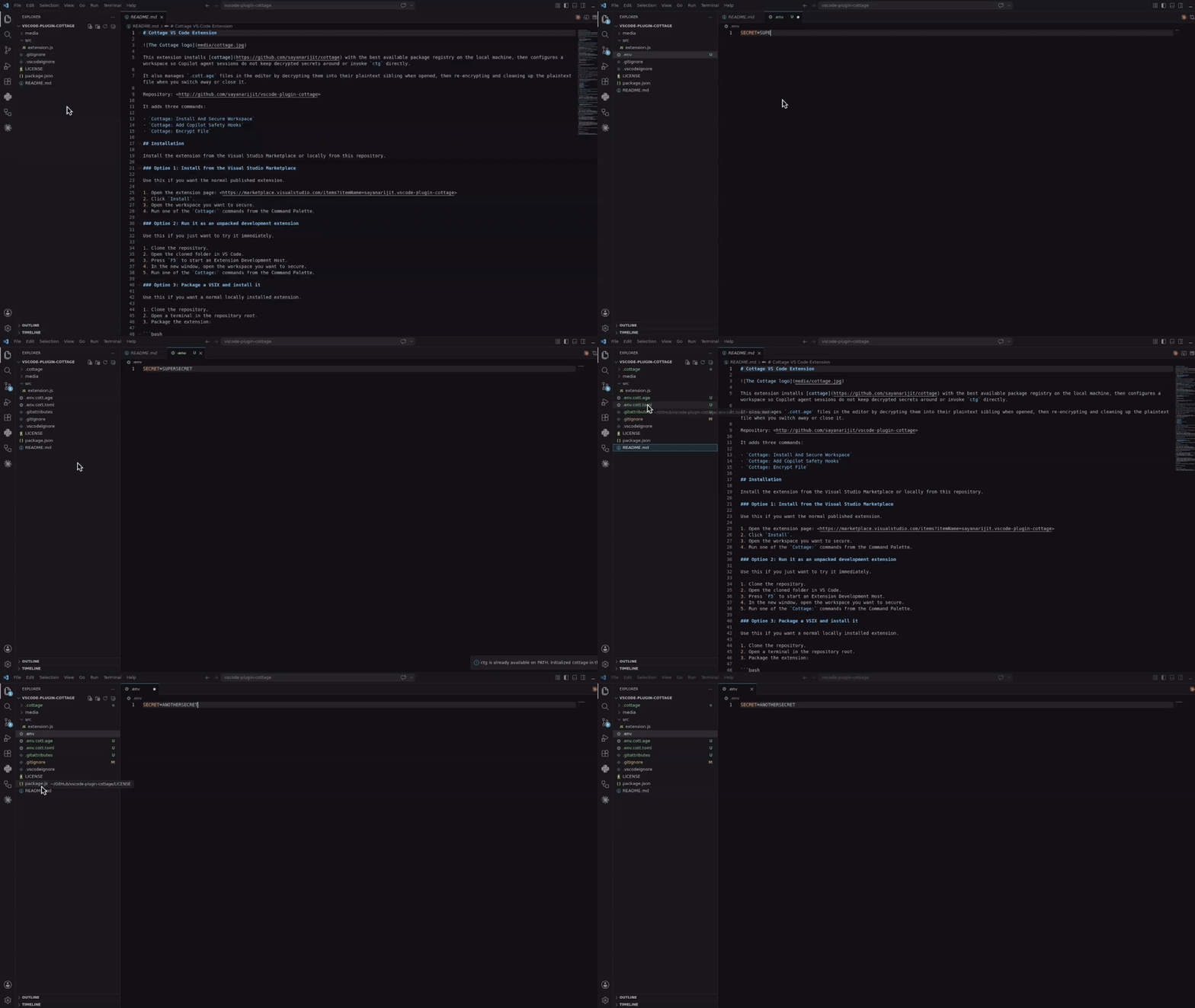
Install it from the Visual Studio Marketplace, or build and install it locally from vscode-plugin-cottage.
Cursor and Eclipse Extension
Download the VSX file and install it in your Cursor or Eclipse IDE. It works similar to the VS Code extension.
Vim Plugin
Use the cottage.vim plugin to encrypt/decrypt secrets from Vim or Neovim.

AI Agent Integrations
All of the integrations below keep AI agents from running ctg/ctgx directly and from viewing or editing secret files: anything inside .cottage/, any *.cott.* file (encrypted *.cott.age blobs and redacted *.cott.toml previews), and any decrypted file that still has a *.cott.age counterpart on disk.
Claude Code Integration
If you are using Claude Code, add .claude/settings.json and .claude/hooks/deny-secrets.py to your repos with secrets so Claude Code sessions handle secrets safely, or install the claude-plugin-cottage plugin.
GitHub Copilot Integration
If you are using GitHub Copilot in VS Code, add .github/hooks/ctg-policy.json and .github/hooks/scripts/deny_ctg_command.py to your repos with secrets so Copilot sessions clean decrypted files, block direct ctg shell commands, and block access to secret files, or install the vscode-plugin-cottage extension to set that up from VS Code.
VS Code loads .claude/settings.json hook definitions too. If you keep both Claude and Copilot hook files in the same repo, make sure you do not accidentally run the same cleanup hook twice.
Codex Integration
If you are using Codex, add .codex/hooks.json and .codex/hooks/deny-ctg.py to your repos with secrets so Codex sessions handle secrets safely, or install the codex-plugin-cottage plugin.
Codex requires local hooks to be reviewed before they run. After adding the files, start Codex in the repo and use /hooks to review and trust the project hooks.
Antigravity (agy) Integration
If you are using Antigravity (agy), add .agents/hooks.json and .agents/scripts/deny-ctg.py to your repos with secrets so Antigravity sessions handle secrets safely, or install the agy-plugin-cottage plugin.
Cursor Integration
If you are using Cursor, add .cursor/hooks.json, .cursor/hooks/deny-ctg.py, .cursor/hooks/deny-read-secrets.py, .cursor/rules/deny-ctg.mdc, and .cursorignore to your repos with secrets so Cursor sessions handle secrets safely.
Cursor requires hooks to be enabled first. Open Cursor Settings > Hooks and enable hooks, then restart the agent session so the project hooks take effect. .cursorignore additionally keeps secret files out of Cursor's indexing and the Agent's context.
Quick Start
Init project:
mkdir project && cd project

git init  # Optional, cottage works better with git but it's not required
ctg init  # Sets up the .cottage directory and necessary files

tree -a
# .
# ├ .cottage/           <- Auto-generated by `ctg init`
# │ └ recipients/     <- This is where your team keeps the public keys of all the recipients.
# │     └ sayanarijit <- Your public key. Commit it. To use an existing public key, just copy that key here.
# ├ .git/...
# └ .gitattributes      <- Added `*.cott.age binary linguist-generated filter=cottage-encrypted -diff` to avoid polluting git diff

# Your private key is stored safely in `~/.config/cottage/identity/<dirname>/<timestamp>.key`.
# You can run `ctg clean --all` anytime to clean up everything cottage ever did.
Create or edit a secret:
# `ctg edit` decrypts the file before opening in $EDITOR and re-encrypts upon save.
# If the decrypted file was not present on disk before running `ctg edit`, it is cleaned up afterwards.
# If it was already present, it is kept on disk.
ctg edit secret.yml

# Use `--clean` with `ctg edit` or `ctg encrypt` to ensure decrypted files are deleted even if present before
ctg edit secret.yml --clean    # Opens in $EDITOR, encrypts on save, and cleans up
ctg encrypt secret.yml --clean # Encrypts secret.yml and cleans up
# encrypt secret.yml
#    into secret.yml.cott.age
#    edit secret.yml.cott.toml
#    edit .gitignore
# delete secret.yml
Run a command with decrypted secrets:
cat secret.yml
# cat: secret.yml: No such file or directory

# `ctg run` (or shortcut `ctgx`) decrypts secrets before running the command.
# If the decrypted files were not present on disk beforehand, they are automatically cleaned up after the command finishes.
# If they were already present beforehand, they are kept on disk.
ctg run -- kubectl apply -f secret.yml          # decrypts secret.yml.cott.age to secret.yml and runs the command
ctg run -- kubectl apply -f secret.yml.cott.age # also replaces the path argument with the decrypted file path
ctg run -- kubectl apply -f .                   # decrypts all .cott.age files in . and runs the command
ctg run -- ./deploy.sh                          # decrypts all .cott.age files in repo and runs the command

cat secret.yml
# cat: secret.yml: No such file or directory

# Use `--clean` to ensure decrypted files are cleaned up even if they were present before
ctg run --clean ./deploy.sh
Or use the shortcut:
ctgx -- ./deploy.sh
ctgx --clean -- ./deploy.sh
Read and pipe a decrypted secret without writing it to disk:
ctg cat secret.yml.cott.age
ctg cat secret.yml | kubectl apply -f -
ctg cat .env.prod | docker run --rm --env-file /dev/stdin my-image:latest
Run a command with secrets injected as environment variables, without writing to disk at all:
ctg env -- ./deploy.sh # Export secrets from .env.cott.age (default) without writing them to disk, then run deploy.sh
ctg env -F .env.prod.cott.age -- ./deploy.sh # exports from .env.prod.cott.age instead of .env.cott.age
ctg env -F secrets.json.cott.age -- printenv COTTAGE_SECRET # Also supports non-dotenv files.
GitOps
To share your secrets with team members, just push to the git repo.
git add .
git commit -m "Add secret.yml"
git push origin main
Ask your teammates to add their public keys to .cottage/recipients and push the
changes. Then you can pull and re-encrypt the secrets for them.
git pull origin main

ctg decrypt --skip-verify-recipients  # Decrypt missing secrets for re-encryption
ctg encrypt                           # Re-encrypt all secrets
# encrypt secret.yml
#    into secret.yml.cott.age
#    edit secret.yml.cott.toml

ctg clean  # optional
# delete secret.yml

# review changes, commit and push
git add .
git commit -m "Add new recipient to secrets"
git push origin main
Now your teammates can pull the latest changes and decrypt secrets for themselves.
Git Hooks
You can use prek or pre-commit to set up git hooks to automatically check/encrypt secrets before commit and decrypt them after checkout.
See the example prek configuration here.
After adding the prek.toml file, run:
prek install
prek install --hook-type post-checkout
prek install --hook-type post-merge
prek install --hook-type post-rewrite
Access Control
Rules
In the metadata file, you can annotate which recipients the secret should be encrypted for. This allows you to have different secrets for different environments (e.g. staging vs production) and only encrypt them for the relevant recipients.
# secret.yml.cott.toml
[secret]
allow = ["sayanarijit"]  # Only encrypt for sayanarijit
# secret.yml.cott.toml
[secret]
deny = ["sayanarijit"]  # Encrypt for everyone except sayanarijit
# secret.yml.cott.toml
[secret]
allow = ["env/staging/*"]  # Supports glob patterns, only encrypt for recipients in env/staging
deny = ["env/staging/badservice"]  # Encrypt for everyone in env/staging except badservice
Deny rules take precedence over allow rules.
See metadata specification for more details.
Verification
You can run ctg verify in CI to verify that the encrypted secrets and recipient lists match the metadata rules, to prevent tampering.
# .github/workflows/cottage-verify.yml
name: Cottage Verify
on: [push, pull_request]
permissions:
  contents: read
jobs:
  verify-secrets:
    runs-on: ubuntu-latest
    steps:
      - uses: actions/checkout@v3
      - name: Verify secrets
        run: docker run --rm -v "${{ github.workspace }}:/app" ghcr.io/sayanarijit/cottage verify
Any Provider as Upstream
With cottage, you can sync secrets with any provider that has an API, not just git.
For that, create a file named cottage.toml in the project root and configure the upstream settings.
See the example cottage.toml here and the secret specific upstream configuration here.
See an example plugin implementation here.
The workflow is similar to git, but instead of git pull and git push, you run ctg pull and ctg push to sync secrets with the configured upstream.
Example:
# Pull latest changes into local encrypted secrets
# Similar to `git pull origin`
ctg pull myvault

# Compare diff with local decrypted secrets
ctg diff

# Sync local decrypted secrets with local encrypted secrets
ctg sync

# Push changes from local encrypted secrets to upstream
# Similar to `git push origin main`
ctg push myvault
See upstream configuration specification for more details.
Example plugins
Cottage supports various plugin providers to sync your secrets. Ready-to-use plugin scripts are available in the examples/plugins directory:
- 1Password
- AWS Secrets Manager
- Azure Key Vault
- Bitwarden
- Dashlane
- Doppler
- ejson
- GitHub Secrets
- Google Cloud Secret Manager
- HashiCorp Vault (also see Vault in Kubernetes)
- Keeper Security
- KeePass (Passhole)
- LastPass
- pass (password-store)
- Proton Pass
- System Keyring
- Zoho Vault
Sync with any device
Use Cottage Sync to sync your secrets across your devices and browse without needing the CLI.
Learn More
See examples directory for more usage examples.
Troubleshooting
# See debug logs with -v, -vv or -vvv
ctg run -vvv -- ./deploy.sh
Comparison
age vs Other Encryption
age uses a modern, simple algorithm optimized for secure file encryption, with a focus on usability and minimal attack surface. It also supports SSH RSA and Ed25519 keys, though it's recommended to use different keys for separate purposes and scopes.
cottage vs SOPS
While SOPS and cottage have many overlapping features, cottage has the following advantages:
- Auto manage .gitignore to ensure unencrypted secrets are never committed to git.
- Encrypted secrets being pure age encrypted .age files, allows for better interoperability with a wider ecosystem of tools.
- Cleaner diffs - unlike SOPS, which generates diffs for every value of every secret, even if the actual change is just adding/removing a recipient, cottage only generates one diff per file, explicitly pointing out the change in recipients checksum.
cottage vs dotenvx
cottage borrows the ctg env API from dotenvx.
- Supports any file type, not just dotenv files.
- Manages multiple secrets in a repo.
- Access control rules to encrypt secrets for specific recipients.
- Cleaner diffs - see cottage vs SOPS.
cottage vs agebox
agebox is very similar to cottage in core philosophy but lacks many features.
1 maintainer

Metadata
1 maintainer
Release files for cottage 0.8.0
For a detailed explanation of source distributions (sdists) and built distributions (wheels), please see the package formats documentation.
Source distribution (sdist)
| File | Size | Uploaded | |
|---|---|---|---|
| cottage-0.8.0.tar.gz | 78.1 kB | Details |
Built distributions (wheels)
Total release size: 61.4 MB
Release files / cottage-0.8.0.tar.gz
| Download URL | cottage-0.8.0.tar.gz |
|---|---|
| Size | 78.1 kB |
| Tags | Source |
|
SHA-256 checksum How to use checksums |
34216e919356ef0ed23a51320f6b4eee2540ab6a7a9fab784a7af9392eb96667
|
|
BLAKE2b-256 checksum How to use checksums |
0c6c2b545fbeead2928c61128c8a8ae46fbc74f4ab36eb519336e404199dd1bb
|
| Upload date | |
|
Uploaded using Trusted Publishing? What is trusted publishing? |
No |
| Uploaded via |
uv/0.12.19 {"installer":{"name":"uv","version":"0.12.19","subcommand":["publish"]},"python":null,"implementation":{"name":null,"version":null},"distro":{"name":"Ubuntu","version":"24.04","id":"noble","libc":null},"system":{"name":null,"release":null},"cpu":null,"openssl_version":null,"setuptools_version":null,"rustc_version":null,"ci":true}
|
Release files / cottage-0.8.0-py3-none-win_arm64.whl
| Download URL | cottage-0.8.0-py3-none-win_arm64.whl |
|---|---|
| Size | 3.7 MB |
| Tags | Python 3 Windows ARM64 |
|
SHA-256 checksum How to use checksums |
f7e305e8d7133f8add7d12af0929c992b5bf051113e6955a7b2affbda9da2f5f
|
|
BLAKE2b-256 checksum How to use checksums |
4ec08f63ba2cd349bad84f5de46b3cce5bbcd4d1691e423d7de29c26d55abbca
|
| Upload date | |
|
Uploaded using Trusted Publishing? What is trusted publishing? |
No |
| Uploaded via |
uv/0.12.19 {"installer":{"name":"uv","version":"0.12.19","subcommand":["publish"]},"python":null,"implementation":{"name":null,"version":null},"distro":{"name":"Ubuntu","version":"24.04","id":"noble","libc":null},"system":{"name":null,"release":null},"cpu":null,"openssl_version":null,"setuptools_version":null,"rustc_version":null,"ci":true}
|
Release files / cottage-0.8.0-py3-none-win_amd64.whl
| Download URL | cottage-0.8.0-py3-none-win_amd64.whl |
|---|---|
| Size | 3.9 MB |
| Tags | Python 3 Windows x86-64 |
|
SHA-256 checksum How to use checksums |
cf08c218b15bea5e5f28a725611003b99e7d491e2506d9f5d0cfc79dc1c6fe11
|
|
BLAKE2b-256 checksum How to use checksums |
a35813b2efe58efdb529d3a0a932bdae80b3fc036d872c9d74863bb870fc6281
|
| Upload date | |
|
Uploaded using Trusted Publishing? What is trusted publishing? |
No |
| Uploaded via |
uv/0.12.19 {"installer":{"name":"uv","version":"0.12.19","subcommand":["publish"]},"python":null,"implementation":{"name":null,"version":null},"distro":{"name":"Ubuntu","version":"24.04","id":"noble","libc":null},"system":{"name":null,"release":null},"cpu":null,"openssl_version":null,"setuptools_version":null,"rustc_version":null,"ci":true}
|
Release files / cottage-0.8.0-py3-none-win32.whl
| Download URL | cottage-0.8.0-py3-none-win32.whl |
|---|---|
| Size | 3.8 MB |
| Tags | Python 3 Windows x86-32 |
|
SHA-256 checksum How to use checksums |
844c9cae1c7fff54d4527375f36996c6db11c800c45daf259c771bb0387a0cd4
|
|
BLAKE2b-256 checksum How to use checksums |
652858396627c13fd25a482d5872ac0a1080085e71848ecda9f1780ee247114f
|
| Upload date | |
|
Uploaded using Trusted Publishing? What is trusted publishing? |
No |
| Uploaded via |
uv/0.12.19 {"installer":{"name":"uv","version":"0.12.19","subcommand":["publish"]},"python":null,"implementation":{"name":null,"version":null},"distro":{"name":"Ubuntu","version":"24.04","id":"noble","libc":null},"system":{"name":null,"release":null},"cpu":null,"openssl_version":null,"setuptools_version":null,"rustc_version":null,"ci":true}
|
Release files / cottage-0.8.0-py3-none-musllinux_1_2_x86_64.whl
| Download URL | cottage-0.8.0-py3-none-musllinux_1_2_x86_64.whl |
|---|---|
| Size | 4.3 MB |
| Tags | Linux musl 1.2+ x86-64 Python 3 |
|
SHA-256 checksum How to use checksums |
ebf2858357d5d014f024118b110be2d188192716fec5d26aa052a98ed4836aa1
|
|
BLAKE2b-256 checksum How to use checksums |
8c28e53104bd1a33454ccddb782978b201a63e9a5ed87c99d190705e60dbe845
|
| Upload date | |
|
Uploaded using Trusted Publishing? What is trusted publishing? |
No |
| Uploaded via |
uv/0.12.19 {"installer":{"name":"uv","version":"0.12.19","subcommand":["publish"]},"python":null,"implementation":{"name":null,"version":null},"distro":{"name":"Ubuntu","version":"24.04","id":"noble","libc":null},"system":{"name":null,"release":null},"cpu":null,"openssl_version":null,"setuptools_version":null,"rustc_version":null,"ci":true}
|
Release files / cottage-0.8.0-py3-none-musllinux_1_2_i686.whl
| Download URL | cottage-0.8.0-py3-none-musllinux_1_2_i686.whl |
|---|---|
| Size | 4.3 MB |
| Tags | Linux musl 1.2+ x86-32 Python 3 |
|
SHA-256 checksum How to use checksums |
9e0ae49417afc97fbf10a0a51555640e28fc6c43155f2e905727e4f81fa8b0ce
|
|
BLAKE2b-256 checksum How to use checksums |
77fe4db89de45bed5975ce187ddaa74e626d9785852401aa2458c872b5b0a408
|
| Upload date | |
|
Uploaded using Trusted Publishing? What is trusted publishing? |
No |
| Uploaded via |
uv/0.12.19 {"installer":{"name":"uv","version":"0.12.19","subcommand":["publish"]},"python":null,"implementation":{"name":null,"version":null},"distro":{"name":"Ubuntu","version":"24.04","id":"noble","libc":null},"system":{"name":null,"release":null},"cpu":null,"openssl_version":null,"setuptools_version":null,"rustc_version":null,"ci":true}
|
Release files / cottage-0.8.0-py3-none-musllinux_1_2_armv7l.whl
| Download URL | cottage-0.8.0-py3-none-musllinux_1_2_armv7l.whl |
|---|---|
| Size | 4.1 MB |
| Tags | Linux musl 1.2+ ARMv7l Python 3 |
|
SHA-256 checksum How to use checksums |
f7428c9fa342db6fc98d105b5d95ba40f3261a86f8baabca5bdcaf4f0cb08610
|
|
BLAKE2b-256 checksum How to use checksums |
989d264360272399b1bdae3a9a3ed233d293b2777b8b1fbe1f5bdc6d33c22458
|
| Upload date | |
|
Uploaded using Trusted Publishing? What is trusted publishing? |
No |
| Uploaded via |
uv/0.12.19 {"installer":{"name":"uv","version":"0.12.19","subcommand":["publish"]},"python":null,"implementation":{"name":null,"version":null},"distro":{"name":"Ubuntu","version":"24.04","id":"noble","libc":null},"system":{"name":null,"release":null},"cpu":null,"openssl_version":null,"setuptools_version":null,"rustc_version":null,"ci":true}
|
Release files / cottage-0.8.0-py3-none-musllinux_1_2_aarch64.whl
| Download URL | cottage-0.8.0-py3-none-musllinux_1_2_aarch64.whl |
|---|---|
| Size | 4.0 MB |
| Tags | Linux musl 1.2+ ARM64 Python 3 |
|
SHA-256 checksum How to use checksums |
df4b1e46d32867bcd06bbdb869d5e10728a0fb0dd633410ee24b6cdf817c3fb0
|
|
BLAKE2b-256 checksum How to use checksums |
60f8502df25786905686d37b18db056c6c4688dc3abc9670e1eda94f0534a55c
|
| Upload date | |
|
Uploaded using Trusted Publishing? What is trusted publishing? |
No |
| Uploaded via |
uv/0.12.19 {"installer":{"name":"uv","version":"0.12.19","subcommand":["publish"]},"python":null,"implementation":{"name":null,"version":null},"distro":{"name":"Ubuntu","version":"24.04","id":"noble","libc":null},"system":{"name":null,"release":null},"cpu":null,"openssl_version":null,"setuptools_version":null,"rustc_version":null,"ci":true}
|
Release files / cottage-0.8.0-py3-none-manylinux_2_17_x86_64.manylinux2014_x86_64.whl
| Download URL | cottage-0.8.0-py3-none-manylinux_2_17_x86_64.manylinux2014_x86_64.whl |
|---|---|
| Size | 4.2 MB |
| Tags | Linux glibc 2.17+ x86-64 Python 3 |
|
SHA-256 checksum How to use checksums |
5c9d22a44720ece4cc617e7828910443c1c5dce506ca578f8e22f1e792d5ff0b
|
|
BLAKE2b-256 checksum How to use checksums |
b7fb3c65981c2e958f34e0d6ffd985dda9e85dfe825e025d4a622bb6ead68d53
|
| Upload date | |
|
Uploaded using Trusted Publishing? What is trusted publishing? |
No |
| Uploaded via |
uv/0.12.19 {"installer":{"name":"uv","version":"0.12.19","subcommand":["publish"]},"python":null,"implementation":{"name":null,"version":null},"distro":{"name":"Ubuntu","version":"24.04","id":"noble","libc":null},"system":{"name":null,"release":null},"cpu":null,"openssl_version":null,"setuptools_version":null,"rustc_version":null,"ci":true}
|
Release files / cottage-0.8.0-py3-none-manylinux_2_17_s390x.manylinux2014_s390x.whl
| Download URL | cottage-0.8.0-py3-none-manylinux_2_17_s390x.manylinux2014_s390x.whl |
|---|---|
| Size | 4.6 MB |
| Tags | Linux glibc 2.17+ IBM System/390x Python 3 |
|
SHA-256 checksum How to use checksums |
ba70233558e8f90d1a0fe0d22b8f5ea2faf61abf516911f7dabc34ff9e898a68
|
|
BLAKE2b-256 checksum How to use checksums |
62069b61a85a30af22decb69fb9f7dbbcf94c7b637a4ec4cfcab5d701fed99e8
|
| Upload date | |
|
Uploaded using Trusted Publishing? What is trusted publishing? |
No |
| Uploaded via |
uv/0.12.19 {"installer":{"name":"uv","version":"0.12.19","subcommand":["publish"]},"python":null,"implementation":{"name":null,"version":null},"distro":{"name":"Ubuntu","version":"24.04","id":"noble","libc":null},"system":{"name":null,"release":null},"cpu":null,"openssl_version":null,"setuptools_version":null,"rustc_version":null,"ci":true}
|
Release files / cottage-0.8.0-py3-none-manylinux_2_17_ppc64le.manylinux2014_ppc64le.whl
| Download URL | cottage-0.8.0-py3-none-manylinux_2_17_ppc64le.manylinux2014_ppc64le.whl |
|---|---|
| Size | 4.5 MB |
| Tags | Linux glibc 2.17+ PowerPC 64-le Python 3 |
|
SHA-256 checksum How to use checksums |
b94f65964196dd7402351daf15118412a9e91c93caa37747b01fab490068400b
|
|
BLAKE2b-256 checksum How to use checksums |
077ec76f1248130c103dc055c81c1d0135c391b7a0e6c240a45d6a9a4acb43e3
|
| Upload date | |
|
Uploaded using Trusted Publishing? What is trusted publishing? |
No |
| Uploaded via |
uv/0.12.19 {"installer":{"name":"uv","version":"0.12.19","subcommand":["publish"]},"python":null,"implementation":{"name":null,"version":null},"distro":{"name":"Ubuntu","version":"24.04","id":"noble","libc":null},"system":{"name":null,"release":null},"cpu":null,"openssl_version":null,"setuptools_version":null,"rustc_version":null,"ci":true}
|
Release files / cottage-0.8.0-py3-none-manylinux_2_17_i686.manylinux2014_i686.whl
| Download URL | cottage-0.8.0-py3-none-manylinux_2_17_i686.manylinux2014_i686.whl |
|---|---|
| Size | 4.4 MB |
| Tags | Linux glibc 2.17+ x86-32 Python 3 |
|
SHA-256 checksum How to use checksums |
84938ad7301ebefdcb3882273dd6c6b63c7e1455f9df70b1c6123d0f045b4cf2
|
|
BLAKE2b-256 checksum How to use checksums |
ac26db4a16c01ddb2a741fe646a394423255c628a6bab30658f6571b21eb54ca
|
| Upload date | |
|
Uploaded using Trusted Publishing? What is trusted publishing? |
No |
| Uploaded via |
uv/0.12.19 {"installer":{"name":"uv","version":"0.12.19","subcommand":["publish"]},"python":null,"implementation":{"name":null,"version":null},"distro":{"name":"Ubuntu","version":"24.04","id":"noble","libc":null},"system":{"name":null,"release":null},"cpu":null,"openssl_version":null,"setuptools_version":null,"rustc_version":null,"ci":true}
|
Release files / cottage-0.8.0-py3-none-manylinux_2_17_armv7l.manylinux2014_armv7l.whl
| Download URL | cottage-0.8.0-py3-none-manylinux_2_17_armv7l.manylinux2014_armv7l.whl |
|---|---|
| Size | 4.1 MB |
| Tags | Linux glibc 2.17+ ARMv7l Python 3 |
|
SHA-256 checksum How to use checksums |
bfcb9e2928b1f7881b12ccce5ce7d2ba33f42b5f5f60b757fd1239c1aed1f9bd
|
|
BLAKE2b-256 checksum How to use checksums |
4d29009d9c3d054e3331104eaa60bf157dfac8728f38ebedb2abbeeb2e446e8a
|
| Upload date | |
|
Uploaded using Trusted Publishing? What is trusted publishing? |
No |
| Uploaded via |
uv/0.12.19 {"installer":{"name":"uv","version":"0.12.19","subcommand":["publish"]},"python":null,"implementation":{"name":null,"version":null},"distro":{"name":"Ubuntu","version":"24.04","id":"noble","libc":null},"system":{"name":null,"release":null},"cpu":null,"openssl_version":null,"setuptools_version":null,"rustc_version":null,"ci":true}
|
Release files / cottage-0.8.0-py3-none-manylinux_2_17_aarch64.manylinux2014_aarch64.whl
| Download URL | cottage-0.8.0-py3-none-manylinux_2_17_aarch64.manylinux2014_aarch64.whl |
|---|---|
| Size | 3.9 MB |
| Tags | Linux glibc 2.17+ ARM64 Python 3 |
|
SHA-256 checksum How to use checksums |
d990d4b094edf1d514d1492cd909b99bfd8d3e2f1089644d1531a77176b484be
|
|
BLAKE2b-256 checksum How to use checksums |
ea89d2e2e7c3c247265ae78d1c87a46d72d037089a83de8e06f7b2c543475cce
|
| Upload date | |
|
Uploaded using Trusted Publishing? What is trusted publishing? |
No |
| Uploaded via |
uv/0.12.19 {"installer":{"name":"uv","version":"0.12.19","subcommand":["publish"]},"python":null,"implementation":{"name":null,"version":null},"distro":{"name":"Ubuntu","version":"24.04","id":"noble","libc":null},"system":{"name":null,"release":null},"cpu":null,"openssl_version":null,"setuptools_version":null,"rustc_version":null,"ci":true}
|
Release files / cottage-0.8.0-py3-none-macosx_11_0_arm64.whl
| Download URL | cottage-0.8.0-py3-none-macosx_11_0_arm64.whl |
|---|---|
| Size | 3.6 MB |
| Tags | Python 3 macOS 11.0+ ARM64 |
|
SHA-256 checksum How to use checksums |
a1d069726dba004ce821126848adc03bab1c7e767eb612d28e383489ce625561
|
|
BLAKE2b-256 checksum How to use checksums |
17a50832ebdb308b788f40e1b2bbf2f99f1ae60bbf8d717b5a1c62951e3d5ab7
|
| Upload date | |
|
Uploaded using Trusted Publishing? What is trusted publishing? |
No |
| Uploaded via |
uv/0.12.19 {"installer":{"name":"uv","version":"0.12.19","subcommand":["publish"]},"python":null,"implementation":{"name":null,"version":null},"distro":{"name":"Ubuntu","version":"24.04","id":"noble","libc":null},"system":{"name":null,"release":null},"cpu":null,"openssl_version":null,"setuptools_version":null,"rustc_version":null,"ci":true}
|
Release files / cottage-0.8.0-py3-none-macosx_10_12_x86_64.whl
| Download URL | cottage-0.8.0-py3-none-macosx_10_12_x86_64.whl |
|---|---|
| Size | 4.0 MB |
| Tags | Python 3 macOS 10.12+ x86-64 |
|
SHA-256 checksum How to use checksums |
79d03b10040fe46b1b97f6a9686e7935386fb1938c855b335ec82d6de242b9f7
|
|
BLAKE2b-256 checksum How to use checksums |
f507fc6c600a65f50f5c9f3e40470616debf8e1fef4591adea9cc24fec3ab0a6
|
| Upload date | |
|
Uploaded using Trusted Publishing? What is trusted publishing? |
No |
| Uploaded via |
uv/0.12.19 {"installer":{"name":"uv","version":"0.12.19","subcommand":["publish"]},"python":null,"implementation":{"name":null,"version":null},"distro":{"name":"Ubuntu","version":"24.04","id":"noble","libc":null},"system":{"name":null,"release":null},"cpu":null,"openssl_version":null,"setuptools_version":null,"rustc_version":null,"ci":true}
|














