
Web-based song library and teleprompter for musicians

Project description
CouchGuitar Web
A web-based song library and teleprompter for musicians. FastAPI, SQLite, no cloud account, no subscription, no telemetry. Runs on your laptop or a spare box on your home network; opens in any browser including your phone.
Features
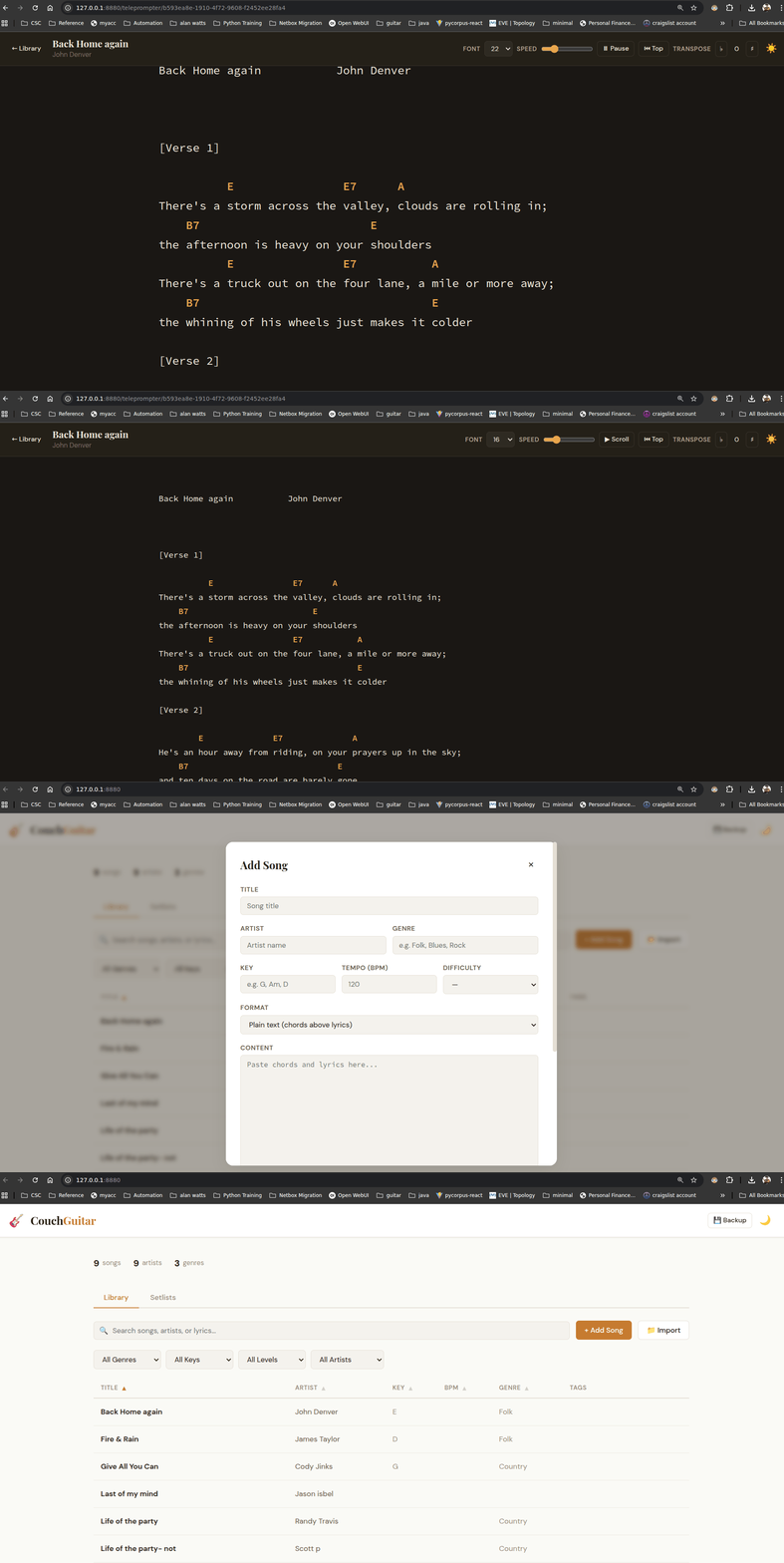
- Song library — title, artist, key, tempo, genre, difficulty, tags, notes
- Teleprompter — auto-scroll with adjustable speed and font size, per-song scroll-speed memory
- Transpose — shift chords by semitone, works with plain text and ChordPro
- Setlists — ordered song lists you can play through in sequence
- ChordPro support — import
.cho/.chordprofiles, auto-converts for display - Bulk import — drop in a folder of
.txt/ChordPro files - Search & filter — full-text across titles, artists, lyrics; filter by genre/key/difficulty/artist/tag
- Database management — in-app backup download, restore from backup, location and stats display
- Light/Dark theme — toggle in the header
Install
pip install couchguitar-web
cgw
Opens at http://127.0.0.1:8880 in your default browser.
Where your data lives
Your song library is a single SQLite file. By default it lives at:
~/.cgw/couchguitar.db                        # Linux, macOS
%APPDATA%\cgw\couchguitar.db                 # Windows
$XDG_DATA_HOME/cgw/couchguitar.db            # Linux when XDG_DATA_HOME is set
To check the resolved path on your install without starting the server:
cgw --info
Returns JSON describing the data directory, current database path, file existence, and any environment overrides in effect.
Overriding the location
Three ways, highest precedence first:
cgw --db /path/to/songs.db            # CLI flag — per-invocation
COUCHGUITAR_DB=/path/to/songs.db cgw  # env var — per-shell
CGW_HOME=/path/to/datadir cgw         # env var — directory containing couchguitar.db
Useful if you keep your library on a synced folder (Dropbox, Syncthing) so the same songs show up on multiple machines.
Network access
By default cgw binds to 127.0.0.1 (loopback only). That means the server
is reachable from the machine running it, and from nowhere else — the most
common case, ideal for a single-laptop setup.
To open it up to your phone or another machine on your home network:
cgw --host 0.0.0.0
0.0.0.0 tells the server to accept connections on every network interface
the machine has. Combined with your machine's LAN IP, that's the URL your
phone uses.
Finding your machine's LAN IP
# Linux / macOS
ip addr | grep inet                # or `ifconfig` on older systems

# Windows
ipconfig
Look for an address like 10.0.0.27 or 192.168.1.42 — those are the private
ranges your home router hands out. Open http://<that-address>:8880 from your
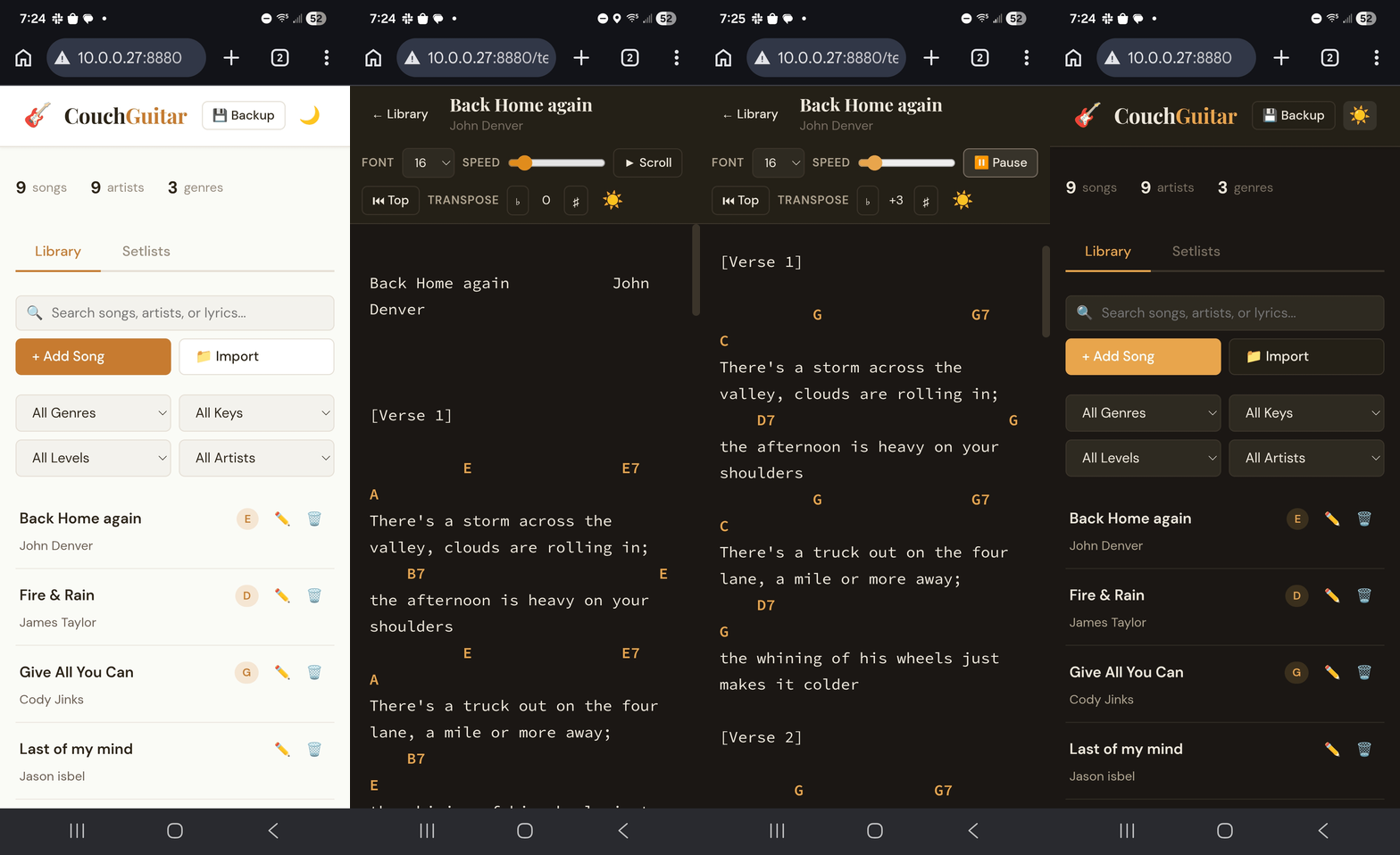
phone's browser and you'll see the same UI as on the laptop.
Picking a port
The default 8880 is a deliberate high port — no root/admin privileges
required to bind it, and unlikely to collide with anything else running on
your machine. To pick a different one (running two instances side-by-side, or
working around a conflict):
cgw --port 9000
Anything in the 1024-65535 range is fair game for a non-root user. Ports below 1024 are privileged on Linux/macOS and not worth dealing with for this.
Firewall
On a fresh Linux desktop you usually won't need to do anything — most distros
ship with no host firewall enabled. On Windows the first time you bind to
0.0.0.0 the OS will pop a firewall dialog asking whether to allow access on
private networks; click "Allow." On macOS, System Settings → Network →
Firewall lets you whitelist Python if the firewall is on.
If you can curl http://127.0.0.1:8880/ from the machine but not from your
phone, the firewall is the most likely culprit.
Security model
There is no authentication. Anyone who can reach the server can read, edit, and delete every song in your library, and can overwrite the database via the restore endpoint. The intended trust model is machines I trust on a network I trust — your laptop, your home WiFi.
Do not expose cgw to the public internet. Don't open the port through your
router's NAT. Don't run it on a hosted VPS bound to 0.0.0.0 without putting
a reverse proxy with auth in front. For a home LAN setup, you're fine; just
don't take the next step beyond that without thinking about it.
Database management
Click 🗄️ Database in the header to open the management modal:
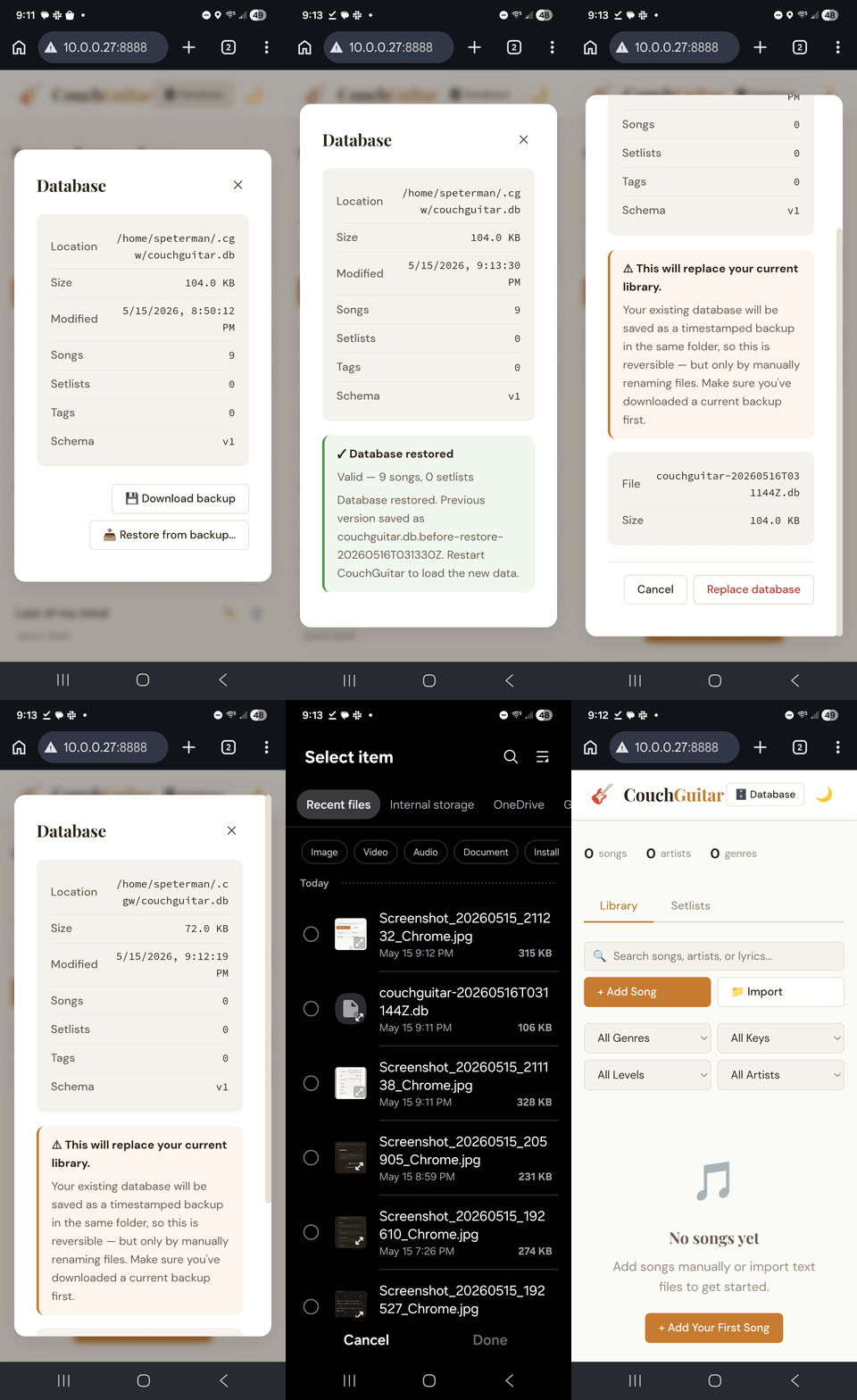
The modal shows:
- Database location (full path)
- File size
- Last modified timestamp
- Song / setlist / tag counts
- Schema version
Plus two actions:
- Download backup — saves a timestamped copy of the database to your Downloads folder.
- Restore from backup — replaces your current library with an uploaded
.dbfile. The upload is validated as a real CouchGuitar database before any swap happens. Your existing database is renamedcouchguitar.db.before-restore-<UTC-timestamp>in the same folder, so the swap is reversible if you uploaded the wrong file. Restart the server after restore to load the new data.
You can also back up at the filesystem level, since the entire library is one file:
cp ~/.cgw/couchguitar.db ~/Dropbox/backups/couchguitar-$(date +%Y%m%d).db
Command-line options
cgw --help
| Flag | Default |
|---|---|
--host |
127.0.0.1 |
--port |
8880 |
--db |
(see Where your data lives) |
--no-browser |
off |
--info |
— |
--version |
— |
Keyboard shortcuts (teleprompter)
| Key | Action |
|---|---|
| Space | Toggle auto-scroll |
| ↑ / ↓ | Manual scroll |
| Home | Jump to top |
| + / = | Transpose up |
| − | Transpose down |
| ← / → | Previous / next song (setlist mode) |
Song formats
Plain text — chords on a line above the lyrics they apply to:
 G            C          G
Amazing Grace, how sweet the sound,
ChordPro — inline chord markers and metadata directives:
{title: Amazing Grace}
{artist: Traditional}
[G]Amazing [C]Grace, how [G]sweet the sound,
On import, files with .cho/.chordpro/.chopro extensions are detected as
ChordPro. Files with ChordPro directives ({title:}, {t:}, {subtitle:},
{artist:}) are detected even when saved as .txt. The display layer renders
ChordPro the same way as plain text — chords above lyrics — so you can edit
in either format and view comfortably.
Building from source
git clone https://github.com/scottpeterman/couch-guitar-web.git
cd couch-guitar-web
pip install -e .
cgw
Or run without installing:
pip install -r requirements.txt
python -m cgw.app
License
MIT
Release history Release notifications | RSS feed

Download files
Download the file for your platform. If you're not sure which to choose, learn more about installing packages.
Source Distribution
Built Distribution
Filter files by name, interpreter, ABI, and platform.
If you're not sure about the file name format, learn more about wheel file names.
Copy a direct link to the current filters
File details
Details for the file couchguitar_web-0.1.0.tar.gz.
File metadata
- Download URL: couchguitar_web-0.1.0.tar.gz
- Upload date:
- Size: 39.2 kB
- Tags: Source
- Uploaded using Trusted Publishing? No
- Uploaded via: twine/6.2.0 CPython/3.10.12
File hashes
| Algorithm | Hash digest | |
|---|---|---|
| SHA256 |
9d80b95c5d8e62e74d48bda5477e93a2934f64ff2f9adb5be1212856eb07704f
|
|
| MD5 |
60787454f6bec75ef9e65bd0cbdaadf8
|
|
| BLAKE2b-256 |
6fa36dbd88ec6e5cfc1efb4590796cccb5384b9ecf9c8afadc822f59ea76a112
|
File details
Details for the file couchguitar_web-0.1.0-py3-none-any.whl.
File metadata
- Download URL: couchguitar_web-0.1.0-py3-none-any.whl
- Upload date:
- Size: 38.5 kB
- Tags: Python 3
- Uploaded using Trusted Publishing? No
- Uploaded via: twine/6.2.0 CPython/3.10.12
File hashes
| Algorithm | Hash digest | |
|---|---|---|
| SHA256 |
9349247e0a6fbdb169052e7818ef276d7fba7521b26ea528e30603ddb6762778
|
|
| MD5 |
75cba66d821c23a82829523c8c5a0ede
|
|
| BLAKE2b-256 |
63043ef03c604ee79f4666b0d8088f9f0d9f2a4513cd5dc2f5bda0f80c2a6acd
|






