
coverage-treemap
A small tool that turns a coverage.py JSON report into an SVG (or standalone HTML) treemap — so you can see at a glance which parts of your codebase are well-tested and which aren't.
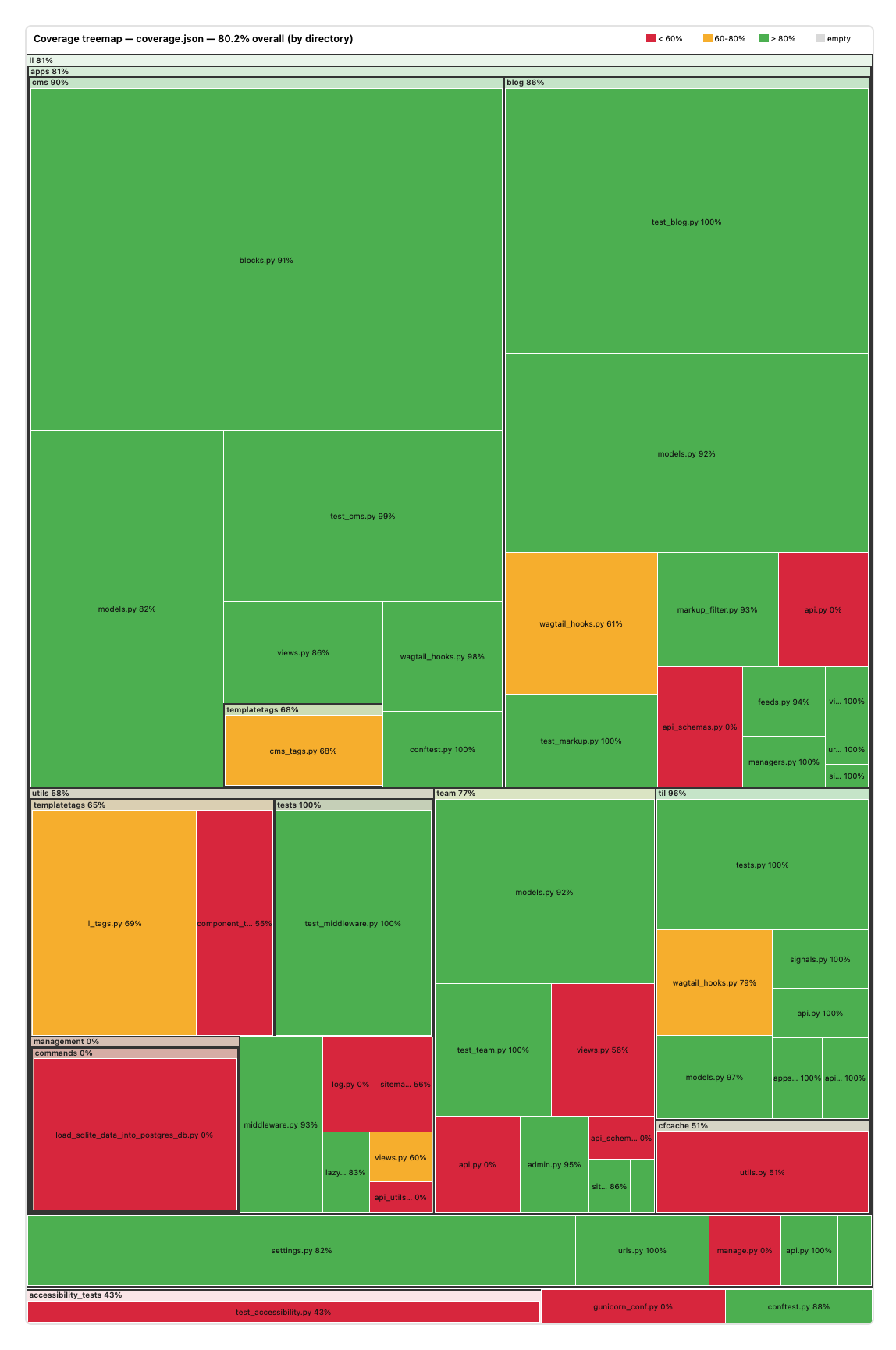
Inspired by go-cover-treemap.
Ships two entry points:
- a standalone CLI for rendering from an existing
coverage.json, - a pytest plugin that writes the treemap at the end of a test run.
Requirements
- Python 3.13+
Install
pip install coverage-treemap
# or, for one-off CLI use:
uvx coverage-treemap coverage.json -o coverage.html
CLI
-
Generate a coverage JSON report:
pytest --cov=. --cov-report=json:coverage.json
-
Render the treemap:
# HTML with interactive hover tooltips (recommended)
coverage-treemap coverage.json -o coverage.html

# Static SVG
coverage-treemap coverage.json -o coverage.svg

# Pipe to stdout
coverage-treemap coverage.json > coverage.svg
Output format is auto-detected from the file extension; override with
--format svg|html|auto.
Pytest plugin
Once installed, pytest picks up the plugin automatically. Pass
--cov-treemap=PATH and a treemap is written at the end of the session:
pytest --cov-treemap=coverage.html
The plugin starts its own coverage.Coverage() under the hood, so you don't
need --cov=. or pytest-cov installed. Source/omit rules come from your
.coveragerc or [tool.coverage.run] section as usual. If pytest-cov is
active, the plugin reuses its coverage instance instead of double-measuring.
Plugin options
| Option | Default | Description |
|---|---|---|
--cov-treemap |
off | Output path. .html / .svg format inferred from extension. |
--cov-treemap-group-by |
package |
package or directory. |
--cov-treemap-depth |
2 |
Depth for --cov-treemap-group-by package. |
CLI options
| Option | Default | Description |
|---|---|---|
--group-by |
package |
package — group by first N path components. directory — full recursive tree. |
--depth |
2 |
For --group-by package: how many leading path components form the group key. |
--width |
1200 |
Canvas width in pixels. |
--height |
1800 |
Canvas height in pixels. |
--format |
auto |
svg, html, or auto (infer from -o extension). |
-o, --output |
stdout | Output path. |
--group-by package with --depth
For a repo laid out like mypkg/subpkg/file.py:
--depth 1groups by top-level package (mypkg).--depth 2(default) groups by sub-package (mypkg/subpkg).--depth 3goes one level deeper.
--group-by directory
Renders the full filesystem tree recursively — every directory becomes a nested rectangle. Useful for exploring deep hierarchies.
Filtering what shows up
The tool reports on whatever is in the coverage data. Exclude noise (migrations, vendored code, settings, tests) via coverage.py's own config, not via the treemap:
# pyproject.toml
[tool.coverage.run]
branch = true
omit = [
    "*/migrations/*",
    "*/tests/*",
    "*/settings/*",
    "vendored/*",
]
1 maintainer

Metadata
1 maintainer
Release files for coverage-treemap 0.2.0
For a detailed explanation of source distributions (sdists) and built distributions (wheels), please see the package formats documentation.
Source distribution (sdist)
| File | Size | Uploaded | Provenance | Actions |
|---|---|---|---|---|
| coverage_treemap-0.2.0.tar.gz | 16.6 kB | Without provenance | Details for coverage_treemap-0.2.0.tar.gz |
Built distribution (wheel)
| File | Interpreter | ABI | Platform | Actions Reset |
|---|---|---|---|---|
| coverage_treemap-0.2.0-py3-none-any.whl | Python 3 | none | any | Details for coverage_treemap-0.2.0-py3-none-any.whl |
Total release size: 34.6 kB
Release files / coverage_treemap-0.2.0.tar.gz
| Download URL | coverage_treemap-0.2.0.tar.gz |
|---|---|
| Size | 16.6 kB |
| Tags | Source |
|
SHA-256 checksum How to use checksums |
3cc27fd9089fe14f224e7e0f612cd34d1ca04ef11222b2bef91f5b8b54818630
|
|
BLAKE2b-256 checksum How to use checksums |
0aaa7d0039257cf7a2f76ec4bd6860e6e86f690ee2806b7bd53ff1323d2b8026
|
| Upload date | |
|
Uploaded using Trusted Publishing? What is trusted publishing? |
No |
| Uploaded via |
uv/0.11.7 {"installer":{"name":"uv","version":"0.11.7","subcommand":["publish"]},"python":null,"implementation":{"name":null,"version":null},"distro":{"name":"macOS","version":null,"id":null,"libc":null},"system":{"name":null,"release":null},"cpu":null,"openssl_version":null,"setuptools_version":null,"rustc_version":null,"ci":null}
|
Release files / coverage_treemap-0.2.0-py3-none-any.whl
| Download URL | coverage_treemap-0.2.0-py3-none-any.whl |
|---|---|
| Size | 18.0 kB |
| Tags | Python 3 |
|
SHA-256 checksum How to use checksums |
be43379e833a6595e8f52e420364c93e7f71bfa1b653f104a04fb25ead8816ca
|
|
BLAKE2b-256 checksum How to use checksums |
b162f38e634bff0e0b4ba5d4e3988393d4274e2bbcf972a0fde880168ad7dc7a
|
| Upload date | |
|
Uploaded using Trusted Publishing? What is trusted publishing? |
No |
| Uploaded via |
uv/0.11.7 {"installer":{"name":"uv","version":"0.11.7","subcommand":["publish"]},"python":null,"implementation":{"name":null,"version":null},"distro":{"name":"macOS","version":null,"id":null,"libc":null},"system":{"name":null,"release":null},"cpu":null,"openssl_version":null,"setuptools_version":null,"rustc_version":null,"ci":null}
|
Security for coverage-treemap 0.2.0
Provenance
Provenance describes where a file came from. On PyPI, provenance is shared via attestations, which provide a verifiable record of the build or publishing details. View details, limitations and caveats.
No provenance found
None of the files in this release were uploaded with provenance metadata.
A note on package security
PyPI is a repository for distributing packages, not a service for auditing them. While third-party security researchers and our staff do their best to detect and remove malicious packages, PyPI cannot guarantee the quality, security or suitability of any given package.
To learn more about protecting yourself from malicious actors, visit our package security documentation.














