
A tool for redacting PDF files and images

Project description
CoverUP PDF Redaction Software
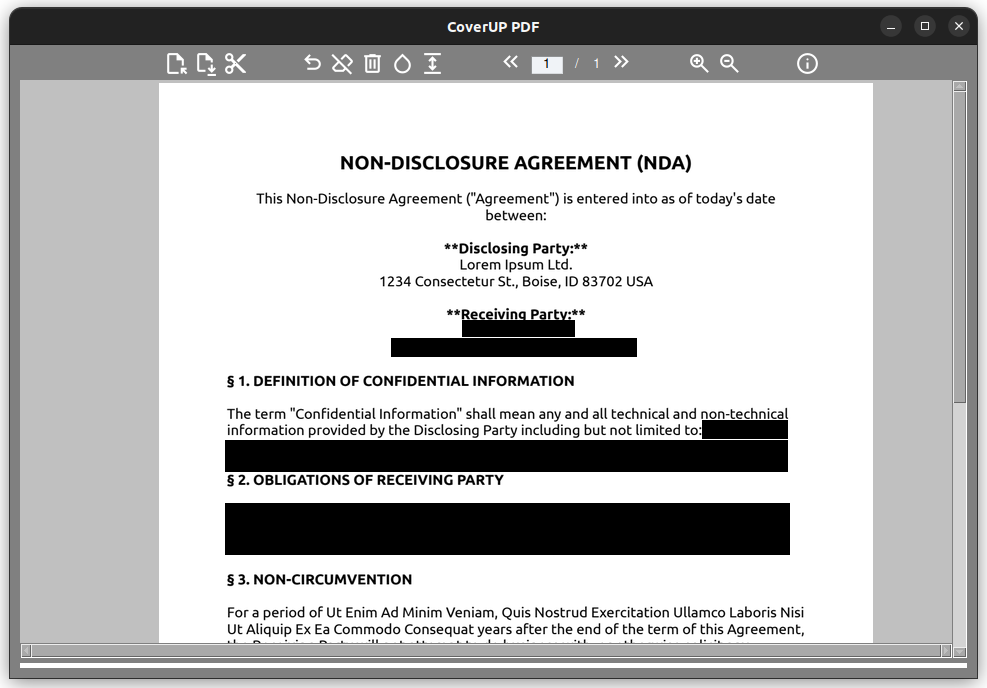
CoverUP is a free software, developed in Python, designed to provide a secure and straightforward method for redacting PDF files. It enables users to conceal sensitive text passages by overlaying them with black or white bars.
Users can import PDF documents into CoverUP, which are then converted into images. This conversion process ensures that the text cannot be copied from the document or indexed without OCR, enhancing the security of your information. Additionally, invisible layers within the PDF are not converted, providing an extra layer of security.
It also supports the import of PNG and JPG files, in addition to PDFs.
Given that image-based PDFs can become quite large, CoverUP offers two modes: a high-quality mode that maintains the visual fidelity of the document, and a compressed mode that reduces file size at the expense of some visual quality.
Whether you're dealing with a single page or an entire document, CoverUP provides a flexible and easy solution for all your PDF redaction needs.
Visit the CoverUP PDF Microsite - This software is a digidigital project.
Features
- Import PDF, PNG, and JPG files
- Draw black or white redaction bars over sensitive content
- Password-protected PDF support
- High-quality and compressed export modes
- Session persistence - continue where you left off
- Undo functionality for corrections
- Zoom in/out for precise redaction
- Command-line file argument support
- Export single pages or entire documents
- Multi-language support (25 languages including English, German, Spanish, French, Chinese, and more)
Installation
Linux - Snap Store


sudo snap install coverup
Python Package (pip)
pip install coverup-pdf
Windows / Other
Windows Installer and other download options
Usage
Graphical Interface
Simply launch CoverUP and use the toolbar to:
- Open a PDF or image file
- Draw redaction bars by clicking and dragging
- Use the eraser tool to remove bars
- Save the redacted document
Command Line
# Open a file directly
coverup document.pdf

# Open an image
coverup screenshot.png

# Show version
coverup --version
Development
Requirements
- Python 3.9+
- Dependencies listed in
requirements.txt
Setup
# Clone the repository
git clone https://github.com/digidigital/CoverUP.git
cd CoverUP

# Install dependencies
pip install -r requirements.txt

# Run from source
python CoverUP.py

# Or install as package
pip install -e .
coverup
Building Packages
Python Package (PyPI)
# Install build tools
pip install build twine

# Build the package
python -m build

# Upload to PyPI (requires PyPI credentials)
twine upload dist/*
Snap
# Install snapcraft
sudo snap install snapcraft --classic

# Build the snap
snapcraft

# Install locally for testing
sudo snap install coverup_*.snap --dangerous
Windows (PyInstaller)
# Install PyInstaller
pip install pyinstaller

# Build executable
pyinstaller --onefile --windowed --icon=CoverUP.ico CoverUP.py
Internationalization (i18n)
CoverUP supports 25 languages. The UI automatically detects the system language and displays translations accordingly.
Supported languages: English, German, Spanish, French, Italian, Portuguese, Romanian, Dutch, Swedish, Danish, Norwegian, Icelandic, Polish, Czech, Slovak, Bulgarian, Serbian, Croatian, Slovenian, Greek, Turkish, Lithuanian, Latvian, Estonian, Chinese, Hindi
Translations are stored in coverup/translations.py. To add or modify translations, edit the TRANSLATIONS dictionary in that file.
License
This project is licensed under the GPL-3.0 License - see the LICENSE file for details.
FOSS Credits
- FreeSimpleGUI - GUI framework
- pypdfium2 - PDF rendering
- fpdf2 - PDF creation
- Pillow - Image processing
- Material Symbols - UI icons
Schwärzen von PDF Dokumenten mit CoverUP
CoverUP ist eine kostenlose Software, die in Python entwickelt wurde, um eine sichere und unkomplizierte Methode zur Schwärzung von PDF-Dateien bereitzustellen. Sie ermöglicht es den Benutzern, sensible Textpassagen zu verbergen, indem sie diese mit schwarzen oder weißen Balken überlagern.
Benutzer können PDF-Dokumente in CoverUP importieren, die dann in Bilder umgewandelt werden. Dieser Umwandlungsprozess stellt sicher, dass der Text nicht ohne zusätzliche Texterkennung kopiert oder indexiert werden kann, was die Sicherheit der Informationen erhöht. Zusätzlich werden unsichtbare Schichten innerhalb der PDF nicht konvertiert, was eine zusätzliche Sicherheitsebene gegen versehentliche Veröffentlichung bietet.
Es unterstützt auch den Import von PNG- und JPG-Dateien, zusätzlich zu PDFs.
Da bildbasierte PDFs recht groß werden können, bietet CoverUP zwei Exportoptonen an: einen Modus in hoher Qualität, der die visuelle Genauigkeit des Dokuments weitestgehend beibehält, und einen komprimierten Modus, der die Dateigröße der exportierten PDF-Datei auf Kosten von visueller Qualität reduziert.
Ob Sie mit einer einzelnen Seite oder einem gesamten Dokument arbeiten, CoverUP bietet eine flexible und einfache Lösung für alle Ihre Bedürfnisse zur Schwärzung von PDFs.
Installation
Linux - Snap Store
sudo snap install coverup
Python-Paket (pip)
pip install coverup-pdf
Windows / Andere
Release history Release notifications | RSS feed


Download files
Download the file for your platform. If you're not sure which to choose, learn more about installing packages.
Source Distribution
Built Distribution
Filter files by name, interpreter, ABI, and platform.
If you're not sure about the file name format, learn more about wheel file names.
Copy a direct link to the current filters
File details
Details for the file coverup_pdf-0.4.0.1.tar.gz.
File metadata
- Download URL: coverup_pdf-0.4.0.1.tar.gz
- Upload date:
- Size: 3.7 MB
- Tags: Source
- Uploaded using Trusted Publishing? No
- Uploaded via: twine/6.2.0 CPython/3.12.3
File hashes
| Algorithm | Hash digest | |
|---|---|---|
| SHA256 |
cff432c546543e01f451c19e0aa36fb365d8d1182cf546ee9d2f25279d10d10a
|
|
| MD5 |
3be5c4a8688a1d675b53bb724a2b96b6
|
|
| BLAKE2b-256 |
7752bdbfb9167ffae58bf62c26c15ae12c302d0e59fcdc6578e835bc6d25acbd
|
File details
Details for the file coverup_pdf-0.4.0.1-py3-none-any.whl.
File metadata
- Download URL: coverup_pdf-0.4.0.1-py3-none-any.whl
- Upload date:
- Size: 3.7 MB
- Tags: Python 3
- Uploaded using Trusted Publishing? No
- Uploaded via: twine/6.2.0 CPython/3.12.3
File hashes
| Algorithm | Hash digest | |
|---|---|---|
| SHA256 |
66e2fa04a1b4acce024595f9add9ccedd8bfabcd560abb690dfd74b049170365
|
|
| MD5 |
2041eff1ea82580e353ed67c396b9d68
|
|
| BLAKE2b-256 |
4530488f3b14183ac090df90ab6403aba4e69b107b4d90b2b3d45707f74d0e56
|






