
PR-first code coverage report generator with modern UI
Verified details
These details have been verified by PyPIProject links
GitHub Statistics
Maintainers

Project description
Covisible
PR-first code coverage report generator with modern UI
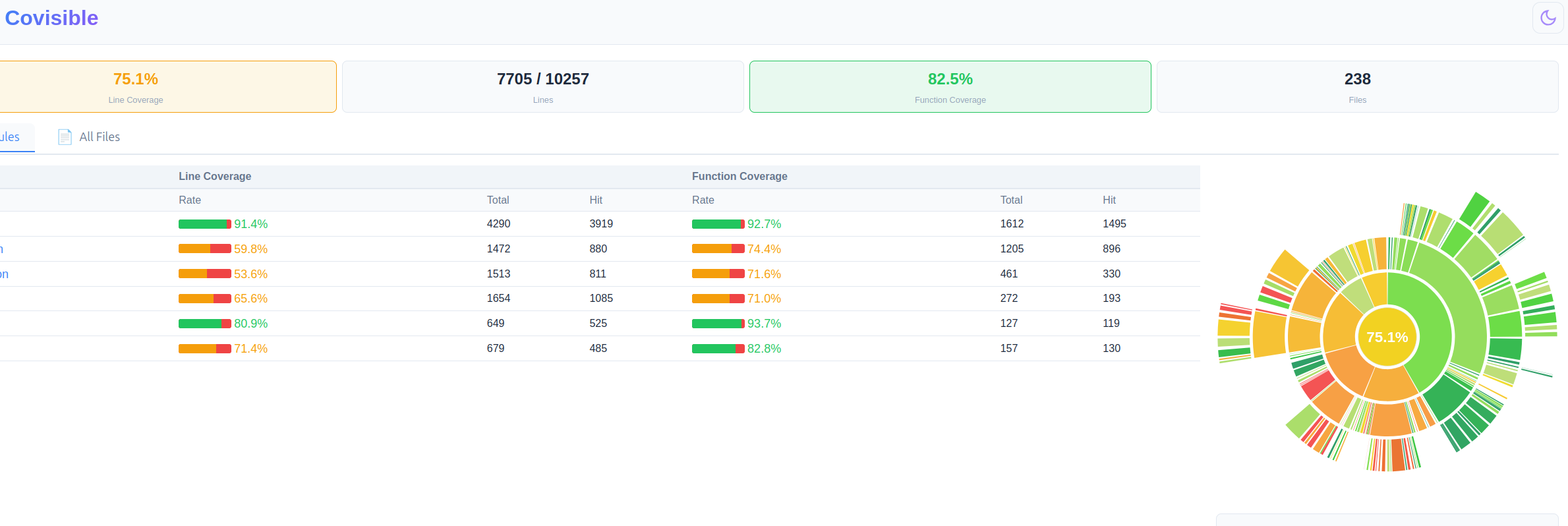
Covisible generates beautiful, interactive coverage reports focused on what matters: your PR changes.
Features
- PR-first view — Shows coverage for new/modified lines, not the entire repo
- Diff-based analysis — Integrates with git diff to highlight what changed
- Modern UI — Dark/light theme, interactive charts, instant search
- Smart summary — "−1.3% coverage, 3 new uncovered lines" instead of "83.42%"
- 1-click drill-down — PR → file → function → line
- Baseline comparison — Compare current coverage with previous runs
Installation
pip install covisible
Or install from source:
git clone https://github.com/LaGrunge/covisible
cd covisible
pip install -e ".[dev]"
Usage
Covisible is a command group. The main command is report; diff, files,
and summary are console-only helpers. Coverage input is auto-detected: .json
(and *.gcov.json) is parsed as gcov JSON, everything else as LCOV .info.
Generate a report (PR coverage)
covisible report \
  --current coverage.info \
  --baseline baseline.info \
  --git-diff HEAD~1..HEAD \
  --output report/ \
  --format both
Without --git-diff/--diff-file you get a whole-project report; with one of
them the report focuses on new/modified lines.
To render the actual source code, covisible locates each file by the path
recorded in the coverage data, then by --source-root — joining relative paths
and matching absolute build paths by their longest existing suffix (so a foreign
build prefix like /home/ci/build/... still resolves). Files it cannot find are
rendered with coverage but no code, and the run prints how many were missing.
Generate gcov JSON coverage
# After running tests with coverage enabled
find . -name "*.gcno" -exec gcov --json-format {} \;
# Or use gcov on specific files
gcov --json-format --stdout myfile.cpp > coverage.json
report options
| Option | Description |
|---|---|
-c, --current |
Current coverage file (gcov JSON or lcov.info) — required |
-b, --baseline |
Baseline coverage for comparison (optional) |
--git-diff |
Git diff range (e.g., main..HEAD) |
--diff-file |
Path to unified diff file |
-o, --output |
Output directory for HTML report (default: coverage-report/) |
--format |
Output format: html, json, or both (default: html) |
--repo |
Path to git repository (for --git-diff / title) |
--source-root |
Directory where the source files live, used to render code when coverage paths are absolute build paths or relative to another root (defaults to --repo) |
--title |
Report title (default: Covisible: <project>) |
--blame / --no-blame |
Include git blame analysis for uncovered code |
--branches / --no-branches |
Show branch coverage columns in the report (off by default; only rendered when the coverage data has branch info) |
--exclude GLOB |
Glob of files to exclude (repeatable, e.g. --exclude '*_test.cpp') |
--ignore-config |
Path to an ignore config (YAML/JSON) with exclude/include/line_markers |
Other commands
# CodeCov-style coverage diff (console), optional markdown brief for CI comments
covisible diff coverage_new.info -b coverage_old.info --markdown brief.md

# List files by coverage (-n 0 lists all, no limit)
covisible files coverage.info --sort uncovered --limit 20

# One-file summary
covisible summary coverage.info
Excluding files and lines
Pass --exclude one or more times, or point --ignore-config at a YAML/JSON
file:
# covisible-ignore.yaml
ignore:
  exclude:
    - "*_test.cpp"
    - "third_party/*"
  line_markers:
    - "// LCOV_EXCL_LINE"
    - "# pragma: no cover"
Excluded files are dropped from the report; lines matched by a marker (or a
LCOV_EXCL_START/STOP block) are removed from their file's coverage.
Development
# Install dev dependencies
pip install -e ".[dev]"

# Run tests
pytest

# Lint
ruff check src tests
mypy src
License
MIT
Project details
Verified details
These details have been verified by PyPIProject links
GitHub Statistics
Maintainers
Release history Release notifications | RSS feed


Download files
Download the file for your platform. If you're not sure which to choose, learn more about installing packages.
Source Distribution
Built Distribution
Filter files by name, interpreter, ABI, and platform.
If you're not sure about the file name format, learn more about wheel file names.
Copy a direct link to the current filters
File details
Details for the file covisible-0.1.4.tar.gz.
File metadata
- Download URL: covisible-0.1.4.tar.gz
- Upload date:
- Size: 348.9 kB
- Tags: Source
- Uploaded using Trusted Publishing? Yes
- Uploaded via: twine/6.1.0 CPython/3.13.12
File hashes
| Algorithm | Hash digest | |
|---|---|---|
| SHA256 |
bfd538397c69edab3cc55f832b9defec1be1bc3ed9028ced5272ebdd8cee70c6
|
|
| MD5 |
1da5a7c97859b5af342fdca0dd079ade
|
|
| BLAKE2b-256 |
2199abf53e01025067f164d0827aeea70abbc0089e59694e5f7a8d235b433ae6
|
Provenance
The following attestation bundles were made for covisible-0.1.4.tar.gz:
Publisher:
publish.yml on LaGrunge/covisible
-
Statement:
-
Statement type:
https://in-toto.io/Statement/v1 -
Predicate type:
https://docs.pypi.org/attestations/publish/v1 -
Subject name:
covisible-0.1.4.tar.gz -
Subject digest:
bfd538397c69edab3cc55f832b9defec1be1bc3ed9028ced5272ebdd8cee70c6 - Sigstore transparency entry: 1828028410
- Sigstore integration time:
-
Permalink:
LaGrunge/covisible@9e77b96b9910d8097abf8aed69effa7889de53a4 -
Branch / Tag:
refs/tags/v0.1.4 - Owner: https://github.com/LaGrunge
-
Access:
public
-
Token Issuer:
https://token.actions.githubusercontent.com -
Runner Environment:
github-hosted -
Publication workflow:
publish.yml@9e77b96b9910d8097abf8aed69effa7889de53a4 -
Trigger Event:
push
-
Statement type:
File details
Details for the file covisible-0.1.4-py3-none-any.whl.
File metadata
- Download URL: covisible-0.1.4-py3-none-any.whl
- Upload date:
- Size: 347.3 kB
- Tags: Python 3
- Uploaded using Trusted Publishing? Yes
- Uploaded via: twine/6.1.0 CPython/3.13.12
File hashes
| Algorithm | Hash digest | |
|---|---|---|
| SHA256 |
4e1348600df7f298fd35a1601f542985b643e66c354f0f701b59bea8ddadb694
|
|
| MD5 |
2b90e38cf83b3fa253afddd81c1a86ca
|
|
| BLAKE2b-256 |
0bd77380a9606ebec762a151255e6a52a3b20ae64d63f0aada59b9f66f8a5d22
|
Provenance
The following attestation bundles were made for covisible-0.1.4-py3-none-any.whl:
Publisher:
publish.yml on LaGrunge/covisible
-
Statement:
-
Statement type:
https://in-toto.io/Statement/v1 -
Predicate type:
https://docs.pypi.org/attestations/publish/v1 -
Subject name:
covisible-0.1.4-py3-none-any.whl -
Subject digest:
4e1348600df7f298fd35a1601f542985b643e66c354f0f701b59bea8ddadb694 - Sigstore transparency entry: 1828028521
- Sigstore integration time:
-
Permalink:
LaGrunge/covisible@9e77b96b9910d8097abf8aed69effa7889de53a4 -
Branch / Tag:
refs/tags/v0.1.4 - Owner: https://github.com/LaGrunge
-
Access:
public
-
Token Issuer:
https://token.actions.githubusercontent.com -
Runner Environment:
github-hosted -
Publication workflow:
publish.yml@9e77b96b9910d8097abf8aed69effa7889de53a4 -
Trigger Event:
push
-
Statement type:






