



ComicWalkerDownloader aka cowado
CLI tool to download manga images from ComicWalker.
⚠️ Make sure you do not use this tool to infringe any copyright laws.
Installation
Python 3.11+ is required. Download it from python.org.
pip install cowado
Quick start
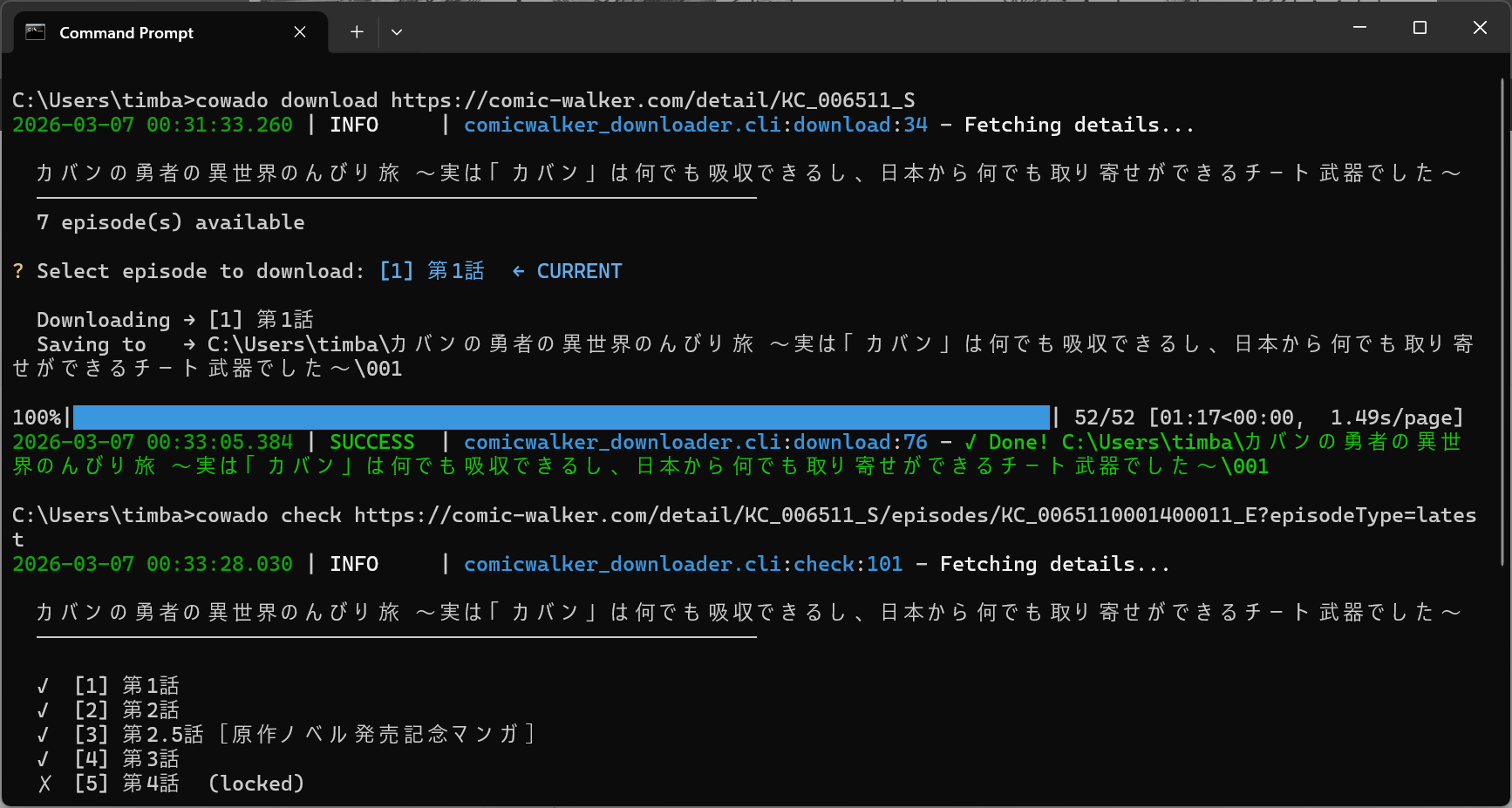
Paste any ComicWalker link and pick an episode:
cowado https://comic-walker.com/detail/KC_000097_S
逢魔暮らしの奴さん
24 episodes, 5 available

? Episode
      #1  (13 pages)  第1話
      #2  (10 pages)  第2話
    ❯ #3   (8 pages)  第3話
   #4-15  locked
     #16    (1 page)  1巻発売記念イラスト

? Size  1284x1844

Saving to 逢魔暮らしの奴さん/003
████████████████████████████  8/8
Done. 1.2 MB
That is the whole flow: choose an episode, choose an image size, wait.
Any ComicWalker URL works — a series page or a direct episode link, with or without query parameters:
cowado https://comic-walker.com/detail/KC_000097_S
cowado https://comic-walker.com/detail/KC_000097_S?episodeType=first
cowado https://comic-walker.com/detail/KC_000097_S/episodes/KC_0000970000100011_E
Reading the episode list
    #1  (13 pages)  第1話
 #4-15  locked
   #16    (1 page)  1巻発売記念イラスト
#1is the episode number. Pass it as--episode=1to skip the prompt and download that episode right away.#4-15 lockedmeans episodes 4 through 15 are not free right now. They are shown so you can see what exists, but they cannot be selected.- Some entries are not chapters at all — illustrations or announcements. The page count gives them away.
Commands
cowado <url>
Short form of cowado download <url>. Both do the same thing.
cowado check <url>
Show the episode list without downloading anything.
cowado check https://comic-walker.com/detail/KC_000097_S
逢魔暮らしの奴さん
24 episodes, 5 available

    #1  (13 pages)  第1話
    #2  (10 pages)  第2話
    #3   (8 pages)  第3話
 #4-15  locked
   #16    (1 page)  1巻発売記念イラスト
#17-23  locked
   #24   (8 pages)  第22話
cowado version
cowado version
Flags
| Flag | What it does |
|---|---|
--episode=N |
Download episode N without asking |
--size=max |
Pick the image size without asking: max, min, mobile, desktop |
--output_dir="./path" |
Save somewhere else (default: {manga title}/{episode number}/) |
# no questions asked
cowado <url> --episode=5 --size=max --output_dir="./manga"
About --size. ComicWalker serves two image sizes, and which one is larger depends on the title. max and min always pick by actual size, so they are the safe choice for scripts. mobile is always 768 px wide; desktop is capped by height and can land anywhere between 650 and 1284 px.
Where the files go
逢魔暮らしの奴さん/
└── 003/
    ├── 001.webp
    ├── 002.webp
    └── ...
One folder per episode, pages named by number. Use --output_dir to change the location.
Troubleshooting
Set COWADO_DEBUG=1 to see full error details instead of a one-line message.
COWADO_DEBUG=1 cowado <url>
Star History

1 maintainer

Release files for cowado 0.3.0
For a detailed explanation of source distributions (sdists) and built distributions (wheels), please see the package formats documentation.
Source distribution (sdist)
| File | Size | Uploaded | |
|---|---|---|---|
| cowado-0.3.0.tar.gz | 12.7 kB | Details |
Built distribution (wheel)
| File | Interpreter | ABI | Platform | Reset |
|---|---|---|---|---|
| cowado-0.3.0-py3-none-any.whl | Python 3 | none | any | Details |
Total release size: 26.4 kB
Release files / cowado-0.3.0.tar.gz
| Download URL | cowado-0.3.0.tar.gz |
|---|---|
| Size | 12.7 kB |
| Tags | Source |
|
SHA-256 checksum How to use checksums |
f8e55a06d6072770dcaa8c8861a261f78319cfbe5882c16c671beb161f9d229c
|
|
BLAKE2b-256 checksum How to use checksums |
be154f3ada856301e36fed38cd6fec8b76ccdc703e79350bf25b3542b2126e86
|
| Upload date | |
|
Uploaded using Trusted Publishing? What is trusted publishing? |
No |
| Uploaded via |
twine/7.0.0 CPython/3.13.14
|
Release files / cowado-0.3.0-py3-none-any.whl
| Download URL | cowado-0.3.0-py3-none-any.whl |
|---|---|
| Size | 13.6 kB |
| Tags | Python 3 |
|
SHA-256 checksum How to use checksums |
74617aaa87556410443d123369c93350ec373620599fa947d77a1e95ed8693b3
|
|
BLAKE2b-256 checksum How to use checksums |
08bbd039855047c9c32b473f83a19286dafc027213a4728e8dfce4ea46e2fda2
|
| Upload date | |
|
Uploaded using Trusted Publishing? What is trusted publishing? |
No |
| Uploaded via |
twine/7.0.0 CPython/3.13.14
|














