

Cowser
Greet people with ASCII art animals — a fun, cross-platform
reimagining of cowsay, written in Python.





Cowser is a command-line tool (and Python library) that wraps a message in a speech or thought bubble and prints it above a randomly chosen animal. It supports 35 built-in animals, cowsay-style moods, colors, fortunes, interactive REPL sessions, and user-supplied art packs — while staying a pure, side-effect-free function you can also call from your own code.
Screenshot
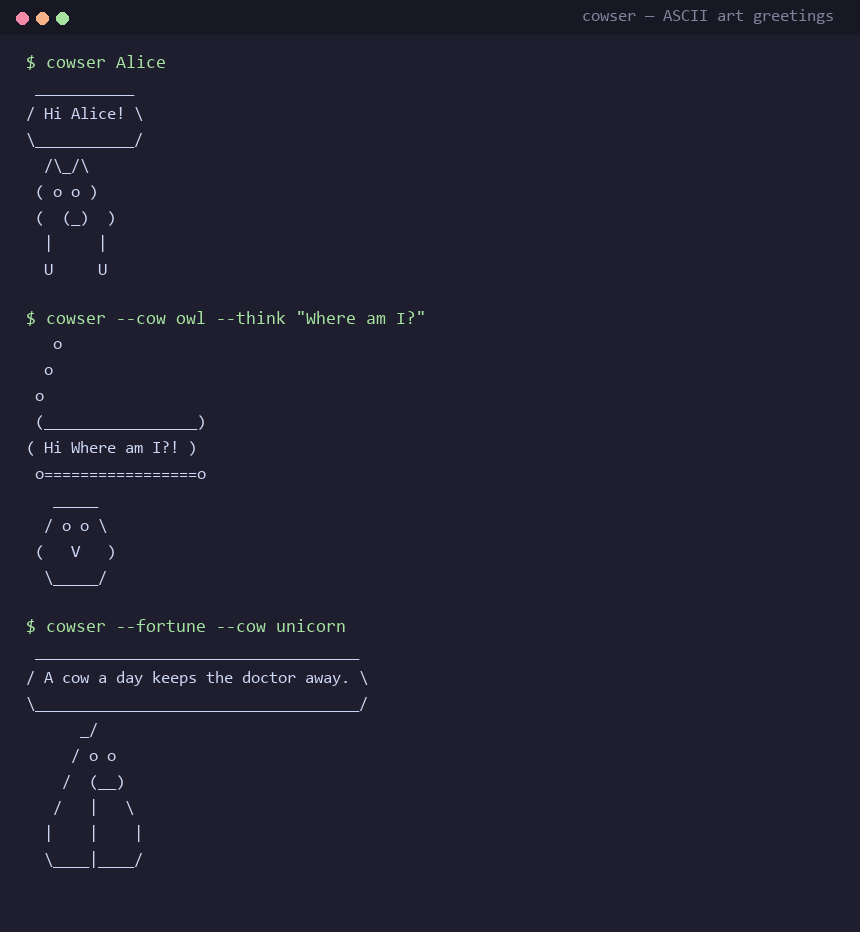
More screenshots: View all screenshots
Table of Contents
- Key Features
- Installation
- Quick Start
- Usage Examples
- Documentation
- Interface
- Architecture
- Requirements
- Prerequisites
- Development
- Contributing
- Security
- License
- Acknowledgments
Key Features
- 35 animals across 12 categories — cows, cats, pets, birds, sea life, farm, wild, robot, hedgehog, alien, spooky, and mythical creatures
- Greetings and messages — greet a name, pass a custom message, or pipe text in from stdin
- cowsay-style moods —
--mode borg|dead|greedy|paranoid|stoned|drunk|wired|youthfulplus thought bubbles with--think - Custom eyes and tongues —
--eyesand--tonguereplace{eyes}and{tongue|default}tokens in the art - Word wrapping —
-W/--wrap WIDTH, disabled with-n/--no-wrap - Color output —
--rainbow,--bold, and 17 ANSI colors via--color; acoloramaextra fixes legacy Windows consoles - Fortune mode — a random fortune instead of a message (
--fortune) - Two animals at once — render a pair side by side (
--and) - Interactive REPL — chat-style session (
--interactive) - Reproducible output —
--seedfixes random animal selection - Legacy-console fallback — output is sanitized for cp437/cmd.exe when the console cannot encode it
- Art packs — drop
.cow,.txt, or.artfiles in a folder and Cowser picks them up, no code changes needed - Config file — defaults live in
~/.config/neostore/cowser/config.toml - Windows wrappers —
cowser.cmdandcowser.ps1, plus single-file binaries built with PyInstaller - Library use — the stable
cowser.apisurface is pure, type-hinted, and covered by a backwards-compatibility guarantee
Installation
pip install cowser
Requires Python 3.8+. For color support on legacy Windows consoles (pre-Windows 10 cmd.exe):
pip install "cowser[color]"
From source:
git clone https://github.com/rkriad585/Cowser
cd Cowser
pip install .
See docs/installation.md for platform-specific notes and docs/getting-started.md for a first-run tour.
Quick Start
cowser Alice                       # greet with a random animal
cowser --cow owl Bob               # pick a specific animal
echo "From stdin" | cowser         # pipe a message
cowser --fortune                   # random fortune
Usage Examples
CLI
cowser Alice                 # greet with a random animal
cowser --cow owl Bob         # pick a specific animal
cowser --message "Hello!"    # custom message
cowser --mode dead --cow pig # mood preset (eyes + tongue)
cowser --think --cow owl "Where am I?"
cowser --rainbow --bold --message "Party time!"
cowser --fortune             # random fortune
cowser --cow dog --and cat "Best friends"
cowser --list                # show all animals
cowser --search mythical     # search by name, category, or tag
cowser --interactive         # chat REPL
cowser --cow-dir ./my-cows "hello from my pack"
Library
from cowser import COWS, render, render_pair, register_cow, search_cows, Cow

print(render("Hello from my app", cow="owl", eyes="0.0"))
print(render("moo", cow="pig", mode="dead", think=True))
print(render_pair("best friends", "dog", "cat", rainbow=True))

for cow in search_cows(category="mythical"):
    print(cow.name, cow.tags)

register_cow(Cow("my-dragon", "   ~\n  (o.o)", category="mythical"))
Configuration
# ~/.config/neostore/cowser/config.toml
color = "green"
cow = "fish"
eyes = "o o"
mode = "dead"
wrap = 40
# seed = 42
Command-line flags always override config values. See config.example.toml and docs/configuration.md.
Documentation
The full documentation is hosted at
https://rkriad585.github.io/Cowser/
and is rebuilt automatically on every push to main.
| File | Contents |
|---|---|
| docs/index.md | Home page of the docs site |
| docs/screenshots.md | Screenshots of the CLI in action |
| docs/getting-started.md | First-run tour and next steps |
| docs/installation.md | Install on Windows, macOS, Linux, and from source |
| docs/usage.md | Every CLI option and command |
| docs/cli.md | Command-line reference |
| docs/api.md | Library API reference |
| docs/configuration.md | Config file and environment variables |
| docs/architecture.md | Module layout and how rendering works |
| docs/development.md | Dev setup, tests, and type checks |
| docs/deployment.md | Packaging, binaries, and container images |
| docs/faq.md | Frequently asked questions |
| docs/troubleshooting.md | Common problems and fixes |
| docs/contributing.md | Contributing guide (docs site) |
Interface
Cowser exposes two interfaces from the same code base:
- CLI — the
cowsercommand (installed viapip), pluspython -m cowser,python main.pyfor backwards compatibility with the original script, and the Windows wrapperscowser.cmd/cowser.ps1. Runcowser --helpfor the full option list, or docs/cli.md. - Library — import
cowseror the stable surfacecowser.api:Cow,COWS,render,render_pair,render_cow,build_speech_bubble,resolve_cow,search_cows,register_cow,substitute_eyes,substitute_tongue,wrap_text, and the art-pack helpers. All functions are pure (no I/O) and fully type-hinted. See docs/api.md.
Architecture
cowser is a small, layered Python package with no hard runtime dependencies
(tomli is used only on Python < 3.11). The CLI calls into pure rendering
functions; the renderer substitutes tokens, builds the bubble, and applies
ANSI styling.
cowser/
├── __init__.py     # re-exports the stable surface + __version__
├── __main__.py     # python -m cowser entry point
├── api.py          # cowser.api: backwards-compatible public names
├── cli.py          # argparse CLI, config defaults, REPL
├── config.py       # reads ~/.config/neostore/cowser/config.toml
├── core.py         # render(), render_pair(), bubble & wrapping logic
├── cows.py         # Cow dataclass + built-in COWS registry (35 animals)
├── modes.py        # mode -> (eyes, tongue) presets
├── ansi.py         # colors, rainbow, bold, legacy-console sanitizing
├── fortunes.py     # built-in fortunes for --fortune
├── plugins.py      # art packs (.cow/.txt/.art loaders)
└── py.typed        # PEP 561 marker
Data flow: cli.py resolves text and options → core.render()/render_pair()
→ core._substituted_art() applies modes.py/cowser.cows token
substitutions → build_speech_bubble() → ansi.py styling →
cli.py sanitizes for legacy consoles and prints. Art packs are registered by
plugins.py into the shared COWS registry before rendering.
See docs/architecture.md for the full breakdown.
Requirements
- OS — platform-independent (Linux, macOS, Windows; the PyPI classifier declares "OS Independent"). The legacy-console fallback specifically targets Windows cmd.exe with cp437.
- Runtime — Python 3.8 or newer.
- Hardware — no special requirements; a terminal is all you need.
- Dependencies — none at runtime on Python 3.11+;
tomlion Python < 3.11 for TOML config parsing. Optional extras:color,dev,binary,docs.
Prerequisites
- Python 3.8+ and pip.
Install from https://www.python.org/downloads/, a package manager
(
winget install Python.Python.3.12,brew install python,apt install python3 python3-pip), or a version manager such aspyenv. - Git (only needed for installing from source).
Development
git clone https://github.com/rkriad585/Cowser
cd Cowser
pip install -e ".[dev]"
python -m pytest      # run the test suite
python -m mypy cowser # type check
Run the docs site locally with mkdocs serve. Full guidance in
CONTRIBUTING.md and docs/development.md.
Contributing
Contributions are welcome — see CONTRIBUTING.md for setup, branch rules, commit style, and the pull-request workflow.
Security
Report vulnerabilities by opening an issue or contacting the maintainer — see SECURITY.md for supported versions and how to report.
License
MIT © 2026 rkriad585.
Acknowledgments
Maintained by rkriad585. Inspired by cowsay. Cow art draws on the classic cow face / ASCII art tradition.
1 maintainer

Release files for cowser 1.5.3
For a detailed explanation of source distributions (sdists) and built distributions (wheels), please see the package formats documentation.
Source distribution (sdist)
| File | Size | Uploaded | |
|---|---|---|---|
| cowser-1.5.3.tar.gz | 29.5 kB | Details |
Built distribution (wheel)
| File | Interpreter | ABI | Platform | Reset |
|---|---|---|---|---|
| cowser-1.5.3-py3-none-any.whl | Python 3 | none | any | Details |
Total release size: 51.5 kB
Release files / cowser-1.5.3.tar.gz
| Download URL | cowser-1.5.3.tar.gz |
|---|---|
| Size | 29.5 kB |
| Tags | Source |
|
SHA-256 checksum How to use checksums |
177dca1d730bc03fb5757763194e90cdc776f4dd279b6318f12fd0743a45e9fe
|
|
BLAKE2b-256 checksum How to use checksums |
fe8cdfe33fa2cbcb0cacd172b05ceb0b79edf3e91aeda379a7d9df90407611c1
|
| Upload date | |
|
Uploaded using Trusted Publishing? What is trusted publishing? |
No |
| Uploaded via |
twine/7.0.0 CPython/3.12.7
|
Release files / cowser-1.5.3-py3-none-any.whl
| Download URL | cowser-1.5.3-py3-none-any.whl |
|---|---|
| Size | 21.9 kB |
| Tags | Python 3 |
|
SHA-256 checksum How to use checksums |
c571b2d6826b3cc1d432e7c664db19650b9d8b503dbd6621f5891abcf1b9304f
|
|
BLAKE2b-256 checksum How to use checksums |
37c18d1f8e165143e7816595d6abe49dfb8eb4d0da1ab084742fcafc12b1b511
|
| Upload date | |
|
Uploaded using Trusted Publishing? What is trusted publishing? |
No |
| Uploaded via |
twine/7.0.0 CPython/3.12.7
|














