
CPA usage persistence and visualization service
Verified details
These details have been verified by PyPIProject links
GitHub Statistics
Maintainers

Project description
CPA Usage Keeper
CPA Usage Keeper 是一个独立的 CPA 用量持久化与可视化服务。
它依赖 CLIProxyAPI(CPA) 作为后端 CPA 数据来源,目标是在 CPA 之上补充持久化存储与统计分析能力。服务会定时拉取 CPA 数据,将规范化后的事件写入 SQLite,暴露聚合 API,并提供内置 Web Dashboard 用于查看 usage、pricing、request health 和 model/API 维度的统计信息。
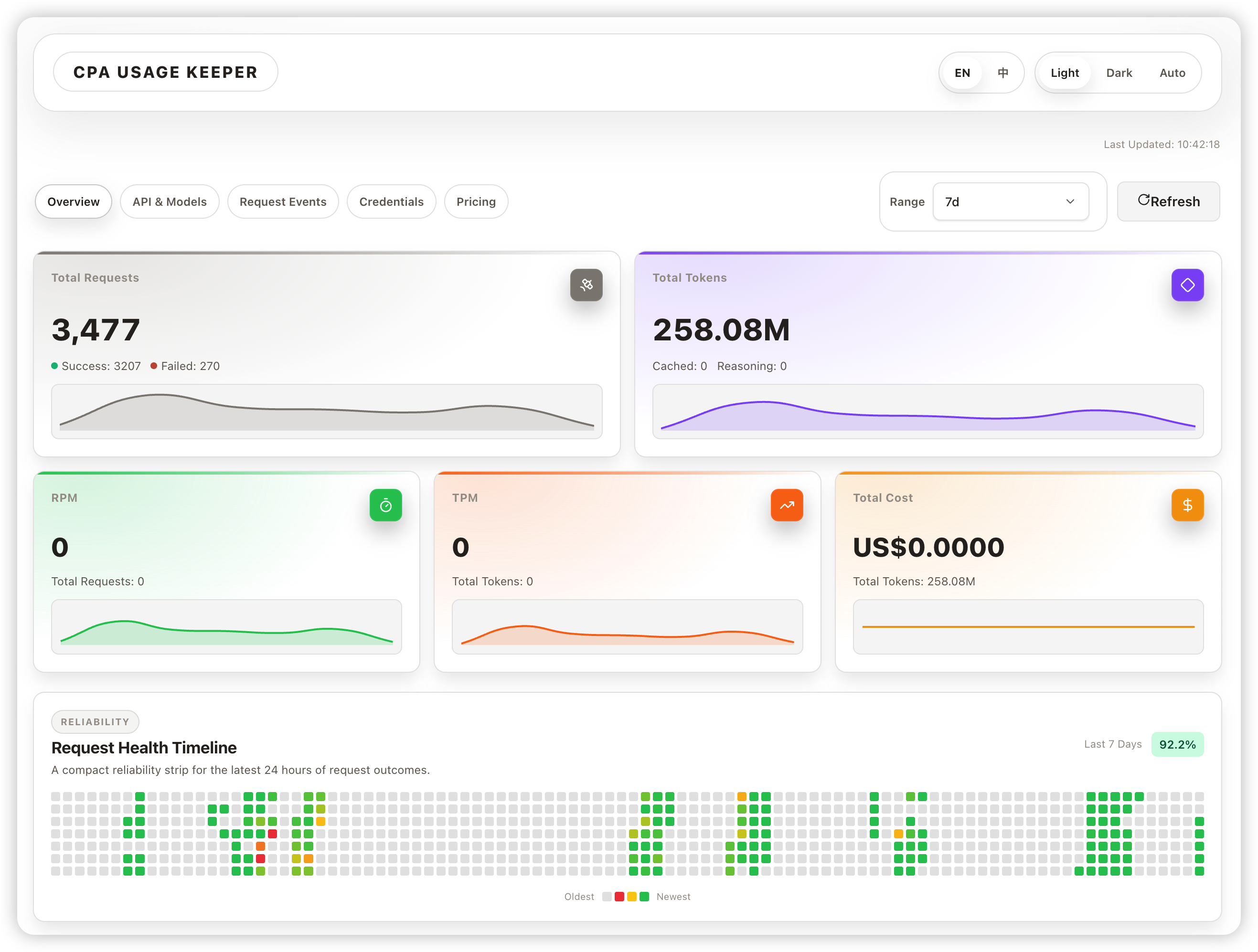
功能特性
- CPA usage 数据持久化到 SQLite
- usage 聚合 API 与 pricing API
- 内置 React Dashboard
- 可选密码登录保护
- SQLite 数据库本地备份与保留策略
技术栈
- 后端: Python 3.12+ / FastAPI / SQLAlchemy / SQLite
- 包管理: uv
- 前端: React + TypeScript (Vite)
安装
方式一:通过 uv(推荐)
uv tool install cpa-usage-keeper
安装后 cpa-usage-keeper 命令即可全局使用。升级:
uv tool upgrade cpa-usage-keeper
方式二:通过 pip
pip install cpa-usage-keeper
快速开始
- 下载配置模板并按实际情况修改:
curl -fsSL https://raw.githubusercontent.com/8DE4732A/cpa-usage-keeper/main/config.example.toml -o config.toml
至少需要填写 [cpa] 节的 base_url 和 management_key。
- 在
config.toml所在目录直接运行(自动加载同目录的config.toml):
cpa-usage-keeper
或显式指定配置文件路径:
cpa-usage-keeper -c /path/to/config.toml
- 打开浏览器访问
http://localhost:8080(端口可在配置中修改)。
项目结构
src/cpa_usage_keeper/    Python 后端源码
  app.py                 FastAPI 应用工厂与生命周期管理
  config.py              环境配置加载
  database.py            SQLAlchemy 数据库初始化
  models.py              ORM 模型
  cpa/                   CPA 客户端与类型定义
  api/                   HTTP 路由处理器
  service/               同步与业务服务
  repository/            数据库访问层
  poller/                后台同步轮询
  auth/                  内存 session 鉴权
  redact/                数据脱敏
  backup.py              SQLite 数据库备份管理
  logging_config.py      日志配置
web/                     React + TypeScript 前端
static/                  前端构建产物 (gitignore)
配置
复制配置模板:
cp config.example.toml config.toml
配置文件按功能分节,以下是各配置项说明:
[cpa]
| 配置项 | 必填 | 默认值 | 说明 |
|---|---|---|---|
base_url |
是 | - | CPA 服务地址 |
management_key |
是 | - | CPA management key |
request_timeout |
否 | 30s |
CPA 请求超时 |
[app]
| 配置项 | 必填 | 默认值 | 说明 |
|---|---|---|---|
port |
否 | 8080 |
HTTP 监听端口 |
base_path |
否 | 根路径 | 子路径部署前缀,例如 /cpa;留空表示 / |
timezone |
否 | Asia/Shanghai |
项目业务时区,影响 Today、按天聚合、每日清理和日志时间 |
[auth]
| 配置项 | 必填 | 默认值 | 说明 |
|---|---|---|---|
enabled |
否 | false |
是否启用登录保护 |
password |
鉴权启用时必填 | - | 登录密码 |
session_ttl |
否 | 168h |
Session 生命周期 |
[sync]
| 配置项 | 必填 | 默认值 | 说明 |
|---|---|---|---|
mode |
否 | auto |
同步模式:auto、redis、legacy_export |
poll_interval |
否 | 5m |
legacy_export 拉取间隔 |
[redis]
| 配置项 | 必填 | 默认值 | 说明 |
|---|---|---|---|
queue_addr |
否 | base_url 主机名 + 8317 |
CPA Redis/RESP TCP 地址 |
queue_batch_size |
否 | 1000 |
每次最多拉取的队列记录数 |
queue_idle_interval |
否 | 1s |
队列为空时的检查间隔 |
[storage]
| 配置项 | 必填 | 默认值 | 说明 |
|---|---|---|---|
work_dir |
否 | ./data |
应用工作目录,数据库、日志和备份均写入此目录 |
backup_enabled |
否 | true |
是否启用 SQLite 数据库备份 |
backup_interval |
否 | 24h |
数据库备份间隔 |
backup_retention_days |
否 | 7 |
备份保留天数 |
[log]
| 配置项 | 必填 | 默认值 | 说明 |
|---|---|---|---|
level |
否 | info |
日志级别 |
file_enabled |
否 | true |
是否写入持久化日志文件 |
retention_days |
否 | 7 |
日志保留天数,0 表示不自动清理 |
本地开发
前置依赖
- Python 3.12+
- uv
- Node.js 22+
- npm
- 已运行的 CLIProxyAPI(CPA)
本地启动
- 复制本地配置:
cp config.example.toml config.toml
-
修改
config.toml配置内容。 -
安装 Python 依赖:
uv sync
- 启动后端:
uv run python -m cpa_usage_keeper -c config.toml
- 在另一个终端安装前端依赖并启动开发服务器:
npm --prefix ./web ci
npm --prefix ./web run dev -- --host 127.0.0.1
- 构建前端生产产物:
npm --prefix ./web run build
测试
运行前端验证:
make verify
子路径反代
部署到 /cpa 时设置 base_path = "/cpa",并在反向代理中保留该前缀:
location /cpa/ {
    proxy_pass http://127.0.0.1:8080;
    proxy_set_header Host $host;
    proxy_set_header X-Forwarded-Proto $scheme;
    proxy_set_header X-Forwarded-For $proxy_add_x_forwarded_for;
}
发布
推送 v* 格式的 tag 即可触发 GitHub Actions 自动构建前端、打包并发布到 PyPI:
git tag v1.2.0
git push origin v1.2.0
发布使用 PyPI Trusted Publishing,需要在 PyPI 项目设置中配置 GitHub Actions 为受信发布者,无需在仓库中存储 API Token。
Project details
Verified details
These details have been verified by PyPIProject links
GitHub Statistics
Maintainers


Download files
Download the file for your platform. If you're not sure which to choose, learn more about installing packages.
Source Distributions
Built Distribution
Filter files by name, interpreter, ABI, and platform.
If you're not sure about the file name format, learn more about wheel file names.
Copy a direct link to the current filters
File details
Details for the file cpa_usage_keeper-0.1.0-py3-none-any.whl.
File metadata
- Download URL: cpa_usage_keeper-0.1.0-py3-none-any.whl
- Upload date:
- Size: 632.2 kB
- Tags: Python 3
- Uploaded using Trusted Publishing? Yes
- Uploaded via: twine/6.1.0 CPython/3.13.12
File hashes
| Algorithm | Hash digest | |
|---|---|---|
| SHA256 |
115552377375cd8a86eb33a91d56a2303b886a90ba8d85f72da7bb9ed074a4f0
|
|
| MD5 |
da42f6816230ad9b19fe9f8c7d30ebc6
|
|
| BLAKE2b-256 |
f22caa3af9b382e5b36370df9a9acbfdeabd3f0c26384ae5f225eaec27df024a
|
Provenance
The following attestation bundles were made for cpa_usage_keeper-0.1.0-py3-none-any.whl:
Publisher:
pypi-publish.yml on 8DE4732A/cpa-usage-keeper
-
Statement:
-
Statement type:
https://in-toto.io/Statement/v1 -
Predicate type:
https://docs.pypi.org/attestations/publish/v1 -
Subject name:
cpa_usage_keeper-0.1.0-py3-none-any.whl -
Subject digest:
115552377375cd8a86eb33a91d56a2303b886a90ba8d85f72da7bb9ed074a4f0 - Sigstore transparency entry: 1436956119
- Sigstore integration time:
-
Permalink:
8DE4732A/cpa-usage-keeper@f22df1a52258c36375d5f60190f37a037a375318 -
Branch / Tag:
refs/tags/v0.1.0 - Owner: https://github.com/8DE4732A
-
Access:
public
-
Token Issuer:
https://token.actions.githubusercontent.com -
Runner Environment:
github-hosted -
Publication workflow:
pypi-publish.yml@f22df1a52258c36375d5f60190f37a037a375318 -
Trigger Event:
push
-
Statement type:






