
CPlayer


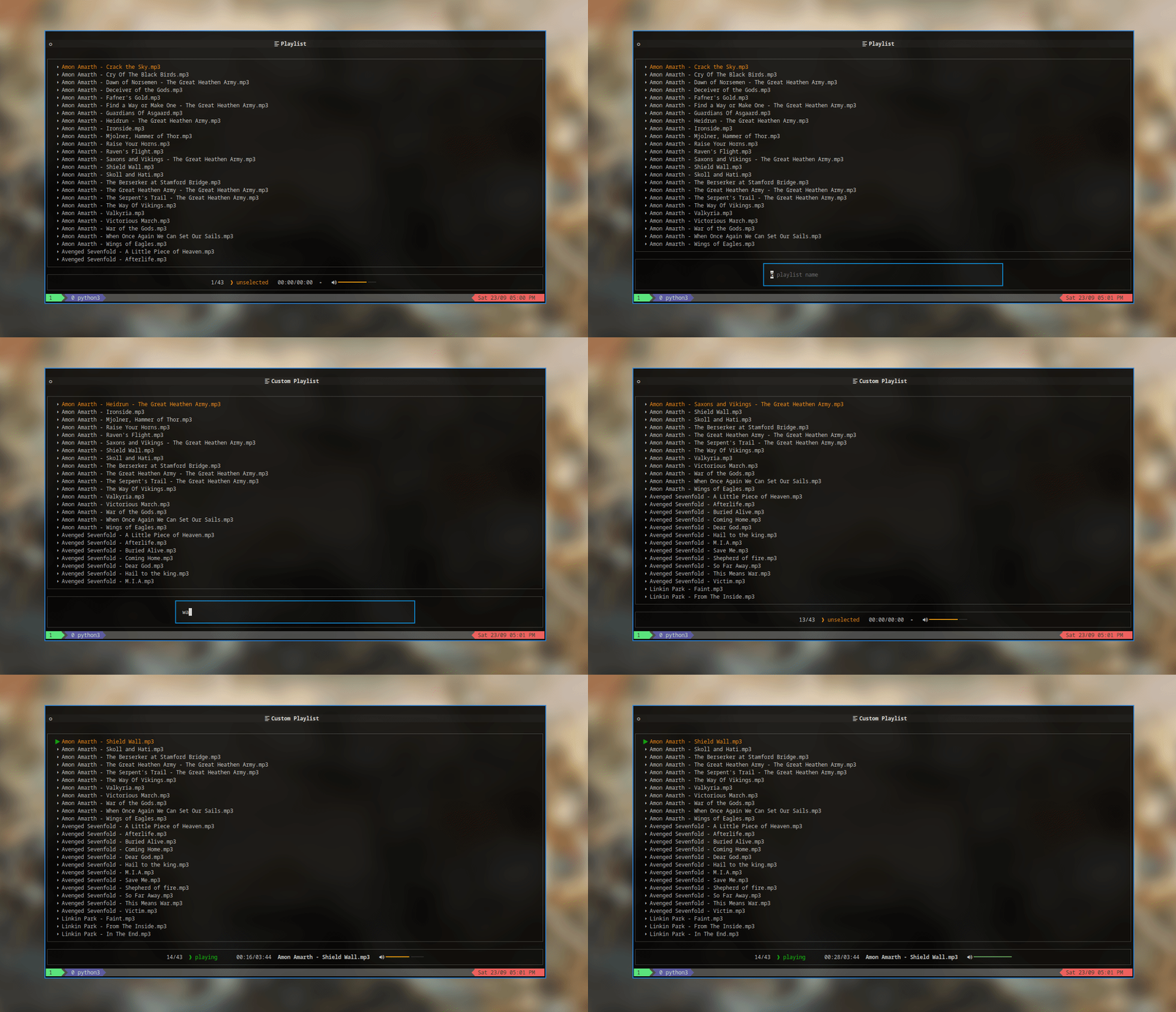
Command Line Python player is a minimalist song player written with Python (github), this application offers a wide range of functionality to enhance your music listening, playlist management, filtering and searching songs and more using keyboard shortcuts.
Below, you'll find a comprehensive list of keyboard shortcuts and their corresponding actions within the application, and additional configurations: keyboard shortcuts and customized configurations.
Only tested in Linux.
Table of contents
Features
- GUI customization.
- If your system does not support the icons used you can set them manually in ~/.config/cplayer/config.yaml.
- Keyboard shortcuts customization.
- Create multiple playlists and manage then.
- Multiple ways to navigate through the playlist including jumping by position, filtering, manual displacements, sorting, etc.
- Download song from a YouTube URL (
--url).
Get started
Installation
This application can be simply installed by running:
pip install cplayer
if you want to install from a source distribution:
git clone https://github.com/eccanto/cplayer
cd cplayer/
pip install .
Uninstallation
To uninstall the application you can use pip:
pip uninstall cplayer
Usage
To run the application you must run the command line:
cplayer
By default the application will load the last playlist if it exists, otherwise the application will use the current
path to load the .mp3 and .wav files from the directory (not recursively).
Options
$ cplayer --help

Usage: cplayer [OPTIONS]

  Command Line Python player CLI.

  This command line tool plays music files from a specified directory or last
  used playlist.

  Examples:

      - Play music from the current directory or the last used playlist if it
      exists:

        $ cplayer

      - Play music from a specific directory:

        $ cplayer --path /path/to/music_directory

      - Download song from YouTube

        $ cplayer --url 'https://www.youtube.com/watch?v=xyz'

  For more information, visit https://github.com/eccanto/cplayer

Options:
  -p, --path PATH  Path to the directory containing your music files.
  -u, --url TEXT   URL of the song to download from YouTube.
  --version        Show the version and exit.
  --help           Show this message and exit.
TODO
- Add favorites feature.
- Add option to restore default configurations.
- Add confirmation dialog to remove/add songs.
- Add "recent" sections: recent folders, recent playlists, recent songs.
Known issues
tmuxsubpanels may cause the application dimensions to be incorrect.
Reports and Debugging
The application uses a log file located at ~/.cplayer/logfile.log to report and debug errors. The log file contains
detailed information about all errors that occur while the application is running, including the time and date of the
error, the error message, and the stack trace.
To view the log file, you can use a text editor or a terminal emulator, e.g.:
tail -f ~/.cplayer/logfile.log
The log file can be used to report and debug errors.
Developers
This project use tox and pytest to run the library tests.
Dependencies
To use development tools you must install the poetry packages:
poetry install --with dev
Set up pre-commit
After cloning the repository run the following command in the repository root, this ensures that library tests are run before each commit into the repository to maintain the quality of the project:
git config core.hooksPath .githooks
Basic configuration
Install development python requirements
poetry install
Testing
Simply run "tox" to execute all the library tests.
poetry run tox
To run the tests for a particular Python version, you can do:
poetry run tox -e py38
To clean the test environment:
poetry run tox -e clean
To publish the pypi package:
poetry run tox -e publish
Advanced configuration
By default tox will look for the python versions available on the system, and will run the compatibility tests on
the detected ones, and skip the versions not found. To ensure that compatibility tests are run for all Python
versions, the following steps must be followed:
-
Install pyenv
-
Install python versions:
for python_version in "3.10" "3.11" "3.12"; do pyenv install ${python_version}; done
-
Enable python versions:
pyenv local "3.10" "3.11" "3.12"
Static code analysis tools
These are the static code analysis tools that will help us to follow good practices and style guides of our source code. We will be using the following tools, which will be executed when generating a new push in the repository (git hooks).
Python static code analysis tools
The tools used are:
-
ruff: An extremely fast Python linter and code formatter, written in Rust.
Tools executed by Ruff:
- pycodestyle: Pycodestyle is a tool to check your Python code against some of the style conventions in PEP 8.
- ruff-format: The formatter is designed to be a drop-in replacement for Black.
- flake8: Flake8 is a python tool that glues together pycodestyle, pyflakes, and third-party plugins to check the style and quality of some python code.
- pydocstyle: Pydocstyle is a static analysis tool for checking compliance with Google-style docstrings.
- isort: Python utility / library to sort imports alphabetically, and automatically separated into sections and by type.
- mccabe: Complexity checker.
- bandit: Bandit is a tool designed to find common security issues.
- tryceratops: A linter to prevent exception handling antipatterns in Python.
-
prospector: Prospector is a tool to analyze Python code and output information about errors, potential problems, convention violations and complexity.
Tools executed by Prospector:
- pylint: Pylint is a Python static code analysis tool which looks for programming errors, helps enforcing a coding standard, sniffs for code smells and offers simple refactoring suggestions.
- dodgy: It is a series of simple regular expressions designed to detect things such as accidental SCM diff checkins, or passwords or secret keys hard coded into files.
- mypy: Mypy is an optional static type checker for Python.
- pyroma: Pyroma is a product aimed at giving a rating of how well a Python project complies with the best practices of the Python packaging ecosystem, primarily PyPI, pip, Distribute etc, as well as a list of issues that could be improved.
Run manually
bash .githooks/pre-commit
License
1 maintainer

Metadata
1 maintainer
Release files for cplayer 1.3.2
For a detailed explanation of source distributions (sdists) and built distributions (wheels), please see the package formats documentation.
Source distribution (sdist)
| File | Size | Uploaded | Provenance | Actions |
|---|---|---|---|---|
| cplayer-1.3.2.tar.gz | 26.7 kB | Without provenance | Details for cplayer-1.3.2.tar.gz |
Built distribution (wheel)
| File | Interpreter | ABI | Platform | Actions Reset |
|---|---|---|---|---|
| cplayer-1.3.2-py3-none-any.whl | Python 3 | none | any | Details for cplayer-1.3.2-py3-none-any.whl |
Total release size: 63.4 kB
Release files / cplayer-1.3.2.tar.gz
| Download URL | cplayer-1.3.2.tar.gz |
|---|---|
| Size | 26.7 kB |
| Tags | Source |
|
SHA-256 checksum How to use checksums |
53fe1f45f613fe78587da8ff7cb4b224ea0d68844de5f5d73ef48dfb74b3a434
|
|
BLAKE2b-256 checksum How to use checksums |
3f1bf6e09c53f81a690927119f05dafb6ef74a3b705f59fd3065ebc5c5fa7955
|
| Upload date | |
|
Uploaded using Trusted Publishing? What is trusted publishing? |
No |
| Uploaded via |
poetry/1.8.2 CPython/3.11.8 Linux/6.5.3-1-MANJARO
|
Release files / cplayer-1.3.2-py3-none-any.whl
| Download URL | cplayer-1.3.2-py3-none-any.whl |
|---|---|
| Size | 36.7 kB |
| Tags | Python 3 |
|
SHA-256 checksum How to use checksums |
fb8a2f4a726d72b7287269df1712a4ce8fc24f1f0604f732d027a5e60922c2b6
|
|
BLAKE2b-256 checksum How to use checksums |
75a1c571dbb78d71e3ce70e2dfb77b7fe6e29fe498138d771b7cdab5e8fa3b38
|
| Upload date | |
|
Uploaded using Trusted Publishing? What is trusted publishing? |
No |
| Uploaded via |
poetry/1.8.2 CPython/3.11.8 Linux/6.5.3-1-MANJARO
|
Security for cplayer 1.3.2
Provenance
Provenance describes where a file came from. On PyPI, provenance is shared via attestations, which provide a verifiable record of the build or publishing details. View details, limitations and caveats.
No provenance found
None of the files in this release were uploaded with provenance metadata.
A note on package security
PyPI is a repository for distributing packages, not a service for auditing them. While third-party security researchers and our staff do their best to detect and remove malicious packages, PyPI cannot guarantee the quality, security or suitability of any given package.
To learn more about protecting yourself from malicious actors, visit our package security documentation.














