
A tool to generate CPU load on a system with runtime configuration through a WebUI and REST API
Verified details
These details have been verified by PyPIProject links
GitHub Statistics
Maintainers

Project description
CPU Loader




A tool to generate CPU load on a system with runtime configuration through a WebUI and REST API.
✨ Key Features
- 🎯 Precise Per-Thread Control: Set individual CPU load (0-100%) for each core independently
- ⚡ High Performance: Native C implementation with pthreads ensures accurate load generation
- 🧮 Configurable Algorithms: Choose between 5 different computation types (busy-wait, PI, primes, matrix, fibonacci)
- ⏱️ Time-Controlled Execution: All algorithms respect precise timing for accurate load percentages
- 📊 Real-Time Monitoring: Live WebSocket updates showing actual CPU usage and temperature via
psutil - 🎛️ Interactive WebUI: Beautiful gradient interface with sliders and visual feedback
- 🚀 REST API: Complete programmatic control for automation and testing
- 📱 Responsive Design: Works seamlessly on desktop and mobile devices
- 🔄 Instant Updates: Changes take effect immediately with sub-second response time
- 🌡️ Temperature Monitoring: Optional CPU temperature tracking with sensor auto-detection
- 📡 MQTT Integration: Publish metrics and settings to MQTT broker for IoT/monitoring systems
🖼️ Screenshots
Interface Screenshots
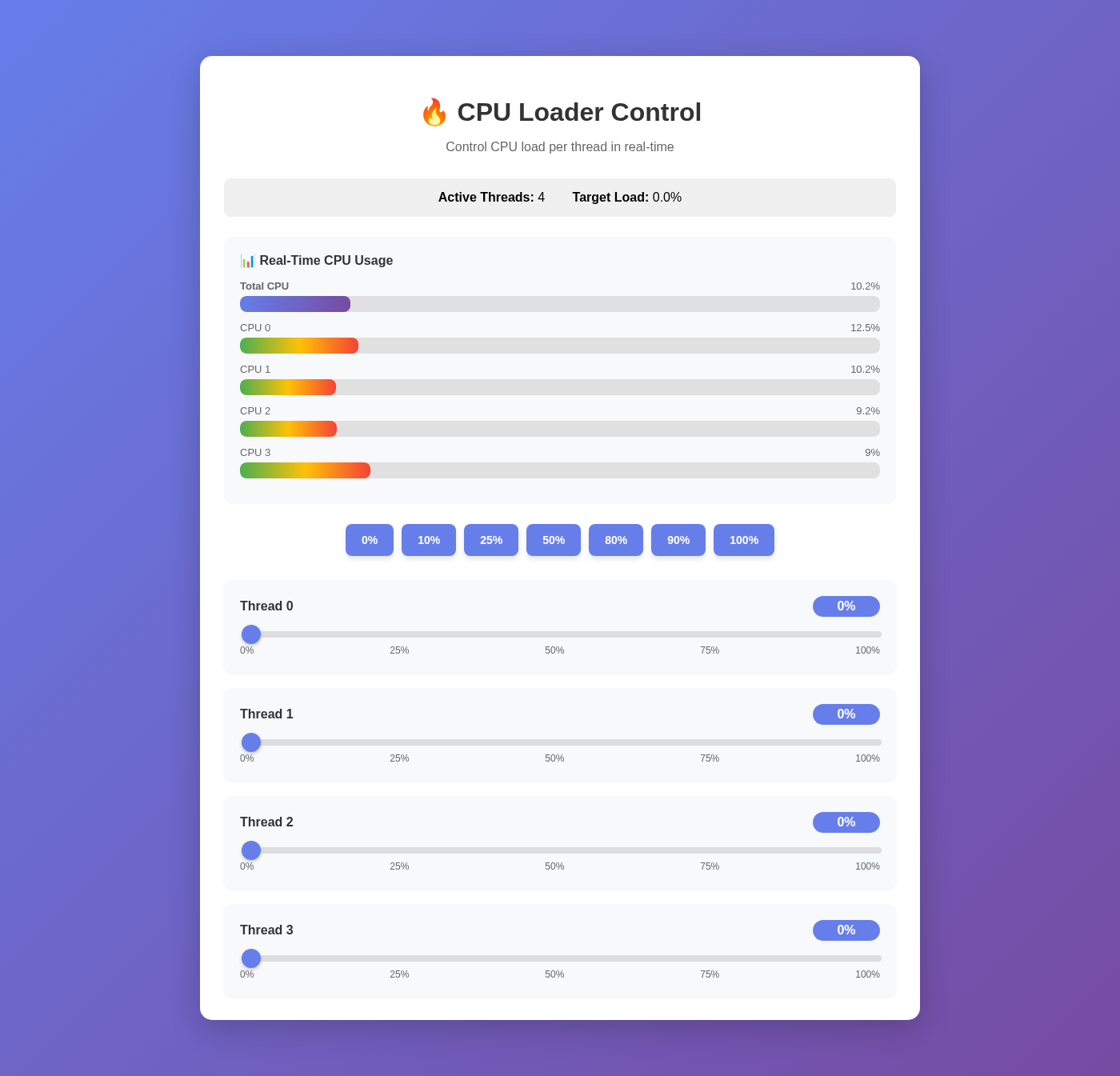
Clean interface showing all CPU threads at idle |
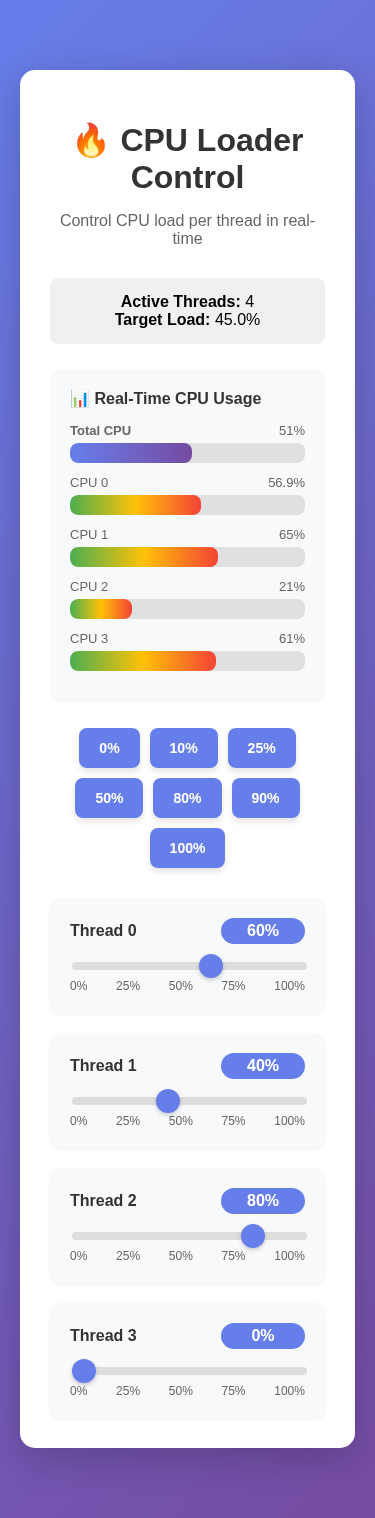
Fully responsive mobile interface |
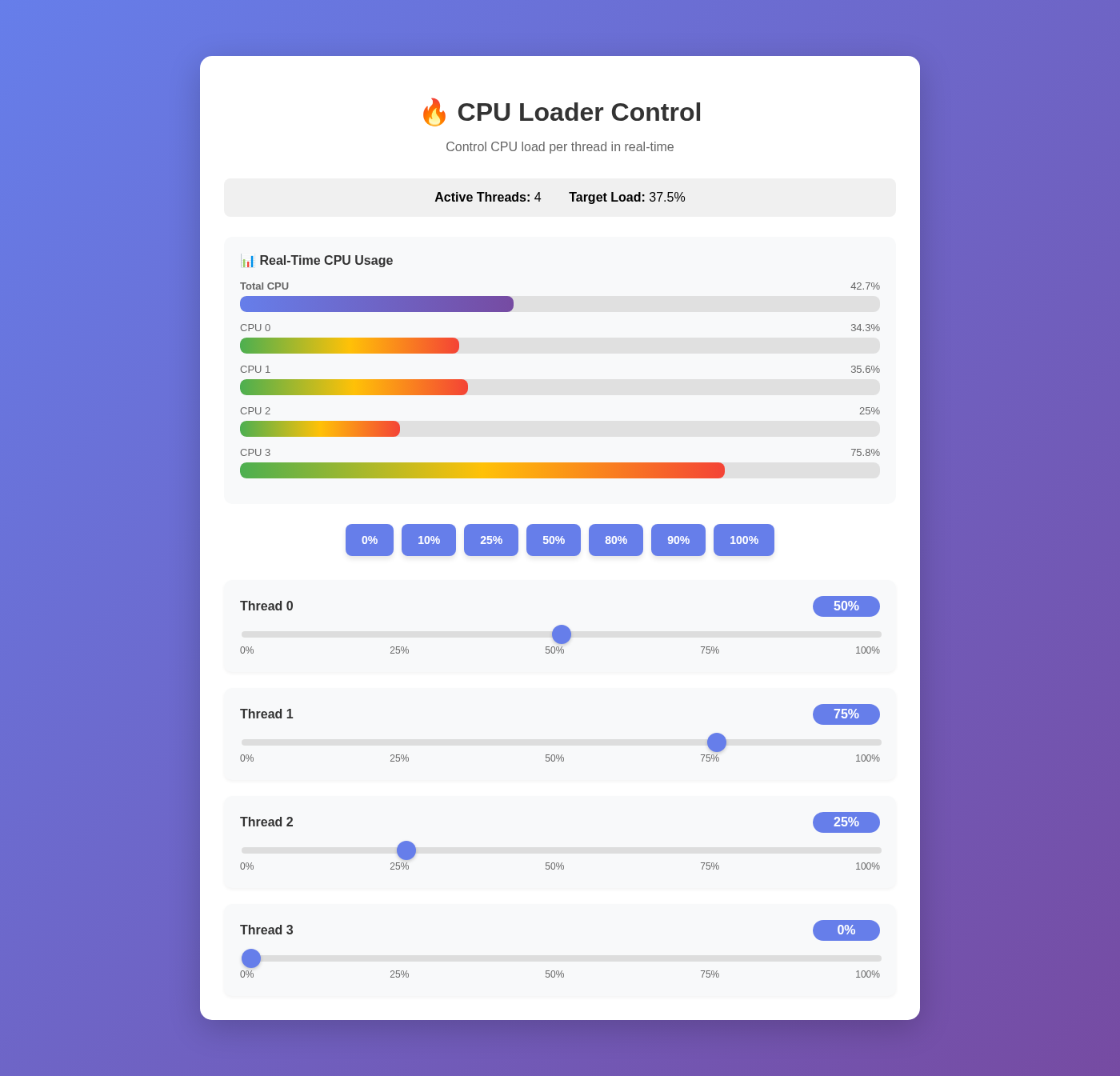
Different load levels: 50%, 75%, and 25% on individual threads |
|
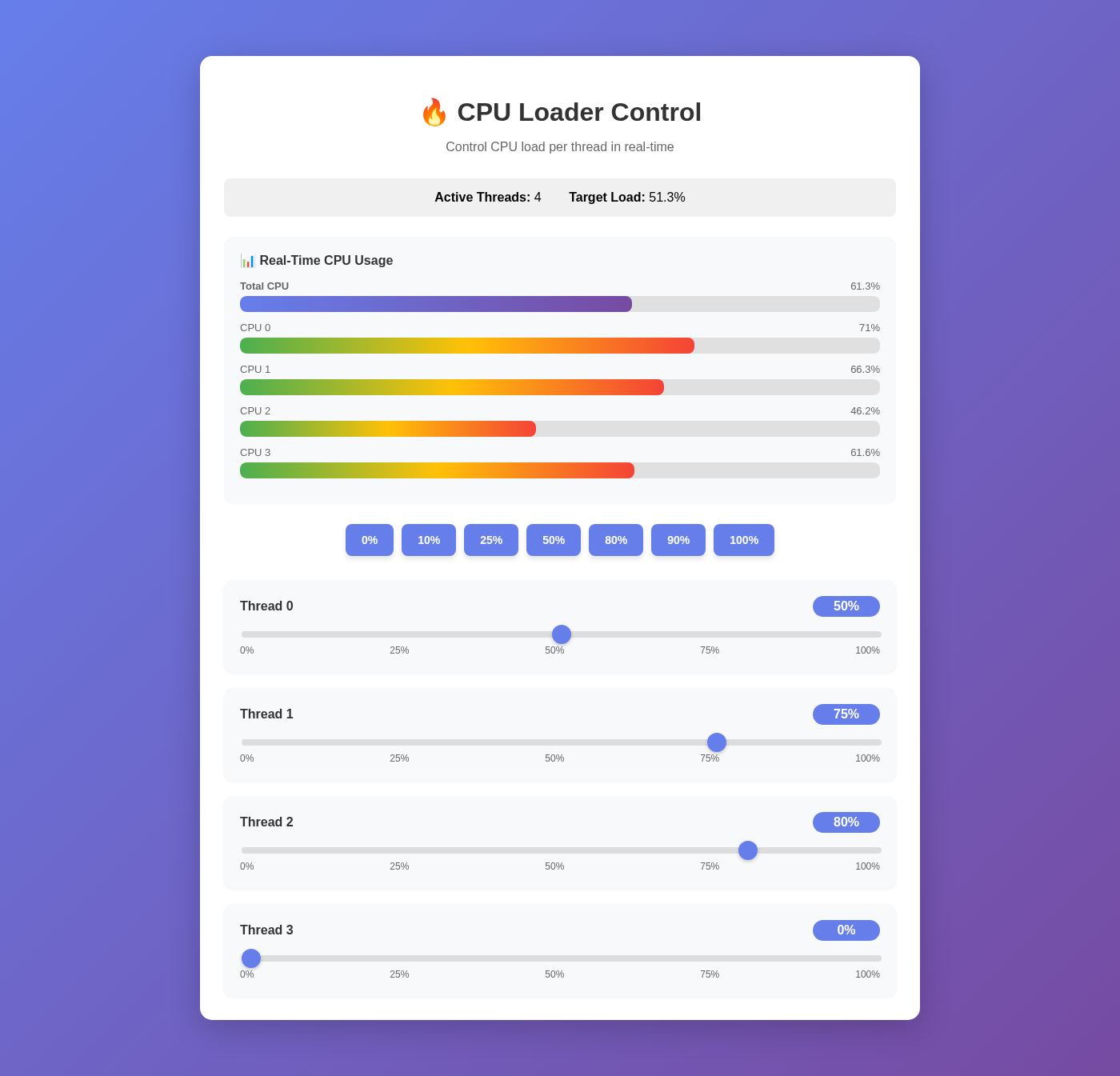
Real-time metrics showing actual CPU usage with color-coded bars |
Features Shown
- Visual Load Bars: Green progress bars show target load, blue bars display actual CPU usage
- Real-Time Updates: WebSocket connection provides live metrics every second
- Preset Buttons: Quick-set options (0%, 25%, 50%, 75%, 100%) for all threads
- Smooth Gradients: Modern UI with purple-to-blue gradient design
Installation
Using uv tool (Recommended for CLI usage)
For users who want the cpu-loader command available system-wide, use uv tool install:
uv tool install cpu-loader
This installs cpu-loader as a standalone tool that can be run from anywhere:
cpu-loader --help
cpu-loader --host 0.0.0.0 --port 8000
From Pre-built Wheels
Pre-compiled wheels are available for Linux (x86_64, ARM64) and macOS (x86_64, ARM64):
pip install cpu-loader
From Source
- Clone the repository:
git clone https://github.com/the78mole/cpu-loader.git
cd cpu-loader
- Install dependencies and build C extension:
uv pip install -e .
This will compile the high-performance C extension for efficient CPU load generation.
- (Optional) Set up pre-commit hooks for development:
pre-commit install
- (Optional) Set up commit message template for semantic versioning:
git config commit.template .gitmessage
See COMMIT_MESSAGE_FORMAT.md for commit message guidelines.
Usage
Starting the Server
uv run src/main.py
The server will start on http://localhost:8000
Command-Line Options
uv run src/main.py --help
Available Options:
--host HOST: Host to bind the server to (default: 0.0.0.0)--port PORT: Port to bind the server to (default: 8000)--disable-temperature: Disable CPU temperature monitoring--computation-type TYPE: Set computation algorithm (busy-wait, pi, primes, matrix, fibonacci)--mqtt-broker-host HOST: MQTT broker hostname--mqtt-broker-port PORT: MQTT broker port (default: 1883)--mqtt-username USER: MQTT username--mqtt-password PASS: MQTT password--mqtt-topic-prefix PREFIX: MQTT topic prefix (default: cpu-loader)--mqtt-client-id ID: MQTT client ID (default: cpu-loader)
Computation Types
CPU Loader supports different computation algorithms for load generation with precise time control:
busy-wait(default): Simple busy loop - fastest execution, minimal overhead, most accurate timingpi: PI calculation using Leibniz formula - moderate computational intensity, mathematical workloadprimes: Prime number finding - variable computational load, cryptographic-style operationsmatrix: 4x4 matrix multiplication - consistent computational patterns, linear algebra operationsfibonacci: Lightweight mathematical operations - balanced computational load with micro-pauses
All algorithms are time-controlled to ensure accurate load percentages. The system uses 10ms cycles with frequent timing checks to maintain precise CPU utilization.
Examples:
# Use PI calculation for CPU load
uv run cpu-loader --computation-type pi

# Use prime number calculation
uv run cpu-loader --computation-type primes --port 8001

# Use matrix multiplication
uv run cpu-loader --computation-type matrix
WebUI
Open your browser and navigate to http://localhost:8000
Features:
- Individual Thread Control: Use sliders to set load for each thread (0-100%)
- Preset Buttons: Quick-set all threads to 0%, 10%, 25%, 50%, 80%, 90%, or 100%
- Live Stats: View active thread count and average load
- Real-time Updates: Changes are applied instantly with visual feedback
REST API
Get Thread Status
curl http://localhost:8000/api/threads
Response:
{
  "num_threads": 4,
  "loads": {
    "0": 0.0,
    "1": 0.0,
    "2": 0.0,
    "3": 0.0
  }
}
Set Load for Specific Thread
curl -X PUT http://localhost:8000/api/threads/0/load \
  -H "Content-Type: application/json" \
  -d '{"load_percent": 50.0}'
Set Load for All Threads
curl -X POST http://localhost:8000/api/threads/load/all \
  -H "Content-Type: application/json" \
  -d '{"load_percent": 75.0}'
Change Number of Threads
curl -X POST http://localhost:8000/api/threads \
  -H "Content-Type: application/json" \
  -d '{"num_threads": 8}'
Get Computation Type
curl http://localhost:8000/api/computation-type
Response:
{
  "computation_type": "pi",
  "available_types": ["busy-wait", "pi", "primes", "matrix", "fibonacci"]
}
Set Computation Type
curl -X PUT http://localhost:8000/api/computation-type \
  -H "Content-Type: application/json" \
  -d '{"computation_type": "fibonacci"}'
API Documentation
Once the server is running, visit http://localhost:8000/docs for interactive API documentation powered by Swagger UI.
MQTT Publishing
CPU Loader can publish real-time CPU metrics and load control settings to an MQTT broker for integration with home automation systems, monitoring tools, or custom applications.
MQTT Topics
The application publishes to two topics:
-
{prefix}/cpu_metrics: Published every second with current CPU utilization{ "total_cpu_percent": 25.5, "per_cpu_percent": [25.0, 26.0, 25.3, 25.7] }
-
{prefix}/load_settings: Published when load settings change (retained message){ "num_threads": 4, "loads": {"0": 25.0, "1": 25.0, "2": 25.0, "3": 25.0}, "average_load": 25.0 }
Configuration
MQTT can be configured using environment variables or command-line arguments. Command-line arguments take precedence over environment variables.
Using Environment Variables
export MQTT_BROKER_HOST=mqtt.example.com
export MQTT_BROKER_PORT=1883
export MQTT_USERNAME=myuser
export MQTT_PASSWORD=mypassword
export MQTT_TOPIC_PREFIX=cpu-loader
export MQTT_CLIENT_ID=cpu-loader-001

uv run src/main.py
Using Command-Line Arguments
uv run src/main.py \
  --mqtt-broker-host mqtt.example.com \
  --mqtt-broker-port 1883 \
  --mqtt-username myuser \
  --mqtt-password mypassword \
  --mqtt-topic-prefix cpu-loader \
  --mqtt-client-id cpu-loader-001
Testing with Mosquitto
To test MQTT publishing locally:
# Install mosquitto
sudo apt-get install mosquitto mosquitto-clients

# Start CPU Loader with MQTT
uv run src/main.py --mqtt-broker-host localhost

# Subscribe to all topics (in another terminal)
mosquitto_sub -h localhost -t "cpu-loader/#" -v
MQTT Settings
| Setting | Environment Variable | CLI Argument | Default | Description |
|---|---|---|---|---|
| Broker Host | MQTT_BROKER_HOST |
--mqtt-broker-host |
None | MQTT broker hostname or IP |
| Broker Port | MQTT_BROKER_PORT |
--mqtt-broker-port |
1883 | MQTT broker port |
| Username | MQTT_USERNAME |
--mqtt-username |
None | MQTT authentication username |
| Password | MQTT_PASSWORD |
--mqtt-password |
None | MQTT authentication password |
| Topic Prefix | MQTT_TOPIC_PREFIX |
--mqtt-topic-prefix |
cpu-loader | Prefix for all MQTT topics |
| Client ID | MQTT_CLIENT_ID |
--mqtt-client-id |
cpu-loader | MQTT client identifier |
Note: If no MQTT broker host is configured, MQTT publishing will be disabled and the application will function normally without it.
Example Script
An example script (src/example.py) is provided to demonstrate programmatic control:
# Start the server first
uv run src/main.py

# In another terminal, run the example
uv run src/example.py
The example demonstrates:
- Getting current status
- Setting all threads to a specific load
- Gradually increasing load
- Individual thread control
- Resetting to idle
Computation Types Demo
A comprehensive demo script is available in examples/computation_types_demo.py to test all computation algorithms:
# Start the server
uv run cpu-loader

# In another terminal, run the demo (tests all computation types)
python examples/computation_types_demo.py

# Test specific computation types only
python examples/computation_types_demo.py --types pi fibonacci

# Custom load and duration
python examples/computation_types_demo.py --load 50 --duration 15
The demo script:
- Tests each computation type systematically
- Monitors actual CPU usage vs. target load
- Provides performance comparisons between algorithms
- Shows timing accuracy for each computation method
Running as a Systemd Service
You can run CPU Loader as a systemd service to start automatically on boot and run in the background.
Create Systemd Service File
Create /etc/systemd/system/cpu-loader.service:
[Unit]
Description=CPU Loader Service
After=network.target

[Service]
Type=simple
User=your-username
WorkingDirectory=/home/your-username
ExecStart=/home/your-username/.local/bin/cpu-loader --host 0.0.0.0 --port 8000
Restart=on-failure
RestartSec=5

# Optional: Set environment variables for MQTT
#Environment="MQTT_BROKER_HOST=mqtt.example.com"
#Environment="MQTT_BROKER_PORT=1883"
#Environment="MQTT_USERNAME=myuser"
#Environment="MQTT_PASSWORD=mypassword"
#Environment="MQTT_TOPIC_PREFIX=cpu-loader"
#Environment="MQTT_CLIENT_ID=cpu-loader-001"

# Optional: Disable temperature monitoring
#Environment="DISABLE_TEMPERATURE=1"

[Install]
WantedBy=multi-user.target
Important: Replace your-username with your actual username, and adjust the ExecStart path to point to where cpu-loader is installed:
- If installed with
uv tool install: Usually~/.local/bin/cpu-loader - If installed with
pip install --user: Usually~/.local/bin/cpu-loader - If installed system-wide: Usually
/usr/local/bin/cpu-loader
Enable and Start the Service
# Reload systemd to recognize the new service
sudo systemctl daemon-reload

# Enable the service to start on boot
sudo systemctl enable cpu-loader

# Start the service now
sudo systemctl start cpu-loader

# Check service status
sudo systemctl status cpu-loader

# View service logs
sudo journalctl -u cpu-loader -f
Manage the Service
# Stop the service
sudo systemctl stop cpu-loader

# Restart the service
sudo systemctl restart cpu-loader

# Disable auto-start on boot
sudo systemctl disable cpu-loader
Example Service Configurations
Basic Service (no MQTT):
[Unit]
Description=CPU Loader Service
After=network.target

[Service]
Type=simple
User=cpuloader
ExecStart=/home/cpuloader/.local/bin/cpu-loader --host 0.0.0.0 --port 8000
Restart=on-failure

[Install]
WantedBy=multi-user.target
Service with MQTT Integration:
[Unit]
Description=CPU Loader Service with MQTT
After=network.target

[Service]
Type=simple
User=cpuloader
ExecStart=/home/cpuloader/.local/bin/cpu-loader --host 0.0.0.0 --port 8000
Environment="MQTT_BROKER_HOST=192.168.1.100"
Environment="MQTT_BROKER_PORT=1883"
Environment="MQTT_USERNAME=cpuloader"
Environment="MQTT_PASSWORD=secretpassword"
Environment="MQTT_TOPIC_PREFIX=home/sensors/cpu-loader"
Restart=on-failure

[Install]
WantedBy=multi-user.target
Service with Custom Computation Type:
[Unit]
Description=CPU Loader Service (Matrix Computation)
After=network.target

[Service]
Type=simple
User=cpuloader
ExecStart=/home/cpuloader/.local/bin/cpu-loader --host 0.0.0.0 --port 8080 --computation-type matrix
Restart=on-failure

[Install]
WantedBy=multi-user.target
Architecture
- src/cpu_loader_core.c: High-performance C implementation using pthreads for CPU load generation
- src/cpu_loader.py: Python wrapper providing a clean API to the C extension
- src/main.py: FastAPI application with REST API and embedded WebUI
- src/mqtt_publisher.py: MQTT client for publishing metrics and settings
- Threading Model: Native pthreads for maximum efficiency and precise timing
- Load Algorithm: High-resolution busy-wait loops with nanosecond precision
Requirements
- Python 3.8+
- FastAPI 0.115.0+
- Uvicorn 0.32.0+
- Pydantic 2.10.0+
- paho-mqtt 2.1.0+ (for MQTT publishing)
- C compiler (gcc or clang) for building the extension
Use Cases
- Performance Testing: Test application behavior under various CPU loads and computation types
- Stress Testing: Validate system stability under high CPU utilization with different algorithms
- Thermal Testing: Use fibonacci or matrix computations for maximum heat generation
- Power Consumption Analysis: Compare power usage across different computation algorithms
- Benchmarking: Create reproducible load scenarios with specific computation patterns
- Algorithm Testing: Test cache performance (matrix), mathematical units (pi), or crypto operations (primes)
- IoT Integration: Integrate with Home Assistant, Node-RED, or other MQTT-based systems
- Monitoring: Feed CPU metrics and temperature data into monitoring dashboards via MQTT
Computation Algorithm Use Cases
busy-wait: Baseline testing, pure timing validation, minimal computational overheadpi: Mathematical processing benchmarks, floating-point unit testingprimes: Cryptographic algorithm simulation, integer arithmetic testingmatrix: Linear algebra workloads, cache hierarchy testing, SIMD instruction testingfibonacci: Balanced computational load for general stress testing
Development
Pre-commit Hooks
This project uses pre-commit hooks to ensure code quality. The hooks include:
- Code Formatting: Black and isort for consistent Python formatting
- Linting: Flake8 for code quality checks
- Type Checking: Mypy for static type analysis
- General Checks: Trailing whitespace, end-of-file fixes, YAML/JSON/TOML validation
To run pre-commit manually on all files:
pre-commit run --all-files
The hooks will run automatically on git commit after installation.
Building and Publishing Releases
The project uses automatic semantic versioning with GitHub Actions:
Versioning Rules
Versions are automatically determined based on commit messages:
-
Patch bump (0.0.X): Every commit to main
-
Minor bump (0.X.0): Commits prefixed with
feat:git commit -m "feat: add new CPU monitoring feature"
-
Major bump (X.0.0): Commits with
major:,breaking:, orBREAKING CHANGE:git commit -m "major: redesign API interface" git commit -m "breaking: remove deprecated endpoints"
Release Process
-
Commit and push to main:
git add .
git commit -m "feat: add WebSocket support"
git push origin main
-
Automated workflow:
- Version is automatically calculated using semantic versioning
- Wheels are built for Linux (x86_64, ARM64) and macOS (x86_64, ARM64)
- Python versions: 3.8, 3.9, 3.10, 3.11, 3.12
- Source distribution (sdist) is created
- All artifacts are published to PyPI
- A GitHub Release is created with version tag and artifacts
License
MIT License - see LICENSE file for details.
Project details
Verified details
These details have been verified by PyPIProject links
GitHub Statistics
Maintainers
Release history Release notifications | RSS feed


Download files
Download the file for your platform. If you're not sure which to choose, learn more about installing packages.
Source Distribution
Built Distributions
Filter files by name, interpreter, ABI, and platform.
If you're not sure about the file name format, learn more about wheel file names.
Copy a direct link to the current filters
File details
Details for the file cpu_loader-0.6.0.tar.gz.
File metadata
- Download URL: cpu_loader-0.6.0.tar.gz
- Upload date:
- Size: 1.4 MB
- Tags: Source
- Uploaded using Trusted Publishing? Yes
- Uploaded via: twine/6.1.0 CPython/3.13.7
File hashes
| Algorithm | Hash digest | |
|---|---|---|
| SHA256 |
b9aa72c6d8ae72a74828e763a73f8d8258b0e0a979af1900813b69b39ab52985
|
|
| MD5 |
ec5e5ab593efeff8f6a46b5431aa0dab
|
|
| BLAKE2b-256 |
48eb1c758283e602ed30cb7662549410e92617c07dd648178c14b4005efa4460
|
Provenance
The following attestation bundles were made for cpu_loader-0.6.0.tar.gz:
Publisher:
build-wheels.yml on the78mole/cpu-loader
-
Statement:
-
Statement type:
https://in-toto.io/Statement/v1 -
Predicate type:
https://docs.pypi.org/attestations/publish/v1 -
Subject name:
cpu_loader-0.6.0.tar.gz -
Subject digest:
b9aa72c6d8ae72a74828e763a73f8d8258b0e0a979af1900813b69b39ab52985 - Sigstore transparency entry: 772506126
- Sigstore integration time:
-
Permalink:
the78mole/cpu-loader@822a959c73a354c1282da1867f9851c43e33c486 -
Branch / Tag:
refs/heads/main - Owner: https://github.com/the78mole
-
Access:
public
-
Token Issuer:
https://token.actions.githubusercontent.com -
Runner Environment:
github-hosted -
Publication workflow:
build-wheels.yml@822a959c73a354c1282da1867f9851c43e33c486 -
Trigger Event:
push
-
Statement type:
File details
Details for the file cpu_loader-0.6.0-cp312-cp312-manylinux2014_x86_64.manylinux_2_17_x86_64.manylinux_2_28_x86_64.whl.
File metadata
- Download URL: cpu_loader-0.6.0-cp312-cp312-manylinux2014_x86_64.manylinux_2_17_x86_64.manylinux_2_28_x86_64.whl
- Upload date:
- Size: 43.8 kB
- Tags: CPython 3.12, manylinux: glibc 2.17+ x86-64, manylinux: glibc 2.28+ x86-64
- Uploaded using Trusted Publishing? Yes
- Uploaded via: twine/6.1.0 CPython/3.13.7
File hashes
| Algorithm | Hash digest | |
|---|---|---|
| SHA256 |
922b1299e4a0e47395ee0dc40fd388238e147b95cc10bdc43e78273cc384faab
|
|
| MD5 |
6ec2284de38c8c267f3803ff3abea820
|
|
| BLAKE2b-256 |
37c328926c1be44c16bf36ad78c04dc82eff68fddfd025a4b554084d90f7b64d
|
Provenance
The following attestation bundles were made for cpu_loader-0.6.0-cp312-cp312-manylinux2014_x86_64.manylinux_2_17_x86_64.manylinux_2_28_x86_64.whl:
Publisher:
build-wheels.yml on the78mole/cpu-loader
-
Statement:
-
Statement type:
https://in-toto.io/Statement/v1 -
Predicate type:
https://docs.pypi.org/attestations/publish/v1 -
Subject name:
cpu_loader-0.6.0-cp312-cp312-manylinux2014_x86_64.manylinux_2_17_x86_64.manylinux_2_28_x86_64.whl -
Subject digest:
922b1299e4a0e47395ee0dc40fd388238e147b95cc10bdc43e78273cc384faab - Sigstore transparency entry: 772506216
- Sigstore integration time:
-
Permalink:
the78mole/cpu-loader@822a959c73a354c1282da1867f9851c43e33c486 -
Branch / Tag:
refs/heads/main - Owner: https://github.com/the78mole
-
Access:
public
-
Token Issuer:
https://token.actions.githubusercontent.com -
Runner Environment:
github-hosted -
Publication workflow:
build-wheels.yml@822a959c73a354c1282da1867f9851c43e33c486 -
Trigger Event:
push
-
Statement type:
File details
Details for the file cpu_loader-0.6.0-cp312-cp312-manylinux2014_aarch64.manylinux_2_17_aarch64.manylinux_2_28_aarch64.whl.
File metadata
- Download URL: cpu_loader-0.6.0-cp312-cp312-manylinux2014_aarch64.manylinux_2_17_aarch64.manylinux_2_28_aarch64.whl
- Upload date:
- Size: 45.1 kB
- Tags: CPython 3.12, manylinux: glibc 2.17+ ARM64, manylinux: glibc 2.28+ ARM64
- Uploaded using Trusted Publishing? Yes
- Uploaded via: twine/6.1.0 CPython/3.13.7
File hashes
| Algorithm | Hash digest | |
|---|---|---|
| SHA256 |
ca9bc0ad2482cf16696d754637656c64c3900a1cf500ebe643e086f7ce937a56
|
|
| MD5 |
d173a7683648f6312919d13e4b3ec154
|
|
| BLAKE2b-256 |
4733fbb5abb6318e9fca3cea341055b1be9a14a93e0468af10b59c420ac1a2fc
|
Provenance
The following attestation bundles were made for cpu_loader-0.6.0-cp312-cp312-manylinux2014_aarch64.manylinux_2_17_aarch64.manylinux_2_28_aarch64.whl:
Publisher:
build-wheels.yml on the78mole/cpu-loader
-
Statement:
-
Statement type:
https://in-toto.io/Statement/v1 -
Predicate type:
https://docs.pypi.org/attestations/publish/v1 -
Subject name:
cpu_loader-0.6.0-cp312-cp312-manylinux2014_aarch64.manylinux_2_17_aarch64.manylinux_2_28_aarch64.whl -
Subject digest:
ca9bc0ad2482cf16696d754637656c64c3900a1cf500ebe643e086f7ce937a56 - Sigstore transparency entry: 772506190
- Sigstore integration time:
-
Permalink:
the78mole/cpu-loader@822a959c73a354c1282da1867f9851c43e33c486 -
Branch / Tag:
refs/heads/main - Owner: https://github.com/the78mole
-
Access:
public
-
Token Issuer:
https://token.actions.githubusercontent.com -
Runner Environment:
github-hosted -
Publication workflow:
build-wheels.yml@822a959c73a354c1282da1867f9851c43e33c486 -
Trigger Event:
push
-
Statement type:
File details
Details for the file cpu_loader-0.6.0-cp312-cp312-macosx_11_0_arm64.whl.
File metadata
- Download URL: cpu_loader-0.6.0-cp312-cp312-macosx_11_0_arm64.whl
- Upload date:
- Size: 31.6 kB
- Tags: CPython 3.12, macOS 11.0+ ARM64
- Uploaded using Trusted Publishing? Yes
- Uploaded via: twine/6.1.0 CPython/3.13.7
File hashes
| Algorithm | Hash digest | |
|---|---|---|
| SHA256 |
92f5f291008974fe63037c022ab9ec7a150d0537a4ea9c4b3634d0da28fb46b5
|
|
| MD5 |
dd5ff1c591dffe4e60731741ebf773d1
|
|
| BLAKE2b-256 |
81807c6a35460ab5ebb9864ab53a6174a5262d46d44bf0169ae0fcd9b233cde1
|
Provenance
The following attestation bundles were made for cpu_loader-0.6.0-cp312-cp312-macosx_11_0_arm64.whl:
Publisher:
build-wheels.yml on the78mole/cpu-loader
-
Statement:
-
Statement type:
https://in-toto.io/Statement/v1 -
Predicate type:
https://docs.pypi.org/attestations/publish/v1 -
Subject name:
cpu_loader-0.6.0-cp312-cp312-macosx_11_0_arm64.whl -
Subject digest:
92f5f291008974fe63037c022ab9ec7a150d0537a4ea9c4b3634d0da28fb46b5 - Sigstore transparency entry: 772506180
- Sigstore integration time:
-
Permalink:
the78mole/cpu-loader@822a959c73a354c1282da1867f9851c43e33c486 -
Branch / Tag:
refs/heads/main - Owner: https://github.com/the78mole
-
Access:
public
-
Token Issuer:
https://token.actions.githubusercontent.com -
Runner Environment:
github-hosted -
Publication workflow:
build-wheels.yml@822a959c73a354c1282da1867f9851c43e33c486 -
Trigger Event:
push
-
Statement type:
File details
Details for the file cpu_loader-0.6.0-cp312-cp312-macosx_10_13_x86_64.whl.
File metadata
- Download URL: cpu_loader-0.6.0-cp312-cp312-macosx_10_13_x86_64.whl
- Upload date:
- Size: 31.5 kB
- Tags: CPython 3.12, macOS 10.13+ x86-64
- Uploaded using Trusted Publishing? Yes
- Uploaded via: twine/6.1.0 CPython/3.13.7
File hashes
| Algorithm | Hash digest | |
|---|---|---|
| SHA256 |
5fff6846830ac6a4afe33db4721f0828169fdb533669bd6be24e4e6181ea395b
|
|
| MD5 |
7e9e32f93ee2a4837a103fdb1d0acb2e
|
|
| BLAKE2b-256 |
d9992481889a8f9deb31f9591794828e05d2824e57f753423fd51bf73649b073
|
Provenance
The following attestation bundles were made for cpu_loader-0.6.0-cp312-cp312-macosx_10_13_x86_64.whl:
Publisher:
build-wheels.yml on the78mole/cpu-loader
-
Statement:
-
Statement type:
https://in-toto.io/Statement/v1 -
Predicate type:
https://docs.pypi.org/attestations/publish/v1 -
Subject name:
cpu_loader-0.6.0-cp312-cp312-macosx_10_13_x86_64.whl -
Subject digest:
5fff6846830ac6a4afe33db4721f0828169fdb533669bd6be24e4e6181ea395b - Sigstore transparency entry: 772506210
- Sigstore integration time:
-
Permalink:
the78mole/cpu-loader@822a959c73a354c1282da1867f9851c43e33c486 -
Branch / Tag:
refs/heads/main - Owner: https://github.com/the78mole
-
Access:
public
-
Token Issuer:
https://token.actions.githubusercontent.com -
Runner Environment:
github-hosted -
Publication workflow:
build-wheels.yml@822a959c73a354c1282da1867f9851c43e33c486 -
Trigger Event:
push
-
Statement type:
File details
Details for the file cpu_loader-0.6.0-cp311-cp311-manylinux2014_x86_64.manylinux_2_17_x86_64.manylinux_2_28_x86_64.whl.
File metadata
- Download URL: cpu_loader-0.6.0-cp311-cp311-manylinux2014_x86_64.manylinux_2_17_x86_64.manylinux_2_28_x86_64.whl
- Upload date:
- Size: 43.8 kB
- Tags: CPython 3.11, manylinux: glibc 2.17+ x86-64, manylinux: glibc 2.28+ x86-64
- Uploaded using Trusted Publishing? Yes
- Uploaded via: twine/6.1.0 CPython/3.13.7
File hashes
| Algorithm | Hash digest | |
|---|---|---|
| SHA256 |
a709debcaa0c9093094fa16fb82f3ed5f11cee17f94500322b43015949726f82
|
|
| MD5 |
10984879af5b439fead804f116822112
|
|
| BLAKE2b-256 |
ea9a610cda7fff1c6b4e38758dd0bccfa812cec18fad3fdd09be508856b539c9
|
Provenance
The following attestation bundles were made for cpu_loader-0.6.0-cp311-cp311-manylinux2014_x86_64.manylinux_2_17_x86_64.manylinux_2_28_x86_64.whl:
Publisher:
build-wheels.yml on the78mole/cpu-loader
-
Statement:
-
Statement type:
https://in-toto.io/Statement/v1 -
Predicate type:
https://docs.pypi.org/attestations/publish/v1 -
Subject name:
cpu_loader-0.6.0-cp311-cp311-manylinux2014_x86_64.manylinux_2_17_x86_64.manylinux_2_28_x86_64.whl -
Subject digest:
a709debcaa0c9093094fa16fb82f3ed5f11cee17f94500322b43015949726f82 - Sigstore transparency entry: 772506141
- Sigstore integration time:
-
Permalink:
the78mole/cpu-loader@822a959c73a354c1282da1867f9851c43e33c486 -
Branch / Tag:
refs/heads/main - Owner: https://github.com/the78mole
-
Access:
public
-
Token Issuer:
https://token.actions.githubusercontent.com -
Runner Environment:
github-hosted -
Publication workflow:
build-wheels.yml@822a959c73a354c1282da1867f9851c43e33c486 -
Trigger Event:
push
-
Statement type:
File details
Details for the file cpu_loader-0.6.0-cp311-cp311-manylinux2014_aarch64.manylinux_2_17_aarch64.manylinux_2_28_aarch64.whl.
File metadata
- Download URL: cpu_loader-0.6.0-cp311-cp311-manylinux2014_aarch64.manylinux_2_17_aarch64.manylinux_2_28_aarch64.whl
- Upload date:
- Size: 45.1 kB
- Tags: CPython 3.11, manylinux: glibc 2.17+ ARM64, manylinux: glibc 2.28+ ARM64
- Uploaded using Trusted Publishing? Yes
- Uploaded via: twine/6.1.0 CPython/3.13.7
File hashes
| Algorithm | Hash digest | |
|---|---|---|
| SHA256 |
2188691ab455ae4a39db2ce9cec8213932bc016c1db3f43aa6fef4a839792b06
|
|
| MD5 |
561d7a7f075b41fd74364bf9a23cdb97
|
|
| BLAKE2b-256 |
9249bbeb812927bb242f3917a83aa523cf32662559fc260275827cf3234525d7
|
Provenance
The following attestation bundles were made for cpu_loader-0.6.0-cp311-cp311-manylinux2014_aarch64.manylinux_2_17_aarch64.manylinux_2_28_aarch64.whl:
Publisher:
build-wheels.yml on the78mole/cpu-loader
-
Statement:
-
Statement type:
https://in-toto.io/Statement/v1 -
Predicate type:
https://docs.pypi.org/attestations/publish/v1 -
Subject name:
cpu_loader-0.6.0-cp311-cp311-manylinux2014_aarch64.manylinux_2_17_aarch64.manylinux_2_28_aarch64.whl -
Subject digest:
2188691ab455ae4a39db2ce9cec8213932bc016c1db3f43aa6fef4a839792b06 - Sigstore transparency entry: 772506133
- Sigstore integration time:
-
Permalink:
the78mole/cpu-loader@822a959c73a354c1282da1867f9851c43e33c486 -
Branch / Tag:
refs/heads/main - Owner: https://github.com/the78mole
-
Access:
public
-
Token Issuer:
https://token.actions.githubusercontent.com -
Runner Environment:
github-hosted -
Publication workflow:
build-wheels.yml@822a959c73a354c1282da1867f9851c43e33c486 -
Trigger Event:
push
-
Statement type:
File details
Details for the file cpu_loader-0.6.0-cp311-cp311-macosx_11_0_arm64.whl.
File metadata
- Download URL: cpu_loader-0.6.0-cp311-cp311-macosx_11_0_arm64.whl
- Upload date:
- Size: 31.6 kB
- Tags: CPython 3.11, macOS 11.0+ ARM64
- Uploaded using Trusted Publishing? Yes
- Uploaded via: twine/6.1.0 CPython/3.13.7
File hashes
| Algorithm | Hash digest | |
|---|---|---|
| SHA256 |
bcbb9922c2e61718cbef0e0b4b15b2591dffc2c88202252e98785a194997b0f2
|
|
| MD5 |
6d03785d36c52812ed576cc834d9f684
|
|
| BLAKE2b-256 |
af90d9f99e55f604ec9a595b1eaee744be14dfd27cdb29d51b64152716b68af1
|
Provenance
The following attestation bundles were made for cpu_loader-0.6.0-cp311-cp311-macosx_11_0_arm64.whl:
Publisher:
build-wheels.yml on the78mole/cpu-loader
-
Statement:
-
Statement type:
https://in-toto.io/Statement/v1 -
Predicate type:
https://docs.pypi.org/attestations/publish/v1 -
Subject name:
cpu_loader-0.6.0-cp311-cp311-macosx_11_0_arm64.whl -
Subject digest:
bcbb9922c2e61718cbef0e0b4b15b2591dffc2c88202252e98785a194997b0f2 - Sigstore transparency entry: 772506205
- Sigstore integration time:
-
Permalink:
the78mole/cpu-loader@822a959c73a354c1282da1867f9851c43e33c486 -
Branch / Tag:
refs/heads/main - Owner: https://github.com/the78mole
-
Access:
public
-
Token Issuer:
https://token.actions.githubusercontent.com -
Runner Environment:
github-hosted -
Publication workflow:
build-wheels.yml@822a959c73a354c1282da1867f9851c43e33c486 -
Trigger Event:
push
-
Statement type:
File details
Details for the file cpu_loader-0.6.0-cp311-cp311-macosx_10_9_x86_64.whl.
File metadata
- Download URL: cpu_loader-0.6.0-cp311-cp311-macosx_10_9_x86_64.whl
- Upload date:
- Size: 31.5 kB
- Tags: CPython 3.11, macOS 10.9+ x86-64
- Uploaded using Trusted Publishing? Yes
- Uploaded via: twine/6.1.0 CPython/3.13.7
File hashes
| Algorithm | Hash digest | |
|---|---|---|
| SHA256 |
aa4a776f5afa27e906435865226c9d2118a73b8905e082e1be6e8bceeaa3ce87
|
|
| MD5 |
5f63bcf0f41adbc4caf8be0a0b779c9f
|
|
| BLAKE2b-256 |
2b8cda435c9d6e405f43582ba1d72d90d46a574c92e21f7d458cf1642b5b2575
|
Provenance
The following attestation bundles were made for cpu_loader-0.6.0-cp311-cp311-macosx_10_9_x86_64.whl:
Publisher:
build-wheels.yml on the78mole/cpu-loader
-
Statement:
-
Statement type:
https://in-toto.io/Statement/v1 -
Predicate type:
https://docs.pypi.org/attestations/publish/v1 -
Subject name:
cpu_loader-0.6.0-cp311-cp311-macosx_10_9_x86_64.whl -
Subject digest:
aa4a776f5afa27e906435865226c9d2118a73b8905e082e1be6e8bceeaa3ce87 - Sigstore transparency entry: 772506197
- Sigstore integration time:
-
Permalink:
the78mole/cpu-loader@822a959c73a354c1282da1867f9851c43e33c486 -
Branch / Tag:
refs/heads/main - Owner: https://github.com/the78mole
-
Access:
public
-
Token Issuer:
https://token.actions.githubusercontent.com -
Runner Environment:
github-hosted -
Publication workflow:
build-wheels.yml@822a959c73a354c1282da1867f9851c43e33c486 -
Trigger Event:
push
-
Statement type:
File details
Details for the file cpu_loader-0.6.0-cp310-cp310-manylinux2014_x86_64.manylinux_2_17_x86_64.manylinux_2_28_x86_64.whl.
File metadata
- Download URL: cpu_loader-0.6.0-cp310-cp310-manylinux2014_x86_64.manylinux_2_17_x86_64.manylinux_2_28_x86_64.whl
- Upload date:
- Size: 43.7 kB
- Tags: CPython 3.10, manylinux: glibc 2.17+ x86-64, manylinux: glibc 2.28+ x86-64
- Uploaded using Trusted Publishing? Yes
- Uploaded via: twine/6.1.0 CPython/3.13.7
File hashes
| Algorithm | Hash digest | |
|---|---|---|
| SHA256 |
c1736c872f847cdeed0b485d5e7224b2e8442b58920de62652143f4f3ba9b654
|
|
| MD5 |
0c3022a407a37186768dc894df4f67ae
|
|
| BLAKE2b-256 |
03e26e427ac0862f7410be952b325d4111468055c9f53c5cb25cb004ed6a1fc2
|
Provenance
The following attestation bundles were made for cpu_loader-0.6.0-cp310-cp310-manylinux2014_x86_64.manylinux_2_17_x86_64.manylinux_2_28_x86_64.whl:
Publisher:
build-wheels.yml on the78mole/cpu-loader
-
Statement:
-
Statement type:
https://in-toto.io/Statement/v1 -
Predicate type:
https://docs.pypi.org/attestations/publish/v1 -
Subject name:
cpu_loader-0.6.0-cp310-cp310-manylinux2014_x86_64.manylinux_2_17_x86_64.manylinux_2_28_x86_64.whl -
Subject digest:
c1736c872f847cdeed0b485d5e7224b2e8442b58920de62652143f4f3ba9b654 - Sigstore transparency entry: 772506185
- Sigstore integration time:
-
Permalink:
the78mole/cpu-loader@822a959c73a354c1282da1867f9851c43e33c486 -
Branch / Tag:
refs/heads/main - Owner: https://github.com/the78mole
-
Access:
public
-
Token Issuer:
https://token.actions.githubusercontent.com -
Runner Environment:
github-hosted -
Publication workflow:
build-wheels.yml@822a959c73a354c1282da1867f9851c43e33c486 -
Trigger Event:
push
-
Statement type:
File details
Details for the file cpu_loader-0.6.0-cp310-cp310-manylinux2014_aarch64.manylinux_2_17_aarch64.manylinux_2_28_aarch64.whl.
File metadata
- Download URL: cpu_loader-0.6.0-cp310-cp310-manylinux2014_aarch64.manylinux_2_17_aarch64.manylinux_2_28_aarch64.whl
- Upload date:
- Size: 45.1 kB
- Tags: CPython 3.10, manylinux: glibc 2.17+ ARM64, manylinux: glibc 2.28+ ARM64
- Uploaded using Trusted Publishing? Yes
- Uploaded via: twine/6.1.0 CPython/3.13.7
File hashes
| Algorithm | Hash digest | |
|---|---|---|
| SHA256 |
a9d0fd40efc35dbd3e8c534a28ef481fd6d9a6f0715165dbde2ab017d4ecbde5
|
|
| MD5 |
fef7513c01cc427a918141be55728248
|
|
| BLAKE2b-256 |
3c1a0aba92a0042ec248c2b31cccd4d8a069cc0e0dd25695b058d0bd25d27c00
|
Provenance
The following attestation bundles were made for cpu_loader-0.6.0-cp310-cp310-manylinux2014_aarch64.manylinux_2_17_aarch64.manylinux_2_28_aarch64.whl:
Publisher:
build-wheels.yml on the78mole/cpu-loader
-
Statement:
-
Statement type:
https://in-toto.io/Statement/v1 -
Predicate type:
https://docs.pypi.org/attestations/publish/v1 -
Subject name:
cpu_loader-0.6.0-cp310-cp310-manylinux2014_aarch64.manylinux_2_17_aarch64.manylinux_2_28_aarch64.whl -
Subject digest:
a9d0fd40efc35dbd3e8c534a28ef481fd6d9a6f0715165dbde2ab017d4ecbde5 - Sigstore transparency entry: 772506175
- Sigstore integration time:
-
Permalink:
the78mole/cpu-loader@822a959c73a354c1282da1867f9851c43e33c486 -
Branch / Tag:
refs/heads/main - Owner: https://github.com/the78mole
-
Access:
public
-
Token Issuer:
https://token.actions.githubusercontent.com -
Runner Environment:
github-hosted -
Publication workflow:
build-wheels.yml@822a959c73a354c1282da1867f9851c43e33c486 -
Trigger Event:
push
-
Statement type:
File details
Details for the file cpu_loader-0.6.0-cp310-cp310-macosx_11_0_arm64.whl.
File metadata
- Download URL: cpu_loader-0.6.0-cp310-cp310-macosx_11_0_arm64.whl
- Upload date:
- Size: 31.6 kB
- Tags: CPython 3.10, macOS 11.0+ ARM64
- Uploaded using Trusted Publishing? Yes
- Uploaded via: twine/6.1.0 CPython/3.13.7
File hashes
| Algorithm | Hash digest | |
|---|---|---|
| SHA256 |
417e1341682e0553ae213a2a3fb5ee8725ad7c251f01305103bb5a0fc046293b
|
|
| MD5 |
ae596a6d25b0cefa82cc95657bfc1739
|
|
| BLAKE2b-256 |
1ee90e709dc0001ada75e8e044618e2fd303047865b23af8427d169dea632194
|
Provenance
The following attestation bundles were made for cpu_loader-0.6.0-cp310-cp310-macosx_11_0_arm64.whl:
Publisher:
build-wheels.yml on the78mole/cpu-loader
-
Statement:
-
Statement type:
https://in-toto.io/Statement/v1 -
Predicate type:
https://docs.pypi.org/attestations/publish/v1 -
Subject name:
cpu_loader-0.6.0-cp310-cp310-macosx_11_0_arm64.whl -
Subject digest:
417e1341682e0553ae213a2a3fb5ee8725ad7c251f01305103bb5a0fc046293b - Sigstore transparency entry: 772506220
- Sigstore integration time:
-
Permalink:
the78mole/cpu-loader@822a959c73a354c1282da1867f9851c43e33c486 -
Branch / Tag:
refs/heads/main - Owner: https://github.com/the78mole
-
Access:
public
-
Token Issuer:
https://token.actions.githubusercontent.com -
Runner Environment:
github-hosted -
Publication workflow:
build-wheels.yml@822a959c73a354c1282da1867f9851c43e33c486 -
Trigger Event:
push
-
Statement type:
File details
Details for the file cpu_loader-0.6.0-cp310-cp310-macosx_10_9_x86_64.whl.
File metadata
- Download URL: cpu_loader-0.6.0-cp310-cp310-macosx_10_9_x86_64.whl
- Upload date:
- Size: 31.5 kB
- Tags: CPython 3.10, macOS 10.9+ x86-64
- Uploaded using Trusted Publishing? Yes
- Uploaded via: twine/6.1.0 CPython/3.13.7
File hashes
| Algorithm | Hash digest | |
|---|---|---|
| SHA256 |
a8296f026b5de1a9755836746f37f933c360211fed2a342a491dcfd9e0853fb9
|
|
| MD5 |
e005cc749f77d50cfaa27e4a8f714505
|
|
| BLAKE2b-256 |
31a875319fca703067464f5ab596d54023ce4ebefa42b505abc803711446ed78
|
Provenance
The following attestation bundles were made for cpu_loader-0.6.0-cp310-cp310-macosx_10_9_x86_64.whl:
Publisher:
build-wheels.yml on the78mole/cpu-loader
-
Statement:
-
Statement type:
https://in-toto.io/Statement/v1 -
Predicate type:
https://docs.pypi.org/attestations/publish/v1 -
Subject name:
cpu_loader-0.6.0-cp310-cp310-macosx_10_9_x86_64.whl -
Subject digest:
a8296f026b5de1a9755836746f37f933c360211fed2a342a491dcfd9e0853fb9 - Sigstore transparency entry: 772506148
- Sigstore integration time:
-
Permalink:
the78mole/cpu-loader@822a959c73a354c1282da1867f9851c43e33c486 -
Branch / Tag:
refs/heads/main - Owner: https://github.com/the78mole
-
Access:
public
-
Token Issuer:
https://token.actions.githubusercontent.com -
Runner Environment:
github-hosted -
Publication workflow:
build-wheels.yml@822a959c73a354c1282da1867f9851c43e33c486 -
Trigger Event:
push
-
Statement type:
File details
Details for the file cpu_loader-0.6.0-cp39-cp39-manylinux2014_x86_64.manylinux_2_17_x86_64.manylinux_2_28_x86_64.whl.
File metadata
- Download URL: cpu_loader-0.6.0-cp39-cp39-manylinux2014_x86_64.manylinux_2_17_x86_64.manylinux_2_28_x86_64.whl
- Upload date:
- Size: 43.5 kB
- Tags: CPython 3.9, manylinux: glibc 2.17+ x86-64, manylinux: glibc 2.28+ x86-64
- Uploaded using Trusted Publishing? Yes
- Uploaded via: twine/6.1.0 CPython/3.13.7
File hashes
| Algorithm | Hash digest | |
|---|---|---|
| SHA256 |
6af18acbace9e2ccdca4363f7bd079b5c9e1b20b30accc6d3398a782bfbc1347
|
|
| MD5 |
b1bf70b268965c8ed1caa6db8e87249b
|
|
| BLAKE2b-256 |
075eeea49a7dc11143ef76a7c9866150dad12c7501265bdaf07054d2d0357cef
|
Provenance
The following attestation bundles were made for cpu_loader-0.6.0-cp39-cp39-manylinux2014_x86_64.manylinux_2_17_x86_64.manylinux_2_28_x86_64.whl:
Publisher:
build-wheels.yml on the78mole/cpu-loader
-
Statement:
-
Statement type:
https://in-toto.io/Statement/v1 -
Predicate type:
https://docs.pypi.org/attestations/publish/v1 -
Subject name:
cpu_loader-0.6.0-cp39-cp39-manylinux2014_x86_64.manylinux_2_17_x86_64.manylinux_2_28_x86_64.whl -
Subject digest:
6af18acbace9e2ccdca4363f7bd079b5c9e1b20b30accc6d3398a782bfbc1347 - Sigstore transparency entry: 772506201
- Sigstore integration time:
-
Permalink:
the78mole/cpu-loader@822a959c73a354c1282da1867f9851c43e33c486 -
Branch / Tag:
refs/heads/main - Owner: https://github.com/the78mole
-
Access:
public
-
Token Issuer:
https://token.actions.githubusercontent.com -
Runner Environment:
github-hosted -
Publication workflow:
build-wheels.yml@822a959c73a354c1282da1867f9851c43e33c486 -
Trigger Event:
push
-
Statement type:
File details
Details for the file cpu_loader-0.6.0-cp39-cp39-manylinux2014_aarch64.manylinux_2_17_aarch64.manylinux_2_28_aarch64.whl.
File metadata
- Download URL: cpu_loader-0.6.0-cp39-cp39-manylinux2014_aarch64.manylinux_2_17_aarch64.manylinux_2_28_aarch64.whl
- Upload date:
- Size: 44.9 kB
- Tags: CPython 3.9, manylinux: glibc 2.17+ ARM64, manylinux: glibc 2.28+ ARM64
- Uploaded using Trusted Publishing? Yes
- Uploaded via: twine/6.1.0 CPython/3.13.7
File hashes
| Algorithm | Hash digest | |
|---|---|---|
| SHA256 |
2bd1ef044f99e32ac23206da34edaf9244de267e240e9419c5a57893655724e9
|
|
| MD5 |
4b0800c75c23ff7fd851c697efc0f3f2
|
|
| BLAKE2b-256 |
affcbf970b68b737b1a0528c943e83a698689b0053fd278bdcf545b2a3a202b5
|
Provenance
The following attestation bundles were made for cpu_loader-0.6.0-cp39-cp39-manylinux2014_aarch64.manylinux_2_17_aarch64.manylinux_2_28_aarch64.whl:
Publisher:
build-wheels.yml on the78mole/cpu-loader
-
Statement:
-
Statement type:
https://in-toto.io/Statement/v1 -
Predicate type:
https://docs.pypi.org/attestations/publish/v1 -
Subject name:
cpu_loader-0.6.0-cp39-cp39-manylinux2014_aarch64.manylinux_2_17_aarch64.manylinux_2_28_aarch64.whl -
Subject digest:
2bd1ef044f99e32ac23206da34edaf9244de267e240e9419c5a57893655724e9 - Sigstore transparency entry: 772506157
- Sigstore integration time:
-
Permalink:
the78mole/cpu-loader@822a959c73a354c1282da1867f9851c43e33c486 -
Branch / Tag:
refs/heads/main - Owner: https://github.com/the78mole
-
Access:
public
-
Token Issuer:
https://token.actions.githubusercontent.com -
Runner Environment:
github-hosted -
Publication workflow:
build-wheels.yml@822a959c73a354c1282da1867f9851c43e33c486 -
Trigger Event:
push
-
Statement type:
File details
Details for the file cpu_loader-0.6.0-cp39-cp39-macosx_11_0_arm64.whl.
File metadata
- Download URL: cpu_loader-0.6.0-cp39-cp39-macosx_11_0_arm64.whl
- Upload date:
- Size: 31.6 kB
- Tags: CPython 3.9, macOS 11.0+ ARM64
- Uploaded using Trusted Publishing? Yes
- Uploaded via: twine/6.1.0 CPython/3.13.7
File hashes
| Algorithm | Hash digest | |
|---|---|---|
| SHA256 |
1b5703fb78a5787655522650f65379e8d6f1927efafa6052e46f0ebc38f2f162
|
|
| MD5 |
6c2f24dd3265972d93182b4d647d8217
|
|
| BLAKE2b-256 |
51a10e41abff05193557de7c9c83ba300db25103d248ded9cd4b7532c73210dd
|
Provenance
The following attestation bundles were made for cpu_loader-0.6.0-cp39-cp39-macosx_11_0_arm64.whl:
Publisher:
build-wheels.yml on the78mole/cpu-loader
-
Statement:
-
Statement type:
https://in-toto.io/Statement/v1 -
Predicate type:
https://docs.pypi.org/attestations/publish/v1 -
Subject name:
cpu_loader-0.6.0-cp39-cp39-macosx_11_0_arm64.whl -
Subject digest:
1b5703fb78a5787655522650f65379e8d6f1927efafa6052e46f0ebc38f2f162 - Sigstore transparency entry: 772506166
- Sigstore integration time:
-
Permalink:
the78mole/cpu-loader@822a959c73a354c1282da1867f9851c43e33c486 -
Branch / Tag:
refs/heads/main - Owner: https://github.com/the78mole
-
Access:
public
-
Token Issuer:
https://token.actions.githubusercontent.com -
Runner Environment:
github-hosted -
Publication workflow:
build-wheels.yml@822a959c73a354c1282da1867f9851c43e33c486 -
Trigger Event:
push
-
Statement type:
File details
Details for the file cpu_loader-0.6.0-cp39-cp39-macosx_10_9_x86_64.whl.
File metadata
- Download URL: cpu_loader-0.6.0-cp39-cp39-macosx_10_9_x86_64.whl
- Upload date:
- Size: 31.5 kB
- Tags: CPython 3.9, macOS 10.9+ x86-64
- Uploaded using Trusted Publishing? Yes
- Uploaded via: twine/6.1.0 CPython/3.13.7
File hashes
| Algorithm | Hash digest | |
|---|---|---|
| SHA256 |
c6447d63b768d8161730ebd1d3325331dff26052f6446386b5e52aa3503e9da3
|
|
| MD5 |
e737c7c5dee163242387a73b666bb10b
|
|
| BLAKE2b-256 |
4a72c72eeba2e45ded0e683d0fd39774c858113cb87fb7e7d020ca1dd663ee0e
|
Provenance
The following attestation bundles were made for cpu_loader-0.6.0-cp39-cp39-macosx_10_9_x86_64.whl:
Publisher:
build-wheels.yml on the78mole/cpu-loader
-
Statement:
-
Statement type:
https://in-toto.io/Statement/v1 -
Predicate type:
https://docs.pypi.org/attestations/publish/v1 -
Subject name:
cpu_loader-0.6.0-cp39-cp39-macosx_10_9_x86_64.whl -
Subject digest:
c6447d63b768d8161730ebd1d3325331dff26052f6446386b5e52aa3503e9da3 - Sigstore transparency entry: 772506151
- Sigstore integration time:
-
Permalink:
the78mole/cpu-loader@822a959c73a354c1282da1867f9851c43e33c486 -
Branch / Tag:
refs/heads/main - Owner: https://github.com/the78mole
-
Access:
public
-
Token Issuer:
https://token.actions.githubusercontent.com -
Runner Environment:
github-hosted -
Publication workflow:
build-wheels.yml@822a959c73a354c1282da1867f9851c43e33c486 -
Trigger Event:
push
-
Statement type:






