
🛡️Crashprobe - makes errors simple, understandable, and beautiful, and generates HTML/TXT reports about them.


Examples:
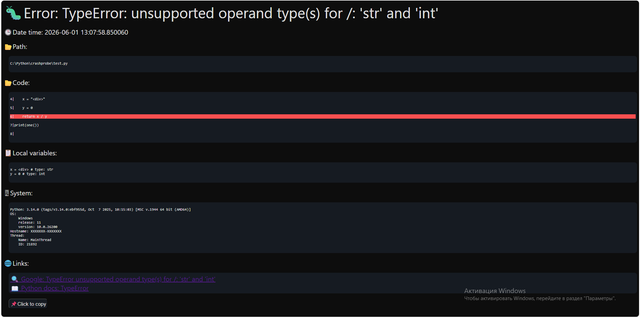
Crashprobe HTML report example:
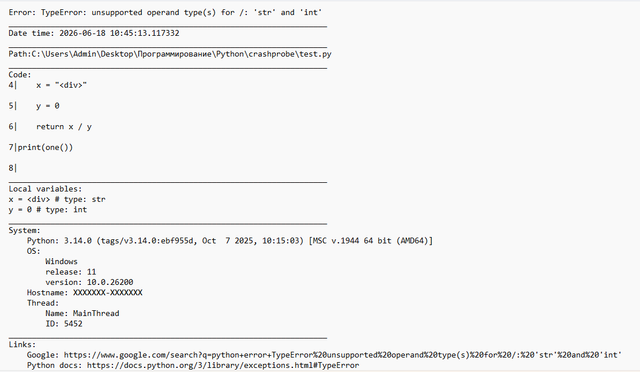
Crashprobe TXT report example:
A library that intercepts errors and creates beautiful, detailed HTML reports.
📦Installation
pip install crashprobe
🚀Quick Start
import crashprobe
crashprobe.start()
print(1/0) # ZeroDivisionError - watch the magic!
✨Crashprobe Features
- No dependencies
- Beautiful, easy-to-read dark theme in reports
- System information
- Very easy to use
- Copy report button
- Useful links with error information
- Support for text reports (TXT)
- Ability to disable auto-opening of the browser
- Reports are saved in a separate folder for each file
- Catches errors in threads – automatically works with
threading(no extra code required).
📃Usage
Library import:
import crashprobe
Start the error catcher. If the program crashes with an error, the library will intercept it, generate an HTML report, automatically open it, and save it in the nameOfYourFile_crash_dir folder:
crashprobe.start()
The generated page is saved in the automatically created nameOfYourFile_crash_dir folder as a file named crash_Y-M-D_H-M-S. Read the details below 👇🏻
Stop the error catcher:
crashprobe.stop()
⚙️crashprobe.start() - Method Settings
The crashprobe.start() method accepts two optional arguments to customize the format and display of error reports.
Report arguments
| Parameter | Type | Default | Values | Description |
|---|---|---|---|---|
auto_open |
bool |
True |
True, False |
This parameter allows you to configure automatic report opening once the error is captured. |
file_format |
str |
"html" |
"html", "txt" |
Specifies the file format for the generated report.(Case-insensitive) |
hide_secrets |
list |
[] |
["your_secret_var", "password"] |
Allows you to replace the variable value in the report with * to hide passwords, secrets, tokens, and so on. |
Report contents
-
HTML page: beautiful dark theme, emoji, as well as the error title, error text, exact date and time, path to the file containing the error, the line containing the error and its closest links, values and types of local variables, system information and Python version, links to Google and the Python documentation for information about the error, and a copy report button.
-
TXT file: error title, error text, exact date and time, path to the file containing the error, the line containing the error and its closest links, values and types of local variables, system information, and Python version, links to Google and the Python documentation for information about the error.
Example (All defaults):
import crashprobe
crashprobe.start()
def example(x, y):
    one = x
    two = y
    return x / y
print(example(1, "Hello"))
The library will create a folder named [name_of_your_file]_crash_dir to store reports. The display behavior depends on your settings:
file_format |
auto_open |
Resulting action |
|---|---|---|
"html" |
True |
Opens the report on your web browser |
"html" |
False |
Saves only (no automatic display) |
"txt" |
True |
Prints the report content to the console |
"txt" |
False |
Saves only (no console output) |
Example:
import crashprobe
crashprobe.start(auto_open = False, file_format = 'html', hide_secrets=["x"])
def example(x, y):
    one = x
    two = y
    return x / y
print(example(1, "Hello"))
🛑 Stopping the error catcher
If you need to temporarily disable crashprobe (for example, to see the standard Python traceback or to avoid conflicts with another error handler), call crashprobe.stop(). After that, uncaught exceptions will be handled by the default Python exception hook.
Example:
import crashprobe
crashprobe.start()
def example(x, y):
    one = x
    two = y
    return x / y
crashprobe.stop()
print(example(1, "Hello")) # Exception will be handled by the default Python exception hook
❔Why is it convenient?
To get started, you only need to write two lines of code, and in the event of an error, you get a beautiful HTML report instead of a console message.
Without crashprobe:

With crashprobe:
❔Whats new in 0.4.1?
- Fixed critical XSS vulnerability.
- Improved documentation.
👦🏻 About the developer
My name is Andrey Egupov, I'm 11 years old. I've been programming for several years. I started in Scratch, now I write in Python, JavaScript, and I'm working with Arduino. I got tired of seeing red error messages and having to print variable values, so I decided to create a truly useful tool that would help me and others!
📄 License
MIT © 2026 Andrey Egupov (11-year-old-developer)
1 maintainer

Metadata
1 maintainer
Release files for crashprobe 0.4.1
For a detailed explanation of source distributions (sdists) and built distributions (wheels), please see the package formats documentation.
Source distribution (sdist)
| File | Size | Uploaded | |
|---|---|---|---|
| crashprobe-0.4.1.tar.gz | 6.8 kB | Details |
Built distribution (wheel)
| File | Interpreter | ABI | Platform | Reset |
|---|---|---|---|---|
| crashprobe-0.4.1-py3-none-any.whl | Python 3 | none | any | Details |
Total release size: 13.8 kB
Release files / crashprobe-0.4.1.tar.gz
| Download URL | crashprobe-0.4.1.tar.gz |
|---|---|
| Size | 6.8 kB |
| Tags | Source |
|
SHA-256 checksum How to use checksums |
4a3894f9186518d7c118aa49642020826c73dda5b7d10aea39839cbbd1f72042
|
|
BLAKE2b-256 checksum How to use checksums |
d1b8030bf63a0241b28b6f5ceeec5f351b431d2ed99c34d4189afe4e121a9cff
|
| Upload date | |
|
Uploaded using Trusted Publishing? What is trusted publishing? |
No |
| Uploaded via |
twine/6.2.0 CPython/3.14.0
|
Release files / crashprobe-0.4.1-py3-none-any.whl
| Download URL | crashprobe-0.4.1-py3-none-any.whl |
|---|---|
| Size | 7.1 kB |
| Tags | Python 3 |
|
SHA-256 checksum How to use checksums |
107292fc56ae15127a71c234de1b6c99bdf2b7b699a750580c7e80ba270ea4ce
|
|
BLAKE2b-256 checksum How to use checksums |
9f4a456b896283053244fd49273dba52399e6203e8641ab71507eb4b7b3efcd1
|
| Upload date | |
|
Uploaded using Trusted Publishing? What is trusted publishing? |
No |
| Uploaded via |
twine/6.2.0 CPython/3.14.0
|














