
Cratefill
A small desktop app that feeds your YouTube Music playlists from a plain list of songs — a CSV file, or a folder of music files. It works the other way too, and exports a playlist back to CSV.
Finding the right track is the hard part, so Cratefill fuzzy-matches artist and title instead of trusting YouTube Music's first search result. When the best candidate isn't clear, it asks rather than guessing.
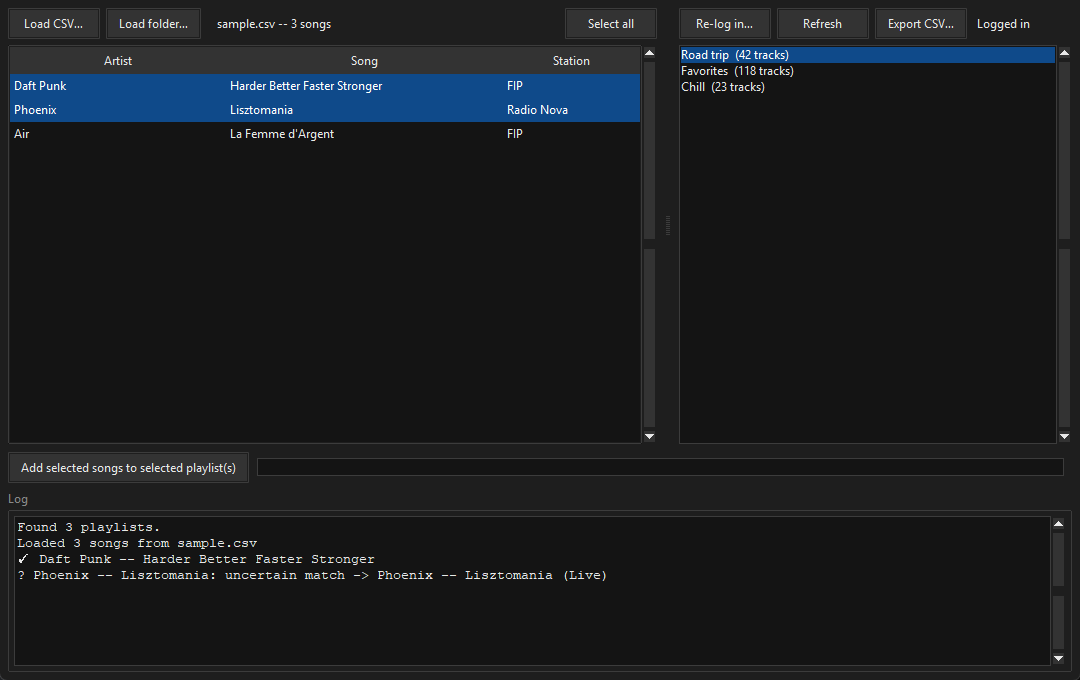
- Left pane: load your songs, either from a CSV (artist + song name; extra columns are ignored) or from a folder of music files (Load folder… — the folder name + file name become the search query). You can also drag and drop a CSV file or a folder straight onto the song list. Click a column title to sort.
- Right pane: log in to YouTube Music and see your playlists.
- Select songs on the left, one or more playlists on the right, click Add — each song is searched on YouTube Music and added to every selected playlist.
- Cratefill won't silently add a song it isn't sure about. Every match is either
confident (
✓, added), uncertain (?, your choice) or no match (✗, skipped, with the reason given). When an uncertain match has close rivals, the prompt lists them all with their album, duration, year and explicit flag — usually the only way to tell a reissue from an original — and an Open ▶ button next to each one plays it on YouTube Music so you can decide by ear before adding. - It also tries hard not to come back empty-handed. If the exact recording isn't on YouTube Music but another version of the same song is — a live take, a remix, an acoustic version, even another band's cover — you're offered that rather than nothing, with the difference spelled out ("this is the live version, not the one asked for"). When the exact version is there, it wins.
✗is reserved for a genuinely different song: nothing came back that shares a word with the title you asked for. SoCher — Onenever becomesCherub — Someone, and a different track by the right artist is never substituted.- The On ambiguous match dropdown next to the Add button decides what happens
to the uncertain ones: Always ask (the default — you get a Requested /
Proposed / Reason prompt with Skip and Add), Always skip, or Always add.
Your choice is remembered between runs. It never applies to
✗results, and the weakest matches — a title that only loosely overlaps, or a song credited to a completely different artist — always ask, even on Always add. - Nothing is written to a playlist until every decision is made, so closing the prompt cancels the whole import and leaves your playlists untouched.
- The reverse works too: select playlists and click Export CSV… to save each one as a CSV file with artist, track name, and album columns.
Get it
- Windows, no Python: download
Cratefill.exefrom the latest release and double-click it. - With Python (any OS):
pipx install cratefill(orpip install cratefill), then runcratefill. Add drag-and-drop withpipx install "cratefill[dnd]". - From source: see Run below.
Requirements
- Python 3.10+ (uses the built-in Tkinter GUI)
- ytmusicapi
- rapidfuzz (song-title/artist similarity)
- tkinterdnd2 (optional — enables drag-and-drop; the app runs fine without it)
py -m pip install -r requirements.txt
Run
Windows:
py -m cratefill
Linux (e.g. Ubuntu) — Tkinter is packaged separately from Python there, so install it once:
sudo apt install python3-tk
python3 -m pip install -r requirements.txt
python3 -m cratefill
Installed from PyPI (pip install cratefill), the cratefill command launches it directly.
If something looks wrong — a missing dependency, an unwritable settings folder —
cratefill --selftest (or py -m cratefill --selftest) checks each piece and
prints what it finds, without opening the window or needing a login.
Logging in (first time)
YouTube Music has no public login API, so the app authenticates the way ytmusicapi browser auth does — by reusing your browser session:
- Open https://music.youtube.com in your browser, logged in to your account.
- Press F12 → Network tab, then click around the page (e.g. Library).
- Filter requests by
browse, click one of thebrowse?...POST requests. - Copy the request headers:
- Firefox: right-click the request → Copy Value → Copy Request Headers
- Chrome/Edge: in the Headers panel, select everything under Request Headers and copy it.
- In Cratefill, click Log in…, paste the headers, click Log in.
The session is saved to a browser.json in your own user profile, so subsequent
launches log in automatically. It stays valid until you log out of YouTube in
that browser.
| Platform | Location |
|---|---|
| Windows | %APPDATA%\Cratefill\browser.json |
| macOS | ~/Library/Application Support/Cratefill/browser.json |
| Linux | $XDG_CONFIG_HOME/cratefill/browser.json (default ~/.config/cratefill/) |
browser.json contains your session cookies — don't share it. On macOS and
Linux the file is created mode 0600 (owner-only) inside a 0700 directory.
Older versions kept it next to the app; that copy is moved to the new location
automatically on first launch.
CSV format
Any CSV with an artist column and a song-name column works:
- Column headers are detected by name (
artist/artiste,title/titre/song/track/chanson…). - Without recognizable headers, the first column is taken as artist, the second as song name.
- Comma, semicolon, or tab delimiters are auto-detected; extra columns are ignored.
- An optional
station/radio/chaînecolumn is displayed in the app — handy to remember where you heard a song — but is not used when searching YouTube Music.
See sample.csv for an example.
Files
| File | Purpose |
|---|---|
cratefill/app.py |
Tkinter window, theme, dialogs, worker threads |
cratefill/matching.py |
Which search result answers a request, and how sure we are |
cratefill/policy.py |
What to do about an uncertain match, and remembering it |
cratefill/storage.py |
CSV import/export, music folders, data directory |
cratefill/youtube.py |
YouTube Music calls and credential handling |
cratefill/selftest.py |
--selftest: checks an install or a build has everything it needs |
run_cratefill.py |
Entry script used to build the Windows .exe |
tests/ |
Test suite (py -m pytest) — no network or login needed |
sample.csv |
Example CSV |
browser.json |
Your saved login session — created on first login in your user profile, not here (see Logging in); keep private |
settings.json |
Your On ambiguous match preference, saved next to browser.json in your user profile |
RESEARCH.md |
Notes on the approaches considered |
License
1 maintainer

Metadata
1 maintainer
Release files for cratefill 0.3.0
For a detailed explanation of source distributions (sdists) and built distributions (wheels), please see the package formats documentation.
Source distribution (sdist)
| File | Size | Uploaded | Provenance | Actions |
|---|---|---|---|---|
| cratefill-0.3.0.tar.gz | 99.9 kB | With provenance | Details for cratefill-0.3.0.tar.gz |
Built distribution (wheel)
| File | Interpreter | ABI | Platform | Actions Reset |
|---|---|---|---|---|
| cratefill-0.3.0-py3-none-any.whl | Python 3 | none | any | Details for cratefill-0.3.0-py3-none-any.whl |
Total release size: 155.4 kB
Release files / cratefill-0.3.0.tar.gz
| Download URL | cratefill-0.3.0.tar.gz |
|---|---|
| Size | 99.9 kB |
| Tags | Source |
|
SHA-256 checksum How to use checksums |
429380e4543158519cc039993056fe758b1394694a4b6c4f9ba907cb92aa0732
|
|
BLAKE2b-256 checksum How to use checksums |
ceb4c560bb5a7b9dc916031e3404f13e7c142d8689f822b17e044e71cf7ebd2e
|
| Upload date | |
|
Uploaded using Trusted Publishing? What is trusted publishing? |
Yes |
| Uploaded via |
twine/7.0.0 CPython/3.13.14
|
Provenance
Provenance describes where a file came from. On PyPI, provenance is shared via attestations, which provide a verifiable record of the build or publishing details. View details, limitations and caveats.


PyPI Publish Attestation
PyPI verified that this artifact, at this checksum, originated from the publisher listed below.
Signed by GitHub Actions, verified by PyPI on Sep 30, 2026.
Transparency logRelease files / cratefill-0.3.0-py3-none-any.whl
| Download URL | cratefill-0.3.0-py3-none-any.whl |
|---|---|
| Size | 55.4 kB |
| Tags | Python 3 |
|
SHA-256 checksum How to use checksums |
742c8c77a09cc43ca0e978b56641e7b82b6c445f20a0d9294b3361947c6942f4
|
|
BLAKE2b-256 checksum How to use checksums |
3ea5545341f38b54309e44f22c0a9550d5a4319a5e50fb6d6ee63059226283b3
|
| Upload date | |
|
Uploaded using Trusted Publishing? What is trusted publishing? |
Yes |
| Uploaded via |
twine/7.0.0 CPython/3.13.14
|
Provenance
Provenance describes where a file came from. On PyPI, provenance is shared via attestations, which provide a verifiable record of the build or publishing details. View details, limitations and caveats.
PyPI Publish Attestation
PyPI verified that this artifact, at this checksum, originated from the publisher listed below.
Signed by GitHub Actions, verified by PyPI on Sep 30, 2026.
Transparency logSecurity for cratefill 0.3.0
Provenance
Provenance describes where a file came from. On PyPI, provenance is shared via attestations, which provide a verifiable record of the build or publishing details. View details, limitations and caveats.
Full provenance
Both files in this release have been uploaded with provenance metadata.
Attestation for cratefill-0.3.0.tar.gz
PyPI Publish Attestation
PyPI verified that this artifact, at this checksum, originated from the publisher listed below.
Signed by GitHub Actions, verified by PyPI on Sep 30, 2026.
Transparency logA note on package security
PyPI is a repository for distributing packages, not a service for auditing them. While third-party security researchers and our staff do their best to detect and remove malicious packages, PyPI cannot guarantee the quality, security or suitability of any given package.
To learn more about protecting yourself from malicious actors, visit our package security documentation.














