
RO-Crate Analysis and Visualisation Tools








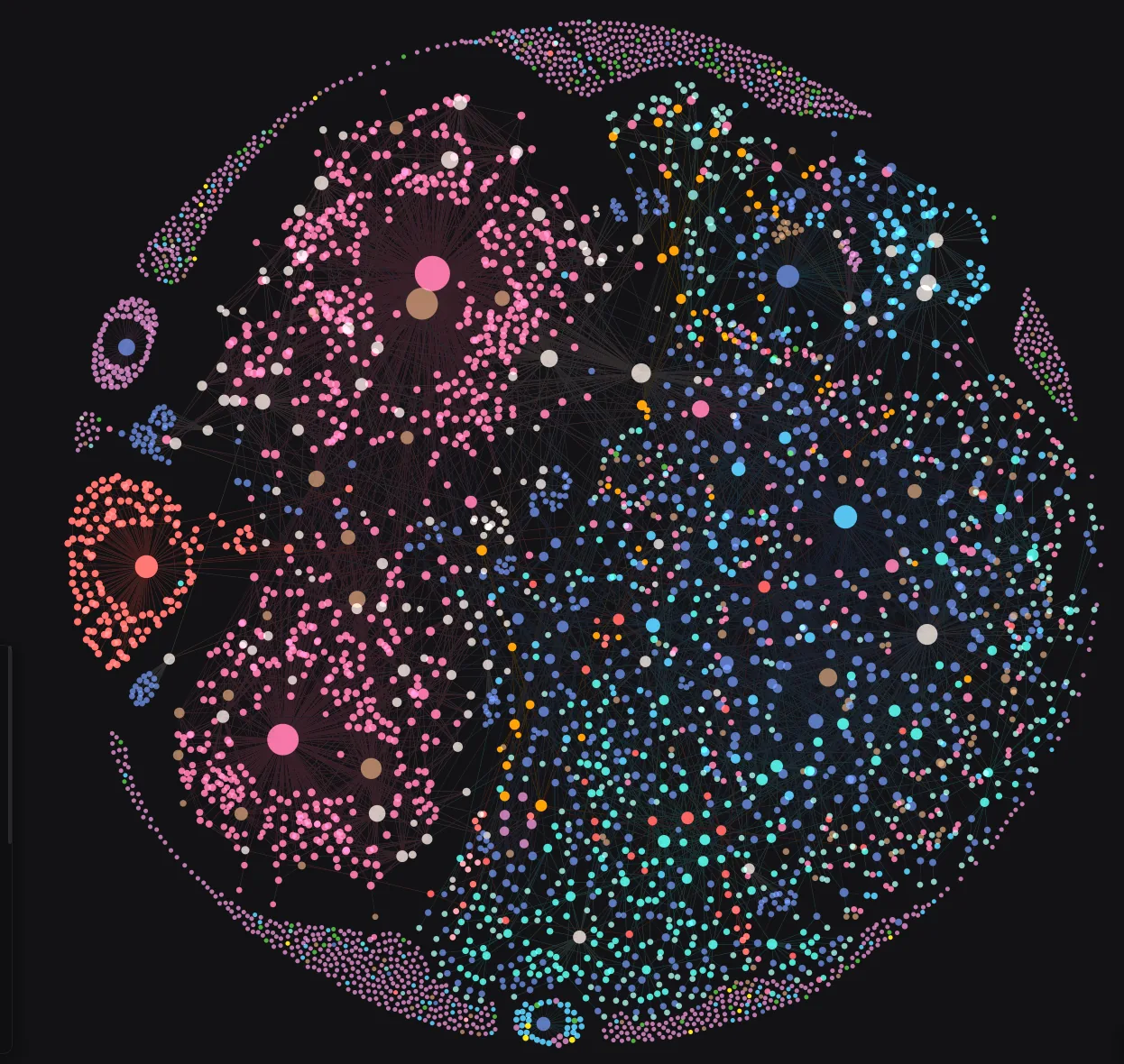
The University of Melbourne Perpetual Calendar RO-Crate rendered as a network graph with crategraph.
ARDC Community Data Lab Phase 2: Work Package 2
Tools for analysing and visualising research data collections stored in RO-Crates.
About
RO-Crates offer a powerful format for preserving HASS and GLAM collections with curated metadata and linkage information. While existing tools focus on creating RO-Crates as archival objects, this project unlocks them for active research use.
This project develops accessible tools for researchers to:
- Analyse network relationships and metadata within and across RO-Crates
- Visualise collections interactively, both online and offline
- Understand and work with RO-Crate workflows through documentation and training
A set of RO-Crates converted from OHRM databases are available on FigShare: https://figshare.unimelb.edu.au/projects/OHRM_Upload_Project/230466
Project Goals
The project focuses on use-case driven development, prioritising specific research contexts for HASS and GLAM collections. Initial work will target:
- Visualisation of linkages between RO-Crates
- Visualisation of contents within RO-Crates
Background
This work builds on existing University of Melbourne projects and external collaborations that have developed specialised RO-Crate tools and workflows, including work derived from former Online Heritage Resource Manager projects.
Survey
We are excited to collaborate with researchers from various backgrounds. By taking this short survey, you're helping us co-design something that reflects and supports the way researchers work. We encourage you to share this survey with colleagues and research networks beyond your institution.
Feedback on WP2: working with RO Crate
Quick Start
Install crategraph from PyPI:
python -m pip install crategraph
Interactive Python shell:
python
>>> from crategraph import Crate
>>> crate = Crate("path/to/my-collection/")
>>> crate.entities
>>> crate.relationships
Jupyter notebook:
python -m pip install jupyter
jupyter notebook
Documentation
Full documentation, guides, and API reference are published at unimelbmdap.github.io/cdl2-rocrates.
- Getting Started — install, load a crate, and take a first look.
- Tutorials — task-focused guides, including Visualising a Collection, From Graph to DataFrame, and Searching a Collection. A one-page cheat sheet covers the common commands.
- Case Studies — real collections explored end to end, such as Navigating the Encyclopedia of Australian Science and the Australian Radio Talkback corpus.
- API Reference and Architecture — for extending crategraph or understanding its internals.
Development Setup
Prerequisites
- Python 3.12 or later
- uv package manager
Installation
# Clone the repository
git clone https://github.com/unimelbmdap/cdl2-rocrates.git
cd cdl2-rocrates

# Install dependencies
uv sync

# Install pre-commit hooks
uv run pre-commit install
Running Tests
uv run pytest
Code Quality
This project uses Ruff for linting and formatting, enforced via pre-commit hooks.
# Run pre-commit checks manually
uv run pre-commit run --all-files

# Run linter
uv run ruff check .

# Run formatter
uv run ruff format .
Licence
Licensed under the Apache License, Version 2.0. See the LICENSE file for the full terms.
AI Attribution

1 maintainer

Metadata
1 maintainer
Release files for crategraph 0.1.4
For a detailed explanation of source distributions (sdists) and built distributions (wheels), please see the package formats documentation.
Source distribution (sdist)
| File | Size | Uploaded | |
|---|---|---|---|
| crategraph-0.1.4.tar.gz | 298.9 kB | Details |
Built distribution (wheel)
| File | Interpreter | ABI | Platform | Reset |
|---|---|---|---|---|
| crategraph-0.1.4-py3-none-any.whl | Python 3 | none | any | Details |
Total release size: 521.2 kB
Release files / crategraph-0.1.4.tar.gz
| Download URL | crategraph-0.1.4.tar.gz |
|---|---|
| Size | 298.9 kB |
| Tags | Source |
|
SHA-256 checksum How to use checksums |
93741e26ea420d3d1a5bd40a11b79bf6bf466a32cd46bfcdcdc72ef14b273ec0
|
|
BLAKE2b-256 checksum How to use checksums |
7e867e9105e64b75db019b21ae6870f394ddcf98c6191ad1b170f5abdca8c12d
|
| Upload date | |
|
Uploaded using Trusted Publishing? What is trusted publishing? |
Yes |
| Uploaded via |
twine/7.0.0 CPython/3.13.14
|
Provenance
Provenance describes where a file came from. On PyPI, provenance is shared via attestations, which provide a verifiable record of the build or publishing details. View details, limitations and caveats.


PyPI Publish Attestation
PyPI verified that this artifact, at this checksum, originated from the publisher listed below.
Signed by GitHub Actions, verified by PyPI on Sep 1, 2026.
Transparency logRelease files / crategraph-0.1.4-py3-none-any.whl
| Download URL | crategraph-0.1.4-py3-none-any.whl |
|---|---|
| Size | 222.3 kB |
| Tags | Python 3 |
|
SHA-256 checksum How to use checksums |
ca109e7f6899f468c4dded19a84c904cf5bde151076d734dc6fcb8befd22044c
|
|
BLAKE2b-256 checksum How to use checksums |
fe3b2ac312c77581d94e673d20d6684efc069cb28197ba2f237ef182c0028410
|
| Upload date | |
|
Uploaded using Trusted Publishing? What is trusted publishing? |
Yes |
| Uploaded via |
twine/7.0.0 CPython/3.13.14
|
Provenance
Provenance describes where a file came from. On PyPI, provenance is shared via attestations, which provide a verifiable record of the build or publishing details. View details, limitations and caveats.
PyPI Publish Attestation
PyPI verified that this artifact, at this checksum, originated from the publisher listed below.
Signed by GitHub Actions, verified by PyPI on Sep 1, 2026.
Transparency log













