

极简高效、易于集成、灵活扩展、上下文管理强大、适合新手的 LLM 智能体开发框架
CrazyAgent 是专为智能体开发新手打造的框架,语法简洁明了,便于将大模型与各类工具和组件高效集成,并能灵活管理上下文记忆,大幅提升开发效率。即使是刚接触 Python 的用户也能快速上手。



特性
- 更少的错误: CrazyAgent 采用简洁明了的 API 设计,显著减少开发者编写代码的错误
- 快速开发: CrazyAgent 提供了一系列工具,帮助开发者快速构建智能体应用
- 易于使用: CrazyAgent 设计简单易用且易于学习,减少阅读文档的时间
兼容的模型服务
依赖
CrazyAgent 站在以下巨人肩膀上
安装
$ python -m pip install crazyagent
对话
CrazyAgent 所支持的大模型厂商的接口都会在 crazyagent.chat 模块中实现,您可以根据自己的需求选择对应接口类
API 密钥获取:
同步输出
from crazyagent.chat import Deepseek
import os

# 从环境变量中获取 Deepseek 的 API 密钥
llm = Deepseek(api_key=os.environ.get('DEEPSEEK_API_KEY'))

response = llm.invoke("你好,我叫小明")
print(response.content)
同步流式输出
from crazyagent.chat import Deepseek
import os

llm = Deepseek(api_key=os.environ.get('DEEPSEEK_API_KEY'))

for response in llm.stream("你好,我叫小明"):
    print(response.content, end="", flush=True)
异步输出
from crazyagent.chat import Deepseek
import os

llm = Deepseek(api_key=os.environ.get('DEEPSEEK_API_KEY'))

async def main():
    response = await llm.ainvoke("你好,我叫小明")
    print(response.content)

import asyncio
asyncio.run(main())
异步流式输出
from crazyagent.chat import Deepseek
import os

llm = Deepseek(api_key=os.environ.get('DEEPSEEK_API_KEY'))

async def main():
    async for response in llm.astream("你好,我叫小明"):
        print(response.content, end="", flush=True)

import asyncio
asyncio.run(main())
记忆
CrazyAgent 提供了功能强大的 Memory 类来管理对话上下文
该类不仅具备完善的记忆管理能力,还兼容 Python 内置的 print 和 list 函数接口
让开发者能够轻松进行可视化调试和灵活的数据处理操作
- 通过
print函数可以以彩色文本形式可视化不同类型的消息,让开发过程更直观 - 通过
list函数轻松获取list[dict[str, str]]格式的消息记录,便于在应用中灵活调用和处理
print(memory)会显示出所有的消息记录,消息角色包括:系统、用户、助手、助手(调用工具)、工具
1. Memory 构造函数的参数
| 参数 | 说明 | 是否必填 | 默认值 |
|---|---|---|---|
max_turns |
最大对话轮数,用于控制用于聊天时记忆的长度 | 否 | 5 |
2. 对话中使用记忆
由于 memory 实现了 __str__ 方法,用户可以直接使用 print(memory) 以彩色表格的形式直观展示记忆中的消息记录
from crazyagent.chat import Deepseek
from crazyagent.memory import Memory
import os

llm = Deepseek(api_key=os.environ.get('DEEPSEEK_API_KEY'))
memory = Memory()  # 创建一个新的记忆对象

# 把 memory 作为参数传递给 llm 的 stream 方法
# 这样 llm 就会把该次对话的记录保存到 memory 中
for response in llm.stream("你好,我叫小明", memory=memory):
    print(response.content, end="", flush=True)
# 在流式输出正常结束后
else:
    print()
    print(memory)  # 打印记忆中的消息记录

3. 自定义记忆和系统提示词
自定义的记忆也可以用于对话中,只需要把 memory 作为参数传递给 llm 的 stream 或 invoke 方法即可
自定义的消息必须是成双数,即 HumanMessage 和 AIMessage 必须成对出现,否则后续使用会抛出异常
from crazyagent.memory import Memory, HumanMessage, AIMessage, SystemMessage

memory = Memory()
memory.system_message = SystemMessage("你是一个疯狂的助手")  # 自定义系统提示词
# 向记忆中添加消息记录
memory.update(
    HumanMessage("你好,我叫小明。"),
    AIMessage("你好呀,小明!我是一个疯狂的助手。"),
)
print(memory)  # 打印记忆中的消息记录
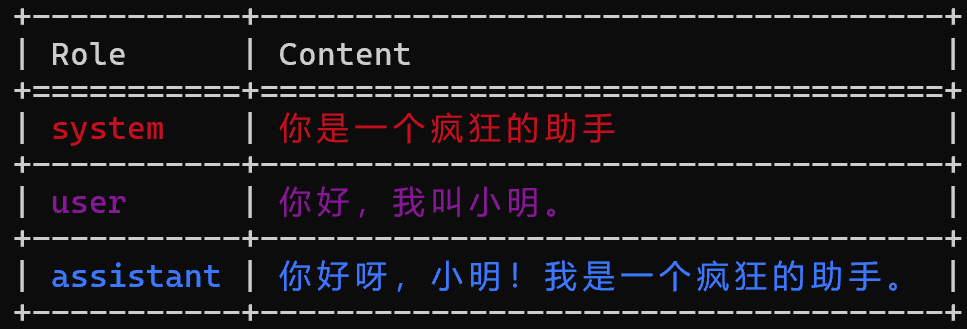
4. 实战案例,添加初始记忆后进行多轮对话
from crazyagent.chat import Deepseek
from crazyagent.memory import Memory, HumanMessage, AIMessage, SystemMessage
import os

llm = Deepseek(api_key=os.environ.get('DEEPSEEK_API_KEY'))

memory = Memory()
memory.system_message = SystemMessage("你是一个疯狂的助手")  # 自定义系统提示词
# 向记忆中添加自定义消息记录
memory.update(
    HumanMessage("你好,我叫小明。"),
    AIMessage("你好呀,小明!我是一个疯狂的助手。"),
)

while True:
    user_input = input("> ")  # 等待用户输入
    for response in llm.stream(user_input, memory=memory):
        print(response.content, end="", flush=True)
    else:
        # 流式输出正常结束后,打印记忆中的消息记录
        print()
        print(memory)

工具
CrazyAgent 提供了整个地球上最精简、高效、迅速和稳定的工具构建框架!
工具函数的每个参数必须要使用类型注解!而且函数的文档字符串要完整!
与工具函数相关的所有参数类型都必须属于 JSONType!
from types import UnionType, NoneType
JSONType: UnionType = dict | list | tuple | str | int | float | bool | NoneType
1. Argument 构造函数的参数
| 参数名称 | 数据类型 | 是否必填 | 默认值 | 说明 |
|---|---|---|---|---|
description |
str |
是 | - | 参数的描述信息 |
default |
JSONType |
否 | ... |
参数的默认值 |
required |
bool |
否 | True |
该参数是否必须 |
enum |
List[JSONType] |
否 | ... |
参数的枚举值 |
2. 把普通函数转化为工具函数
这是一个用于查询天气的普通函数
def get_weather(city_name: str) -> dict:
    """
    查询天气

    Args:
        city_name: 城市名称

    Returns:
        dict: 天气信息
    """
    ...  # 假设这里是查询天气的逻辑
    return {
        "city_name": city_name,
        "weather": "晴",
        "temperature": "25°C",
        "wind": "微风",
    }
要把这个函数转化为大模型可以使用的工具函数
只需要把函数用 @crazy_tool 装饰器装饰,然后把每个参数的默认值设置为 Argument 对象即可
异步工具函数只能在
llm.ainvoke和llm.astream中被使用,它们同时也兼容同步工具函数但
llm.invoke和llm.stream不支持使用异步工具函数
from crazyagent.toolkit.core import crazy_tool, Argument

# 普通工具函数
@crazy_tool
def get_weather(city_name: str = Argument("城市名称")) -> dict:
    """查询天气"""
    ...  # 假设这里是查询天气的逻辑
    return {
        "city_name": city_name,
        "weather": "晴",
        "temperature": "25°C",
        "wind": "微风",
    }

# 异步工具函数
@crazy_tool
async def async_get_weather(city_name: str = Argument("城市名称")) -> dict:
    """查询天气"""
    ...  # 假设这里是查询天气的逻辑
    return {
        "city_name": city_name,
        "weather": "晴",
        "temperature": "25°C",
        "wind": "微风",
    }
3. 实战案例,对话中使用多个工具函数
CrazyAgent 提供了许多已封装好的工具函数,大致分为两类:外部工具和私有工具
具体的工具函数可以查看
crazyagent.toolkit._external和crazyagent.toolkit._private模块下的文件,这些工具会在crazyagent.toolkit模块下的__init__.py文件中被导入和导出,可以直接通过from crazyagent.toolkit import *导入所有 CrazyAgent 提供的工具函数
外部工具一般是一些第三方免费的 API 私有工具一般是一些内部使用的工具,比如查询数据库、发送邮件等 使用内部工具时需要先调用对应的 configure 函数来配置私有工具的 API 密钥
from crazyagent.toolkit import (
    get_weather,  # 外部工具函数, 查询天气
    send_email,  # 私有工具函数, 发送邮件
    configure_email_service,
)
from crazyagent.memory import Memory
from crazyagent.chat import Deepseek
import os

# 为私有工具函数 send_email 配置邮件服务的 API 密钥信息
configure_email_service(
    sender_mail='...',  # 替换为实际的发件人邮箱地址
    authorization_code='...',   # 替换为实际的授权码
    server='...'  # 替换为实际的 SMTP 服务器地址
)

llm = Deepseek(api_key=os.environ.get('DEEPSEEK_API_KEY'))
memory = Memory()

while True:
    user_prompt = input('> ')
    # 这里把 获取天气 和 发送邮件 两个工具函数传入 tools 参数, 这样在对话中大模型就会知道这些工具的存在, 并根据用户的输入来选择使用哪个工具
    for response in llm.stream(
        user_prompt,
        memory=memory,
        tools=[get_weather, send_email]
    ):
        print(response.content, end='', flush=True)
    else:
        print()
        print(memory)

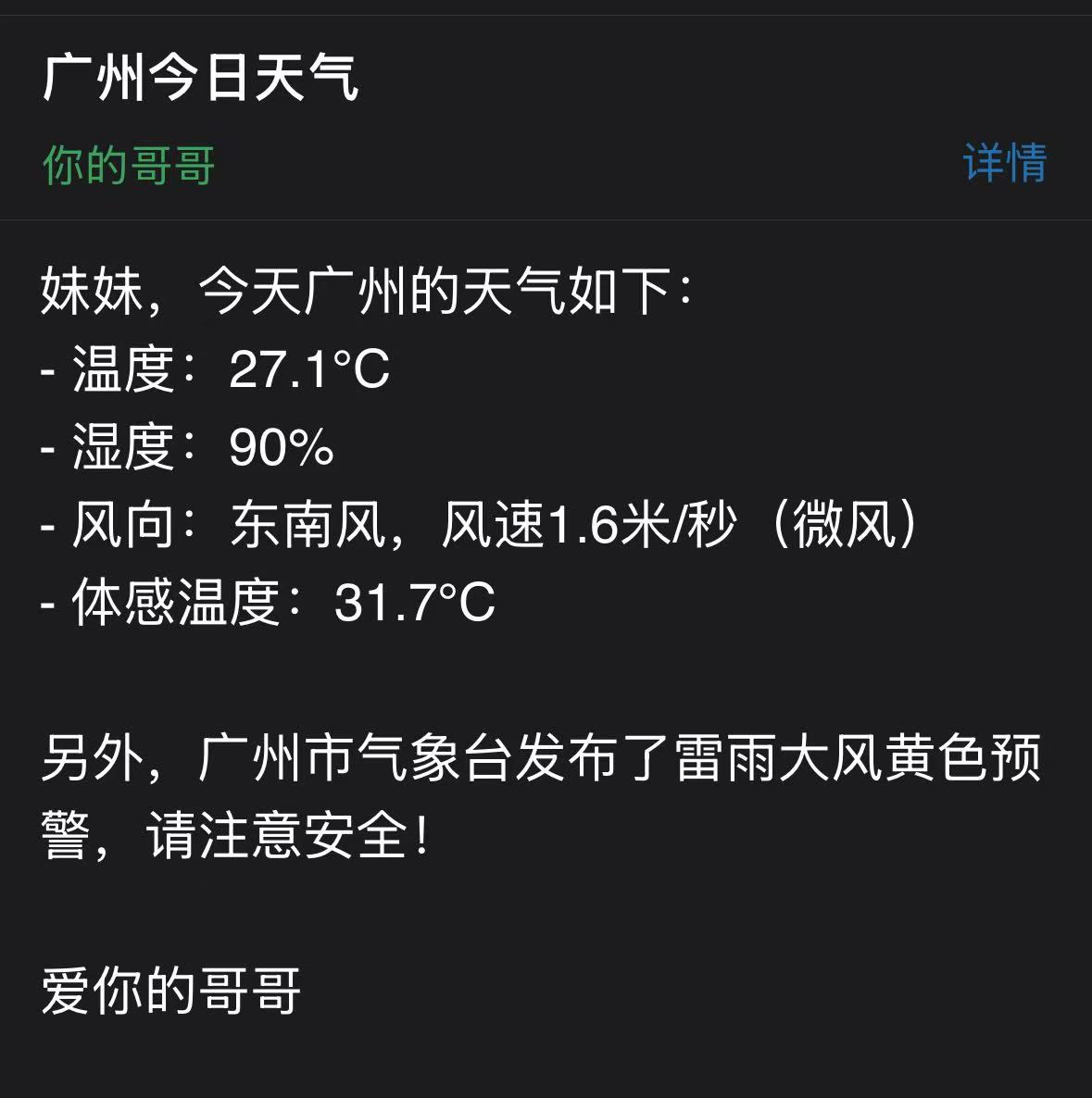
在代码中,我们传入了 get_weather 和 send_email 两个工具函数到 llm.stream 方法的 tools 参数中
然后我们提问:“告诉我妹妹(她的邮箱是2036166178@qq.com)今天广州的天气怎么样”
然后大模型就理解了用户的意图,首先选择了 get_weather 工具函数来获取天气信息,然后选择了 send_email 工具函数来发送邮件
这么丝滑稳定的使用体验,归功于 CrazyAgent 对于工具模块极其优秀的设计理念
漂亮的提示词
CrazyAgent 提供非常多优秀的提示词,有着不同的种类,可以通过 crazyagent.pretty_prompts 模块导入
from crazyagent.pretty_prompts import LOVER
from crazyagent.memory import Memory, SystemMessage

memory = Memory()
memory.system_message = SystemMessage(LOVER)  # 把优秀的提示词作为系统提示词

...  # 对话逻辑
response 对象的属性
| 参数名称 | 数据类型 | 说明 |
|---|---|---|
content |
str |
大模型返回的聊天内容,如果是流式输出,则为当前流式内容 |
stop_usage |
dict |
结束对话时 prompt 和 completion 的 token 使用量 |
tool_calls_info |
list[dict] |
包含了该次对话中所有的工具调用信息 |
total_tokens |
int |
该次对话的总 token 使用量(包括结束对话和所有工具调用) |
如果是流式输出,则除了 content 之外的其它三个属性要在最后一个 response 中才能获取到
1 maintainer

Metadata
1 maintainer
Release files for crazyagent 1.4.1
For a detailed explanation of source distributions (sdists) and built distributions (wheels), please see the package formats documentation.
Source distribution (sdist)
| File | Size | Uploaded | |
|---|---|---|---|
| crazyagent-1.4.1.tar.gz | 25.1 kB | Details |
Built distribution (wheel)
| File | Interpreter | ABI | Platform | Reset |
|---|---|---|---|---|
| crazyagent-1.4.1-py3-none-any.whl | Python 3 | none | any | Details |
Total release size: 45.7 kB
Release files / crazyagent-1.4.1.tar.gz
| Download URL | crazyagent-1.4.1.tar.gz |
|---|---|
| Size | 25.1 kB |
| Tags | Source |
|
SHA-256 checksum How to use checksums |
6455af8715be6f764e85d408b512bbf7683ed4585cb1263b2f4e544c8f7f8422
|
|
BLAKE2b-256 checksum How to use checksums |
56ef360ad11fb4b22464079cc62f0fb26c230e12e9aadfbda6216580fd148704
|
| Upload date | |
|
Uploaded using Trusted Publishing? What is trusted publishing? |
No |
| Uploaded via |
twine/6.1.0 CPython/3.12.7
|
Release files / crazyagent-1.4.1-py3-none-any.whl
| Download URL | crazyagent-1.4.1-py3-none-any.whl |
|---|---|
| Size | 20.6 kB |
| Tags | Python 3 |
|
SHA-256 checksum How to use checksums |
3d4f20fe06d5f631de7e720f365fdd8ea0d79ec4b6aa863d447a8eaf6675a9d2
|
|
BLAKE2b-256 checksum How to use checksums |
d94941429849018e0382d40df0f1da8fd09c74bc296478d03bb500b5cc568e83
|
| Upload date | |
|
Uploaded using Trusted Publishing? What is trusted publishing? |
No |
| Uploaded via |
twine/6.1.0 CPython/3.12.7
|














