
credativ-pg-migrator

credativ-pg-migrator is a solution for the migration of databases from legacy systems to PostgreSQL.
It is is written in Python in multiple classes and modules.
Main features
- Pure python solution, uses only standard libraries, structured in modules, written in object-oriented style in classes
- Currently supported source databases are:
- IBM DB2 LUW (live connection), DB2 z/OS and DB2 i (offline, from DDL + CSV extracts)
- Informix
- MS SQL Server
- MySQL and MariaDB (engines with INFORMATION_SCHEMA; separate connectors)
- Oracle
- PostgreSQL (mainly for special use cases)
- SQL Anywhere
- SQLite (a plain local file - the only source engine needing no driver installation)
- Sybase ASE
- Supports migration of tables, column constraints and defaults, data, primary keys, secondary indexes, foreign keys, functions/procedures, triggers and views from source to target database
- If tables have sequences, migrator sets current values of sequences on the target database. Standalone sequence objects are additionally migrated for Oracle, MS SQL Server, MariaDB, PostgreSQL and the DB2 connectors.
- Migration of views is in a rudimentary version for Informix and SQL Anywhere, just replacing source schema names in code with target schema names. The other connectors transpile the view query into PostgreSQL SQL (using
sqlglotor the shared T-SQL parser). - Conversion and migration of functions, procedures and triggers fully works for Informix. It is best-effort for Oracle, Sybase ASE, MS SQL Server and DB2 z/OS, triggers-only for DB2 LUW, DB2 i and SQLite, and not implemented for MySQL, MariaDB and SQL Anywhere. Can be added on demand for other databases too.
- How complete each connector is differs considerably - see FEATURE_MATRIX.md for the per-connector, per-feature status.
- Migrator allows customizable substitutions of data types, default values of columns, calls of remote objects.
- Supports offline, file-based data ingestion for restricted environments (e.g., using offline DDL SQL scripts for schema discovery and CSV files for data migrations from IBM DB2 z/OS, or proactively processing Informix
.unlexport files). - User can also define limitations for migration of data - as where conditions for tables. This option requires good analysis of dependencies in the source database. Missing data can break Foreign Key constraints in the target database. See further in the documentation.
- Migrator features an advanced Mapping Workflow directed by the central orchestrator, enabling complex schema matching, application of customizable normalization rules, and automated dropping and recreating of target indexes and constraints during mapped data migrations.
- Migrator supports strict post-migration verification utilizing discrete parallel tests measuring row counts, table checksums, random row hashes, and explicit byte-size telemetry. The enhanced validation engine includes detailed validation summaries, structured error handling, and built-in log size monitoring. Row counts and table checksums work for every live-connection source; the random-sample and LOB-size checks currently require Oracle, PostgreSQL or SQLite as the source.
- Migrator provides reach logging and error handling, has 2 levels of logging - INFO and DEBUG, in case of error, detailed error message is printed.
- By default logging messages are printed both to console and to log file, name of the log file is configurable in command line arguments.
- Rich information is also logged to the migration database - see below.
Documentation
Detailed documentation and technical insights are available in the docs/ directory:
- User Guide & Connectivity Options - per-connector status, connectivity and limitations
- Feature Matrix - which feature is supported by which connector
- Standard Migration Workflow
- Configuration Examples - ready-to-use configuration file for every source database and workflow
- Configuration Reference
Installation
Via PyPI:
credativ-pg-migrator is available from PyPI: https://pypi.org/project/credativ-pg-migrator/
python3 -m venv migrator_venv
. ./migrator_venv/bin/activate
pip install credativ-pg-migrator
Via Debian/Ubuntu packages:
credativ-pg-migrator is included in apt.postgresql.org PostgreSQL community repository, see https://wiki.postgresql.org/wiki/Apt for details.
Usage
credativ-pg-migrator --config=./test_database.yaml --log-file=./test_database_$(date +%Y%m%d).log --log-level=INFO
Configuration file
- Configuration file is a YAML file
- Ready-to-use configuration examples for every supported source database and workflow are in docs/configs/ - copy the one matching your source, adjust the lines marked
>>> ADJUST, run it. See docs/configs/README.md for the overview - Every setting available in the config file is described in docs/config_reference.md - generated from
credativ_pg_migrator/config.schema.json, which the migrator also validates your configuration against at startup
Architecture
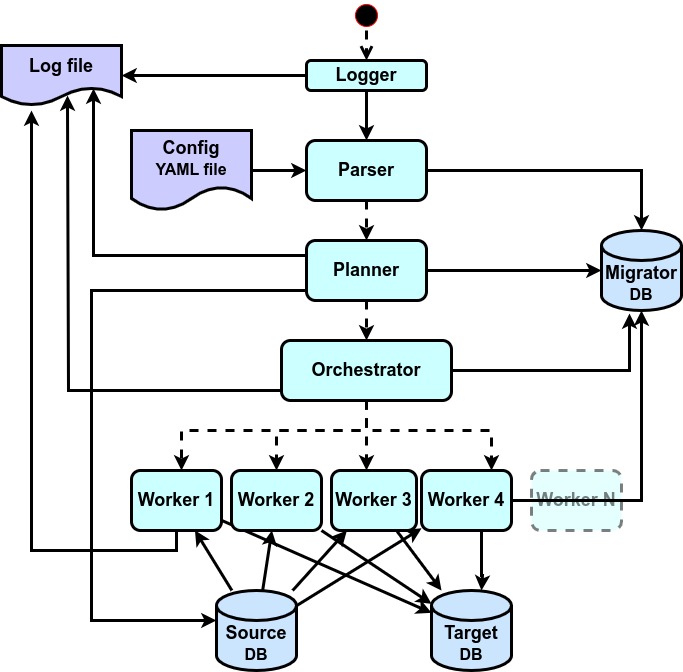
Source databases
- Source database connector must implement DatabaseConnector class from the credativ_pg_migrator.database_connector module
- Methods of this class contain descriptions of actions and return values that are expected by the migrator tool
- Supported databases should be accessed via ODBC, JDBC or native python libraries. Not all options are available for all databases.
- See feature matrix in FEATURE MATRIX for supported features in different database connectors.
Target databases
- Target database connector must implement DatabaseConnector class from the migrator.database_connector module
- Solution currently supports only PostgreSQL as target database
Migration database
- Solution uses a migration database to store metadata about the migration process
- Migration database is a PostgreSQL database, credentials must be configured in the configuration file
- In most cases we assume that the migration database will the same as the target database, but it is fully possible to use a different database from the same or different PostgreSQL server
- Migration protocol tables contain detailed information about all migrated objects, like source code, target code, success or failure of migration, etc.
Changes
See CHANGELOG.
Authors
credativ-pg-migrator has been primarily developped and is maintained by Josef Machytka, see AUTHORS.
License
credativ-pg-migrator is released under the GNU General Public License, version 3 (or any later version).
See the file COPYING in the distribution for details.
Metadata
Release files for credativ-pg-migrator 0.16.0
For a detailed explanation of source distributions (sdists) and built distributions (wheels), please see the package formats documentation.
Source distribution (sdist)
| File | Size | Uploaded | |
|---|---|---|---|
| credativ_pg_migrator-0.16.0.tar.gz | 1.3 MB | Details |
Built distribution (wheel)
| File | Interpreter | ABI | Platform | Reset |
|---|---|---|---|---|
| credativ_pg_migrator-0.16.0-py3-none-any.whl | Python 3 | none | any | Details |
Total release size: 2.1 MB
Release files / credativ_pg_migrator-0.16.0.tar.gz
| Download URL | credativ_pg_migrator-0.16.0.tar.gz |
|---|---|
| Size | 1.3 MB |
| Tags | Source |
|
SHA-256 checksum How to use checksums |
f3b9af71e4220ac0bb6070653b01580300175edf1d00fcdb83c18c2b00c5539d
|
|
BLAKE2b-256 checksum How to use checksums |
a976cf1c5527dbc8977293cf5ae1aea328a4e420c9a21cafff311153db029acb
|
| Upload date | |
|
Uploaded using Trusted Publishing? What is trusted publishing? |
No |
| Uploaded via |
twine/7.0.0 CPython/3.13.5
|
Release files / credativ_pg_migrator-0.16.0-py3-none-any.whl
| Download URL | credativ_pg_migrator-0.16.0-py3-none-any.whl |
|---|---|
| Size | 827.5 kB |
| Tags | Python 3 |
|
SHA-256 checksum How to use checksums |
3f70911438cc35f9c02c13d0b53d1d64084e6e920d66cf1b1c36ca732d302fb0
|
|
BLAKE2b-256 checksum How to use checksums |
c784d20b9d6c2d5b93108bd8392b43f6f8dd22f45be1142e29e0092841e7349d
|
| Upload date | |
|
Uploaded using Trusted Publishing? What is trusted publishing? |
No |
| Uploaded via |
twine/7.0.0 CPython/3.13.5
|














