







Credential Digger
Credential Digger is a GitHub scanning tool that identifies hardcoded credentials (Passwords, API Keys, Secret Keys, Tokens, personal information, etc), filtering the false positive data through machine learning models.
TLDR; watch the video ⬇️
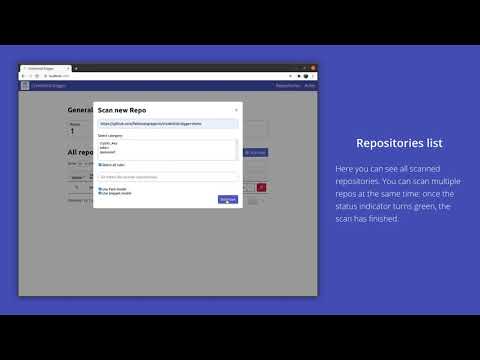
- Credential Digger
Why
In data protection, one of the most critical threats is represented by hardcoded (or plaintext) credentials in open-source projects. Several tools are already available to detect leaks in open-source platforms, but the diversity of credentials (depending on multiple factors such as the programming language, code development conventions, or developers' personal habits) is a bottleneck for the effectiveness of these tools. Their lack of precision leads to a very high number of pieces of code incorrectly detected as leaked secrets. Data wrongly detected as a leak is called false positive data, and compose the huge majority of the data detected by currently available tools.
The goal of Credential Digger is to reduce the amount of false positive data on the output of the scanning phase by leveraging machine learning models.
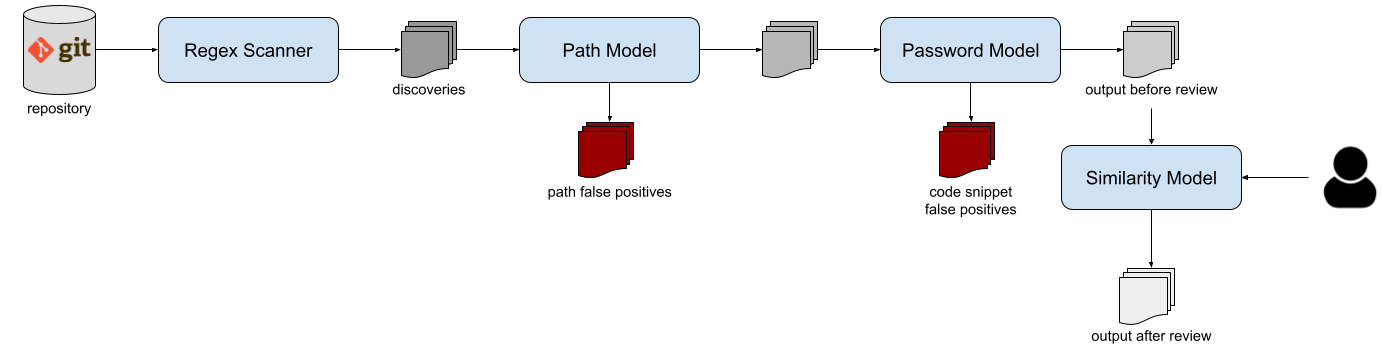
The tool supports several scan flavors: public and private repositories on github and gitlab, pull requests, wiki pages, github organizations, local git repositories, local files and folders. Please refer to the Wiki for the complete documentation.
For the complete description of the approach of Credential Digger (versions <4.4), you can read this publication.
@InProceedings {lrnto-icissp21,
    author = {S. Lounici and M. Rosa and C. M. Negri and S. Trabelsi and M. Önen},
    booktitle = {Proc. of the 8th The International Conference on Information Systems Security and Privacy  (ICISSP)},
    title = {Optimizing Leak Detection in Open-Source Platforms with Machine Learning Techniques},
    month = {February},
    day = {11-13},
    year = {2021}
}
Requirements
Credential Digger supports Python >= 3.8 and < 3.13, and works only with Linux and MacOS systems. In case you don't meet these requirements, you may consider running a Docker container (that also includes a user interface).
Download and Installation
First, you need to install some dependencies (namely, build-essential and python3-dev). No need to explicitely install hyperscan anymore.
sudo apt install -y build-essential python3-dev
Then, you can install Credential Digger module using pip.
pip install credentialdigger
For ARM machines (e.g., new MacBooks), installation is possible following this guide
How to run
Add rules
One of the core components of Credential Digger is the regular expression scanner. You can choose the regular expressions rules you want (just follow the template here). We provide a list of patterns in the rules.yml file, that are included in the UI. The scanner supports rules of 4 different categories: password, token, crypto_key, and other.
Before the very first scan, you need to add the rules that will be used by the scanner. This step is only needed once.
credentialdigger add_rules --sqlite /path/to/data.db /path/to/rules.yaml
Scan a repository
After adding the rules, you can scan a repository:
credentialdigger scan https://github.com/user/repo --sqlite /path/to/data.db
Machine learning models are not mandatory, but highly recommended in order to reduce the manual effort of reviewing the result of a scan:
credentialdigger scan https://github.com/user/repo --sqlite /path/to/data.db --models PathModel PasswordModel
As for the models, also the similarity feature is not mandatory, but highly recommended in order to reduce the manual effort while assessing the discoveries after a scan:
credentialdigger scan https://github.com/user/repo --sqlite /path/to/data.db --similarity --models PathModel PasswordModel
Docker container
To have a ready-to-use instance of Credential Digger, with a user interface, you can use a docker container. This option requires the installation of Docker and Docker Compose.
Credential Digger is published on dockerhub. You can pull the latest release
sudo docker pull saposs/credentialdigger
Or build and run containers with docker compose
git clone https://github.com/SAP/credential-digger.git
cd credential-digger
cp .env.sample .env
docker compose up --build
The UI is available at http://localhost:5000/
It is preferrable to have at least 8 GB of RAM free when using docker containers
Advanced Installation
Credential Digger is modular, and offers a wide choice of components and adaptations.
Build from source
After installing the dependencies listed above, you can install Credential Digger as follows.
Configure a virtual environment for Python 3 (optional) and clone the main branch of the project:
virtualenv -p python3 ./venv
source ./venv/bin/activate

git clone https://github.com/SAP/credential-digger.git
cd credential-digger
Install the tool from source:
pip install .
Then, you can add the rules and scan a repository as described above.
External postgres database
Another ready-to-use instance of Credential Digger with the UI, but using a dockerized postgres database instead of a local sqlite one:
git clone https://github.com/SAP/credential-digger.git
cd credential-digger
cp .env.sample .env
vim .env  # set credentials for postgres
docker compose -f docker-compose.postgres.yml up --build
WARNING: Differently from the sqlite version, here we need to configure the
.envfile with the credentials for postgres (by modifyingPOSTGRES_USER,POSTGRES_PASSWORDandPOSTGRES_DB).
Most advanced users may also wish to use an external postgres database instead of the dockerized one we provide in our docker-compose.postgres.yml.
How to update the project
If you are already running Credential Digger and you want to update it to a newer version, you can refer to the wiki for the needed steps.
Python library usage
When installing credentialdigger from pip (or from source), you can instantiate the client and scan a repository.
Instantiate the client proper for the chosen database:
# Using a Sqlite database
from credentialdigger import SqliteClient
c = SqliteClient(path='/path/to/data.db')

# Using a postgres database
from credentialdigger import PgClient
c = PgClient(dbname='my_db_name',
             dbuser='my_user',
             dbpassword='my_password',
             dbhost='localhost_or_ip',
             dbport=5432)
Add rules
Add rules before launching your first scan.
c.add_rules_from_file('/path/to/rules.yml')
Scan a repository
new_discoveries = c.scan(repo_url='https://github.com/user/repo',
                         models=['PathModel', 'PasswordModel'],
                         debug=True)
WARNING: Make sure you add the rules before your first scan.
Please refer to the Wiki for further information on the arguments.
CLI - Command Line Interface
Credential Digger also offers a simple CLI to scan a repository. The CLI supports both sqlite and postgres databases. In case of postgres, you need either to export the credentials needed to connect to the database as environment variables or to setup a .env file. In case of sqlite, the path of the db must be passed as argument.
Refer to the Wiki for all the supported commands and their usage.
Micosoft Visual Studio Plugin
VS Code extension for project "Credential Digger" is a free IDE extension that let you detect secrets and credentials in your code before they get leaked! Like a spell checker, the extension scans your files using the Credential Digger and highlights the secrets as you write code, so you can fix them before the code is even committed.
The VS Code extension can be donwloaded from the Microsoft VS Code Marketplace

pre-commit hook
Credential Digger can be used with the pre-commit framework to scan staged files before each commit.
Please, refer to the Wiki page of the pre-commit hook for further information on its installation and execution.
CI/CD Pipeline Intergation on Piper (SAP Jenkins Library)

Credential Digger is intergrated with the continuous delivery CI/CD pipeline Piper in order to automate secrets scans for your Github projects and repositories. In order to activate the Credential Diggger Step please refer to this Credential Digger step documentation for Piper
Wiki
For further information, please refer to the Wiki
Contributing
We invite your participation to the project through issues and pull requests. Please refer to the Contributing guidelines for how to contribute.
How to obtain support
As a first step, we suggest to read the wiki. In case you don't find the answers you need, you can open an issue or contact the maintainers.
News
2 maintainers


Release files for credentialdigger 4.15.0
For a detailed explanation of source distributions (sdists) and built distributions (wheels), please see the package formats documentation.
Source distribution (sdist)
| File | Size | Uploaded | |
|---|---|---|---|
| credentialdigger-4.15.0.tar.gz | 54.5 kB | Details |
Built distribution (wheel)
| File | Interpreter | ABI | Platform | Reset |
|---|---|---|---|---|
| credentialdigger-4.15.0-py3-none-any.whl | Python 3 | none | any | Details |
Total release size: 124.1 kB
Release files / credentialdigger-4.15.0.tar.gz
| Download URL | credentialdigger-4.15.0.tar.gz |
|---|---|
| Size | 54.5 kB |
| Tags | Source |
|
SHA-256 checksum How to use checksums |
0cb47140a5e956b283bab115b9329252c316348769634a2aaca803d8f63ce50b
|
|
BLAKE2b-256 checksum How to use checksums |
4d0b46417842008644ae9b330328f90cab12b63e8384751df480b803ec9e6649
|
| Upload date | |
|
Uploaded using Trusted Publishing? What is trusted publishing? |
Yes |
| Uploaded via |
twine/6.1.0 CPython/3.12.9
|
Provenance
Provenance describes where a file came from. On PyPI, provenance is shared via attestations, which provide a verifiable record of the build or publishing details. View details, limitations and caveats.


PyPI Publish Attestation
PyPI verified that this artifact, at this checksum, originated from the publisher listed below.
Signed by GitHub Actions, verified by PyPI on Aug 4, 2025.
Transparency logRelease files / credentialdigger-4.15.0-py3-none-any.whl
| Download URL | credentialdigger-4.15.0-py3-none-any.whl |
|---|---|
| Size | 69.6 kB |
| Tags | Python 3 |
|
SHA-256 checksum How to use checksums |
e6fba7ca1141fb9c8e99d7f903af9b2a2e663afaa5c628fff7be609875db4630
|
|
BLAKE2b-256 checksum How to use checksums |
ce4f20b057123626f530f8444bd1aea64c6d210fe442809e6714981f0efc1e63
|
| Upload date | |
|
Uploaded using Trusted Publishing? What is trusted publishing? |
Yes |
| Uploaded via |
twine/6.1.0 CPython/3.12.9
|
Provenance
Provenance describes where a file came from. On PyPI, provenance is shared via attestations, which provide a verifiable record of the build or publishing details. View details, limitations and caveats.
PyPI Publish Attestation
PyPI verified that this artifact, at this checksum, originated from the publisher listed below.
Signed by GitHub Actions, verified by PyPI on Aug 4, 2025.
Transparency log













