
Multi-protocol credential validation tool for penetration testing

Project description
CredSpray

Multi-protocol credential validation tool for penetration testing


Overview
CredSpray is a bash wrapper around NetExec (nxc) designed to streamline credential validation across multiple protocols during penetration testing. It supports both spray mode (testing all users against all passwords) and no-spray mode (paired credential testing).
Perfect for OSCP/CTF/CPTS/PNPT environments, password spraying attacks, targeted credential testing, and multi-protocol enumeration with consolidated results.
Features
- Mixed Hashes/Password File Handling: Automatically detects and separates hashes from passwords in a combined file
- Interrupt Handling: Skip current test (Ctrl+C once) or exit (Ctrl+C twice)
- Spray & No-Spray Modes: Test all combinations or pair credentials
- Dual Authentication: Supports both domain and local authentication
- Multi-Protocol Support: SMB, WinRM, RDP, SSH, MSSQL, LDAP, FTP, WMI, VNC, NFS
- Results Tracking: Automatically saves successful authentications
- Troubleshooting Hints: Built-in error detection with solutions (see Common Issues Gist)
CTF/OSCP/CPTS/PNPT Use Cases & Examples
Common Scenarios
Scenario 1: Same file contains both usernames and passwords
# For paired testing (spraying usernames as passwords)
credspray.sh -t 192.168.1.100 -u usernames.txt -p usernames.txt --no-spray
Scenario 2: Found credentials in different formats with orphaned hashes and users
# Create a combined file with all findings
vim findings.txt
admin:Password123
strikoder:8846f7eaee8fb117ad06bdd830b7586c
:Welcome2024
:8846f7eaee8fb117ad06bdd830b7586445

# Test all credentials against target
credspray.sh -t 10.10.10.100 -u findings.txt -c findings.txt
Scenario 3: Password spraying with common passwords
# Check out NagoyaSpray for common password lists
# https://github.com/strikoder/NagoyaSpray

# Spray across all protocols
credspray.sh -t 10.10.10.100 -u users.txt -p nagoyapasswords.txt
Installation
Prerequisites
NetExec (nxc) - Required for credential testing
pip install netexec
Install CredSpray
Option 1: Using pip/pip3 (recommended)
pip3 install credspray
Option 2: Using pipx
pipx install credspray
Option 3: Manual installation
# Clone the repository
git clone https://github.com/strikoder/CredSpray.git
cd CredSpray

# Make the script executable
chmod +x credspray.sh

# Optional: Move to system path
sudo cp credspray.sh /usr/local/bin/credspray
Usage
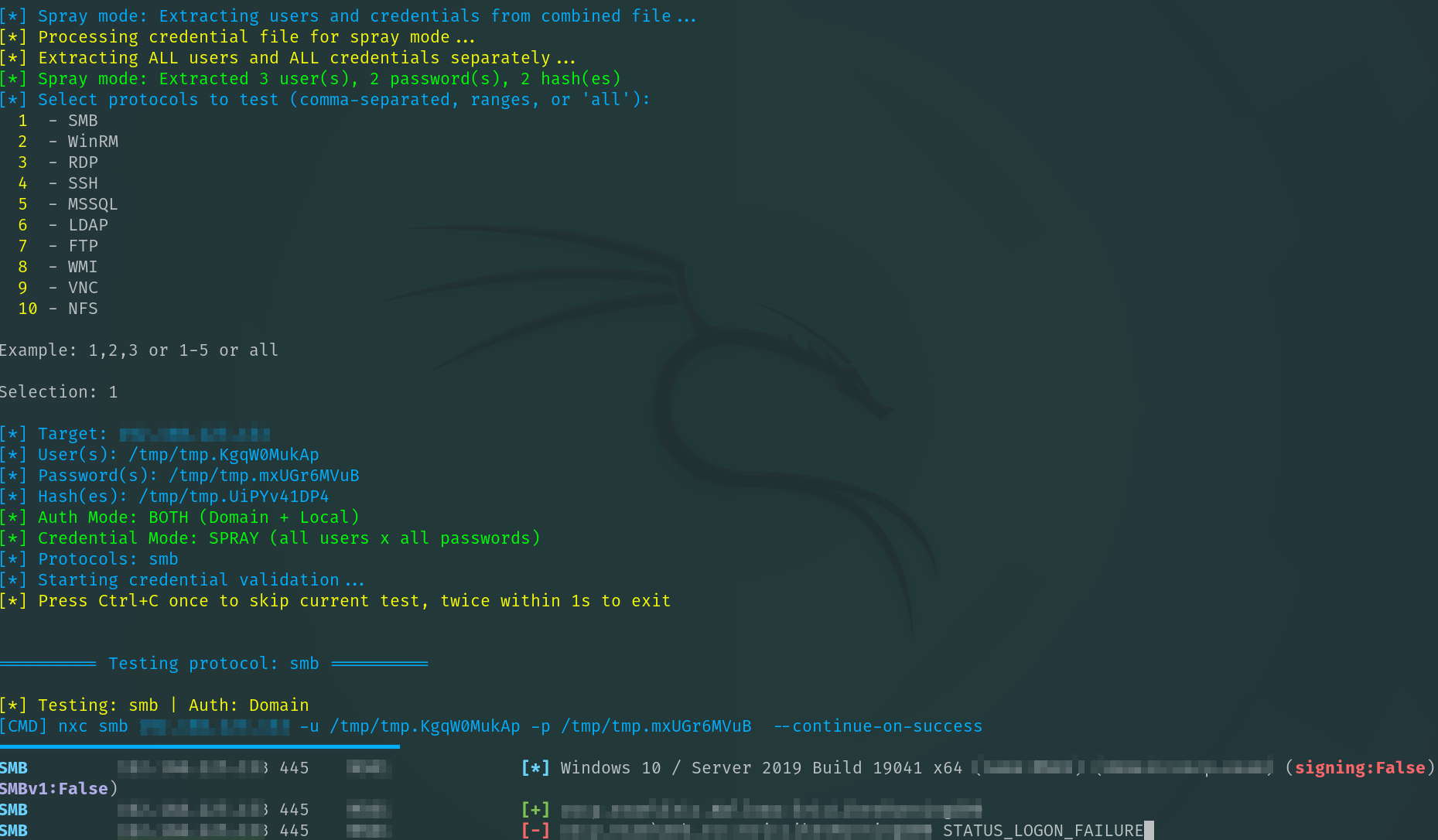
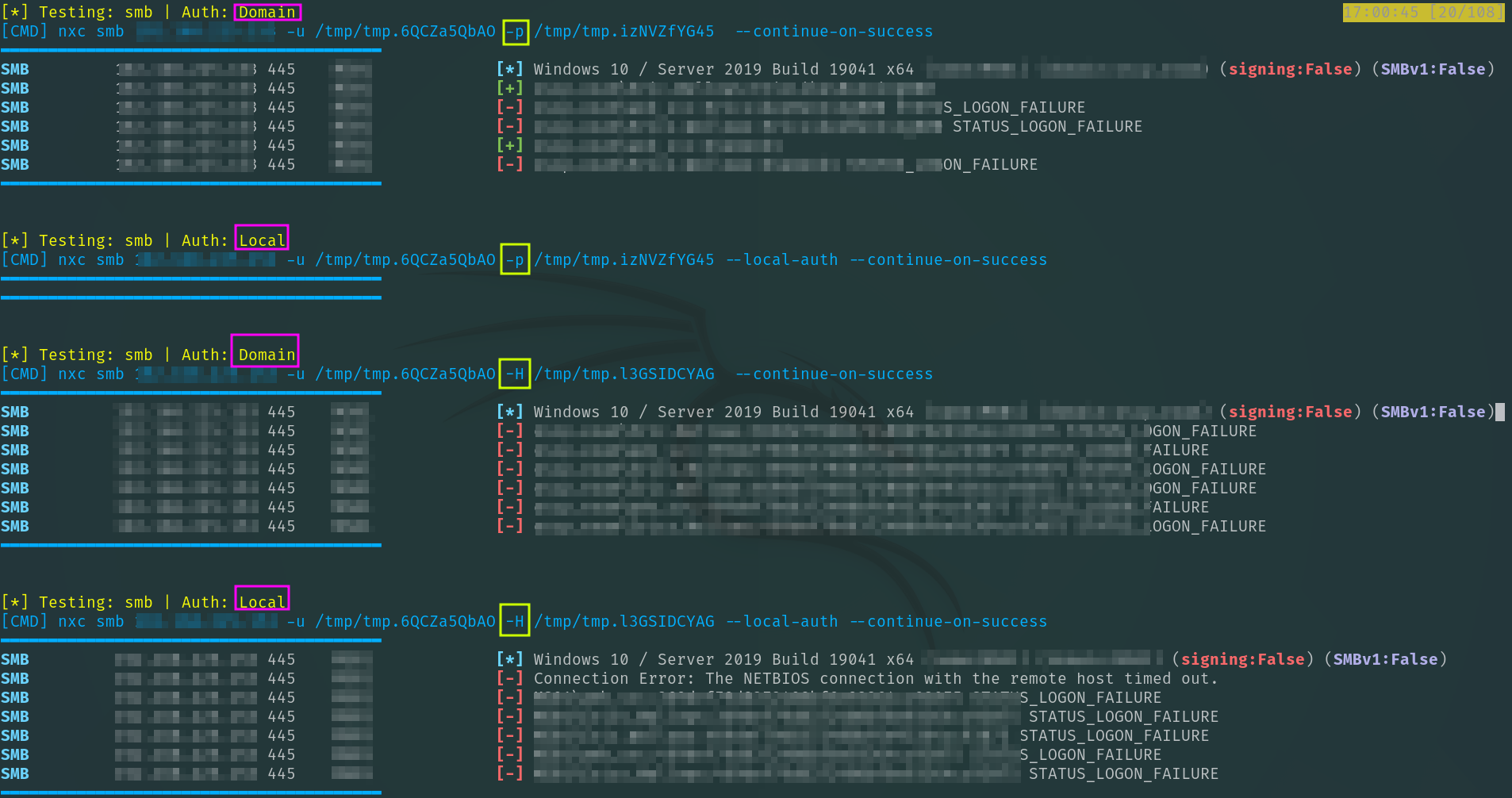
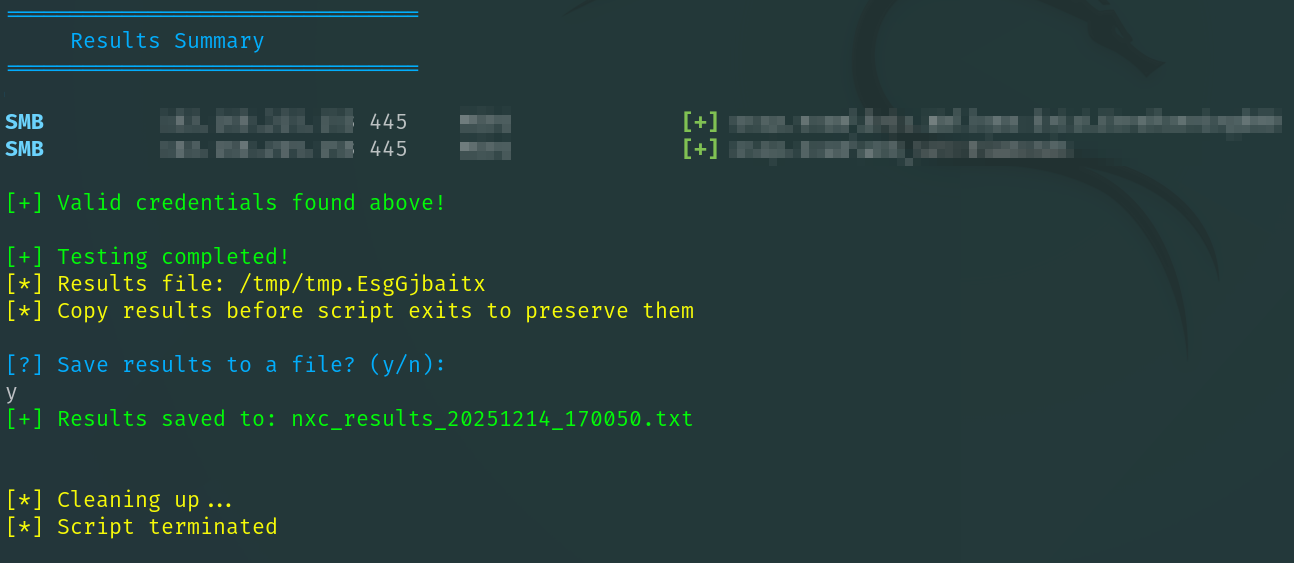
credspray.sh -t <target> -u <username|userfile> [-p <password|passfile>] [-H <hash|hashfile>] [-c <combined_file>] [-a <auth_type>] [--spray|--no-spray]
Options
| Option | Description |
|---|---|
-t <target> |
Target IP or hostname (required) |
-u <user> |
Username or file with usernames (required) |
-p <password> |
Password or file with ONLY passwords |
-H <hash> |
NTLM hash or file with ONLY hashes |
-c <file> |
Combined file with mixed format (user:pass, user:hash, etc.) |
-a <auth_type> |
Authentication type: both (default), local, domain |
--spray |
Spray mode: test all users with all passwords (DEFAULT) |
--no-spray |
No-spray mode: pair credentials (user1:pass1, user2:pass2) |
Important Notes
- Default mode is spray - use
--no-sprayfor paired testing - Default authentication mode is both (domain + local) - use
-ato specify domain or local only
Supported Protocols by NXC
| Protocol | Port | Hash Support | Local Auth |
|---|---|---|---|
| SMB | 445 | Yes | Yes |
| WinRM | 5985 | Yes | Yes |
| RDP | 3389 | Yes | Yes |
| SSH | 22 | No | N/A |
| MSSQL | 1433 | Yes | Yes |
| LDAP | 389 | Yes | Yes |
| FTP | 21 | No | N/A |
| WMI | 135 | Yes | Yes |
| VNC | 5900 | No | Yes |
| NFS | 2049 | No | Yes |
Protocol Selection
After running the script, you'll be prompted to select protocols:
Examples:
1,2,3- Test SMB, WinRM, and RDP1-5- Test protocols 1 through 5all- Test all available protocols
File Formats
User File (users.txt)
administrator
strikoder
Password File (passwords.txt)
Password123!
Summer2024
Hash File (hashes.txt)
NTLM hashes:
8846f7eaee8fb117ad06bdd830b7586c
32ed87bdb5fdc5e9cba88547376818d4
Combined File Format (-c option)
Spray Mode - Extracts all users and all credentials separately:
user1:password1          → extracts: user1, password1
user2:hash123...         → extracts: user2, hash123...
user3:                   → extracts: user3 (no credential)
:orphan_password         → extracts: orphan_password
standalone_username      → extracts as username
:unknown_credential    → smart detection (hash vs password)
No-Spray Mode - Pairs credentials when the same file used twice -u creds.txt -p creds.txt (skips unpaired entries):
user1:password1          → tests: user1:password1
user2:hash123...         → tests: user2:hash123...
user3:                   → SKIPPED (no credential)
:orphan_password         → SKIPPED (no username)
standalone_username      → SKIPPED (no credential)
Acknowledgments
- NetExec - The powerful network protocol testing tool that powers CredSpray. Check out the NXC Cheatsheet
- OSCP/CTF Community - For inspiring practical penetration testing tools
If you find this tool useful, please consider giving it a star! ⭐
Made with care for the penetration testing community
Release history Release notifications | RSS feed


Download files
Download the file for your platform. If you're not sure which to choose, learn more about installing packages.
Source Distribution
Built Distribution
Filter files by name, interpreter, ABI, and platform.
If you're not sure about the file name format, learn more about wheel file names.
Copy a direct link to the current filters
File details
Details for the file credspray-1.0.1.tar.gz.
File metadata
- Download URL: credspray-1.0.1.tar.gz
- Upload date:
- Size: 17.2 kB
- Tags: Source
- Uploaded using Trusted Publishing? No
- Uploaded via: twine/6.2.0 CPython/3.14.2
File hashes
| Algorithm | Hash digest | |
|---|---|---|
| SHA256 |
6869eda6eb1a8aba944553f2e98830256d6213eecfab413e6f0d46f030fea698
|
|
| MD5 |
d788a27da8844e2e61ca87645670a9d9
|
|
| BLAKE2b-256 |
31c04b0fddc2a614fe371800c9fab269cc79dffd1ec6d9e42547121987767e7b
|
File details
Details for the file credspray-1.0.1-py3-none-any.whl.
File metadata
- Download URL: credspray-1.0.1-py3-none-any.whl
- Upload date:
- Size: 17.3 kB
- Tags: Python 3
- Uploaded using Trusted Publishing? No
- Uploaded via: twine/6.2.0 CPython/3.14.2
File hashes
| Algorithm | Hash digest | |
|---|---|---|
| SHA256 |
416c82f76aea74a13058b11e9d74a65c42adc9ac5973264aa157cece11c2311c
|
|
| MD5 |
2ba13c2701fcf568ee8dd0f91260e6ff
|
|
| BLAKE2b-256 |
6a29cfea81356b23f2a00c482c7c4abf159a5427bdc3b5ff4dbdb36980022328
|






