
Linux file renamer featuring an advanced macro ecosystem

Project description
Description
RenameToIX is a visual Linux Gtk file renamer featuring an advanced macro ecosystem, seamlessly integrating with Nemo, Nautilus, and Thunar file managers.
For crenametoix, the console version without Gtk dependencies, read here
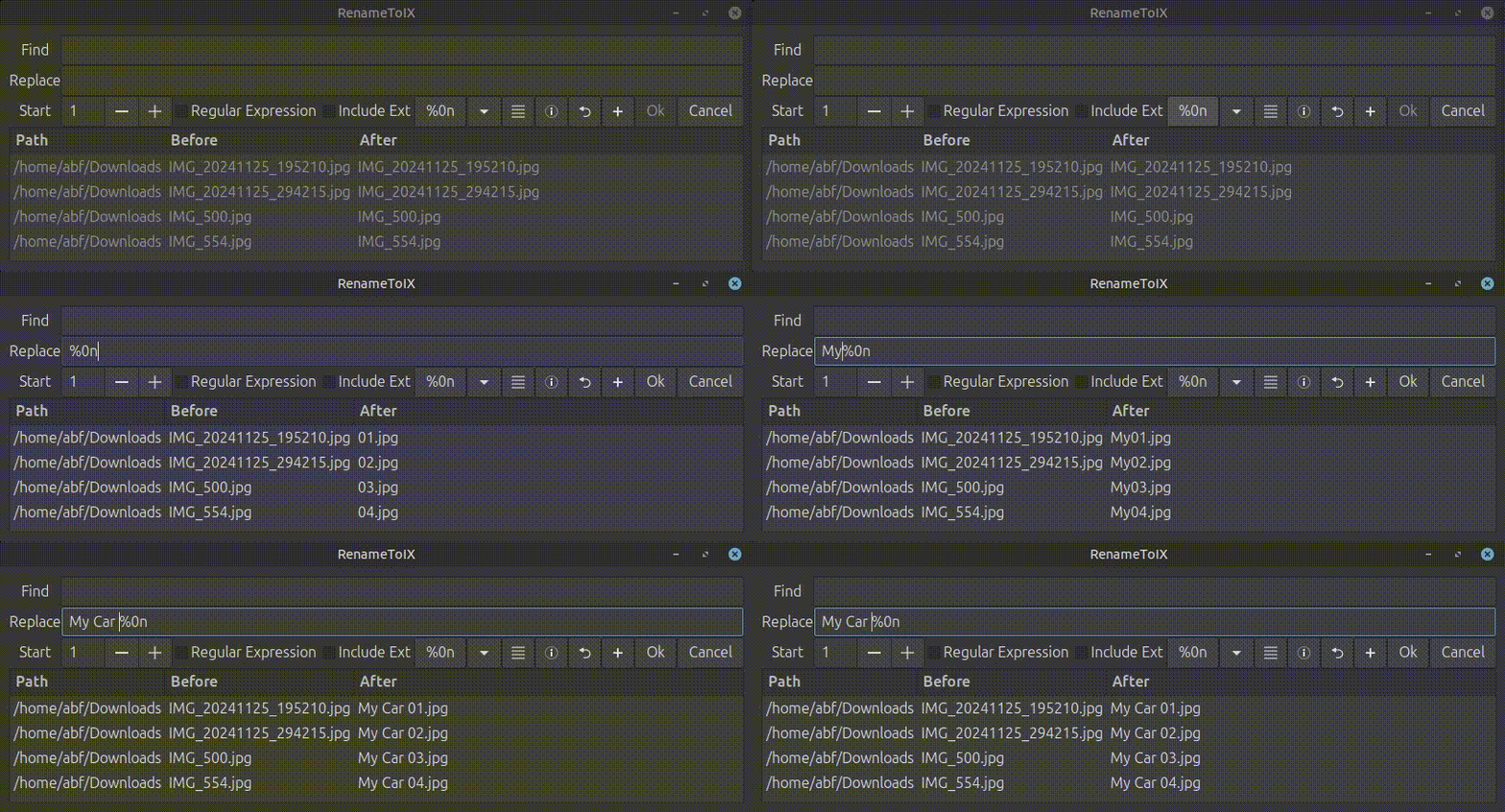
Simple macro example:
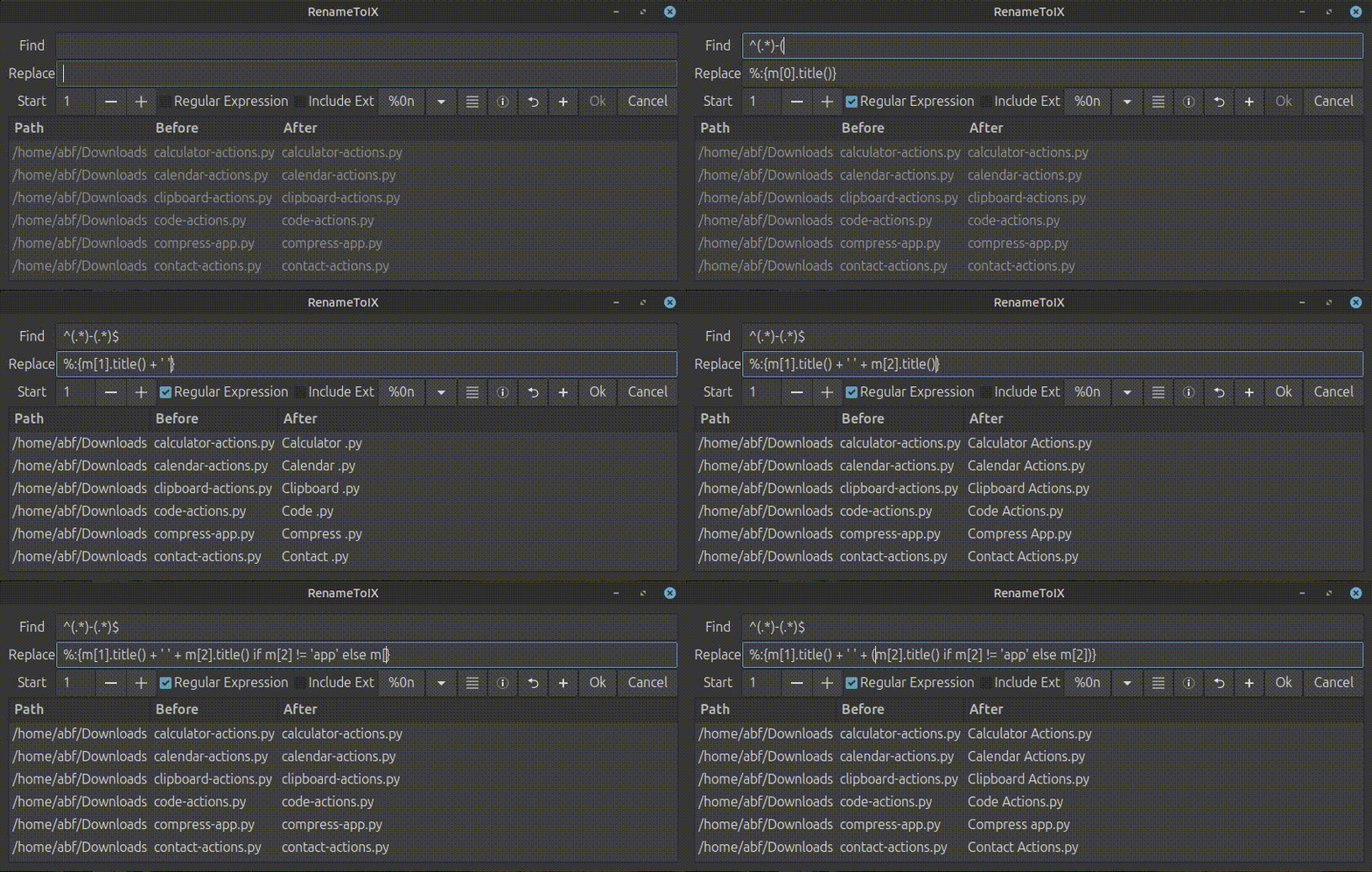
Python lambda expression example:
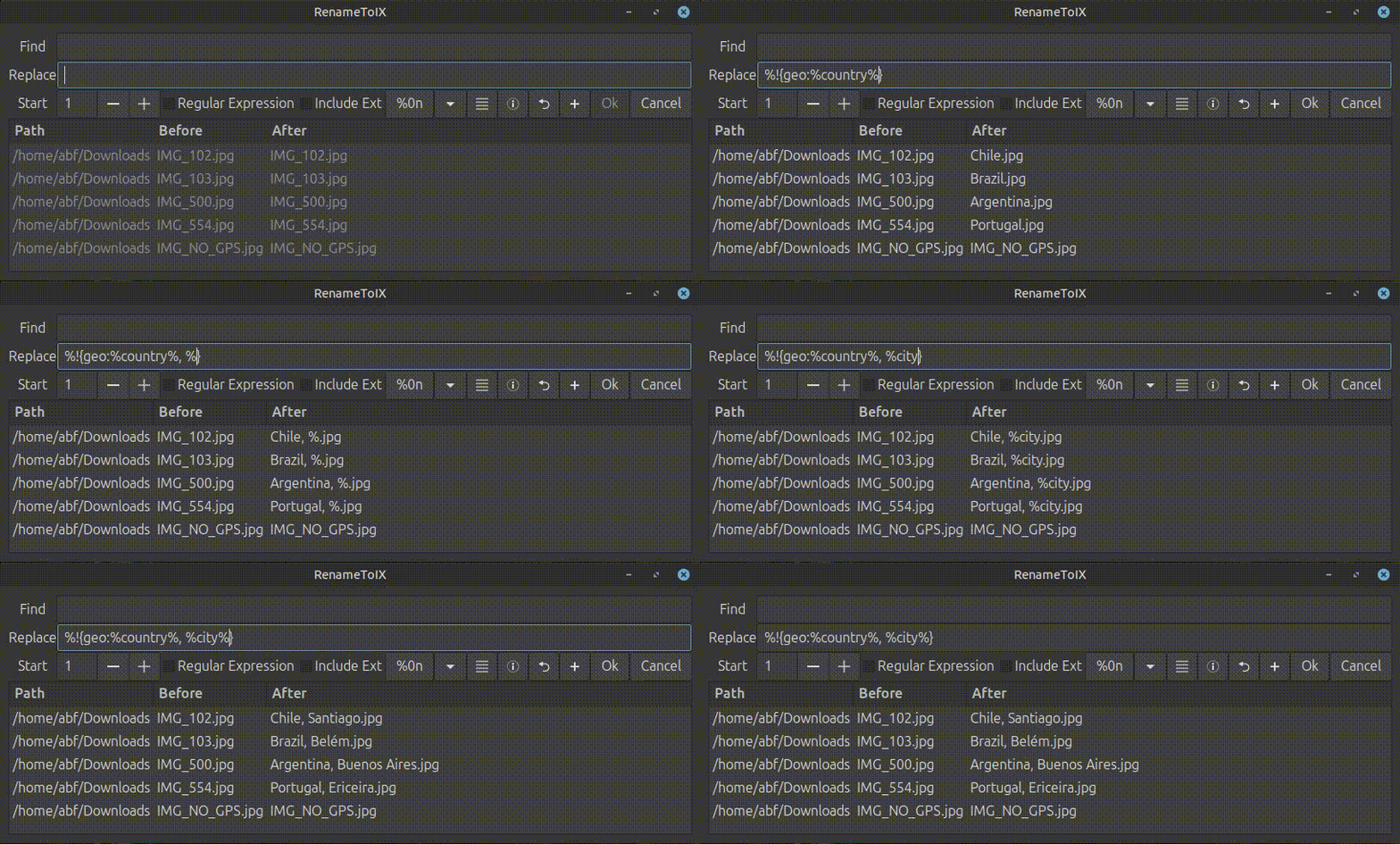
Reverse Geocoding macro example:
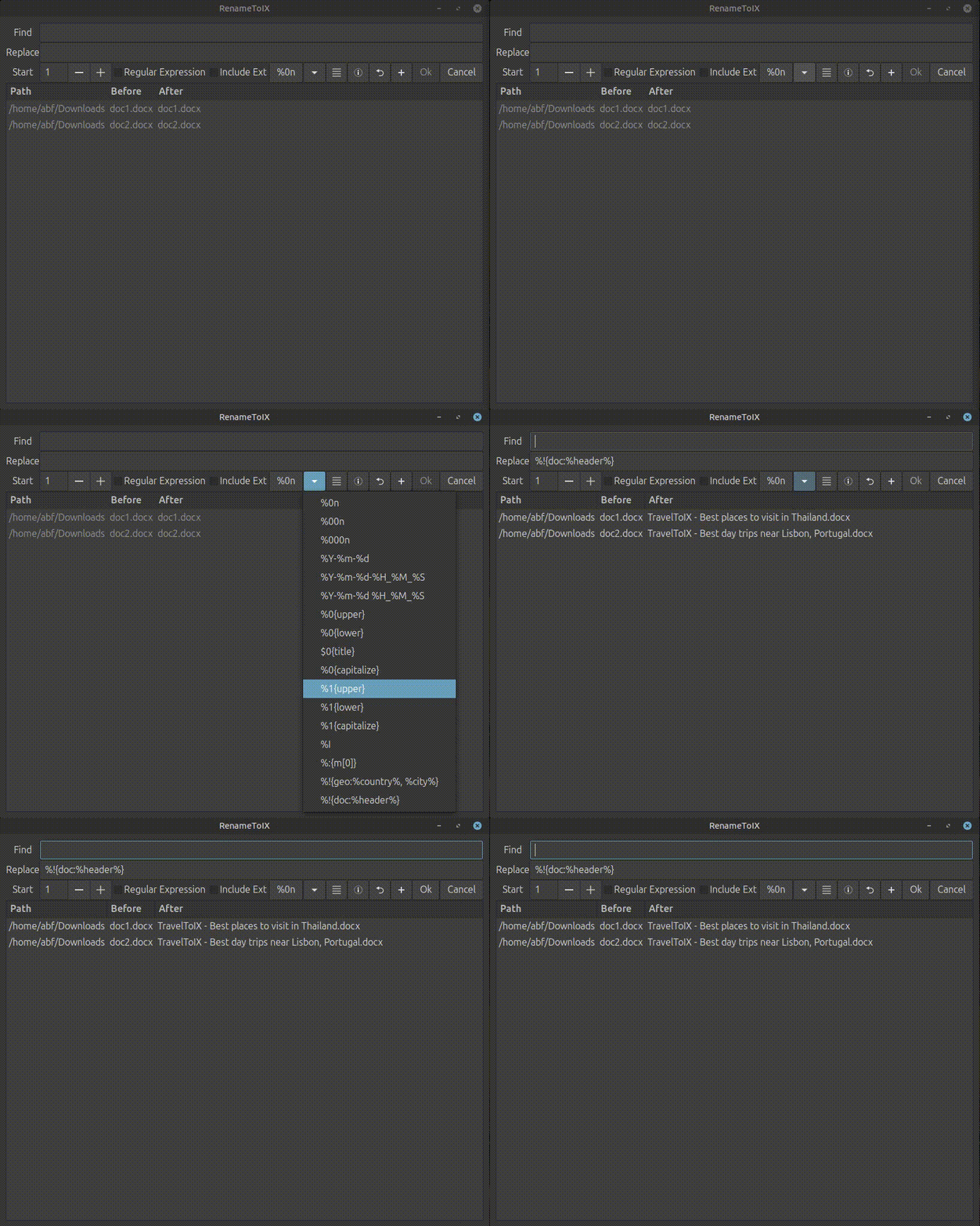
Doc Header macro example:
Read section Integrate on now to integrate with Nemo, Nautilus and Thunar.
If you find this project useful, please, read the Support this Project on how to contribute.
Features
-
GUI and Console mode. (¹)
-
Single click macro.
-
Counter, file datetime, and extension Macros.
-
Function Macros with regex group capture:
lower,upper,capitalizeandtitle. -
Python lambda expressions macro.
-
Reverse geocoding of JPEG images from GPS information macro via geo plugin.
-
Header of Word documents macro via doc plugin.
-
Custom macro extensions using plugins.
-
Start index for counter macro.
-
Configurable list of macros.
-
Drag'n'Drop.
-
Move files up and down.
-
Revert previous renames (first activate on Settings dialog). (¹)
-
Send notification after renames (first activate on Settings dialog). (¹)
-
Integration with Nemo, Nautilus and Thunar File Manager. (¹)
-
Limited support for mtp devices (Smartphones, Cameras, etc...). (¹)
-
Translated into multiple languages 1
(¹) - supported only on renametoix but not on crenametoix
Installation
sudo add-apt-repository ppa:a-bentofreire/toix
sudo apt-get update
sudo apt install renametoix
crenametoix
crenametoix is a version of renametoix for console only without Gtk dependencies,
it supports all the features including plugins, except: translations, mtp devices, revert and notifications.
Configuration files aren't generated.
sudo add-apt-repository ppa:a-bentofreire/toix
sudo apt-get update
sudo apt install crenametoix
crenametoix can also be installed via pip
pip install crenametoix
Requirements
RenameToIX uses xdg-open and notify-send external commands.
Macros
%n, %0n ... %00000n- counter%B- file basename (without extension)%E- file extension%Y- file 4-digit year%m- file 2-digit month%d- file 2-digit day%H- file 2-digit hour%M- file 2-digit minute%S- file 2-digit second%0{upper}%0{u}- uppercase (function)%0{lower}%0{l}- lowercase (function)%0{capitalize}%0{c}- capitalize (function)%0{title}%0{t}- capitalize (function)%:{expr}- evaluates python lambda expressions%!{geo:%country%, %city%}- replaces with the "country", "city" from the JPEG image GPS info via geo plugin%!{doc:%header%}- replaces with the "header" with the first header in a doc file doc plugin
Macro functions
The macro functions can also be used with regular expressions to capture groups.
ex1:
- Replace:
%0{title} - Filename:
my document.pngwill becomeMy Document.png
ex2:
- Find:
..(NEW).(design) - Replace:
%1{l}-%2{u} - Filename:
n-myNEW design.pngwill becomen-new-DESIGN.png
ex3:
- Find: ``
- Replace:
new-%B ready - Filename:
design.pngwill becomenew-design ready.png
Python Lambda Expressions
The %:{expr} will internally evaluate a lambda expression: eval(f"lambda m: {expr}")(groups)
where groups are:
- if regular expressions, then are the captured groups from a regular expression.
- otherwise, it's the text to find.
ex:
- Find:
^(.*)-(.*)$ - Replace:
%:{m[2] - m[1]} - Regular Expression:
checked. - Filename:
code-actions.pywill becomeActions - Code.py
Features and Limitations
- The expression can't contain a closed curly bracket
}. - The evaluator doesn't do any security checks, so run it at your own risk.
Plugins
The %!{plugin_name:expr} will call an external plugin to evaluate the expression.
- Plugins are python scripts located on
/usr/lib/renametoix/plugins. - A plugin must have a function named
get_worker(), returning an instance of a class with the following methods: - The expression can't contain a closed curly bracket
}.
| Method | Description |
|---|---|
is_slow(self) |
returns True if the plugin requires slow operations |
get_extensions(self) |
returns a list of file extensions supported |
eval_expr(self, macro, filename, groups) |
evaluates a macro. It should be a fast operation |
prepare(self, files) |
for each file, it will prepare the macro evaluation if is_slow is True, it will run in a working thread if it's GUI mode |
Geo Plugin
Geo Plugin performs reverse geocoding.
- Requires install python packages:
pip install geopy piexif. - Supports the following geocoding fields:
country,state,city,postcode,suburb. - Supports
.jpgand.jpegfile extensions. - Ending spaces, commas and semi-commas are striped.
ex:
- Replace:
%!{geo:%country%, %city%} - Filename:
IMG_.jpgwill becomeMyCountry, MyCity.jpg
Doc Plugin
Doc Plugin extracts the first header from a Word doc/docx file.
- Requires install python package:
pip install python-docx. - Supports the following geocoding fields:
header. - Supports
.docand.docxfile extensions.
ex:
- Replace:
%!{doc:%header%} - Filename:
a.docxwill becomeMyHeaderH1.docx
Running in console mode
To activate on console mode, use --console on command line:
usage: renametoix [-h] [-console] [-start-index START_INDEX] [-reg-ex] [-include-ext] [-find FIND] [-replace REPLACE] [-allow-revert] [-test-mode] [-revert-last] [files ...]

positional arguments:
  files                 Source files

options:
  -h, --help            show this help message and exit
  -console              Console mode (¹)
  -start-index START_INDEX
                        Start index used with there is a %0n macro
  -reg-ex               Uses regular expressions on the find field
  -include-ext          Renames including the file extension
  -find FIND            Text to Find
  -replace REPLACE      Text to Replace
  -allow-revert         Generates a revert file (console mode) (¹)
  -test-mode            Outputs only the new result, doesn't rename (console mode) (¹)
  -revert-last          Reverts last rename and exits (¹)
(¹) - supported only on renametoix but not on crenametoix
Revert the last rename in console mode
If the previous console mode rename was executed with -allow-revert, then:
renametoix -revert-last will revert the last rename.
Integrate
RenameToIX can be integrated with Nemo, Nautilus and Thunar.
On RenameToIX application, click on the Settings button, and then Integrate button.
- Nemo Bulk Rename: When you press F2 it will use RenameToIX instead of bulky.
- Nemo Action: On context menu, it will include an item named RenameToIX.
- Nautilus Script: On context menu Scripts, it will include an item named RenameToIX.
- Thunar Action: On context menu, it will include an item named RenameToIX.
Languages
- English
- Portuguese
- Spanish
- German
- Russian
- Ukrainian
Mtp Devices
RenameToIX can rename files on mtp devices with the following limitations:
- It doesn't support revert.
- The file is copied and the deleted the original, this is a slow operation and doesn't preserves the timestamp.
- When modifying the Find Replace fields, it's checking if the new filename exists on the destination. This is a slow operation.
Translations
To improve translations:
- Clone the project from Github.
- Update the translation on
tools/l10n.po. - Run
convert-l10n.sh.
Support this Project
If you find this project useful, consider supporting it:
- Donate:


- Visit the project homepage
- Give the project a ⭐ on Github
- Translate into your language
- Spread the word
- Follow me:
License
GPLv3 License
Contributions
- claimsecond - Translations in Russian and Ukrainian
Copyrights
(c) 2024-2025 Alexandre Bento Freire
Release history Release notifications | RSS feed


Download files
Download the file for your platform. If you're not sure which to choose, learn more about installing packages.
Source Distribution
Built Distribution
Filter files by name, interpreter, ABI, and platform.
If you're not sure about the file name format, learn more about wheel file names.
Copy a direct link to the current filters
File details
Details for the file crenametoix-1.5.0.tar.gz.
File metadata
- Download URL: crenametoix-1.5.0.tar.gz
- Upload date:
- Size: 13.3 kB
- Tags: Source
- Uploaded using Trusted Publishing? No
- Uploaded via: twine/6.2.0 CPython/3.12.3
File hashes
| Algorithm | Hash digest | |
|---|---|---|
| SHA256 |
2f76efea7a7344263b20f1249b0d35401cba804c37a4c13d55ede86a758aeed1
|
|
| MD5 |
344dd72adb75e66be9e7af53ec838cb1
|
|
| BLAKE2b-256 |
c88d937011a5f878acbc5f26cdeb9c63673020367f8840337b1184bc6af17c85
|
File details
Details for the file crenametoix-1.5.0-py3-none-any.whl.
File metadata
- Download URL: crenametoix-1.5.0-py3-none-any.whl
- Upload date:
- Size: 10.9 kB
- Tags: Python 3
- Uploaded using Trusted Publishing? No
- Uploaded via: twine/6.2.0 CPython/3.12.3
File hashes
| Algorithm | Hash digest | |
|---|---|---|
| SHA256 |
4cec19a87009153192e644f32d5c50cb0595ee513e1b396810c6b6c66fcf3e16
|
|
| MD5 |
3f06248093db9d54c420ebb7cf23122e
|
|
| BLAKE2b-256 |
04b07f95dba469a91be481e79f8c2b1cb91d3c25c253670da4dc0eb4020ecc81
|






