
GPT Image by Ace Data Cloud for CrewAI
Independent native GPT Image image tools for CrewAI. Provided by Ace Data Cloud, not an official GPT Image or CrewAI product. This is a standalone service package; no all-services bundle or generic provider setup is required.
简体中文 · Current models and prices
1. Install the correct service package
Review-preview source and a GitHub wheel/sdist prerelease are available; implementation remains under review. Not yet PyPI-published or listed in the official CrewAI / AMP catalog. The source version below is pinned to c39dcdb493a5f96fc53f05f5d4cfa4f081e740f5. Do not treat a repository as an official listing.
uv add 'crewai-gpt-image @ git+https://github.com/AceDataCloud/GPTImageCrewAI.git@c39dcdb493a5f96fc53f05f5d4cfa4f081e740f5'
The pinned SHA is the version published in the review preview; inspect source PR #1 before adoption. After verified PyPI publication the standard command will be uv add crewai-gpt-image; do not assume it works before publication. CrewAI supports Python 3.10–3.13. Intel macOS may lack its mandatory lancedb wheel; use supported Linux rather than bypassing dependencies for production.
uv add 'crewai-gpt-image @ https://github.com/AceDataCloud/GPTImageCrewAI/releases/download/v0.1.0-preview.2/crewai_gpt_image-0.1.0-py3-none-any.whl#sha256=8cf1f81a86eb7bc815cdfebac325a0306b07d364623e6656c821ce729b7e4651'
The fixed preview.2 wheel was built from the same terminal-state-verified source c39dcdb493a5f96fc53f05f5d4cfa4f081e740f5 used by the pinned source install. Historical preview.1 is retained unchanged. SHA256 must match; the mutable release page/tag is informational, not a trust anchor.
2. Register / sign in and get your own API Token
- Open Ace Data Cloud → Applications; register and sign in. If needed, choose Initialize General Application.
- Open General application, check GPT Image service access, current model price and balance. A service-specific application can only use its entitled service.
- Copy the selected API Key using icon 1, or Manage Keys 2 → Create for a separate
GPT Image CrewAIkey.
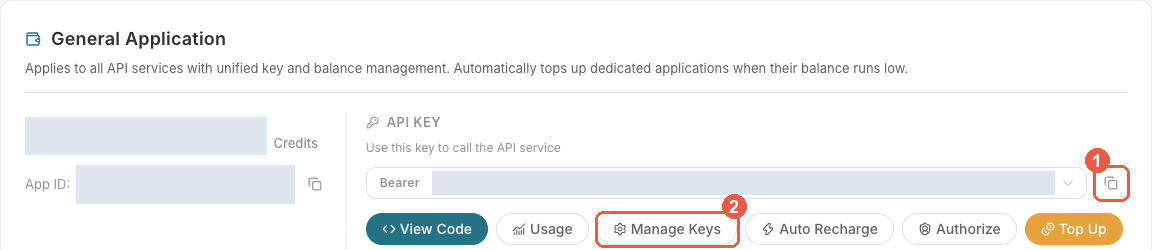
- Configure expiration and usage limits only as needed. If Allowed APIs is enabled, include both
/openai/images/generationsand/openai/tasks.
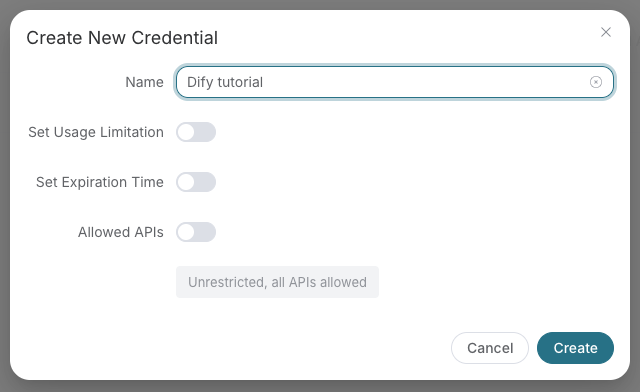
Historical authentic Ace screenshots reused unchanged from SunoDify commit 8d3d03570e73324220f111f7fe343da0792a8071, retrieved 2026-10-18. The second image's old name Dify tutorial is an example only: use GPT Image CrewAI. No visible real credential is included; image sources.
Set the raw consumer Token in environment variable ACEDATACLOUD_API_KEY through secure terminal input or a secret manager. It is not a platform-... management Token and must not include Bearer , spaces or quotation marks. Never place it in prompts, screenshots, committed .env or workflow exports. api_key=... may be supplied from secure credential storage and is excluded from serialization.
3. Add the named native tools
from crewai import Agent
from gpt_image_crewai import GPTImageGenerateImageTool, GPTImageRetrieveTaskTool

agent = Agent(
    role="GPT Image producer",
    goal="Create the approved media, then retrieve the original task result",
    backstory="Use GPT Image through Ace Data Cloud within the user's approved budget.",
    llm=your_configured_llm,
    tools=[GPTImageGenerateImageTool(), GPTImageRetrieveTaskTool()],
    allow_delegation=False,
    max_retry_limit=0,
)
The two discoverable tool names are GPT Image by Ace Data Cloud - Generate Image and GPT Image by Ace Data Cloud - Retrieve Task. The Token goes in the environment, not a custom MCP header or agent prompt. Adding tools does not execute them. The caller approves paid requests; generation defaults to one use per instance to reduce duplicate submissions, which is not a funds cap or a permission system.
4. Service-specific input and first use
GPT Image generation only: current gpt-image-* model, prompt, size (auto or WIDTHxHEIGHT), quality, n 1..10, background, output_format/compression and moderation. Uses /openai/images/generations, response_format=url, and asynchronous same-task queries. This is not the built-in DallETool, Nano Banana or a general image-provider alias. Image editing/multipart is not included in this first package.
Check the current model catalog and price before calling; model IDs are passed unchanged and no substitute model is added. The following values are examples from the pinned current API contract, not permanent defaults. Executing generation is billable; this guide does not run it.
import json
from gpt_image_crewai import GPTImageGenerateImageTool, GPTImageRetrieveTaskTool

parameters = {
    "model": "gpt-image-2",
    "prompt": "A red apple on a plain white background",
    "size": "1024x1024",
    "quality": "low",
    "n": 1
}
# BILLABLE when executed; approve the current model and budget first.
submitted = GPTImageGenerateImageTool().run(**parameters)
submitted = json.loads(submitted)  # A ToolFailure must be handled before this step.
task_id = submitted["task_id"]
result = GPTImageRetrieveTaskTool().run(task_id=task_id, wait_seconds=240)
print(result)
The request submits once with async=true. accepted/pending is not a terminal result, even when an envelope has success=true. Preserve the original task ID; pending, timeouts or unknown submission outcomes do not authorize another generation. Bounded wait only queries that same ID, and can include an in-flight request timeout. Continue using Retrieve Task until terminal status. A true completed response requires the stored finished_at, service success and a valid target media URL. Nested failed states are treated as failure; a missing terminal media link is not fake success.
For a task you already own, run only this read-only example:
uv run python examples/query_existing.py YOUR_EXISTING_TASK_ID
The query is POST /openai/tasks with action=retrieve,id=.... A completed result returns status=succeeded, success=true, task_id, filtered media_urls and original cost in Credits when present. No raw original prompt, request, account/application identity, internal diagnostics or unfiltered body is returned. cost is not a new bill or USD amount. URL presence does not verify ongoing media playback.
5. Inspect execution and output
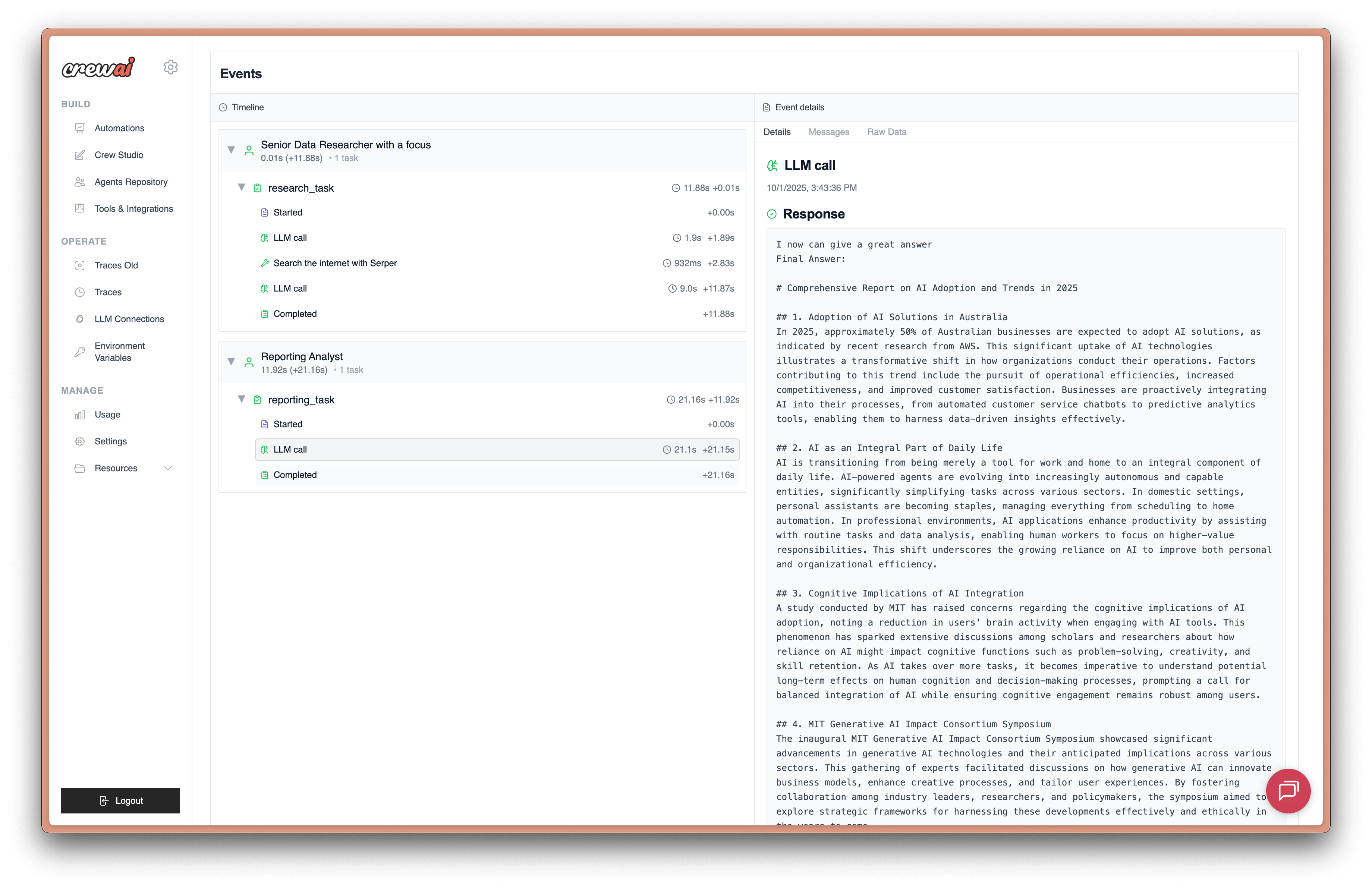
Official CrewAI tracing reference, historical date marker 10/1/2025, capture version unspecified; retrieved 2026-10-18. Left: task and tool timeline; right: expanded Response output, not input. Not this package running, not an Ace task and not a promised new GUI. Trace account/auth/consent is optional and not enabled by this package. For your actual run inspect the named tool and its returned terminal fields; never expose Token or private media URLs in screenshots.
Troubleshooting, privacy and cost
| Result | Action |
|---|---|
| 401 / 403 | Check full raw consumer Token, expiration, service entitlement, Allowed APIs and balance. A 403 is not always moderation. |
| 400 / schema rejection | Follow this service's fields, casing and model capability; unknown cross-service fields are rejected before network. |
| pending / no media yet | Query the same original task ID; never regenerate to poll. |
| 429 | Reduce concurrency and wait. One HTTP attempt per operation; your configured LLM/agent may retry separately. |
| Timeout / 5xx | Submission outcome can be unknown. Inspect request history before creating another task. |
| ToolFailure | Failed task or invalid terminal media; structured non-retryable result. Preserve task/trace ID for support, never Key. |
| Result URL cannot open | Check terminal success and your network; link existence alone is not playback evidence. |
The code is free; media generation and the LLM you configure have their current prices. No payment handler, fallback or automatic paid HTTP retry is added. Original Credits cost follows the API's current package/account rate and discounts; this package does not hard-code USD conversion. No install/CI count is presented as users or revenue.
Provided prompts/references and the consumer Token are sent to api.acedata.cloud over HTTPS. The package adds no telemetry or tracing; CrewAI/your LLM may have separate settings. Privacy. Source · Issues · dev@acedata.cloud
Development: uv sync --group dev, uv run pytest, uv run ruff check ., uv build. Paid HTTP is mocked in tests; native Agent/Task/Crew cycles use a deterministic local model fixture. See tests/contract-source.json for immutable service contract provenance and tests/live-readonly-evidence.json when an old-task check is available. No new paid request runs in CI.
The pinned source and preview.2 include explicit failed-state handling before finished_at. Historical preview.1 remains unchanged; use the pinned fixed version above.
1 maintainer

Metadata
1 maintainer
Release files for crewai-gpt-image 0.1.0
For a detailed explanation of source distributions (sdists) and built distributions (wheels), please see the package formats documentation.
Source distribution (sdist)
| File | Size | Uploaded | Provenance | Actions |
|---|---|---|---|---|
| crewai_gpt_image-0.1.0.tar.gz | 558.7 kB | Without provenance | Details for crewai_gpt_image-0.1.0.tar.gz |
Built distribution (wheel)
| File | Interpreter | ABI | Platform | Actions Reset |
|---|---|---|---|---|
| crewai_gpt_image-0.1.0-py3-none-any.whl | Python 3 | none | any | Details for crewai_gpt_image-0.1.0-py3-none-any.whl |
Total release size: 569.8 kB
Release files / crewai_gpt_image-0.1.0.tar.gz
| Download URL | crewai_gpt_image-0.1.0.tar.gz |
|---|---|
| Size | 558.7 kB |
| Tags | Source |
|
SHA-256 checksum How to use checksums |
72dc9a804a5d8054ae24813db21ad9f2f2362c5e7ed00269c13148a2f1f8bbc3
|
|
BLAKE2b-256 checksum How to use checksums |
8b1473f73a93734f287edd2c8037fcb6454df08409bea3873b2baf1021c4d59e
|
| Upload date | |
|
Uploaded using Trusted Publishing? What is trusted publishing? |
No |
| Uploaded via |
twine/6.0.1 CPython/3.12.16
|
Release files / crewai_gpt_image-0.1.0-py3-none-any.whl
| Download URL | crewai_gpt_image-0.1.0-py3-none-any.whl |
|---|---|
| Size | 11.1 kB |
| Tags | Python 3 |
|
SHA-256 checksum How to use checksums |
6051bd70f833e1c05dc9bae405a23ee6316818efc50deeb38e95a4926b37068e
|
|
BLAKE2b-256 checksum How to use checksums |
378b8ecd6af6a7fbd7aea1076085e852bded42805523d49138360a23d428c76b
|
| Upload date | |
|
Uploaded using Trusted Publishing? What is trusted publishing? |
No |
| Uploaded via |
twine/6.0.1 CPython/3.12.16
|
Security for crewai-gpt-image 0.1.0
Provenance
Provenance describes where a file came from. On PyPI, provenance is shared via attestations, which provide a verifiable record of the build or publishing details. View details, limitations and caveats.
No provenance found
None of the files in this release were uploaded with provenance metadata.
A note on package security
PyPI is a repository for distributing packages, not a service for auditing them. While third-party security researchers and our staff do their best to detect and remove malicious packages, PyPI cannot guarantee the quality, security or suitability of any given package.
To learn more about protecting yourself from malicious actors, visit our package security documentation.













